Hi all,
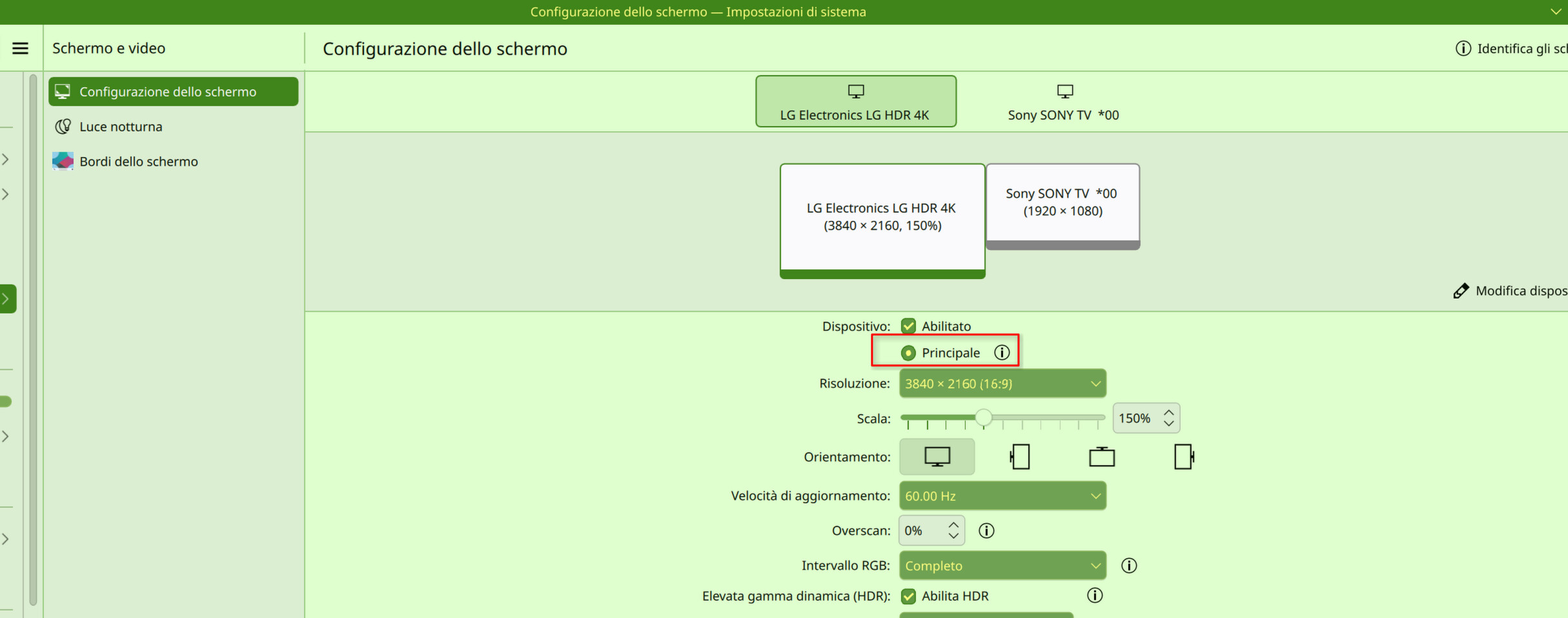
I have a full AMD machine with 2 monitors:
- a 4k primary monitor on a display port
- a full HD tv set secondary monitoron an HDMI port
With sddm whenever I login all the applications start on the secondary monitor.
So I tried to switch to plasma-login-manager but the behaviour is the same.
What can I do to force the applications to start on the primary monitor?
TL;DR
The secondary monitor is plugged into the HDMI port that is the first port on the graphic card.
I tried every combination of desktop session restore without success
- save at the session close: logout / login / reboot - everytime all the windows on the secondary monitor
- save manually the session: logout / login the windows remain on the primary monitor - reboot all the windows on the secondary monitor
My configuration
sh-5.3$ inxi -Fazi
System:
  Kernel: 7.0.3-1-MANJARO arch: x86_64 bits: 64 compiler: gcc v: 15.2.1
    clocksource: tsc avail: hpet,acpi_pm
    parameters: BOOT_IMAGE=/boot/vmlinuz-7.0-x86_64
    root=UUID=95b01923-1bed-4694-bb66-72e635384b04 rw quiet splash
    udev.log_priority=3
  Desktop: KDE Plasma v: 6.6.4 tk: Qt v: N/A info: frameworks v: 6.25.0
    wm: kwin_wayland vt: 3 dm: N/A Distro: Manjaro base: Arch Linux
Machine:
  Type: Desktop Mobo: Micro-Star model: MAG X570 TOMAHAWK WIFI (MS-7C84)
    v: 1.0 serial: <superuser required> uuid: <superuser required>
    Firmware: UEFI vendor: American Megatrends LLC. v: 1.H0 date: 07/16/2024
CPU:
  Info: model: AMD Ryzen 7 5800X bits: 64 type: MT MCP arch: Zen 3+ gen: 3
    level: v3 note: check built: 2022 process: TSMC n6 (7nm) family: 0x19 (25)
    model-id: 0x21 (33) stepping: 0 microcode: 0xA20102E
  Topology: cpus: 1x dies: 1 clusters: 1 cores: 8 threads: 16 tpc: 2
    smt: enabled cache: L1: 512 KiB desc: d-8x32 KiB; i-8x32 KiB L2: 4 MiB
    desc: 8x512 KiB L3: 32 MiB desc: 1x32 MiB
  Speed (MHz): avg: 3596 min/max: 556/4854 boost: enabled scaling:
    driver: amd-pstate-epp governor: powersave cores: 1: 3596 2: 3596 3: 3596
    4: 3596 5: 3596 6: 3596 7: 3596 8: 3596 9: 3596 10: 3596 11: 3596 12: 3596
    13: 3596 14: 3596 15: 3596 16: 3596 bogomips: 121601
  Flags-basic: avx avx2 ht lm nx pae sse sse2 sse3 sse4_1 sse4_2 sse4a
    ssse3 svm
  Vulnerabilities:
  Type: gather_data_sampling status: Not affected
  Type: ghostwrite status: Not affected
  Type: indirect_target_selection status: Not affected
  Type: itlb_multihit status: Not affected
  Type: l1tf status: Not affected
  Type: mds status: Not affected
  Type: meltdown status: Not affected
  Type: mmio_stale_data status: Not affected
  Type: old_microcode status: Not affected
  Type: reg_file_data_sampling status: Not affected
  Type: retbleed status: Not affected
  Type: spec_rstack_overflow mitigation: Safe RET
  Type: spec_store_bypass mitigation: Speculative Store Bypass disabled via
    prctl
  Type: spectre_v1 mitigation: usercopy/swapgs barriers and __user pointer
    sanitization
  Type: spectre_v2 mitigation: Retpolines; IBPB: conditional; IBRS_FW;
    STIBP: always-on; RSB filling; PBRSB-eIBRS: Not affected; BHI: Not
    affected
  Type: srbds status: Not affected
  Type: tsa mitigation: Clear CPU buffers
  Type: tsx_async_abort status: Not affected
  Type: vmscape mitigation: IBPB before exit to userspace
Graphics:
  Device-1: Advanced Micro Devices [AMD/ATI] Navi 33 [Radeon RX 7600/7600
    XT/7600M XT/7600S/7700S / PRO W7600] vendor: Sapphire driver: amdgpu
    v: kernel arch: RDNA-3 code: Navi-3x process: TSMC n6 (6nm) built: 2023+
    pcie: gen: 4 speed: 16 GT/s lanes: 8 ports: active: DP-1,HDMI-A-2
    empty: DP-2,HDMI-A-1,Writeback-1 bus-ID: 2f:00.0 chip-ID: 1002:7480
    class-ID: 0300
  Device-2: Microdia Webcam Vitade AF driver: snd-usb-audio,uvcvideo
    type: USB rev: 2.0 speed: 480 Mb/s lanes: 1 mode: 2.0 bus-ID: 5-3.1:3
    chip-ID: 0c45:6366 class-ID: 0102 serial: <filter>
  Display: wayland server: X.org v: 1.21.1.22 with: Xwayland v: 24.1.11
    compositor: kwin_wayland driver: X: loaded: amdgpu
    unloaded: modesetting,radeon alternate: fbdev,vesa dri: radeonsi
    gpu: amdgpu d-rect: 5760x2160 display-ID: 0
  Monitor-1: DP-1 pos: primary,left model: LG (GoldStar) HDR 4K
    serial: <filter> built: 2024 res: mode: 3840x2160 hz: 60 scale: 150% (1.5)
    to: 2560x1440 dpi: 139 gamma: 1.2 size: 697x392mm (27.44x15.43")
    diag: 806mm (31.7") ratio: 16:9 modes: max: 3840x2160 min: 640x480
  Monitor-2: HDMI-A-2 pos: right model: Sony TV 00 serial: <filter>
    built: 2015 res: mode: 1920x1080 hz: 60 scale: 100% (1) dpi: 51 gamma: 1.2
    size: 952x535mm (37.48x21.06") diag: 1092mm (43") ratio: 16:9 modes:
    max: 1920x1080 min: 640x480
  API: EGL v: 1.5 hw: drv: amd radeonsi platforms: device: 0 drv: radeonsi
    device: 1 drv: swrast gbm: drv: kms_swrast surfaceless: drv: radeonsi
    wayland: drv: radeonsi x11: drv: radeonsi
  API: OpenGL v: 4.6 compat-v: 4.5 vendor: amd mesa v: 26.0.6-arch1.1
    glx-v: 1.4 direct-render: yes renderer: AMD Radeon RX 7600 XT (radeonsi
    navi33 ACO DRM 3.64 7.0.3-1-MANJARO) device-ID: 1002:7480
    memory: 15.62 GiB unified: no display-ID: :0.0
  API: Vulkan v: 1.4.341 layers: 2 device: 0 type: discrete-gpu name: AMD
    Radeon RX 7600 XT (RADV NAVI33) driver: mesa radv v: 26.0.6-arch1.1
    device-ID: 1002:7480 surfaces: N/A
  Info: Tools: api: clinfo, eglinfo, glxinfo, vulkaninfo
    de: kscreen-console,kscreen-doctor gpu: lact wl: wayland-info
    x11: xdpyinfo, xprop, xrandr
Audio:
  Device-1: Advanced Micro Devices [AMD/ATI] Navi 31 HDMI/DP Audio
    driver: snd_hda_intel v: kernel pcie: gen: 4 speed: 16 GT/s lanes: 8
    bus-ID: 2f:00.1 chip-ID: 1002:ab30 class-ID: 0403
  Device-2: Advanced Micro Devices [AMD] Starship/Matisse HD Audio
    vendor: Micro-Star MSI driver: snd_hda_intel v: kernel pcie: gen: 4
    speed: 16 GT/s lanes: 16 bus-ID: 31:00.4 chip-ID: 1022:1487 class-ID: 0403
  Device-3: Microdia Webcam Vitade AF driver: snd-usb-audio,uvcvideo
    type: USB rev: 2.0 speed: 480 Mb/s lanes: 1 mode: 2.0 bus-ID: 5-3.1:3
    chip-ID: 0c45:6366 class-ID: 0102 serial: <filter>
  API: ALSA v: k7.0.3-1-MANJARO status: kernel-api with: aoss
    type: oss-emulator tools: alsactl,alsamixer,amixer
  Server-1: sndiod v: N/A status: off tools: aucat,midicat,sndioctl
  Server-2: JACK v: 1.9.22 status: off tools: N/A
  Server-3: PipeWire v: 1.6.4 status: active with: 1: pipewire-pulse
    status: active 2: wireplumber status: active 3: pipewire-alsa type: plugin
    tools: pactl,pw-cat,pw-cli,wpctl
Network:
  Device-1: Realtek RTL8125 2.5GbE driver: r8169 v: kernel pcie: gen: 2
    speed: 5 GT/s lanes: 1 port: e000 bus-ID: 25:00.0 chip-ID: 10ec:8125
    class-ID: 0200
  IF: enp37s0 state: down mac: <filter>
  Device-2: Realtek RTL8125 2.5GbE vendor: Micro-Star MSI driver: r8169
    v: kernel pcie: gen: 2 speed: 5 GT/s lanes: 1 port: d000 bus-ID: 26:00.0
    chip-ID: 10ec:8125 class-ID: 0200
  IF: enp38s0 state: up speed: 1000 Mbps duplex: full mac: <filter>
  Device-3: Intel Wi-Fi 6 AX200 driver: iwlwifi v: kernel pcie: gen: 2
    speed: 5 GT/s lanes: 1 bus-ID: 28:00.0 chip-ID: 8086:2723 class-ID: 0280
  IF: wlo1 state: down mac: <filter>
  IF-ID-1: br0 state: up speed: 1000 Mbps duplex: unknown mac: <filter>
  IP v4: <filter> type: noprefixroute scope: global broadcast: <filter>
  IF-ID-2: virbr0 state: down mac: <filter>
  IP v4: <filter> scope: global broadcast: <filter>
  IF-ID-3: virbr1 state: down mac: <filter>
  IP v4: <filter> scope: global broadcast: <filter>
  IF-ID-4: virbr2 state: down mac: <filter>
  IP v4: <filter> scope: global broadcast: <filter>
  Info: services: NetworkManager, nfsd, sshd, systemd-timesyncd,
    wpa_supplicant
  WAN IP: <filter>
Bluetooth:
  Device-1: Intel AX200 Bluetooth driver: btusb v: 0.8 type: USB rev: 2.0
    speed: 12 Mb/s lanes: 1 mode: 1.1 bus-ID: 1-4:3 chip-ID: 8087:0029
    class-ID: e001
  Report: rfkill ID: hci0 rfk-id: 2 state: down bt-service: enabled,running
    rfk-block: hardware: no software: yes address: see --recommends
Drives:
  Local Storage: total: 20.92 TiB used: 9.18 TiB (43.9%)
  SMART Message: Unable to run smartctl. Root privileges required.
  ID-1: /dev/nvme0n1 maj-min: 259:0 vendor: Sabrent model: Rocket 4.0 Plus
    size: 931.51 GiB block-size: physical: 512 B logical: 512 B speed: 63.2 Gb/s
    lanes: 4 tech: SSD serial: <filter> fw-rev: RKT4P1.3 temp: 33.9 C
    scheme: GPT
  ID-2: /dev/nvme1n1 maj-min: 259:1 vendor: Sabrent model: Rocket 4.0 Plus
    size: 1.82 TiB block-size: physical: 512 B logical: 512 B speed: 63.2 Gb/s
    lanes: 4 tech: SSD serial: <filter> fw-rev: R4PB47.2 temp: 32.9 C
    scheme: GPT
  ID-3: /dev/sda maj-min: 8:0 vendor: Seagate model: ST2000DM008-2FR102
    size: 1.82 TiB block-size: physical: 4096 B logical: 512 B speed: 6.0 Gb/s
    tech: HDD rpm: 7200 serial: <filter> fw-rev: 0001 scheme: GPT
  ID-4: /dev/sdb maj-min: 8:16 vendor: Seagate model: ST18000NM000J-2TV103
    size: 16.37 TiB block-size: physical: 4096 B logical: 512 B speed: 6.0 Gb/s
    tech: HDD rpm: 7200 serial: <filter> fw-rev: SC02 scheme: GPT
Partition:
  ID-1: / raw-size: 931.22 GiB size: 915.53 GiB (98.32%)
    used: 179.03 GiB (19.6%) fs: ext4 dev: /dev/nvme0n1p2 maj-min: 259:3
  ID-2: /boot/efi raw-size: 300 MiB size: 299.4 MiB (99.80%)
    used: 328 KiB (0.1%) fs: vfat dev: /dev/nvme0n1p1 maj-min: 259:2
Swap:
  Alert: No swap data was found.
Sensors:
  System Temperatures: cpu: 49.1 C mobo: 43.5 C gpu: amdgpu temp: 51.0 C
    mem: 67.0 C
  Fan Speeds (rpm): N/A gpu: amdgpu fan: 115
Info:
  Memory: total: 64 GiB note: est. available: 62.72 GiB used: 5.08 GiB (8.1%)
  Processes: 397 Power: uptime: 19m states: freeze,mem,disk suspend: deep
    avail: s2idle wakeups: 0 hibernate: platform avail: shutdown, reboot,
    suspend, test_resume image: 25.03 GiB services: org_kde_powerdevil,
    power-profiles-daemon, upowerd Init: systemd v: 260 default: graphical
    tool: systemctl
  Packages: pm: pacman pkgs: 2001 libs: 455 tools: pamac pm: flatpak pkgs: 0
    Compilers: clang: 22.1.3 gcc: 15.2.1 Shell: sh default: Bash v: 5.3.9
    running-in: konsole inxi: 3.3.40
sh-5.3$