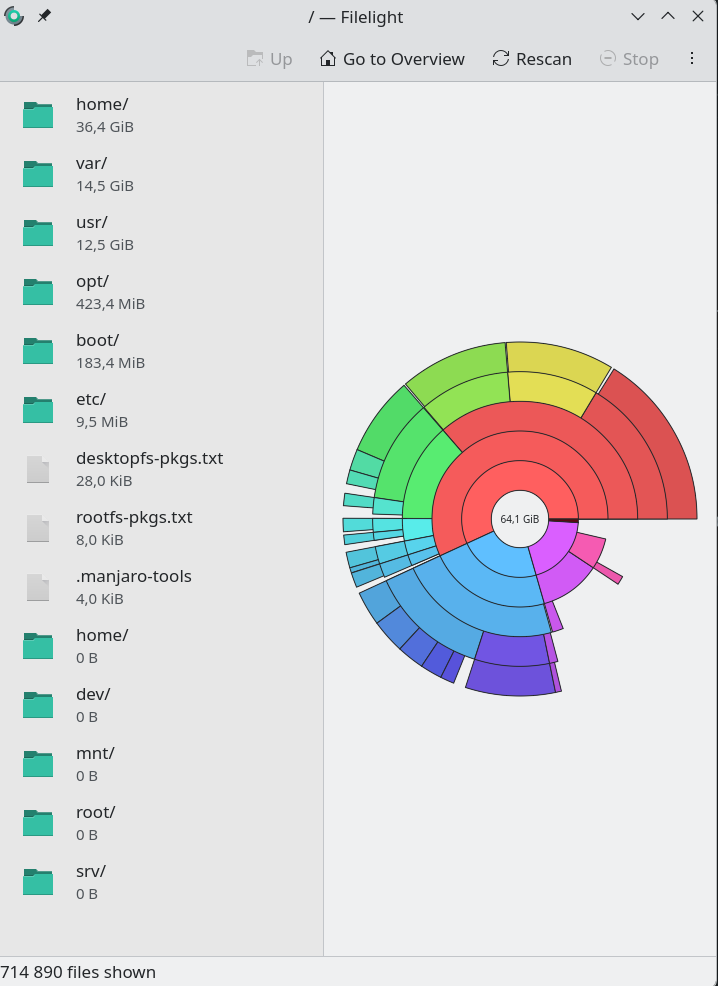
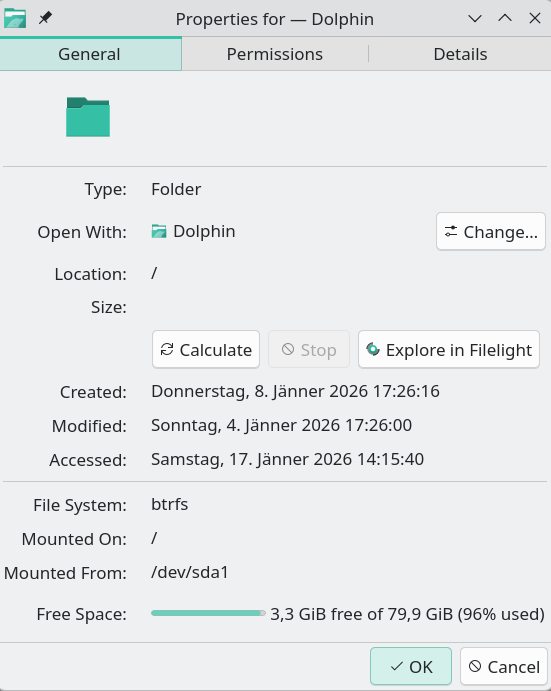
Dolphin shows 3,4 GiB free space, filelight about 50 GiB.
I uninstalled several progams via pacman and bazar, emptied trash, but free space does not change. It happened yesterday or so, the days before, free space was about 50 GiB.
What could be the reason? What should i do? I am new to manjaro and btrfs.
inxi -Fnzy ✔
System:
Kernel: 6.18.3-2-MANJARO arch: x86_64 bits: 64
Desktop: KDE Plasma v: 6.5.4 Distro: Manjaro Linux
Machine:
Type: Desktop System: Dell product: OptiPlex 7010 v: 01
serial: <superuser required>
Mobo: Dell model: 0773VG v: A02 serial: <superuser required> Firmware: BIOS
vendor: Dell v: A13 date: 03/25/2013
CPU:
Info: dual core model: Intel Core i3-3225 bits: 64 type: MT MCP cache:
L2: 512 KiB
Speed (MHz): avg: 1600 min/max: 1600/3300 cores: 1: 1600 2: 1600 3: 1600
4: 1600
Graphics:
Device-1: NVIDIA GP108 [GeForce GT 1030] driver: nvidia v: 575.64.05
Display: wayland server: X.org v: 1.21.1.21 with: Xwayland v: 24.1.9
compositor: kwin_wayland driver: X: loaded: nvidia
gpu: nvidia,nvidia-nvswitch resolution: 3840x2160~60Hz
API: EGL v: 1.5 drivers: nvidia,swrast
platforms: gbm,wayland,x11,surfaceless,device
API: OpenGL v: 4.6.0 compat-v: 4.5 vendor: nvidia mesa v: 575.64.05
renderer: NVIDIA GeForce GT 1030/PCIe/SSE2
API: Vulkan v: 1.4.335 drivers: nvidia surfaces: N/A
Info: Tools: api: clinfo, eglinfo, glxinfo, vulkaninfo
de: kscreen-console,kscreen-doctor gpu: nvidia-settings,nvidia-smi
wl: wayland-info x11: xdpyinfo,xprop
Audio:
Device-1: Intel 7 Series/C216 Family High Definition Audio
driver: snd_hda_intel
Device-2: NVIDIA GP108 High Definition Audio driver: snd_hda_intel
API: ALSA v: k6.18.3-2-MANJARO status: kernel-api
Server-1: PipeWire v: 1.4.9 status: active
Network:
Device-1: Intel 82579LM Gigabit Network driver: e1000e
IF: eno1 state: up speed: 1000 Mbps duplex: full mac: <filter>
Drives:
Local Storage: total: 1.37 TiB used: 955.73 GiB (68.1%)
ID-1: /dev/sda vendor: SanDisk model: SDSSDH3256G size: 238.47 GiB
ID-2: /dev/sdb vendor: HGST (Hitachi) model: HTS541010A9E680
size: 931.51 GiB
ID-3: /dev/sdc vendor: SanDisk model: USB 3.2Gen1 size: 232.97 GiB
type: USB
Partition:
  ID-1: / size: 79.9 GiB used: 74.12 GiB (92.8%) fs: btrfs dev: /dev/sda1
  ID-2: /home size: 79.9 GiB used: 74.12 GiB (92.8%) fs: btrfs dev: /dev/sda1
  ID-3: /var/log size: 79.9 GiB used: 74.12 GiB (92.8%) fs: btrfs
    dev: /dev/sda1
Swap:
Alert: No swap data was found.
Sensors:
System Temperatures: cpu: 38.0 C mobo: N/A
Fan Speeds (rpm): N/A
Info:
Memory: total: 12 GiB available: 11.63 GiB used: 4.58 GiB (39.4%)
Processes: 300 Uptime: 2h 59m Shell: Zsh inxi: 3.3.40
~