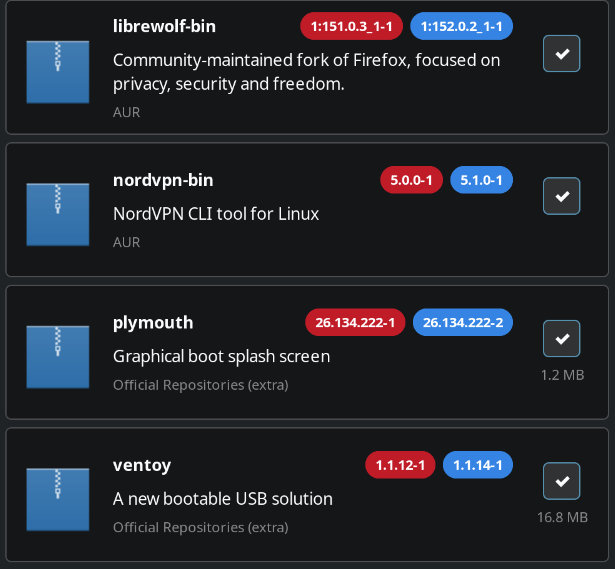
This is a new one for me. I don’t use the Pamac GUI but I’ve left the notification in the system tray as a quick visual that something is available. The system tray shows 4 updates, and indeed if I open the Pamac GUI there are 4 updates (plymouth, ventoy, librewolf, nordvpn).
But running pamac from the terminal it won’t see the AUR packages. I’ve seen this happen in reverse, where the CLI sees AUR packages but not the GUI but this is the opposite.
❯ pamac update --force-refresh --aur
Preparing...
Synchronizing package databases...
Refreshing core.db...
Refreshing extra.db...
Refreshing multilib.db...
Refreshing core.files...
Refreshing extra.files...
Refreshing multilib.files...
Refreshing AUR...
Resolving dependencies...
Checking inter-conflicts...

To upgrade (2):
  plymouth  26.134.222-2  (26.134.222-1)  extra  1.2 MB
  ventoy    1.1.14-1      (1.1.12-1)      extra  16.8 MB

Total download size: 18.0 MB
Total installed size: -76.7 kB

Apply transaction ? [y/N] n

Transaction cancelled.
I cannot say what is happening on your system - but if I search the AUR for nordvpn-bin from commandline line I get
 $ pamac search nordvpn-bin --aur
nordvpn-s6  20201020-1                                                                                     AUR
    s6 service scripts for nordvpn-bin
nordvpn-runit  3.9.5_1-1                                                                                   AUR
    runit service script for nordvpn-bin
nordvpn-openrc  1.0-1                                                                                      AUR
    OpenRC service script for nordvpn-bin
nordvpn-dinit  20260107-1                                                                                  AUR
    dinit service script for nordvpn-bin
nordvpn-bin  5.1.0-1                                                                                       AUR
    NordVPN CLI tool for Linux
I don’t think there is an issue with Pamac as application - I am thinking more ghost in the machine - a happy cache incidence or something…
Sorry, I should have included that as well. I don’t get the new version listed:
❯ pamac search nordvpn-bin
nordvpn-s6  20201020-1                                                                                     AUR
    s6 service scripts for nordvpn-bin
nordvpn-runit  3.9.5_1-1                                                                                   AUR
    runit service script for nordvpn-bin
nordvpn-openrc  1.0-1                                                                                      AUR
    OpenRC service script for nordvpn-bin
nordvpn-dinit  20260107-1                                                                                  AUR
    dinit service script for nordvpn-bin
nordvpn-bin  5.0.0-1 [Installed]                                                                           AUR
    NordVPN CLI tool for Linux
and I seem to have a new package meta package which I presume both the CLI and GUI use?
❯ ls -la /var/lib/pacman/sync
total 74936
drwxr-xr-x 1 root root      226 Jun 26 17:03 .
drwxr-xr-x 1 root root       18 Jun 26 17:03 ..
-rw-r--r-- 1 root root   153990 Jun 23 18:06 core.db
-rw-r--r-- 1 root root  2359933 Jun 23 18:06 core.files
-rw-r--r-- 1 root root  9302743 Jun 26 01:32 extra.db
-rw-r--r-- 1 root root 50888470 Jun 26 01:32 extra.files
-rw-r--r-- 1 root root    29153 Oct 14  2025 mhwd.db
-rw-r--r-- 1 root root   146075 Jun 23 18:06 multilib.db
-rw-r--r-- 1 root root   282849 Jun 23 18:06 multilib.files
-rw-r--r-- 1 root root 13553612 Jun 26 16:54 packages-meta-ext-v1.json.gz
-rw-r--r-- 1 root root        0 Jun 26 17:03 refresh_timestamp
Can I safely just delete the packages-meta-ext-v1.json.gz? But this doesn’t make sense to me either if both CLI and GUI are using the same data.
You can safely delete all files - they will be downloaded again - no harm done.
GUI and CLI uses the same set of metadata.
I have seen reference to the refresh_timestamp in pamac sources.
I don’t know the exact functionality perhaps the difference in the actual time compared to packages-meta-ext-v1.json.gz file has something to do with it.
In any case simply remove all the files and refresh the databases - see what happens.
I tried that then ran pamac again and got the same two (ventoy & plymouth).
So I figured I’d install them (pacman -Syu) and see what happens, they installed fine.
I ran pamac again:
❯ pamac update --force-refresh --aur
Preparing...
Synchronizing package databases...
Refreshing core.db...
Refreshing extra.db...
Refreshing multilib.db...
Refreshing core.files...
Refreshing extra.files...
Refreshing multilib.files...
Refreshing AUR...
Nothing to do.
Cloning librewolf-bin build files...
Generating librewolf-bin information...
==> ERROR: install file (librewolf-bin.install) does not exist or is not a regular file.
Error: Failed to prepare transaction: Failed to generate librewolf-bin information
So I figured I’d clear the pamac build cache at /var/tmp/pamac-build-$USER and now it sees the updates and installs.
I guess for some reason it isn’t reading the versions correctly???  Not sure why it failed to see both packages, or why it only failed and exited for librewolf. It seems some logic is broken!?
If you build folders in /var/tmp/pamac-$USER get’s muddy somehow, it is always a good idea to clear the structure /var/tmp/pamac* folders from time to time.
I can’t understand the logic though that would prevent the 2 AUR packages from showing up at all until the cache was cleared. What’s pamac even doing checking the cache before checking the installed version and the new version?
Created an issue on Github: pamac CLI doesn't show AUR updates but the GUI does · Issue #578 · manjaro/pamac · GitHub