With the fresh installment of the new Manjaro 26 version it think i made a mistake.
When i open an application, normally it shows up in the taskbar, but it does not.
So when i open several thunar instanties i get the thunar icon in the taskbar with the number of open instanties.
What did i do wrong?
thanks
Jean
Please open a Terminal and run inxi -zv8 copy the output from this and paste it into the Editor using the </> button.
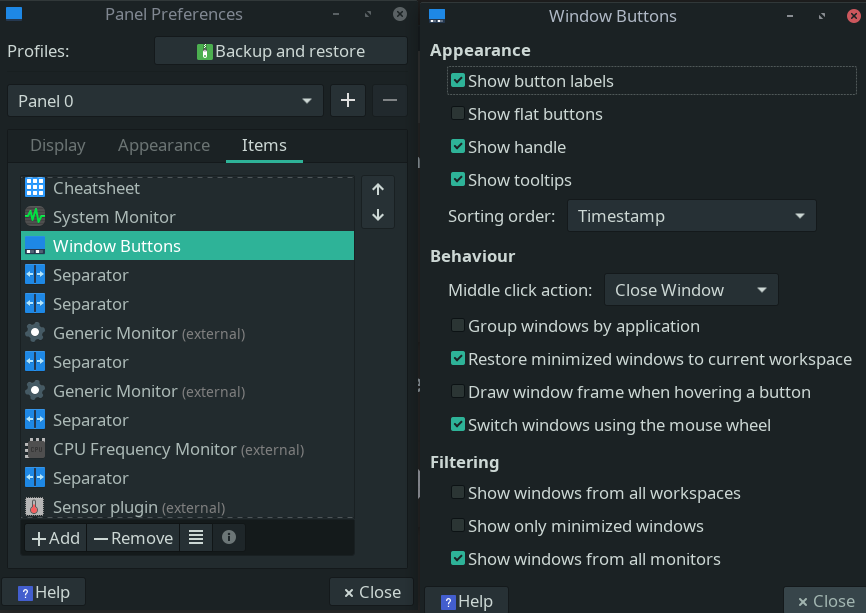
If you’re talking about combining windows from one app in the panel, it is a setting. If i remember correctly it was in the pannel settings (might as well be in thunar or desktop manager tweaks, i cannot check now). Right click on empty panel space, properties, items tab, windows element and hit its properties.
First of all, what you need to realize is that what you call “a taskbar” is actually a panel, and that the task manager which shows you the name and/or icon of an open application is an applet on that panel, just like the clock and the system tray.
These applets can be added or removed, and I’m guessing that you removed it by accident. So you’ll have to go into the panel settings and re-enable it again.
Problem solved, i had removed “Vensterknoppen”.
Thanks
Moderator edit: Cleaned up duplicate replies
No idea what that is, but i guess you had some custom/customized applet which interfered with the default windows applet of the main panel. (Or it was just another instance of it with wrong settings…removing deletes the settings too, contrary to everything else in linux. Readding adds it with the defaults.)
It means “window buttons”. In Plasma that’s an entirely different thing, but in Xfce, it’s the task manager applet.