Onefile EFI mini-os for filesystem repairs without live usb

Merry Christmas everyone!

Some time ago we had a discussion if it would be possible to have a super minimal OS, running from a single file from the ESP partition, for a limited number of repair actions without the need of a live usb. Turns out there are 2-3 such projects. Note that this will not replace a full blown live usb which you can use to chroot, but may be enough for quick fsck of a filesystem (which cannot be mounted for the check so the main OS cannot be running).

I took one of these projects and fixed a little error here and there. Note that i did not test the very last fix (because i do not want to wait another half an hour). In worst case you will have to copy build/arch/x86/boot/bzImage and rename it to EFI yourself, but i think it should appear as LifeboatLinux.efi automagically.

Without further ado, here is the repo

Check the prerequisites you need base-devel and git packages, after that

git clone https://github.com/teou1/lifeboat_linux.git
cd lifeboat_linux
make clean build
1 Like

Built without issue. Will test on next reboot, later today.

1 Like

Loads a bit slow for some reason (ca. 10 seconds), but it loads eventually so i didn’t investigate. Fsck for ext and fat works, and that was the whole point. Probably btrfs tools work too (they are included) but i don’t use btrfs and cannot test.

List of the included tools in the current version:

openrc busybox-openrc busybox-mdev-openrc haveged 
bash gawk grep sed util-linux nano font-terminus kbd
unzip tar zstd mtools net-tools pigz pixz 
partclone partclone-utils partimage parted 
efibootmgr gptfdisk 
lvm2 cryptsetup dmraid mdadm 
e2fsprogs e2fsprogs-extra dosfstools xfsprogs btrfs-progs

It is now about 31 MB. (after compilation, for it you need 3GB temporarily)

Naming

The convention for other .efi files is to add x64 to the end, so I suggest lifeboatx64.efi, which is shorter than LifeboatLinux.efi (not that file length is a problem in Linux).


Most of what follows is recreated from “whispers” (previously hidden discussion):


Text editor

A text editor with a small footprint:

sudo pacman -S msedit – Installed size: ~ 0.51 MiB

Yes, it’s the M$ editor – Sorry to shock you… :sweat_smile:

I understand it’s now open-source, nonetheless, check the licensing for compatibility.


Icon

I might suggest a Lifeboat icon of some kind for those who use rEFInd. There is/was a Manjaro theme for Refind. If that theme is updated with a Lifeboat icon and promoted for Refind users, it should solve that. Plus, make the icon.png file available separately for those who prefer another Refind theme.


When testing, I placed the file in /EFI/Lifeboat and it was immediately discovered by Refind, as expected.

Lifeboat boots swiftly enough for me.

Toying with an idea or two:

Just looking at CloneZilla – a bit big at 14.32 MiB (installed) – but then, some of that is already on Lifeboat: :man_shrugging:

Packages (14) drbl-5.3.2-1  gptfdisk-1.0.10-1  lbzip2-2.5-6  lrzip-0.651-3  lzop-1.04-4  net-tools-2.10-3
              nilfs-utils-2.2.12-1  partclone-0.3.40-1  partimage-0.6.9-16  pbzip2-1.1.13-4  pigz-2.8-2
              pixz-1.0.7-5  screen-5.0.1-3  clonezilla-5.13.10-1

Total Download Size:    4.42 MiB
Total Installed Size:  14.32 MiB

Something like:

Manjaro Lifeboat
(Running on Alpine Linux)

might be a better welcome experience when it starts, but otherwise everything’s open-source; use the best available tool for the job.

Puppy is supposed to be lightweight, and it doesn’t use systemd.


Script

I wonder if a low-footprint script might be useful on startup – perhaps your “cheatsheet” could be refactored to create convenient shortcuts to tools on the Lifeboat; each with a brief description.

Interesting ideas. Edit will probably not happen - i checked and there is only one remake version in their (alpine) “aur” which needs cargo to compile and i don’t know how much of it will be left in the final image. Besides, i doubt a text editor is much needed at all. Ok, in theory you can mount manjaro, you can change a config and the what? You cannot regenerate initramfs for example since you cannot chroot.
Let’s remember the purpose of it: a convenience tool for semi- and advanced users to use in some limited cases before live usb comes in play. But it cannot replace the live session and chroot.

Clonezilla was not in alpine repo, so i added what i could of the tools you wrote yesterday.

Puppy - sounds like an idea, but needs research if at all possible for the purpose. Remember, for compatibility reasons i try to keep this as small as possible, definitely under or around 100mb.
I played a little with Core and DSL but they were somehow not my thing. The closest to very compact, versatile and usable distribution i found was SliTaz. But it it has also undergone some changes recently. The version that is 64MB is based on kernel 3…so i don’t know if that old is good. The newer versions are not that compact anymore.

So alpine is probably the golden standart now for small and modern (unless one wants a gui, then it’s not so small anymore), since it is primarily made for servers and Internet of things and not for desktops.

You spoke of mc yesterday, which is why I mentioned msedit (and also due to it being so small) but, mc of course has it’s own internal editor, in any case.

CloneZilla, and probably other small suites of tools might be a consideration for other potential projects. However, you’re right of course – keep Lifeboat as small as possible, as well as practical.

What i personally did: i bought a 256 GB usb key, with usb a and c (so that can even be used on a phone), whith a keyhanger so it is always with me. I ventoyed it and put several iso-s on it. The very least: manjaro, WIN PE, and Clonezilla.

I did much the same, although I’m regretting my choice of USB – large capacity, but very slow file transfer. I might replace it the first chance I get.

I keep Debian, FreeBSD, Manjaro, Windows and many other ISOs on the Ventoy partition, as well as several (bootable .wim) recovery and repair systems – CloneZilla, Super Grub2, Hiren’s, PartedMagic, and so on – also, various Windows PortableApps with a menu.

Plus, I have NomadBSD on a separate partition.

It truly is a Swiss army knife; a pot pourri of tools.

1 Like

By the way, here is my /etc/grub.d/40_custom in case someone needs help with the grub integration (after editing, sudo update-grub). Ignore the first 2 lines with the german keyboard (it has to be compiled first)

#!/bin/sh
exec tail -n +3 $0
# This file provides an easy way to add custom menu entries.  Simply type the
# menu entries you want to add after this comment.  Be careful not to change
# the 'exec tail' line above.
insmod keylayouts
keymap /boot/grub/de.gkb
menuentry "UEFI Shell" {
search --no-floppy --fs-uuid --set=root XXXX-XXXX
chainloader /EFI/shell/UEFIshell.EFI
}
menuentry "Lifeboat fsck" {
search --no-floppy --fs-uuid --set=root XXXX-XXXX
chainloader /EFI/lifeboat/lifeboat.efi
}
menuentry "rEFInd" {
search --no-floppy --fs-uuid --set=root XXXX-XXXX
chainloader /EFI/refind/refind_x64.efi
}
menuentry "Shut Down" {
halt
}

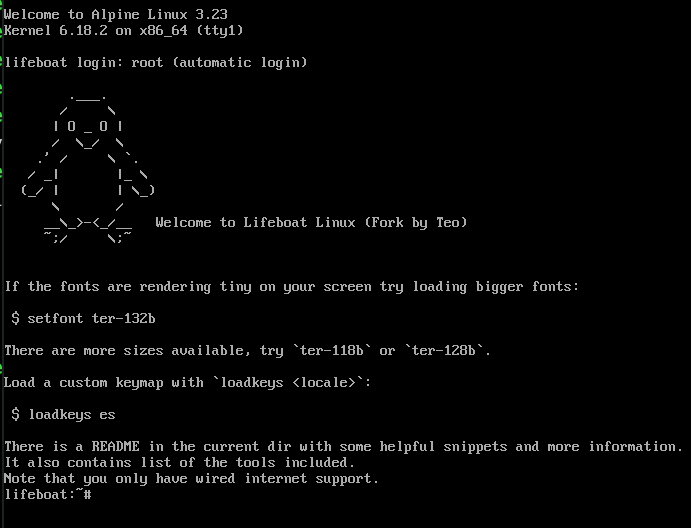
And a photo after booting

You may also want to add an efi boot entry like this (please check the paths for correctness). Manual for efibootmgr here.:

sudo efibootmgr -c -d /dev/nvme0n1 -p 6 -L "lifeboat" -l '\EFI\lifeboat\lifeboat.efi'

Note that this might change the currently selected boot entry - adjust it either with efibootmgr or through the uefi settings.