One of four bootable partitions won’t boot any more

Hi all,

it seems that all of my questions are so special that I can never find an answer in the forum topics – I have to start a thread.

On this iMac here there are the following partitions:

  1. the original MacOS, which I reduced to half of the HD
  2. the (very small, hidden) standard MacOS recovery partition
  3. a partition with Manjaro xfce (about a quarter of the HD)
  4. a partition with Manjaro KDE (another quarter of the HD)

Hence: three „big” partitions with a useable OS. Of these, No. 3 won’t boot anymore, which before it did.

The history is this:

First I reduced the formerly HD-wide MacOS partition to half, then, in the freed space, created two additional partitions, employing the Apple disk utility for both procedures.

In the partition next to the MacOS partition I installed Manjaro xfce. I was able, then, to boot into any of these at my choice.

After a week or so of trying to work with xfce, I installed Manjaro KDE on the other, the last free partition, ending up with a choice of three OSs.

Only: the choice remains reduced to two: MacOS and Manjaro KDE. I can’t boot into Manjaro xfce any more. It doesn’t appear when I start the machine holding down the „alt” key. The choice is only „MacOS” or „MacOS Recovery” or „EFI boot”, the latter of which always turns out to be Manjaro KDE, never Manjaro xfce.

But: whenever I put in a USB drive with another OS, it is detected and presented as a possibility to boot from, too. Only Manjaro xfce, which is on the centre partition, is somehow lost.

However, the partition with xfce is well there: it is there on the sidebar of Dolphin, called „root”, between „Macintosh HD” and the „root” partition of KDE. It is also seen by any disk utility. Only it won’t appear among the OSs of the Apple Startup manager.

This is not the first time this has happened. I observed the same behaviour on an identical iMac last year during trials, but wasn’t bothered because anyway I was about to wipe the HD and install only Manjaro.

Is there a way of recovering the boot command for all three OSs? Could I have done s. th. to prevent this?

Thanks for your suggestions!

Peter

PS.: My knowledge of computers is little more than basic, but I’m willing to learn.

Should be fixable, but the problem is you are using Mac firmware and bootloader and those are probably a bit different than everything else, so i will not assume how stuff works and wait for someone with Mac knowledge.

But if you boot KDE and open for example Gparted or similar program, you will very probably see yet another small partition, the ESP partition. If you can mount it and inspect the structure it will shed a lot of light.

One possible solution, if nobody with enough Mac knowledge appears, will probably be to “chainload” another more potent than the default grub boot loader for manjaro - like Refind.

p.s. inxi -zv8 from the manjaro posted with the </> button will be helpful.

Hi Teo,

and thank you for your suggestions.

I had already been thinking that the installation of a boot manager like rEFInd would solve the problem, but need to be encouraged and led by the hand, since this is new territory for me.

GParted sees no partition called „ESP”.

inxi -zv8 turns out tons (13 pages) of system information. I hesitate to post all of it here. What should I look for?

Regards,
Peter

The EFI system partition need not necessarily have a LABEL. All that matters is that…

  1. it should be about 300-512 MiB in size;
  2. it should be formatted as vfat (FAT32); and
  3. it should have the esp flag in the partition table.

It is of course also possible that your system boots in legacy BIOS mode, but given that it’s a Mac, I seriously doubt whether that would be the case, because Intel-based Macintosh computers come loaded with a custom, Apple-specific version of the UEFI firmware, and I’m not so sure it even supports legacy BIOS emulation.

Hi Aragorn,
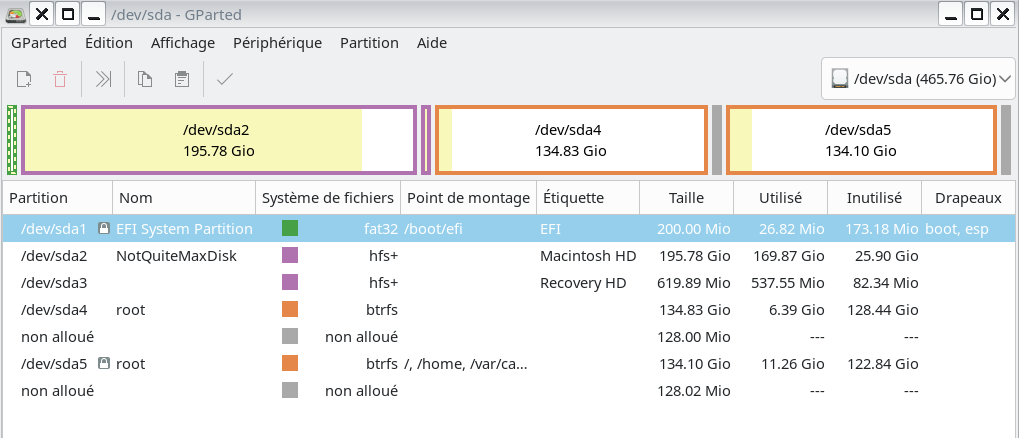
there is the original Apple EFI partition, formatted in FAT32, which hasn’t been touched by me. Its size is 200 MB, 26 MB of which are in use. I see now that in the GParted report on the right-hand side it says flags: boot, esp

See the screenshot.

That’s the one we need. Now tell us what’s inside of it… :backhand_index_pointing_down:

tree -f /boot/efi

Terminal doesn’t seem to accept the command:

tree -f /boot/efi                                                                                                                                                                                  ✔  
zsh: correct 'tree' to 'tee' [nyae]? y
tee : option invalide -- 'f'
Saisissez « tee --help » pour plus d'informations.

Assuming you’re attempting to run the command from Manjaro, it may be that tree is not installed; if that’s the case, install it with:

sudo pacman -S tree

and try again, using a slight variation of the command:

sudo tree -f /boot/efi/EFI
3 Likes

It is turning out:

sudo tree -f /boot/efi/EFI                                                                                                                                                                 ✔  19s  
/boot/efi/EFI
├── /boot/efi/EFI/APPLE
│   ├── /boot/efi/EFI/APPLE/EXTENSIONS
│   │   └── /boot/efi/EFI/APPLE/EXTENSIONS/Firmware.scap
│   └── /boot/efi/EFI/APPLE/FIRMWARE
│       └── /boot/efi/EFI/APPLE/FIRMWARE/IM121.scap
├── /boot/efi/EFI/boot
│   └── /boot/efi/EFI/boot/bootx64.efi
└── /boot/efi/EFI/Manjaro
    └── /boot/efi/EFI/Manjaro/grubx64.efi

6 directories, 4 files

I’ll note that it’s an uncommon scenario to install two instances of Manjaro in this way, however, I suspect what may have happened is this:

  1. You installed Manjaro XFCE edition, and it booted successfully.
  2. Then you installed Manjaro Plasma edition, again successfully, as you can boot into it.
  • When you installed the Plasma edition, it overwrote the UEFI boot files of the XFCE edition – the boot files for both editions install to the same directory on the $ESP unless one is told not to. :eyes:
{$ESP}/EFI/Manjaro

Installing the Plasma edition also used the same mount point, so following the “last installed, gets the worm” rule, the Plasma edition took over the boot entry.

/boot/efi/EFI/Manjaro

That only one “Manjaro” directory exists and Majaro Plasma boots, seems to support the likelihood of this scenario.


A possible resolution is to boot with the XFCE edition USB again and reinstall Grub manually from a chroot environment, but this time changing the --bootloader-id=Manjaro parameter to something like --bootloader-id=ManjaroXFCE.

To be clear, this is only an example:

grub-install --target=x86_64-efi --efi-directory=esp --bootloader-id=ManjaroXFCE

Re: chroot – the appropriate / for the installed Manjaro XFCE edition would need to be mounted – as I am (as yet) sufficiently unfamiliar with btrfs, please seek further advice on the procedures to follow.


Grub documentation (Arch Wiki):


Regarding rEFInd: :eyes:

Generally, I support the use of rEFInd UEFI Boot Manager in many scenarios, however in this case it won’t be overly useful until the Manjaro XFCE edition actually has boot files that it can find. Installing it now may allow you to boot via the kernel stub, but chainloading the (missing) Grub UEFI boot files is currently not possible.

1 Like

I agree with the first part. Using 2 manjaros is a rare usage case, so no one is to blame the installer does not check for that and just overwrites the Manjaro directory.
Option 1 would be to reinstall the XFCE grub with a distinctive name as shown above. Here is the relevant wiki entry by the way

Option 2 would be to use refind. I do not entirely agree with Soundofthunder here, or maybe i do not understand exactly what he means. What i think is you can install the refind package, just to get the files of it in /usr/share/refind. Then do not continue running install-refind script to make it the main boot loader, because i do not know if it can boot MacOS (or maybe it can, do your research). But you can make it “default” for the “EFI system” in the Mac boot menu. Just copy everything from /usr/share/refind to /boot/efi/EFI/boot and rename refind_x64.efi to bootx64.efi

Whatever you do, keep a live usb at hand in case of emergency.

1 Like

What is it that you do not understand?


  • sudo refind-install is the command I’m sure you must have meant.
  • Using --usedefault /dev/sdXY with refind-install should install rEFInd files to the fallback location (/EFI/Boot) instead of the default (/EFI/refind), without the need for any manual intervention.
  • Installing rEFInd to the fallback location is not strictly necessary. MacOS does work similarly to Windows (in that it commandeers the fallback location for it’s own use), so I agree the location has advantages for rEFInd.
  • rEFInd will discover the Mac boot files under /EFI/Apple – as the $ESP is formatted with fat32 additional UEFI file system drivers shouldn’t be needed (more information about MacOS version might be needed).
  • UEFI boot files for the Manjaro XFCE edition would still need to be in place for rEFInd to find them – otherwise only the boot-to-kernel-stub option might be available to boot Manjaro XFCE.
1 Like

tree came with MS-DOS v3.30!

We use: find /boot/efi :wink:

1 Like

We use tree on Linux and macOS; it produces more readable output, generally. :wink: – However, I’m not a “Royal” so I shall replace that with “I”.

Hey, I didn’t make the defaults!

(But I do tee, and tea.)

Good morning,

thank you for diving into my problem during night-shift! I can see that it is a not-so-common-and straightforward one, caused naively by a beginner.

Please allow me a day or two to peruse your contributions and familiarize myself and experiment with the terminal commands suggested. All of this is completely new territory to me.

I’ll be back.

Regards,

Peter

It is of the utmost importance that the following files are binary identical.

It is also important that the configuration file /boot/grub/grub.cfg match the efi binaries.

I am thinking that your #3 system (xfce) has a mismatch compared to system #4 (kde).

I suggest you boot the working installation #4 (kde) and do a rescue mount of the partition belonging to system #3 (xfce), enter chroot and run install-grub followed by update-grub.

The above will bring the xfce system in sync with the kde system and hopefully both will be able to boot.

2 Likes

Thank you all.

Now I have multiple questions on various levels, and: if I should try the repair, I would have to be guided closely step by step. I am such a newbie to terminal language that, along the way, I would have to look up every second word of your contributions in a glossary.

I’ll state what I have understood:

During the installation of the first Manjaro, the (GUI) installer saw that – somewhere on the HD, and not on the partition it was told to install xfce to – there was an EFI section already in use for MacOS, and said, “Fine, let’s write the Manjaro boot files into there, so the user will have a choice: MacOS or me.“

Then the second installer came along, the one for KDE, and saw, “Well, somebody has been here before and has done part of my job: there are the boot files for Manjaro that I was going to write. Let’s leave it like that.“

And the latter took priority over the previous one, for some reason.

This may have been possible to prevent, but not using the GUI installer, only by installing via CLI and knowing one’s way.

So far, so right (approximately)?
P.

I’m not so sure whether it was already in DOS 3.30 — I seem to remember it only appeared in DOS 4.0 or 5.0. :thinking:

Either way, many of the commands in DOS (and even in CP/M before it) were actually taken over from UNIX — the dir command, for instance, as well as mkdir, cd, more, et al. :wink:

… continuing my post #18:

And when the installer meets a virgin hard disk, it creates this EFI section itself. Only when asked to install to a partition amongst others on a given hard disk, it first looks for an existing EFI section and leaves the boot files there, next to others. Is that correct?

If that was so:

I could not, then, in this case, wipe the HD and put back Manjaro KDE (as only OS – no more MacOS, no more xfce) via a restore done by Rescuezilla? Because there would be no EFI section included, or would there?

I would have to do a new, full install?