hi folks,
may I ask for an advise on nvidia drivers. On last update I had some issues and it was proposed to not use proprietary drivers.
I use this computer for gaming, so what shall be used for best performance, compatibility (wine) etc.
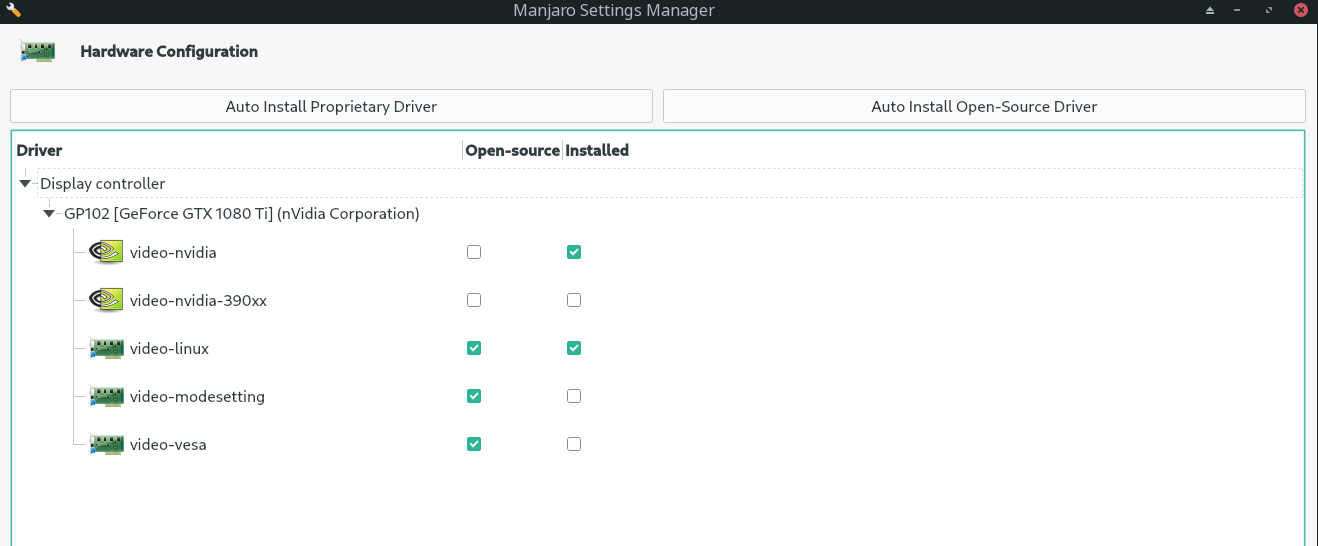
For gaming, you definitely want the non-free (proprietary) driver. Just click the Auto Install Proprietary Driver button there to make sure the right profile is loaded.
thanks for that.
I did it and this is the output:
Starting
Warning: config ‘/var/lib/mhwd/local/pci/video-nvidia-455xx/MHWDCONFIG’ is invalid!
Skipping already installed config ‘video-nvidia’ for device: 0000:09:00.0 (0300:10de:1b06) Display controller nVidia Corporation GP102 [GeForce GTX 1080 Ti]
Done …
The proprietary drivers should already be installed based on the screenshot (“video-nvidia” - installed).
ahh okay, wasnt too sure because video-linux seems also installed.
so system takes whatever is most performant?
Hmm, apparently you’re not the only one:
Not exactly, though if video-nvidia is installed it will use that.
What’s the output of
mhwd -li
It should be:
--------------------------------------------------------------------------------
                  NAME               VERSION          FREEDRIVER           TYPE
--------------------------------------------------------------------------------
          video-nvidia            2020.11.30               false            PCI
Also the following should list nvidia as the driver:
inxi -G
> [desktop@desktop-systemproductname ~]$ mhwd -li
> Warning: config ‘/var/lib/mhwd/local/pci/video-nvidia-455xx/MHWDCONFIG’ is invalid!
> Installed PCI configs:
NAME VERSION FREEDRIVER TYPE
      video-nvidia            2020.11.30               false            PCI
       video-linux            2018.05.04                true            PCI
Warning: No installed USB configs!
and the other one:
[desktop@desktop-systemproductname ~]$ inxi -N
Network: Device-1: Intel I211 Gigabit Network driver: igb
not exactly what is expected…
I think @Yochanan meant inxi -Gazy (or similar).
yep:
[desktop@desktop-systemproductname ~]$ inxi -Gazy
Graphics:
Device-1: NVIDIA GP102 [GeForce GTX 1080 Ti] vendor: ASUSTeK driver: nvidia
v: 455.45.01 alternate: nouveau,nvidia_drm bus ID: 09:00.0
chip ID: 10de:1b06
Display: x11 server: X.Org 1.20.10 driver: nvidia display ID: :0.0
screens: 1
Screen-1: 0 s-res: 3840x2160 s-dpi: 96 s-size: 1016x572mm (40.0x22.5")
s-diag: 1166mm (45.9")
Monitor-1: DP-0 res: 3840x2160 hz: 60 dpi: 164 size: 596x335mm (23.5x13.2")
diag: 684mm (26.9")
OpenGL: renderer: GeForce GTX 1080 Ti/PCIe/SSE2 v: 4.6.0 NVIDIA 455.45.01
direct render: Yes
Oops. Indeed I did. Post edited for posterity. 
As you surmised, nvidia is taking priority so it really shouldn’t make any difference.
However, if you want to avoid MHWD errors, you can remove the free driver:
sudo mhwd -r pci video-linux
I was just wondering… I had the exact same problem. Is this the way forward for the mhwd? Meaning, Is it only me seeing a “video-nvidia” now instead of a list of specific drivers…aside from the older 390? Or is something still technically broken with my installs?
0000:01:00.0 (0300:10de:13c0) Display controller nVidia Corporation:
NAME VERSION FREEDRIVER TYPE
      video-nvidia            2020.11.30               false            PCI
video-nvidia-390xx            2020.11.30               false            PCI
       video-linux            2018.05.04                true            PCI
 video-modesetting            2020.01.13                true            PCI
        video-vesa            2017.03.12                true            PCI
Hi @abz7,
No, I don’t think anything’s broken. Yes, this is how things are going to stay.
The process has been changed significantly.
Also see here from earlier: Problems with new Manjaro update and nvidia
Ok Thanks so much!.. Since it’s arch… I can sometimes get OCD… want things to be up to date and look/work correct