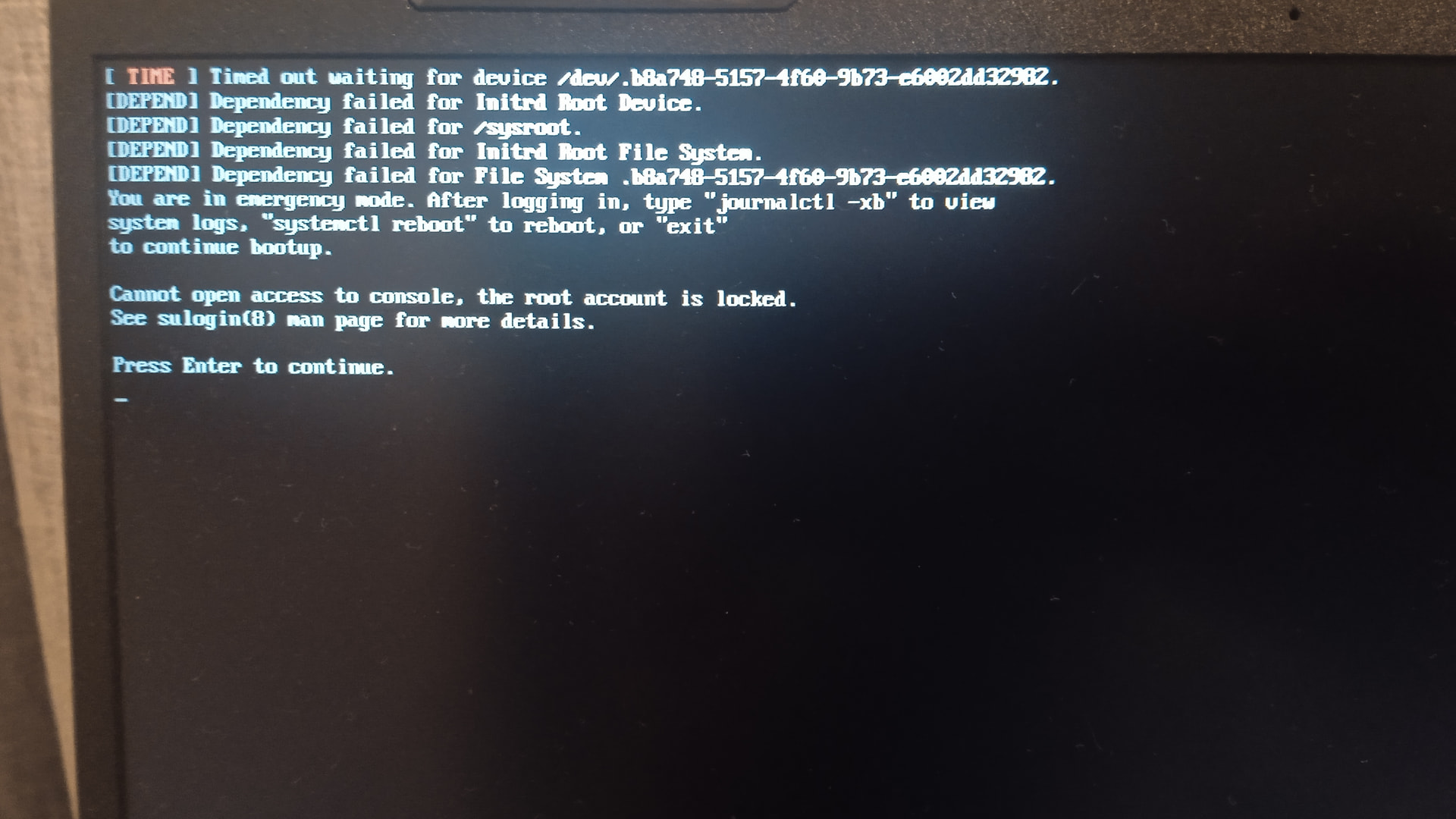
My system can’t start after the 2026-05-02 Stable update

hi guys.
I need help. my system can’t start after the update.
the update went normally but when I now start my system I see this


I’m using an encrypted root partition and it’s btrfs.
I booted the system with a manjaro cinnamon sd card and tried to chroot:

[manjaro@manjaro-cinnamon ~]$ manjaro-chroot -a
==> ERROR: No Linux partitions detected!

then I tried to mount the encrypted partition manually:

[manjaro@manjaro-cinnamon ~]$ sudo -i
[manjaro-cinnamon ~]# lsblk -f
NAME FSTYPE FSVER LABEL                  UUID                                 FSAVAIL FSUSE% MOUNTPOINTS
loop0
squash 4.0                                                                     0   100% /run/miso/sfs/livefs
loop1
squash 4.0                                                                     0   100% /run/miso/sfs/mhwdfs
loop2
squash 4.0                                                                     0   100% /run/miso/sfs/desktopfs
loop3
squash 4.0                                                                     0   100% /run/miso/sfs/rootfs
sda
├─sda1
│ │  exfat  1.0   Ventoy                 6BC2-2391
│ ├─ventoy
│ │  iso966 Jolie MANJARO_CINNAMONM_2503 2025-06-09-06-56-43-00                     0   100% /run/miso/bootmnt
│ └─sda1
│    exfat  1.0   Ventoy                 6BC2-2391
└─sda2
vfat   FAT16 VTOYEFI                3105-B091
nvme0n1
│
├─nvme0n1p1
│    vfat   FAT32                        E778-83E3
├─nvme0n1p2
│    crypto 1                            fbb8a748-5157-4f60-9b73-e6002dd32982
├─nvme0n1p3
│    crypto 1                            32cce5eb-b7e3-48e9-a80a-cfbd12bd1e1c
├─nvme0n1p4
│    btrfs        opt                    6dc3b65a-c8cd-4762-95ae-9a2543dec4e2
└─nvme0n1p5
btrfs        DATA                   238c9b51-cd27-405f-bdcf-6d65071b6346    1.5T    13% /run/media/manjaro/DATA
[manjaro-cinnamon ~]# cryptsetup open /dev/nvme0n1p2 crypto
Enter passphrase for /dev/nvme0n1p2:
[manjaro-cinnamon ~]# mount /dev/mapper/crypto /mnt
[manjaro-cinnamon ~]# manjaro-chroot -a
==> ERROR: No Linux partitions detected!

then I tried to chroot manually:

[manjaro-cinnamon ~]# cd /mnt
[manjaro-cinnamon mnt]# ls
@  @cache  @home  @log
[manjaro-cinnamon mnt]# manjaro-chroot /mnt/@
sh-5.3# install-grub
WARNING: EFI directory not found! Grub couldn’t be installed.
sh-5.3# exit
exit

then I tried to mount efi manually:

[manjaro-cinnamon mnt]# mount /dev/nvme0n1p1 /mnt/@/boot/efi
[manjaro-cinnamon mnt]# manjaro-chroot /mnt/@
sh-5.3# install-grub
WARNING: EFI directory not found! Grub couldn’t be installed.
sh-5.3# ls /boot/
amd-ucode.img  initramfs-6.12-x86_64.img  linux612-x86_64.kver	vmlinuz-6.12-x86_64
efi	       initramfs-6.18-x86_64.img  linux618-x86_64.kver	vmlinuz-6.18-x86_64
grub	       intel-ucode.img		  memtest86+
sh-5.3# ls /boot/efi

sh-5.3# exit
exit

for some reason the mounted efi partition contents are invisible in chroot

then I tried to chroot even more manually:

[manjaro-cinnamon mnt]# mount --bind /proc /mnt/@/proc
[manjaro-cinnamon mnt]# mount --bind /dev /mnt/@/dev
[manjaro-cinnamon mnt]# mount --bind /sys /mnt/@/sys
[manjaro-cinnamon mnt]# manjaro-chroot /mnt/@

but install-grub still fails:

sh-5.3# install-grub
WARNING: EFI directory not found! Grub couldn’t be installed.

and /boot/efi still seems empty:

sh-5.3# ls /boot/efi

however, when I exit chroot the contents are visible:

sh-5.3# exit
exit
[manjaro-cinnamon mnt]# ls /mnt/@/boot/efi
EFI

what do I do wrong and how do I make my system bootable?
please help.

Mod edit: Fixed formatting.

Start here after unlocking your encrypted drive:

3 Likes

thanks for your reply.

I booted my manjaro cinnamon sdcard as before. then I did:

[manjaro@manjaro-cinnamon ~]$ sudo su -
[manjaro-cinnamon ~]# lsblk --fs
NAME FSTYPE FSVER LABEL                  UUID                                 FSAVAIL FSUSE% MOUNTPOINTS
loop0
squash 4.0                                                                     0   100% /run/miso/sfs/livefs
loop1
squash 4.0                                                                     0   100% /run/miso/sfs/mhwdfs
loop2
squash 4.0                                                                     0   100% /run/miso/sfs/desktopfs
loop3
squash 4.0                                                                     0   100% /run/miso/sfs/rootfs
sda
├─sda1
│ │  exfat  1.0   Ventoy                 6BC2-2391
│ ├─ventoy
│ │  iso966 Jolie MANJARO_CINNAMONM_2503 2025-06-09-06-56-43-00                     0   100% /run/miso/bootmnt
│ └─sda1
│    exfat  1.0   Ventoy                 6BC2-2391
└─sda2
vfat   FAT16 VTOYEFI                3105-B091
nvme0n1
│
├─nvme0n1p1
│    vfat   FAT32                        E778-83E3
├─nvme0n1p2
│    crypto 1                            fbb8a748-5157-4f60-9b73-e6002dd32982
├─nvme0n1p3
│    crypto 1                            32cce5eb-b7e3-48e9-a80a-cfbd12bd1e1c
├─nvme0n1p4
│    btrfs        opt                    6dc3b65a-c8cd-4762-95ae-9a2543dec4e2
└─nvme0n1p5
btrfs        DATA                   238c9b51-cd27-405f-bdcf-6d65071b6346    1.5T    13% /run/media/manjaro/DATA

before mounting and chrooting I unlocked the encrypted partition:

[manjaro-cinnamon ~]# cryptsetup open /dev/nvme0n1p2 crypto
Enter passphrase for /dev/nvme0n1p2:

then I mounted substituting /dev/sda2 with my unlocked partition /dev/mapper/crypto:

[manjaro-cinnamon ~]# mount -t btrfs -o subvol=@ /dev/mapper/crypto /mnt
[manjaro-cinnamon ~]# ls /mnt
bin   crypto_keyfile.bin  dev  home  lib64  mnt  proc  rootfs-pkgs.txt  sbin  sys  usr
boot  desktopfs-pkgs.txt  etc  lib   media  opt  root  run              srv   tmp  var
[manjaro-cinnamon ~]# mount -t btrfs -o subvol=@home /dev/mapper/crypto /mnt/home
[manjaro-cinnamon ~]# mount -t btrfs -o subvol=@log /dev/mapper/crypto /mnt/var/log
[manjaro-cinnamon ~]# ls /mnt/var/log
audit  btmp.1  dnscrypt-proxy  httpd    lastlog  old         private  samba  Xorg.0.log
btmp   cups    gssproxy        journal  lightdm  pacman.log  README   wtmp   Xorg.0.log.old
[manjaro-cinnamon ~]# mount -t btrfs -o subvol=@cache /dev/mapper/crypto /mnt/var/cache

mounted my efi partition and the rest:

[manjaro-cinnamon ~]# mount -t vfat /dev/nvme0n1p1 /mnt/boot/efi
[manjaro-cinnamon ~]# mount --bind /dev /mnt/dev
[manjaro-cinnamon ~]# mount -t proc proc /mnt/proc
[manjaro-cinnamon ~]# mount -t sysfs sysfs /mnt/sys
[manjaro-cinnamon ~]# mount -t efivarfs efivarfs /mnt/sys/firmware/efi/efivars

then chrooted:

[manjaro-cinnamon ~]# chroot /mnt /bin/bash

[manjaro-cinnamon /]# [ -f /var/lib/pacman/db.lck ] && rm -f /var/lib/pacman/db.lck

the network commands didn’t really work, becasue of the network name resolution problems:

[manjaro-cinnamon /]# pacman-mirrors -f && pacman -Syyu
::WARNING
 Connection: ‘http://ping.manjaro.org/pacmanmirrors’ => ‘HTTPConnectionPool(host=‘ping.manjaro.org’, port=80): Max retries exceeded with url: /pacmanmirrors (Caused by NameResolutionError(“HTTPConnection(host=‘ping.manjaro.org’, port=80): Failed to resolve ‘ping.manjaro.org’ ([Errno -3] Temporary failure in name resolution)”))’ 
 Connection: ‘https://wikipedia.org’ => ‘HTTPSConnectionPool(host=‘wikipedia.org’, port=443): Max retries exceeded with url: / (Caused by NameResolutionError(“HTTPSConnection(host=‘wikipedia.org’, port=443): Failed to resolve ‘wikipedia.org’ ([Errno -3] Temporary failure in name resolution)”))’ 
 Connection: ‘https://archlinux.org’ => ‘HTTPSConnectionPool(host=‘archlinux.org’, port=443): Max retries exceeded with url: / (Caused by NameResolutionError(“HTTPSConnection(host=‘archlinux.org’, port=443): Failed to resolve ‘archlinux.org’ ([Errno -3] Temporary failure in name resolution)”))’ 
::INFO Internet connection appears to be down
::INFO Mirror ranking is not available
::INFO Mirror list is generated using random method
::INFO Writing mirror list
::France          :  https://mirror.bakertelekom.fr/manjaro/stable
::Serbia          :  https://mirror1.sox.rs/manjaro/stable
…
::United_States   :  https://repo.ialab.dsu.edu/manjaro/stable
::Germany         :  https://ftp.halifax.rwth-aachen.de/manjaro/stable
::INFO Mirror list generated and saved to: /etc/pacman.d/mirrorlist
:: Synchronizing package databases…
core.db failed to download
extra.db failed to download
multilib.db failed to download
 error: failed retrieving file ‘extra.db’ from mirror.bakertelekom.fr : Could not resolve host: mirror.bakertelekom.fr 
 warning: fatal error from mirror.bakertelekom.fr, skipping for the remainder of this transaction 
 error: failed retrieving file ‘multilib.db’ from mirror.bakertelekom.fr : Failed to connect to mirror.bakertelekom.fr port 443 after 2 ms: Could not connect to server 
 error: failed retrieving file ‘core.db’ from mirror.bakertelekom.fr : Failed to connect to mirror.bakertelekom.fr port 443 after 2 ms: Could not connect to server 
…
error: failed to synchronize all databases (failed to retrieve some files)
 [manjaro-cinnamon /]# ping google.com 
 ping: google.com: Temporary failure in name resolution 
[manjaro-cinnamon /]# ping 8.8.8.8
PING 8.8.8.8 (8.8.8.8) 56(84) bytes of data.
64 bytes from 8.8.8.8: icmp_seq=1 ttl=116 time=27.2 ms
64 bytes from 8.8.8.8: icmp_seq=2 ttl=116 time=30.7 ms
^C
— 8.8.8.8 ping statistics —
2 packets transmitted, 2 received, 0% packet loss, time 1002ms
rtt min/avg/max/mdev = 27.186/28.923/30.660/1.737 ms

but most important is the boot process. I tried to fix boot:

[manjaro-cinnamon /]# mkinitcpio -P
==> Building image from preset: /etc/mkinitcpio.d/linux612.preset: ‘default’
==> Using default configuration file: ‘/etc/mkinitcpio.conf’
 → -k /boot/vmlinuz-6.12-x86_64 -g /boot/initramfs-6.12-x86_64.img
==> Starting build: ‘6.12.85-1-MANJARO’
 → Running build hook: [base]
 → Running build hook: [systemd]
 → Running build hook: [autodetect]
 → Running build hook: [microcode]
 → Running build hook: [modconf]
 → Running build hook: [kms]
 → Running build hook: [keyboard]
 → Running build hook: [sd-vconsole]
 → Running build hook: [sd-encrypt]
 → Running build hook: [resume]
 → Running build hook: [block]
 → Running build hook: [filesystems]
 → Running build hook: [fsck]
==> Generating module dependencies
==> Creating zstd-compressed initcpio image: ‘/boot/initramfs-6.12-x86_64.img’
 → Early uncompressed CPIO image generation successful
==> Initcpio image generation successful
==> Running post hooks
 → Running post hook: [sbctl]
Secureboot key directory doesn’t exist, not signing!
==> Post processing done
==> Building image from preset: /etc/mkinitcpio.d/linux618.preset: ‘default’
==> Using default configuration file: ‘/etc/mkinitcpio.conf’
 → -k /boot/vmlinuz-6.18-x86_64 -g /boot/initramfs-6.18-x86_64.img
==> Starting build: ‘6.18.26-1-MANJARO’
 → Running build hook: [base]
 → Running build hook: [systemd]
 → Running build hook: [autodetect]
 → Running build hook: [microcode]
 → Running build hook: [modconf]
 → Running build hook: [kms]
 → Running build hook: [keyboard]
 → Running build hook: [sd-vconsole]
 → Running build hook: [sd-encrypt]
==> WARNING: Possibly missing firmware for module: ‘qat_6xxx’
 → Running build hook: [resume]
 → Running build hook: [block]
 → Running build hook: [filesystems]
 → Running build hook: [fsck]
==> Generating module dependencies
==> Creating zstd-compressed initcpio image: ‘/boot/initramfs-6.18-x86_64.img’
 → Early uncompressed CPIO image generation successful
==> Initcpio image generation successful
==> Running post hooks
 → Running post hook: [sbctl]
Secureboot key directory doesn’t exist, not signing!
==> Post processing done

then I updated grub:

[manjaro-cinnamon /]# update-grub
Generating grub configuration file …
Found linux image: /boot/vmlinuz-6.18-x86_64
Found initrd image: /boot/intel-ucode.img /boot/amd-ucode.img /boot/initramfs-6.18-x86_64.img
Found linux image: /boot/vmlinuz-6.12-x86_64
Found initrd image: /boot/intel-ucode.img /boot/amd-ucode.img /boot/initramfs-6.12-x86_64.img
Warning: os-prober will be executed to detect other bootable partitions.
Its output will be used to detect bootable binaries on them and create new boot entries.
ERROR: mkdir /var/lock/dmraid
Adding boot menu entry for UEFI Firmware Settings …
Detecting snapshots …
No snapshots found.
If you think an error has occurred, please file a bug report at “ https://github.com/Antynea/grub-btrfs ”
Unmount /tmp/grub-btrfs.0wubN5yMXx .. Success
Found memtest86+ image: /boot/memtest86+/memtest.bin
Found memtest86+ EFI image: /boot/memtest86+/memtest.efi
done

and ran install-grub for a good measure:

[manjaro-cinnamon /]# install-grub
Grub will be installed on: EFI
Installing for x86_64-efi platform.
Installation finished. No error reported.
Generating grub configuration file …
Found linux image: /boot/vmlinuz-6.18-x86_64
Found initrd image: /boot/intel-ucode.img /boot/amd-ucode.img /boot/initramfs-6.18-x86_64.img
Found linux image: /boot/vmlinuz-6.12-x86_64
Found initrd image: /boot/intel-ucode.img /boot/amd-ucode.img /boot/initramfs-6.12-x86_64.img
Warning: os-prober will be executed to detect other bootable partitions.
Its output will be used to detect bootable binaries on them and create new boot entries.
Adding boot menu entry for UEFI Firmware Settings …
Detecting snapshots …
No snapshots found.
If you think an error has occurred, please file a bug report at “ https://github.com/Antynea/grub-btrfs ”
Unmount /tmp/grub-btrfs.HVd6w3Ygzb .. Success
Found memtest86+ image: /boot/memtest86+/memtest.bin
Found memtest86+ EFI image: /boot/memtest86+/memtest.efi
done
Warning: GRUB bootloader at ‘/boot/efi/EFI/Manjaro’ was updated.
Your booted entry ‘’ is not the same as ‘Manjaro’.
This may be a rescue ISO, but if not check your EFI boot priority.
[manjaro-cinnamon /]# exit

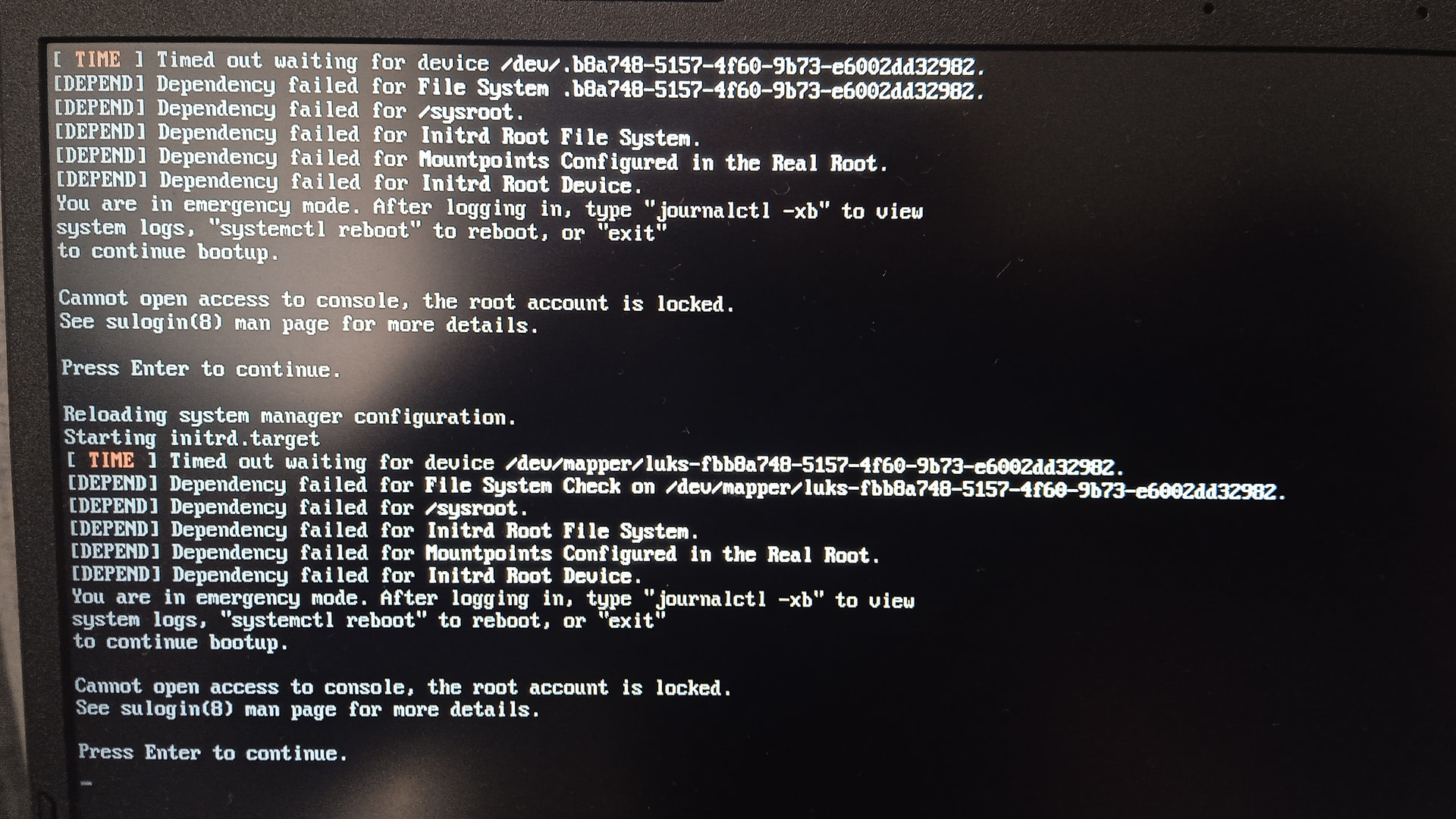
but unfortunately it didn’t correct anything. my system still can’t boot and is stuck at the same screen as before.

the hooks here are modified, but the error is the same.

please tell me if I did everything correctly and what else can I try to fix the boot.

Mod edit: Fixed the formatting.
Please use code blocks for multi-line terminal output, not inline code. See

Please explain what you mean by this. Do you mean you changed encrypt to sd-encrypt in the /etc/mkinitcpio.conf hooks, for example?

1 Like

I’ll try with Code blocks. but I’m not sure how to apply code blocks to a text. there’s no preview and the tutorial is uninformative.

by that I mean that since the system became unbootable, I modified the hooks in ‘/etc/mkinitcpio.conf’ a couple of times.

the original was like

HOOKS=(base udev systemd microcode modconf kms keyboard keymap consolefont sd-vconsole autodetect encrypt openswap resume block filesystems fsck)

since then I tried (this is one of the examples):

HOOKS=(base systemd autodetect microcode modconf kms keyboard sd-vconsole sd-encrypt resume block filesystems fsck)

now it is like this:

HOOKS=(base udev systemd microcode modconf kms keyboard keymap consolefont sd-vconsole sd-encrypt autodetect encrypt openswap resume block lvm2 btrfs filesystems fsck)

I think there may be something wrong with the hooks, so I’m open to suggestions.

Stick with your second hooks example, and make sure your kernel parameters are correct:

1 Like

I’ve fixed your posts above. :wink:

One way of formatting pasted output is to select the pasted text and click the </> button at the top of the Reply window, but for long outputs it will likely be easier to put three backticks ``` (or three tildes ~~~) on a new line, hit Enter, paste the text, then on a new line below adding the tildes there too.

Edit: If you go as if to edit one of the above “fixed” posts, you will be able to see how the formatting is done. No need to save the edit unless you actually want to change anything though! :wink:

Edit2: Corrected above suggestion.

2 Likes

if I stick to the example, that would mean that I’ll effectively replace encrypt with sd-encrypt.

is that what I need to do?

here are the partitions:

[manjaro-cinnamon ~]# lsblk -f
NAME        FSTYPE      FSVER            LABEL                  UUID                                 FSAVAIL FSUSE% MOUNTPOINTS
loop0       squashfs    4.0                                                                                0   100% /run/miso/sfs/livefs
loop1       squashfs    4.0                                                                                0   100% /run/miso/sfs/mhwdfs
loop2       squashfs    4.0                                                                                0   100% /run/miso/sfs/desktopfs
loop3       squashfs    4.0                                                                                0   100% /run/miso/sfs/rootfs
sda                                                                                                                 
├─sda1      exfat       1.0              Ventoy                 6BC2-2391                                           
│ ├─ventoy  iso9660     Joliet Extension MANJARO_CINNAMONM_2503 2025-06-09-06-56-43-00                     0   100% /run/miso/bootmnt
│ └─sda1    exfat       1.0              Ventoy                 6BC2-2391                                           
└─sda2      vfat        FAT16            VTOYEFI                3105-B091                                           
nvme0n1                                                                                                             
├─nvme0n1p1 vfat        FAT32                                   E778-83E3                             298.4M     0% /mnt/boot/efi
├─nvme0n1p2 crypto_LUKS 1                                       fbb8a748-5157-4f60-9b73-e6002dd32982                
│ └─crypto  btrfs                                               fc97d886-56a8-4ad3-9077-dc766a5dec62     13G    61% /mnt/var/cache
│                                                                                                                   /mnt/var/log
│                                                                                                                   /mnt/home
│                                                                                                                   /mnt
├─nvme0n1p3 crypto_LUKS 1                                       32cce5eb-b7e3-48e9-a80a-cfbd12bd1e1c                
├─nvme0n1p4 btrfs                        opt                    6dc3b65a-c8cd-4762-95ae-9a2543dec4e2                
└─nvme0n1p5 btrfs                        DATA                   238c9b51-cd27-405f-bdcf-6d65071b6346    1.5T    13% /run/media/manjaro/DATA

my /etc/default/grub looks like this:

GRUB_DEFAULT=saved
GRUB_TIMEOUT=5
GRUB_TIMEOUT_STYLE=hidden
GRUB_DISTRIBUTOR='Manjaro'
GRUB_CMDLINE_LINUX_DEFAULT='quiet cryptdevice=UUID=fbb8a748-5157-4f60-9b73-e6002dd32982:luks-fbb8a748-5157-4f60-9b73-e6002dd32982 root=/dev/mapper/luks-fbb8a748-5157-4f60-9b73-e6002dd32982 resume=/dev/mapper/luks-32cce5eb-b7e3-48e9-a80a-cfbd12bd1e1c udev.log_priority=3'
GRUB_CMDLINE_LINUX=""

# If you want to enable the save default function, uncomment the following
# line, and set GRUB_DEFAULT to saved.
GRUB_SAVEDEFAULT=false

# Preload both GPT and MBR modules so that they are not missed
GRUB_PRELOAD_MODULES="part_gpt part_msdos"

# Uncomment to enable booting from LUKS encrypted devices
GRUB_ENABLE_CRYPTODISK=y

# Uncomment to use basic console
GRUB_TERMINAL_INPUT=console

# Uncomment to disable graphical terminal
#GRUB_TERMINAL_OUTPUT=console

# The resolution used on graphical terminal
# note that you can use only modes which your graphic card supports via VBE
# you can see them in real GRUB with the command 'videoinfo'
GRUB_GFXMODE=auto

# Uncomment to allow the kernel use the same resolution used by grub
GRUB_GFXPAYLOAD_LINUX=keep

# Uncomment if you want GRUB to pass to the Linux kernel the old parameter
# format "root=/dev/xxx" instead of "root=/dev/disk/by-uuid/xxx"
#GRUB_DISABLE_LINUX_UUID=true

# Uncomment to disable generation of recovery mode menu entries
GRUB_DISABLE_RECOVERY=true

# Uncomment this option to enable os-prober execution in the grub-mkconfig command
GRUB_DISABLE_OS_PROBER=false

# Uncomment and set to the desired menu colors.  Used by normal and wallpaper
# modes only.  Entries specified as foreground/background.
GRUB_COLOR_NORMAL="light-gray/black"
GRUB_COLOR_HIGHLIGHT="green/black"

# Uncomment one of them for the gfx desired, a image background or a gfxtheme
#GRUB_BACKGROUND="/usr/share/grub/background.png"
#GRUB_THEME="/path/to/gfxtheme"

# Uncomment to get a beep at GRUB start
#GRUB_INIT_TUNE="480 440 1"

# Uncomment to ensure that the root filesystem is mounted read-only so that
# systemd-fsck can run the check automatically. We use 'fsck' by default, which
# needs 'rw' as boot parameter, to avoid delay in boot-time. 'fsck' needs to be
# removed from 'mkinitcpio.conf' to make 'systemd-fsck' work.
# See also Arch-Wiki: https://wiki.archlinux.org/index.php/Fsck#Boot_time_checking
#GRUB_ROOT_FS_RO=true

do I need to fix GRUB_CMDLINE_LINUX_DEFAULT?

If you do that, then you should also change /etc/default/grub, because then it needs the new syntax with luks.name=.

After changing both /etc/mkinitcpio.conf and /etc/default/grub, you must run… :backhand_index_pointing_down:

sudo mkinitcpio -P && sudo update-grub
1 Like

ok, I’ll keep the simple encrypt hook then, and not introduce sd-encrypt

1 Like

Be sure to then also stick with the udev hook instead of the systemd hook, and with keymap and consolefont instead of sd-vconsole.

1 Like

thanks. that is a brilliant suggestion. let me check if it works…

1 Like

it worked!!!

the last combination that I tried and that didn’t work was

HOOKS=(base systemd autodetect microcode modconf kms keyboard sd-vconsole encrypt resume block filesystems fsck)

as per your suggestion @Aragorn I modified it to

HOOKS=(base udev autodetect microcode modconf kms keyboard keymap consolefont encrypt resume block filesystems fsck)

et viola.

thank you very much @Aragorn !

now I remember how these systemd and sd-vconsole found their way into my /etc/mkinitcpio.conf. it was with one of these updates that installed a new version of the file with the prefix .pacnew. I made a diff between the old and the .pacnew file and without having the necessary information thought that it wouldn’t hurt to add the differences. I shouldn’t have done that.

1 Like

You can find more information on the mkinitcpio hooks at the Arch Wiki page at the link below. :wink:

:backhand_index_pointing_down:

2 Likes

thanks. I will now try to return to the HOOKS list that I had before and make the same changes about udev - systemd etc there, and this wiki will help me.

@Takakage thanks for your help too

1 Like

Look at the table and the links there, the sd-encrypt links to the general encryption setup…and there is explained the need for rd.luks= in the grub line.

2 Likes

@synthakai

In the edit window, look for the button M → markdown symbol; this is a toggle between two editor windows – one has a preview panel on the right side, which may need to be toggled via the button (bottom/right).

The link referenced provides many examples of formatting that may be used in the context of a Discourse forum post; one needs to make an effort to read/understand information given.

However, perhaps the following Mini-HowTo specifically targeting presentation of code and command output will serve you better.

Regards.


[Mini-HowTo] Present code or command output

Note: Grave accent (or, backtick) characters are used. :eyes:

For inline code or to show a single command:

  • please follow this simple example: code here.

For multi-line command output:

  • place text beween two rows of three (```) backtick characters to form a scrollable text box, or …
  • use the </> button in the Compose window to achieve the same result.

The empty row between these rows of backtick characters is where to paste any multi-line command output (such as inxi).

An example of a pre-formatted text enclosure:

What is a Quark?

A. In Physics, an elementary particle and fundamental constituent of matter. 
B. A character from the Star Trek: "Deep Space Nine" television series.
C. A soft, creamy, usually unsalted cheese traditional to central Europe.

This topic was automatically closed 3 days after the last reply. New replies are no longer allowed.