Manjaro-tools / buildiso - what is the smallest Manjaro-based live system I can build?

As you may know from a previous post of mine…

But now I’m trying to build a live JeOS (Just enough Operating System) based on Manjaro.

I copied the GNOME ISO profile and started a new JeOS ISO profile.

So far, the smallest ISO image I could get by cutting a lot of packages ended up in 578MB.

openSUSE-based Jeos ISO image (tutorial, source, download) is 319MB.

Do you see any way I could further reduce my Manjaro-based JeOS live ISO?

2 Likes

Hi!
I copied manjaro-jeos-25.10-development-minimal-251001-linux616.iso to Ventoy pen. and wanted to check/try it in live mode.
But I couldn’t log in. :frowning:
manjaro
manjaro
did not accept the pair.

An answer to that would depend on what you are trying to do.

If you want an absolute minimal terminal experience - it can be less than 1GiB.

The JeOS concept is not a concept set in stone but a concept that is designed around a single application or use case and therefore the question is kind’a moot.

For a Manjaro system you would also need to decide whether you will support Nvidia GPU by using mhwd or decide beforehand which GPU drivers to include - if any.

Currently the mhwd filesystem takes up 1.6G of the distributed ISO’s.

Where is the mhwd filesystem ? Is it on disc after installation or only on the ISO ?

Only on the ISO

1 Like

Ah yes, manjaro-kde-25.0.8-minimal-250902-linux612.iso/manjaro/x86_64/mhwdfs.sfs Squashfs filesystem 901 MB

The most recent ISO I built

18:04:21 ○ [fh@manjaro] .../manjaro/x86_64
 $ ls -l -h
total 3,8G
-rw-r--r-- 1 root root   48 30 sep 10:45 desktopfs.md5
-rw-r--r-- 1 root root 1,2G 30 sep 10:45 desktopfs.sfs
-rw-r--r-- 1 root root   45 30 sep 10:46 livefs.md5
-rw-r--r-- 1 root root  42M 30 sep 10:46 livefs.sfs
-rw-r--r-- 1 root root   45 30 sep 10:46 mhwdfs.md5
-rw-r--r-- 1 root root 1,6G 30 sep 10:46 mhwdfs.sfs
-rw-r--r-- 1 root root   45 30 sep 10:46 rootfs.md5
-rw-r--r-- 1 root root 950M 30 sep 10:46 rootfs.sfs

Oh, sorry! I forgot to tell: I changed it.

You can log in with linux or root and the password is still manjaro.

That’s it: simply a system that boots and presents a terminal to the user.

I kept just a small number of command line utilities because they can be useful. For instance, ip, ssh, scp, rsync could be used to copy files to/from the live system. I could remove them as well, but I think they don’t occupy that much space.

You are right. My intention with this JeOS image is to be able to test things such as the GRUB and the Plymouth themes without building a 4 GB (minimal) / 6 GB (full) ISO image.

Also, in the future I want to write a tutorial on buildiso the same way I did with kiwi, and I wanted a textbook case live image. Think of a buildiso’s “it works” or “hello world”.

~500-600 MB for what I want is just fine. I asked just out of curiosity to see if anyone had any idea on how to reduce it further.

Also it caught my attention that Manjaro JeOS (~600MB) takes almost double the space of the openSUSE Leap JeOS (~300MB). I didn’t inspect them in detail, but I believe they have quite the same basic utilities.

The JeOS image won’t support any particular GPU. AFAIK a minimal system with just a command line interface should work in any PC.

I deleted the Packages-Mhwd file from the jeos profile, so my ISO image does not have it.

1 Like

The architect profile does just that.

I can recommend reading the Installation guide - ArchWiki as you likely want to learn how a Arch based system is put together.

Best way to learn is to get an Architect ISO Releases · manjaro-architect/download · GitHub and build from ground up.

As for Manjaro - you may also look at the Packages-Root - technically you can trim that further down - but getting down to 300MiB - I don’t think that is possible.

A few years back when I maintained the openbox based ISOs I experimented on how low I could go.

A stripped down ISO with GUI and basic X support and installer would go around 1.7GiB and consume 100MiB when booted.

You could try this

mv Packages-Live Packages-Live.bak
mv Packages-Desktop Packages-Desktop.bak
mv Packages-Mhwd Packages-Mhwd.bak
mv live-overlay live-overlay.bak
mv desktop-overlay desktop-overlay.bak

Comment content of Packages-Root except for

base
grub
linux-firmware-meta
KERNEL

Edit profile.conf

displaymanager=""

See where that takes you :slight_smile:

I am currently experimenting with wayland-x11 because it has a very small footprint and you can run everything on top of it.

EDIT 2025-10-04T10:07:00Z

The smallest bootable ISO I have been able to build using buildiso and a customized profile is just closely around 500MiB.

Demo ISO at manjaro.dk (cannot be installed - just booted) if you want something installable you need to create a customs script.

EDIT:
ISO profile used

1 Like

Nice to know! I’ll experiment with it later.

[…]

I followed your suggestion, but it was not enough to build. After some trial and error, I’ve got an ISO image which is 495 MB, smaller than the previous one. Thanks!

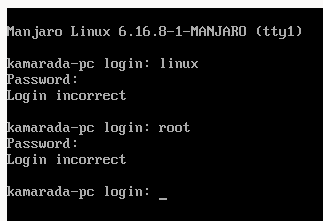
The problem with this image is that I’m not able to log in. It keeps saying Login incorrect:

That should work. But it’s not working. Do you know what I’m missing?

Nice! I downloaded it and I was able to boot it using a VirtualBox VM. Where is the source for it?

And it has only been tested using virtual machine (in my case KVM using libvirt)

I used an auto login - same concept I use for my rescue ISO - but I found the exact same issue when switching to another tty.

EDIT: 2025-10-05T08:23:00Z

Some additional tweaking (involving changes to the tools) I could bring the ISO below 450MiB.

1 Like

I know how to set up auto login on GDM. But how did you do to set up on tty?

Following this?

The Arch Wiki is a goldmine - nuggets everywhere :slight_smile:

For what I need, that’s good enough. Many thanks, @linux-aarhus!

Then, let’s apply the solution to an appropriate post, shall we?

This allows others with a similar query to more easily find a solution as well.

Regards.

2 Likes

This topic was automatically closed 3 days after the last reply. New replies are no longer allowed.