I recall odd examples from various models including an admin password needing to be set before secure boot could be disabled.
Indeed, after I set an admin password I could de-activate the secure boot mode. Thus I could set UEFI boot mode without secure boot. With these settings I booted Manjaro from the stick and invoked the Manjaro installallation program. The result is a Manjaro system on my hard disk that - hopefully - boots in UEFI mode. How can I verify that?
I remove the Manjaro stick, reboot my PC with interruption of the boot process. I set boot mode from UEFI to legacy. This results in an error, where no GRUB menu appears and neither Windows nor Manjaro can be booted.
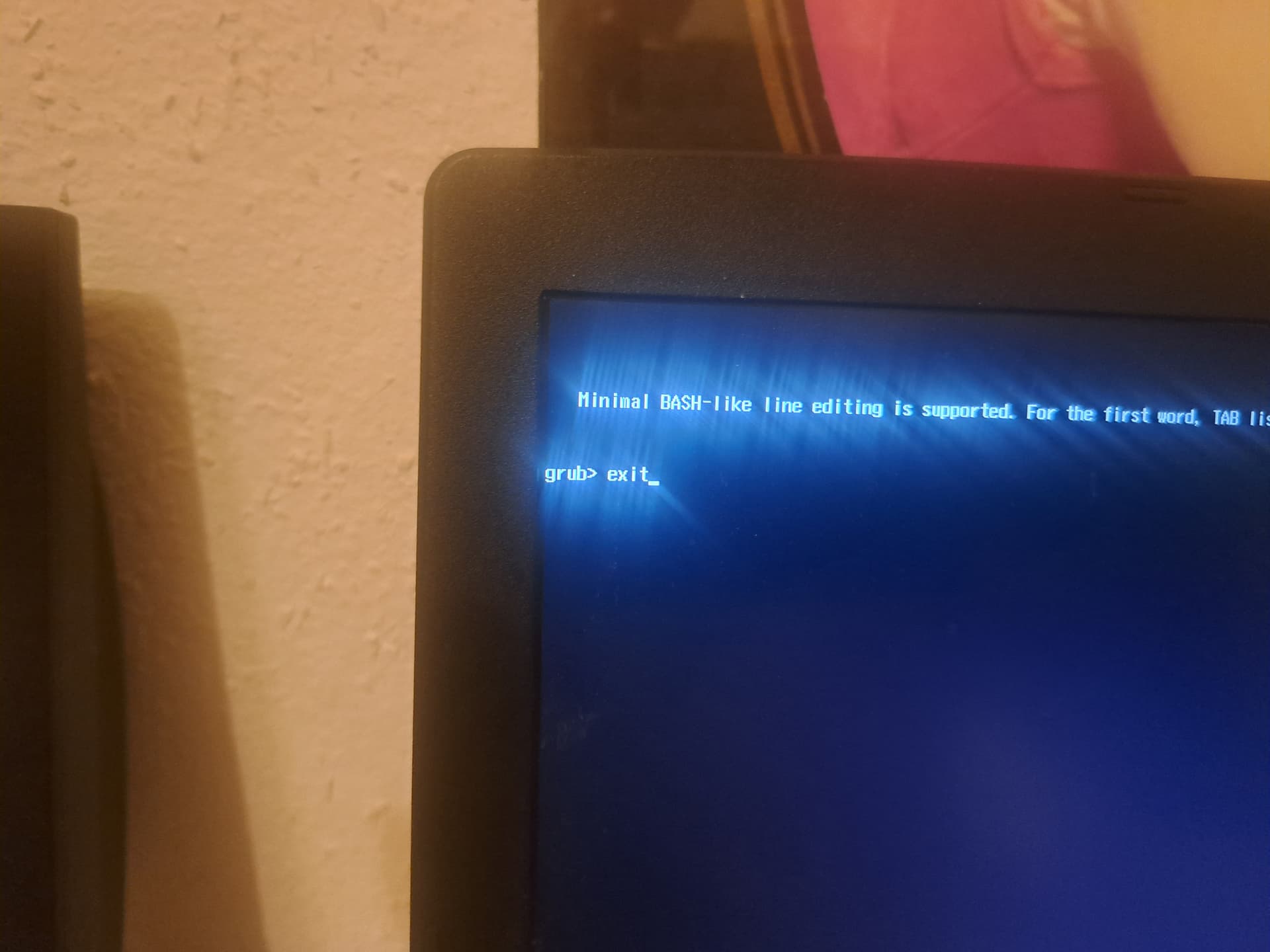
Reboot. Again I interrupt the boot process, set Boot mode to UEFI (secure boot disabled). No GRUB menu appears. The PC boots into windows - there is no choice.
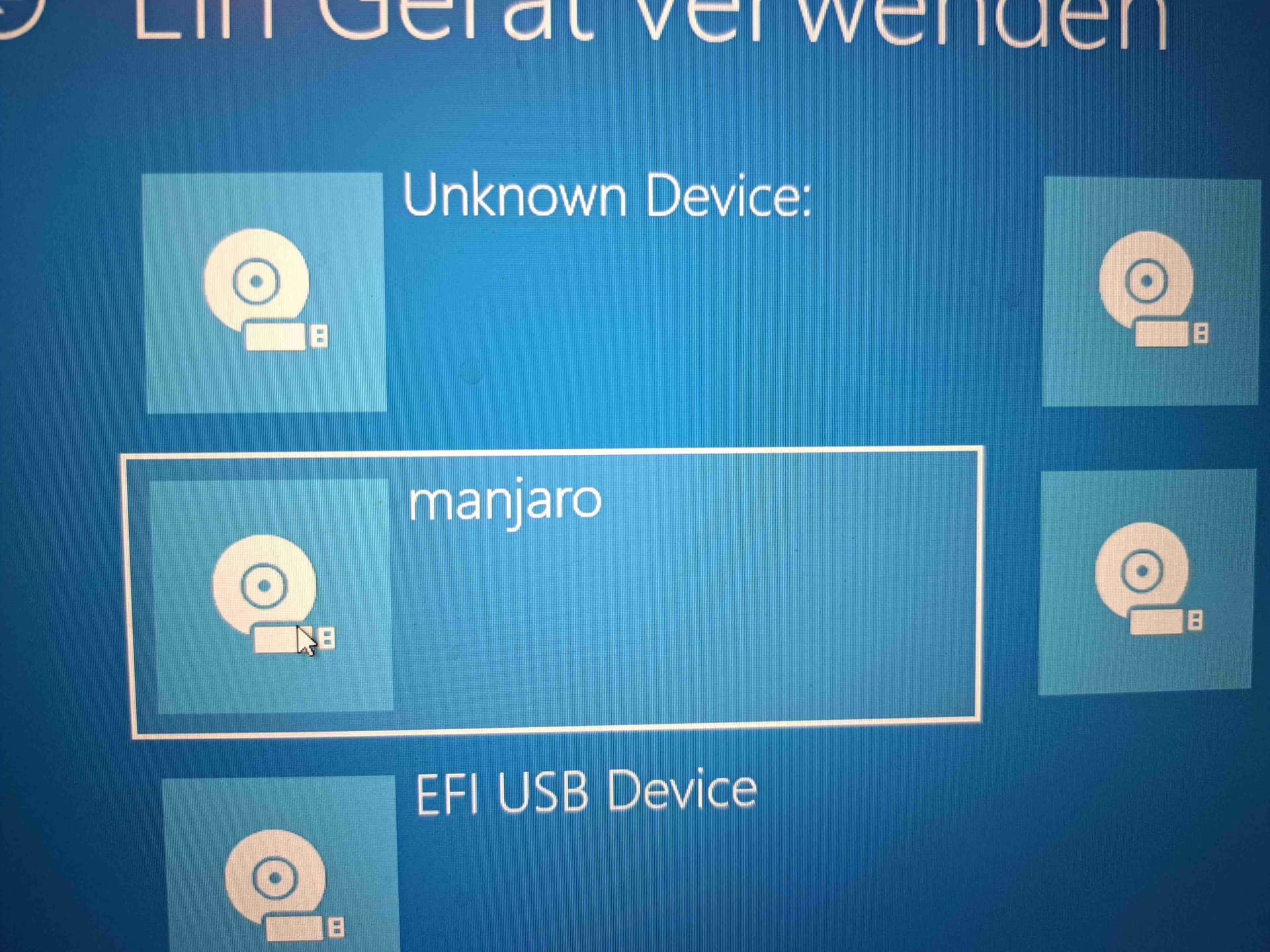
After login to Windows I can invoke the “Settings” > “Windows recovery” > … > “use device” > “Manjaro”
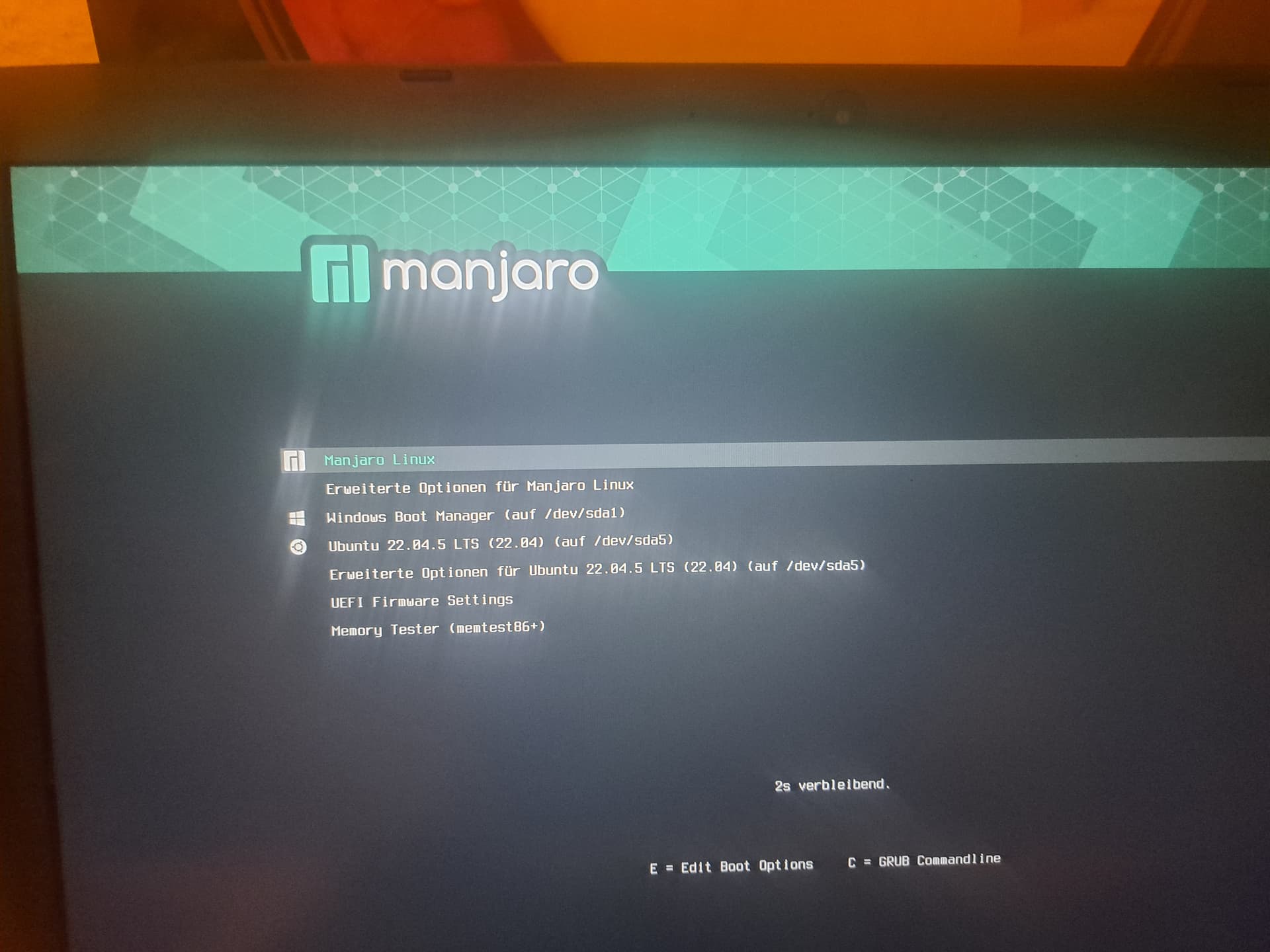
Now the PC reboots and the GRUB menu appears. I can choose and boot Manjaro. Finally!
From that process I conclude that Manjaro is now installed in EFI mode. Is my conclusion correct?
I log into Manjaro. I run grub-instal to /dev/sda, I run grub-mkconfig -o /boot/grub/grub.cfg
Reboot. Again (boot mode UEFI) Windows is booting, i.e. grub-mkconfig did not yield the desired result…
So what can I do in order to see the GRUB menu BEFORE Windows boots?
Ubuntu supports Secure Boot out of the box.
Arch/Manjaro can support it … but you must use self-signed keys, etc.
The output of this command usually indicates that the OS is currently booted using UEFI, while the absence of any output is typically indicative of a legacy boot.
To start with, set the boot priority in your BIOS. Make sure that the disk containing Manjaro (with the Grub boot loader) is set as the first boot entry. Save the BIOS, and reboot.
If you still have difficulty, there are other steps to consider.
It’s difficult to progress without knowing whether Manjaro is actually installed in UEFI mode or not.
Did you recreate the Manjaro Installer USB to ensure that it boots in UEFI mode? The methods to do this vary depending on the method you used to create the USB.
Did you subsequently install Manjaro in UEFI mode? Complications may arise if you failed to prepare your disk with a GUID partition table (GPT). In Calamares, before you choose a partitioning method, whether the disk and system is configured as UEFI (or not) is noted at the top of the screen (if you see MBR then it’s not UEFI).
If your BIOS also allows Legacy booting (i.e., CSM is enabled in a UEFI BIOS) this procedure can allow you to boot to Grub whether Manjaro is installed as UEFI or Legacy (but, after a forced reboot). So, this conclusion is indeterminate.
My assumption is that Manjaro is still booting as MBR.
Please boot to the Live environment of the Manjaro Installer USB, and follow relevant instructions in the following guide:
Only follow directions intended for a EFI/GPT system. Naturally, the instructions rely on booting as UEFI; refer to information given in the previous thread; each OS must boot as UEFI.
Aside:- I wrote a general guide to multibooting Windows and Manjaro some time ago; I’ll link this here as it includes information which will also be beneficial (without actually following the guide).
Yes, both of these comments are true, but are irrelevant to the issue at hand as Manjaro (by default) does not support Secure Boot, and thusly it should be disabled before installing Manjaro.
Note that disabling Secure Boot at the BIOS level (as you have done) is preferable to any mechanism Windows might offer.
This appears that it might be a Windows generated screen; I can’t see with your eyes, so it’s difficult to be sure.
Changing the boot priority in BIOS to have Manjaro (or possibly ‘Linux OS’) appear first in the relevant section of the BIOS should ensure that Manjaro’s Grub UEFI bootloader boots first (which would then list Windows as an option).
If the Manjaro entry in BIOS is somehow missing, this can often be solved by following a guide such as Restore the GRUB bootloader (above).
In the previous thread you mentioned:
Is this still the case now?
Yes – Manjaro is likely (still) booting in Legacy mode.
No – Please show us exactly what you see.
If both Windows and Manjaro are installed using UEFI mode (no CSM) then the $ESP should contain these (top level) directories:
[ESP] -- BOOT
         Manjaro
         Microsoft
If the ‘Manjaro’ directory doesn’t exist in the ESP, the likelihood is high that your installation remains as a msdos/mbr based installation.
Again, as before, each OS and the installation media must all be the same type; either UEFI/GPT or MSDOS/MBR (legacy). From what you have shown, Windows boots as UEFI/GPT, but for some reason Manjaro is not.
You ask us to please explain;
Perhaps it’s time for show and tell:
1. Please show us some system information; Boot to the Manjaro Live envionment of your Manjaro Installer USB, and provide the output of:
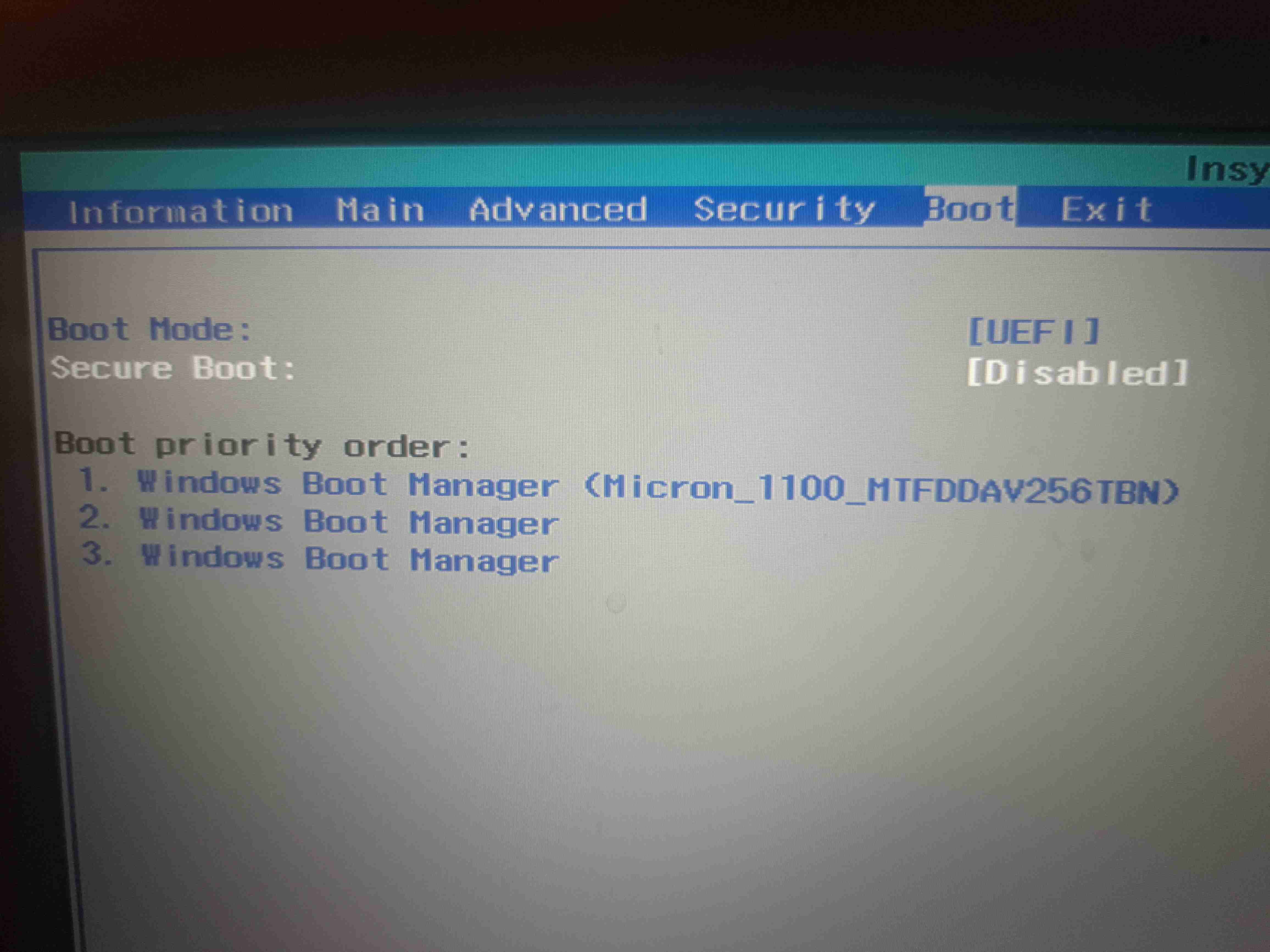
2. Boot into your system BIOS firmware and show us your settings – specifically for Secure Boot, UEFI and Legacy/CSM and Boot Priority. Use a camera, if needed, and post clearly images.
This makes no sense at all if you installed both Windoof and Manjaro in UEFI mode.
Because your firmware still looked to the ESP set by Windoof.
This is not the recommended procedure. You should have manjaro-chrooted into Manjaro and restore the boot loader for UEFI installs.
Wrong command. Ever looked for the wiki how to restore the boot loader? It’s so easy to find I’m not leaving the link here, you need to learn how to do your homework.
No, Manjaro is not supporting SB. Making it possible is not the same as supporting it.
The refind-install command can be used to automatically install rEFInd (the EFI partition may need to be mounted for this to work). See the Arch wiki for more details.
sudo pacman -S refind
[sudo] Passwort für mjhildegard:
Abhängigkeiten werden aufgelöst …
Nach in Konflikt stehenden Paketen wird gesucht …

Pakete (1) refind-0.14.2-1

Gesamtgröße des Downloads:             0,96 MiB
Gesamtgröße der installierten Pakete:  1,85 MiB

:: Installation fortsetzen? [J/n] J
:: Pakete werden empfangen …
 refind-0.14.2-1-x86_64                                    985,0 KiB  1791 KiB/s 00:01 [##################################################] 100%
(1/1) Schlüssel im Schlüsselbund werden geprüft                                        [##################################################] 100%
(1/1) Paket-Integrität wird überprüft                                                  [##################################################] 100%
(1/1) Paket-Dateien werden geladen                                                     [##################################################] 100%
(1/1) Auf Dateikonflikte wird geprüft                                                  [##################################################] 100%
(1/1) Verfügbarer Festplattenspeicher wird ermittelt                                   [##################################################] 100%
:: Paketänderungen werden verarbeitet …
(1/1) Installiert wird refind                                                          [##################################################] 100%
Optionale Abhängigkeiten für refind
    gptfdisk: for finding non-vfat ESP with refind-install
    imagemagick: for refind-mkfont [Installiert]
    openssl: for generating local certificates with refind-install [Installiert]
    python: for refind-mkdefault [Installiert]
    refind-docs: for HTML documentation
    sbsigntools: for EFI binary signing with refind-install
    sudo: for privilege elevation in refind-install and refind-mkdefault [Installiert]
:: Post-transaction-Hooks werden gestartet …
(1/1) Arming ConditionNeedsUpdate...
[mjhildegard@aspi ~]$

[mjhildegard@aspi ~]$ refind
bash: refind: Kommando nicht gefunden.
@soundofthunder:
inxi --admin --verbosity=8 --filter --no-host --width
yields the following output:
There was no error.
… there is just no refind binary - you expected it, but it’s just not there
and this is normal
Type refind and then hit TAB a few times to autocomplete the available commands which start with “refind”.
Installing rEFInd Using refind-install under Linux or MacOS
If you’re using Linux or macOS, the easiest way to install rEFInd is to use the refind-install script. This script automatically copies rEFInd’s files to your ESP or other target location and makes changes to your firmware’s NVRAM settings so that rEFInd will start the next time you boot
The rEFInd package includes the refind-install script to simplify the process of setting rEFInd as your default EFI boot entry. The script has several options for handling differing setups and UEFI implementations. See refind-install(8) or read the comments in the install script for explanations of the various installation options.
For many systems it should be sufficient to simply run:
Boot into your system BIOS firmware and show us your settings – specifically for Secure Boot, UEFI and Legacy/CSM and Boot Priority. Use a camera, if needed, and post clearly images
I made screen shots of all pages of the startup (BIOS). I believe that the “boot” screen is most relevant for my problem:
@soundofthunder:
/dev/sdb is an external hard disk for data backup. There is no SW on that disk. I only forgot to unplug it. Is it necessary to do so in order to solve my problem?
It’s necessary to test a theory; to see if it’s presence is preventing discovery of both OS. Instead of querying you could have simply removed it and reported the results.
With the limited information provided, the only explanation seems to be that Manjaro is installed as MSDOS/MBR/Legacy.
Instead of querying you could have simply removed it and reported the results.
tells me that you are unconciously supposing I can simply turn on the PC and run the command. This is not the case! Our dialogue is about my friend’s PC; he lives a few km away, i.e. he needs to visit me or vice versa.
But when you do have the chance: bootctl status may be of use.
Or: test -d /sys/firmware/efi && echo efi || echo bios.
Example from this machine
bootctl status
Couldn't find EFI system partition. It is recommended to mount it to /boot or /efi.
Alternatively, use --esp-path= to specify path to mount point.
System:
Not booted with EFI
There actually is an EFI partition but I haven’t populated it; it’s there for future use.
Your objection presumes that you had somehow magically informed us of your difficulty. Until post #14 I see no such mention. Keep in mind that few of those wishing to help are equipped with a proverbial crystal ball at their disposal.
The obvious workaround in light of your newly provided information is to return any requested information when you are able. In turn, we can evaluate any information you provide when we are able.
These are times when those volunteering to help might well prefer to be spending time with family and friends; such is the holiday season; nonetheless, help is given freely despite personal limitations.
Question: Is completely reinstalling Windows and Manjaro an option?
If I now understand correctly, I should expect a response sometime within the next few days, or a perhaps in a week, whenever it may be convenient for you.
Never seen you tried this for an UEFI install. Best starting point would be manjaro-chrooting from live ISO booted in UEFI mode. Make sure Windoze has been fully shutdown (no Fast startup enabled etc.), so no hidden resume mode which could cause issues for dual boot.
Afterwards, you should go into firmware settings and boot in UEFI mode into newly created Manjaro UEFI entry.
If this works, you only need to enable os-prober in your /etc/default/grub, perform an sudo update-grub and should be able to boot both OS from Manjaro’s grub menu.
I learned that I need to configure the PC Startup ( I call it BIOS) to allow insecure UEFI boot.
With that configuration I repeated the Manjaro installation from bootable stick hoping that the (Calamaris) installer would establish a system, where after power-on the GRUB boot manager shows the choice between Manjaro and Windows.
Our further discussion circles around the question why the GRUB menu does not appear after power-on.
3.a There are indicators that support the assumption that most likely Manjaro has been installed in UEFI boot mode:
see the photos of the Startup screen
see the output of the command: dmesg | grep -i "EFI v"
the fact that it is impossible boot the PC in legacy mode; I can only
boot in UEFI mode, but then Windows starts
the fact that Manjaro can be started at all – even if only via Windows Recovery.
3.b There are indicators that support the assumption that most likely Manjaro has been installed in legacy boot mode.
the observation that the GRUB menu does not appear when I boot the PC in UEFI mode.
3c. I do not understand what the results of the inxi command indicate.
I would not dare to repeat the Windows installation. The PC was bought with Windows 10 pre-installed; I have no expertise with Windows installation.
I would have repeated the Manjaro installation process from the beginning rather than conduct this discussion, but that would have yielded the same result, wouldn’t it? Therefore I believe it is necessary to find the cause of my problem.