KVM: copy from guest and paste into host not working

Hi all,
Trying to copy from guest and paste into host not working.

I have:
host: Manjaro stable updated up to today - plasma - wayland - KVM
guest1: Manjaro stable updated up to today - plasma - wayland - quemu-guest-agent installed
quest2: Debian 13 updated up to today - plasma - wayland - quemu-guest-agent installed

Copy from host and paste into guest working with any host
Copy from any guest and paste into host NOT WORKING

All tests were done using Konsole

What I’m missing?

Copy and paste are bidirectional active between my host and my guest (both KDE).

I greped these packages as installed on the host and in the details menu of virtman the memory configuration shows checkbox as active for shared memory:

# pacman -Q |grep -Eic 'qemu|kvm|libvirt' 
86
# pacman -Q |grep -Ei 'qemu|kvm|libvirt' 
libvirt 1:12.0.0-1
libvirt-glib 5.0.0-3
libvirt-python 1:12.0.0-1
libvirt-storage-gluster 1:12.0.0-1
libvirt-storage-iscsi-direct 1:12.0.0-1
qemu-audio-alsa 10.2.0-1
qemu-audio-dbus 10.2.0-1
qemu-audio-jack 10.2.0-1
qemu-audio-oss 10.2.0-1
qemu-audio-pa 10.2.0-1
qemu-audio-pipewire 10.2.0-1
qemu-audio-sdl 10.2.0-1
qemu-audio-spice 10.2.0-1
qemu-base 10.2.0-1
qemu-block-curl 10.2.0-1
qemu-block-dmg 10.2.0-1
qemu-block-gluster 10.2.0-1
qemu-block-iscsi 10.2.0-1
qemu-block-nfs 10.2.0-1
qemu-block-ssh 10.2.0-1
qemu-chardev-baum 10.2.0-1
qemu-chardev-spice 10.2.0-1
qemu-common 10.2.0-1
qemu-desktop 10.2.0-1
qemu-docs 10.2.0-1
qemu-emulators-full 10.2.0-1
qemu-full 10.2.0-1
qemu-hw-display-qxl 10.2.0-1
qemu-hw-display-virtio-gpu 10.2.0-1
qemu-hw-display-virtio-gpu-gl 10.2.0-1
qemu-hw-display-virtio-gpu-pci 10.2.0-1
qemu-hw-display-virtio-gpu-pci-gl 10.2.0-1
qemu-hw-display-virtio-gpu-pci-rutabaga 10.2.0-1
qemu-hw-display-virtio-gpu-rutabaga 10.2.0-1
qemu-hw-display-virtio-vga 10.2.0-1
qemu-hw-display-virtio-vga-gl 10.2.0-1
qemu-hw-display-virtio-vga-rutabaga 10.2.0-1
qemu-hw-s390x-virtio-gpu-ccw 10.2.0-1
qemu-hw-uefi-vars 10.2.0-1
qemu-hw-usb-host 10.2.0-1
qemu-hw-usb-redirect 10.2.0-1
qemu-hw-usb-smartcard 10.2.0-1
qemu-img 10.2.0-1
qemu-pr-helper 10.2.0-1
qemu-system-aarch64 10.2.0-1
qemu-system-alpha 10.2.0-1
qemu-system-alpha-firmware 10.2.0-1
qemu-system-arm 10.2.0-1
qemu-system-arm-firmware 10.2.0-1
qemu-system-avr 10.2.0-1
qemu-system-hppa 10.2.0-1
qemu-system-hppa-firmware 10.2.0-1
qemu-system-loongarch64 10.2.0-1
qemu-system-m68k 10.2.0-1
qemu-system-microblaze 10.2.0-1
qemu-system-microblaze-firmware 10.2.0-1
qemu-system-mips 10.2.0-1
qemu-system-or1k 10.2.0-1
qemu-system-ppc 10.2.0-1
qemu-system-ppc-firmware 10.2.0-1
qemu-system-riscv 10.2.0-1
qemu-system-riscv-firmware 10.2.0-1
qemu-system-rx 10.2.0-1
qemu-system-s390x 10.2.0-1
qemu-system-s390x-firmware 10.2.0-1
qemu-system-sh4 10.2.0-1
qemu-system-sparc 10.2.0-1
qemu-system-sparc-firmware 10.2.0-1
qemu-system-tricore 10.2.0-1
qemu-system-x86 10.2.0-1
qemu-system-x86-firmware 10.2.0-1
qemu-system-xtensa 10.2.0-1
qemu-tests 10.2.0-1
qemu-tools 10.2.0-1
qemu-ui-curses 10.2.0-1
qemu-ui-dbus 10.2.0-1
qemu-ui-egl-headless 10.2.0-1
qemu-ui-gtk 10.2.0-1
qemu-ui-opengl 10.2.0-1
qemu-ui-sdl 10.2.0-1
qemu-ui-spice-app 10.2.0-1
qemu-ui-spice-core 10.2.0-1
qemu-user 10.2.0-1
qemu-user-static 10.2.0-1
qemu-vhost-user-gpu 10.2.0-1
qemu-vmsr-helper 10.2.0-1
1 Like

I have a lot less but copy paste still works bidirectional on X11 host and windows guest.

libvirt 1:12.0.0-1
libvirt-glib 5.0.0-3
libvirt-python 1:12.0.0-1
qemu-audio-alsa 10.2.0-1
qemu-audio-dbus 10.2.0-1
qemu-audio-jack 10.2.0-1
qemu-audio-oss 10.2.0-1
qemu-audio-pa 10.2.0-1
qemu-audio-pipewire 10.2.0-1
qemu-audio-sdl 10.2.0-1
qemu-audio-spice 10.2.0-1
qemu-base 10.2.0-1
qemu-block-curl 10.2.0-1
qemu-block-dmg 10.2.0-1
qemu-block-nfs 10.2.0-1
qemu-block-ssh 10.2.0-1
qemu-chardev-spice 10.2.0-1
qemu-common 10.2.0-1
qemu-desktop 10.2.0-1
qemu-hw-display-qxl 10.2.0-1
qemu-hw-display-virtio-gpu 10.2.0-1
qemu-hw-display-virtio-gpu-gl 10.2.0-1
qemu-hw-display-virtio-gpu-pci 10.2.0-1
qemu-hw-display-virtio-gpu-pci-gl 10.2.0-1
qemu-hw-display-virtio-gpu-pci-rutabaga 10.2.0-1
qemu-hw-display-virtio-gpu-rutabaga 10.2.0-1
qemu-hw-display-virtio-vga 10.2.0-1
qemu-hw-display-virtio-vga-gl 10.2.0-1
qemu-hw-display-virtio-vga-rutabaga 10.2.0-1
qemu-hw-uefi-vars 10.2.0-1
qemu-hw-usb-host 10.2.0-1
qemu-hw-usb-redirect 10.2.0-1
qemu-hw-usb-smartcard 10.2.0-1
qemu-img 10.2.0-1
qemu-system-x86 10.2.0-1
qemu-system-x86-firmware 10.2.0-1
qemu-ui-curses 10.2.0-1
qemu-ui-dbus 10.2.0-1
qemu-ui-egl-headless 10.2.0-1
qemu-ui-gtk 10.2.0-1
qemu-ui-opengl 10.2.0-1
qemu-ui-sdl 10.2.0-1
qemu-ui-spice-app 10.2.0-1
qemu-ui-spice-core 10.2.0-1
qemu-vhost-user-gpu 10.2.0-1

1 Like

Have you read this?

It mentions wl-clipboard, and spice-vdagent with qemu-vdagent, though as you’re using wayland you probably want the first one.

:man_shrugging:

2 Likes

I am pretty sure copy/paste is all done through spice-vdagent. Which you need a functioning SPICE server on the hypervisor to talk to as well.

I have SPICE disabled since I use GPU pass-through. But even in a window on the host, I have never been able to copy/paste, since I don’t run it.

1 Like

Hi @Acor and @Teo I’ve tried to compare the installed packages
Please note I’m using wayland and have an AMD gpu.

I have the same packages as @Teo (the only difference is X11 vs Wayland); so maybe there is some difference in the vm created with virtual manager.

In my configuration:
HOST
Plasma Wayland AMDgpu KVM qemu

GUEST
Plasma Wayland
screen spice

<graphics type="spice" port="-1" autoport="no">
  <listen type="address"/>
  <image compression="off"/>
  <gl enable="no"/>
</graphics>

video virtio

<graphics type="spice" port="-1" autoport="no">
  <listen type="address"/>
  <image compression="off"/>
  <gl enable="no"/>
</graphics>

Still looking for what I’m missing

TL;DR

The XML of one guest:

<domain type="kvm">
  <name>manjaro</name>
  <uuid>02864194-f333-46b6-8a02-21dcbf3efae8</uuid>
  <title>Manjaro per test vari</title>
  <metadata>
    <libosinfo:libosinfo xmlns:libosinfo="http://libosinfo.org/xmlns/libvirt/domain/1.0">
      <libosinfo:os id="http://manjaro.org/manjaro/rolling"/>
    </libosinfo:libosinfo>
  </metadata>
  <memory unit="KiB">65536000</memory>
  <currentMemory unit="KiB">65536000</currentMemory>
  <vcpu placement="static">12</vcpu>
  <os>
    <type arch="x86_64" machine="pc-q35-9.1">hvm</type>
    <boot dev="hd"/>
  </os>
  <features>
    <acpi/>
    <apic/>
    <vmport state="off"/>
  </features>
  <cpu mode="host-passthrough" check="none" migratable="on"/>
  <clock offset="utc">
    <timer name="rtc" tickpolicy="catchup"/>
    <timer name="pit" tickpolicy="delay"/>
    <timer name="hpet" present="no"/>
  </clock>
  <on_poweroff>destroy</on_poweroff>
  <on_reboot>restart</on_reboot>
  <on_crash>destroy</on_crash>
  <pm>
    <suspend-to-mem enabled="no"/>
    <suspend-to-disk enabled="no"/>
  </pm>
  <devices>
    <emulator>/usr/bin/qemu-system-x86_64</emulator>
    <disk type="file" device="disk">
      <driver name="qemu" type="qcow2"/>
      <source file="/BIANCO-SATA1/sata1-disco/VIRTIMAGES/manjaro.04_kernel-6.1771605952"/>
      <target dev="vda" bus="virtio"/>
      <address type="pci" domain="0x0000" bus="0x04" slot="0x00" function="0x0"/>
    </disk>
    <controller type="usb" index="0" model="qemu-xhci" ports="15">
      <address type="pci" domain="0x0000" bus="0x02" slot="0x00" function="0x0"/>
    </controller>
    <controller type="pci" index="0" model="pcie-root"/>
    <controller type="pci" index="1" model="pcie-root-port">
      <model name="pcie-root-port"/>
      <target chassis="1" port="0x10"/>
      <address type="pci" domain="0x0000" bus="0x00" slot="0x02" function="0x0" multifunction="on"/>
    </controller>
    <controller type="pci" index="2" model="pcie-root-port">
      <model name="pcie-root-port"/>
      <target chassis="2" port="0x11"/>
      <address type="pci" domain="0x0000" bus="0x00" slot="0x02" function="0x1"/>
    </controller>
    <controller type="pci" index="3" model="pcie-root-port">
      <model name="pcie-root-port"/>
      <target chassis="3" port="0x12"/>
      <address type="pci" domain="0x0000" bus="0x00" slot="0x02" function="0x2"/>
    </controller>
    <controller type="pci" index="4" model="pcie-root-port">
      <model name="pcie-root-port"/>
      <target chassis="4" port="0x13"/>
      <address type="pci" domain="0x0000" bus="0x00" slot="0x02" function="0x3"/>
    </controller>
    <controller type="pci" index="5" model="pcie-root-port">
      <model name="pcie-root-port"/>
      <target chassis="5" port="0x14"/>
      <address type="pci" domain="0x0000" bus="0x00" slot="0x02" function="0x4"/>
    </controller>
    <controller type="pci" index="6" model="pcie-root-port">
      <model name="pcie-root-port"/>
      <target chassis="6" port="0x15"/>
      <address type="pci" domain="0x0000" bus="0x00" slot="0x02" function="0x5"/>
    </controller>
    <controller type="pci" index="7" model="pcie-root-port">
      <model name="pcie-root-port"/>
      <target chassis="7" port="0x16"/>
      <address type="pci" domain="0x0000" bus="0x00" slot="0x02" function="0x6"/>
    </controller>
    <controller type="pci" index="8" model="pcie-root-port">
      <model name="pcie-root-port"/>
      <target chassis="8" port="0x17"/>
      <address type="pci" domain="0x0000" bus="0x00" slot="0x02" function="0x7"/>
    </controller>
    <controller type="pci" index="9" model="pcie-root-port">
      <model name="pcie-root-port"/>
      <target chassis="9" port="0x18"/>
      <address type="pci" domain="0x0000" bus="0x00" slot="0x03" function="0x0" multifunction="on"/>
    </controller>
    <controller type="pci" index="10" model="pcie-root-port">
      <model name="pcie-root-port"/>
      <target chassis="10" port="0x19"/>
      <address type="pci" domain="0x0000" bus="0x00" slot="0x03" function="0x1"/>
    </controller>
    <controller type="pci" index="11" model="pcie-root-port">
      <model name="pcie-root-port"/>
      <target chassis="11" port="0x1a"/>
      <address type="pci" domain="0x0000" bus="0x00" slot="0x03" function="0x2"/>
    </controller>
    <controller type="pci" index="12" model="pcie-root-port">
      <model name="pcie-root-port"/>
      <target chassis="12" port="0x1b"/>
      <address type="pci" domain="0x0000" bus="0x00" slot="0x03" function="0x3"/>
    </controller>
    <controller type="pci" index="13" model="pcie-root-port">
      <model name="pcie-root-port"/>
      <target chassis="13" port="0x1c"/>
      <address type="pci" domain="0x0000" bus="0x00" slot="0x03" function="0x4"/>
    </controller>
    <controller type="pci" index="14" model="pcie-root-port">
      <model name="pcie-root-port"/>
      <target chassis="14" port="0x1d"/>
      <address type="pci" domain="0x0000" bus="0x00" slot="0x03" function="0x5"/>
    </controller>
    <controller type="sata" index="0">
      <address type="pci" domain="0x0000" bus="0x00" slot="0x1f" function="0x2"/>
    </controller>
    <controller type="virtio-serial" index="0">
      <address type="pci" domain="0x0000" bus="0x03" slot="0x00" function="0x0"/>
    </controller>
    <interface type="bridge">
      <mac address="52:54:00:77:31:c7"/>
      <source bridge="br0"/>
      <model type="virtio"/>
      <address type="pci" domain="0x0000" bus="0x01" slot="0x00" function="0x0"/>
    </interface>
    <serial type="pty">
      <target type="isa-serial" port="0">
        <model name="isa-serial"/>
      </target>
    </serial>
    <console type="pty">
      <target type="serial" port="0"/>
    </console>
    <channel type="unix">
      <target type="virtio" name="org.qemu.guest_agent.0"/>
      <address type="virtio-serial" controller="0" bus="0" port="1"/>
    </channel>
    <channel type="spicevmc">
      <target type="virtio" name="com.redhat.spice.0"/>
      <address type="virtio-serial" controller="0" bus="0" port="2"/>
    </channel>
    <input type="tablet" bus="usb">
      <address type="usb" bus="0" port="1"/>
    </input>
    <input type="mouse" bus="ps2"/>
    <input type="keyboard" bus="ps2"/>
    <graphics type="spice" port="-1" autoport="no">
      <listen type="address"/>
      <image compression="off"/>
      <gl enable="no"/>
    </graphics>
    <sound model="ich9">
      <address type="pci" domain="0x0000" bus="0x00" slot="0x1b" function="0x0"/>
    </sound>
    <audio id="1" type="spice"/>
    <video>
      <model type="virtio" heads="1" primary="yes">
        <acceleration accel3d="no"/>
      </model>
      <address type="pci" domain="0x0000" bus="0x00" slot="0x01" function="0x0"/>
    </video>
    <redirdev bus="usb" type="spicevmc">
      <address type="usb" bus="0" port="2"/>
    </redirdev>
    <redirdev bus="usb" type="spicevmc">
      <address type="usb" bus="0" port="3"/>
    </redirdev>
    <watchdog model="itco" action="reset"/>
    <memballoon model="virtio">
      <address type="pci" domain="0x0000" bus="0x05" slot="0x00" function="0x0"/>
    </memballoon>
    <rng model="virtio">
      <backend model="random">/dev/urandom</backend>
      <address type="pci" domain="0x0000" bus="0x06" slot="0x00" function="0x0"/>
    </rng>
  </devices>
</domain>

I have only 45 packages installed

pacman -Q |grep -Eic 'qemu|kvm|libvirt'
45

Packages are

pacman -Q |grep -Ei 'qemu|kvm|libvirt' 
libvirt 1:12.0.0-1
libvirt-glib 5.0.0-3
libvirt-python 1:12.0.0-1
qemu-audio-alsa 10.2.0-1
qemu-audio-dbus 10.2.0-1
qemu-audio-jack 10.2.0-1
qemu-audio-oss 10.2.0-1
qemu-audio-pa 10.2.0-1
qemu-audio-pipewire 10.2.0-1
qemu-audio-sdl 10.2.0-1
qemu-audio-spice 10.2.0-1
qemu-base 10.2.0-1
qemu-block-curl 10.2.0-1
qemu-block-dmg 10.2.0-1
qemu-block-nfs 10.2.0-1
qemu-block-ssh 10.2.0-1
qemu-chardev-spice 10.2.0-1
qemu-common 10.2.0-1
qemu-desktop 10.2.0-1
qemu-hw-display-qxl 10.2.0-1
qemu-hw-display-virtio-gpu 10.2.0-1
qemu-hw-display-virtio-gpu-gl 10.2.0-1
qemu-hw-display-virtio-gpu-pci 10.2.0-1
qemu-hw-display-virtio-gpu-pci-gl 10.2.0-1
qemu-hw-display-virtio-gpu-pci-rutabaga 10.2.0-1
qemu-hw-display-virtio-gpu-rutabaga 10.2.0-1
qemu-hw-display-virtio-vga 10.2.0-1
qemu-hw-display-virtio-vga-gl 10.2.0-1
qemu-hw-display-virtio-vga-rutabaga 10.2.0-1
qemu-hw-uefi-vars 10.2.0-1
qemu-hw-usb-host 10.2.0-1
qemu-hw-usb-redirect 10.2.0-1
qemu-hw-usb-smartcard 10.2.0-1
qemu-img 10.2.0-1
qemu-system-x86 10.2.0-1
qemu-system-x86-firmware 10.2.0-1
qemu-ui-curses 10.2.0-1
qemu-ui-dbus 10.2.0-1
qemu-ui-egl-headless 10.2.0-1
qemu-ui-gtk 10.2.0-1
qemu-ui-opengl 10.2.0-1
qemu-ui-sdl 10.2.0-1
qemu-ui-spice-app 10.2.0-1
qemu-ui-spice-core 10.2.0-1
qemu-vhost-user-gpu 10.2.0-1

Then I listed my packages and tried to get the differences
Acor vs Mirto

diff qemu-acor.txt qemu-mirto.txt 
4,5d3
< libvirt-storage-gluster 1:12.0.0-1
< libvirt-storage-iscsi-direct 1:12.0.0-1
17,18d14
< qemu-block-gluster 10.2.0-1
< qemu-block-iscsi 10.2.0-1
21d16
< qemu-chardev-baum 10.2.0-1
25,27d19
< qemu-docs 10.2.0-1
< qemu-emulators-full 10.2.0-1
< qemu-full 10.2.0-1
38d29
< qemu-hw-s390x-virtio-gpu-ccw 10.2.0-1
44,69d34
< qemu-pr-helper 10.2.0-1
< qemu-system-aarch64 10.2.0-1
< qemu-system-alpha 10.2.0-1
< qemu-system-alpha-firmware 10.2.0-1
< qemu-system-arm 10.2.0-1
< qemu-system-arm-firmware 10.2.0-1
< qemu-system-avr 10.2.0-1
< qemu-system-hppa 10.2.0-1
< qemu-system-hppa-firmware 10.2.0-1
< qemu-system-loongarch64 10.2.0-1
< qemu-system-m68k 10.2.0-1
< qemu-system-microblaze 10.2.0-1
< qemu-system-microblaze-firmware 10.2.0-1
< qemu-system-mips 10.2.0-1
< qemu-system-or1k 10.2.0-1
< qemu-system-ppc 10.2.0-1
< qemu-system-ppc-firmware 10.2.0-1
< qemu-system-riscv 10.2.0-1
< qemu-system-riscv-firmware 10.2.0-1
< qemu-system-rx 10.2.0-1
< qemu-system-s390x 10.2.0-1
< qemu-system-s390x-firmware 10.2.0-1
< qemu-system-sh4 10.2.0-1
< qemu-system-sparc 10.2.0-1
< qemu-system-sparc-firmware 10.2.0-1
< qemu-system-tricore 10.2.0-1
72,74d36
< qemu-system-xtensa 10.2.0-1
< qemu-tests 10.2.0-1
< qemu-tools 10.2.0-1
83,84d44
< qemu-user 10.2.0-1
< qemu-user-static 10.2.0-1
86d45
< qemu-vmsr-helper 10.2.0-1

Teo vs Mirto

[mirto@bianco500 ~]$ diff qemu-teo.txt qemu-mirto.txt 
[mirto@bianco500 ~]$ 

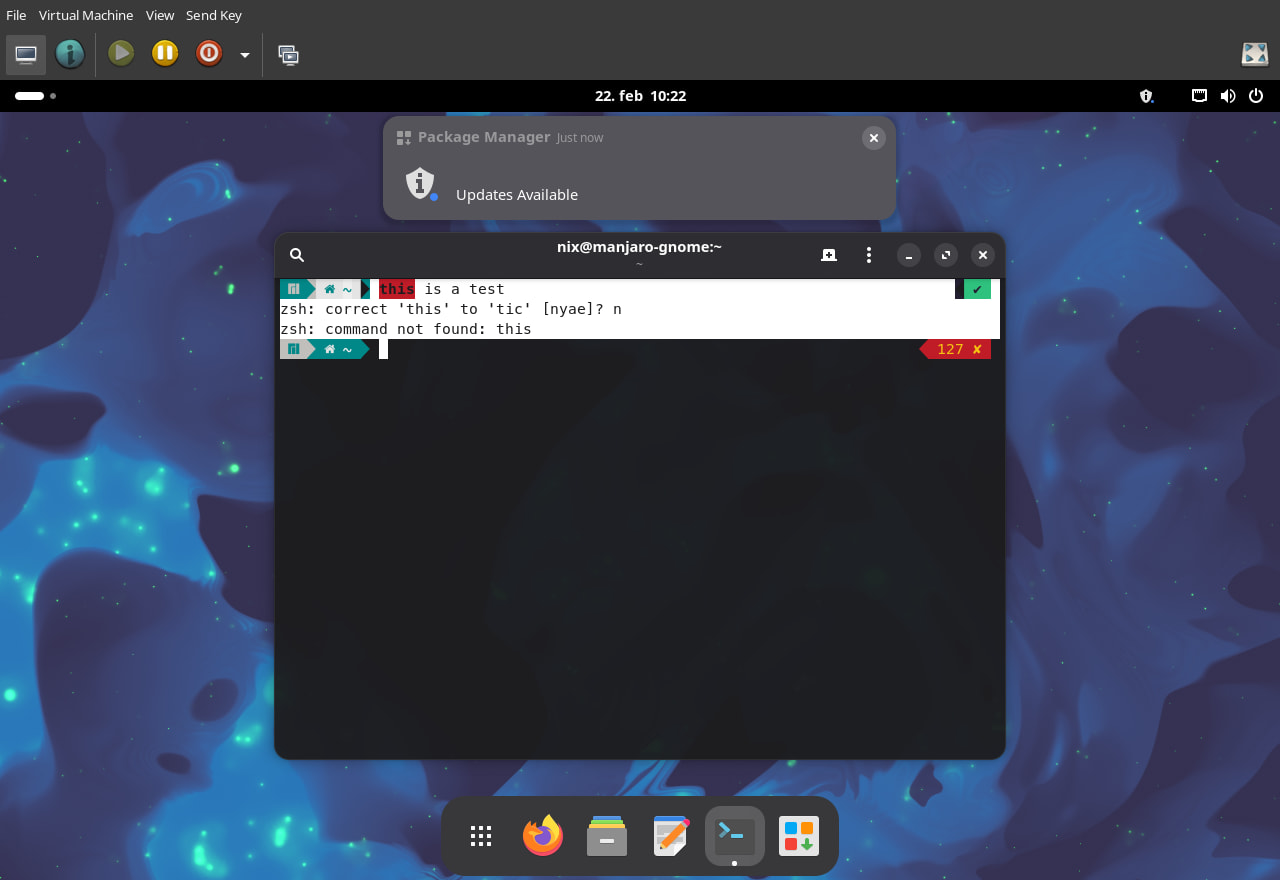
I did a quick test just now

Select and copy text from the virtual machine, gives this on the host

 \EF\8C\92 \EE\82\B0 \EF\80\95 ~ \EE\82\B0 this is a test                                                  \EE\82\B2 \E2\9C\94 
zsh: correct 'this' to 'tic' [nyae]? n
zsh: command not found: this

Well,
qemu-vdagent is not between installable packages
spice-vdagent was already installed
wl-clipboard was missing. I installed it but nothing changed

Thanks

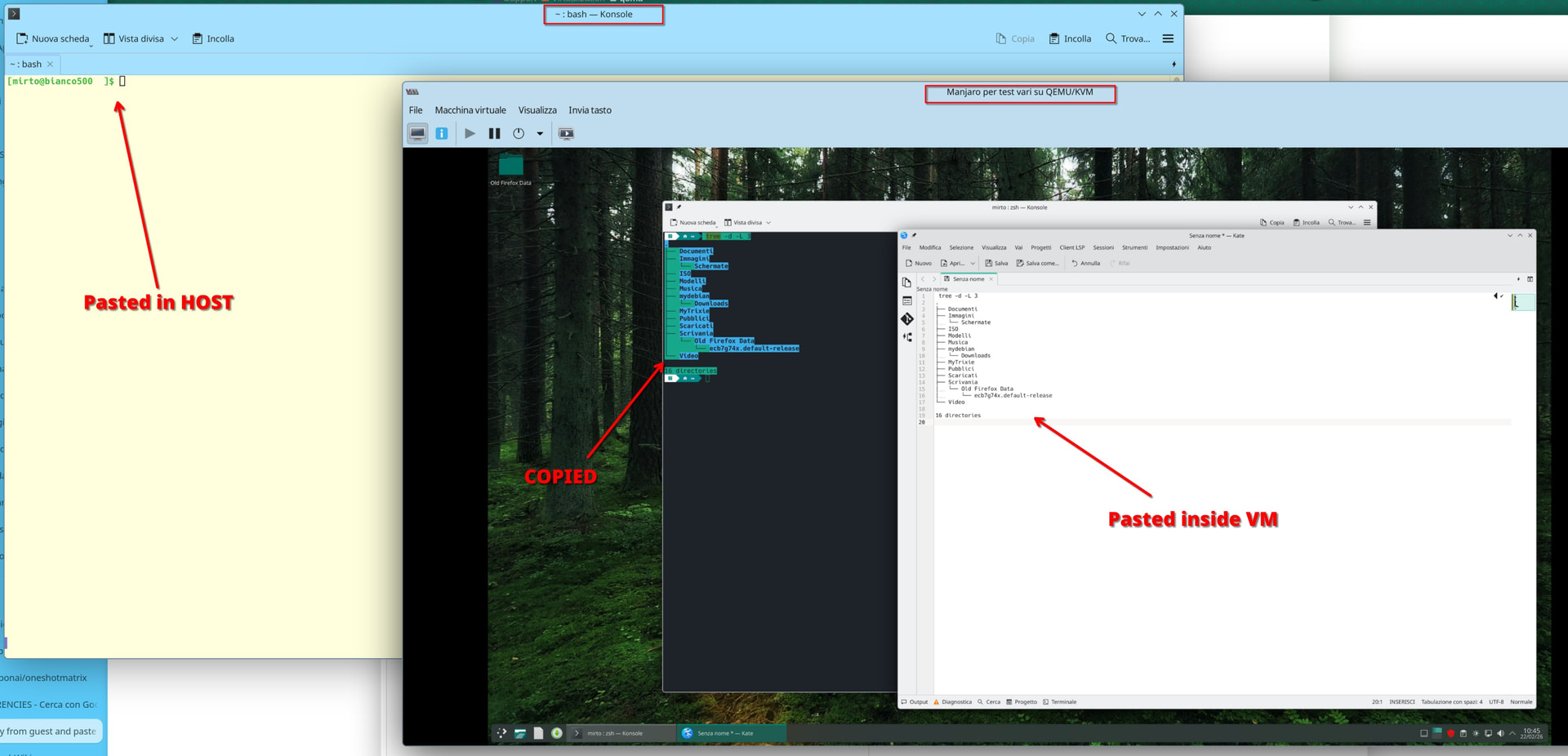
I tried

  1. empty clipboard in host and guesr
  2. copy text in guest from Konsole
  3. paste in guest into kate (works)
  4. paste in host into konsole: clipboard empty

What I described was done with a default Manjaro Gnome using kernel virtual machine (KVM).

One could speculate it is Plasma related, so I will test with the new KVM using Plasma minimal ISO of 260206.

1 Like

Thanks
BTW one of the guest was installed from manjaro-kde-26.0-260104-linux618.iso and then updtated up to today

My computer and grahics are AMD, too, and I use wayland on KDE (sddm).

In /etc/group of host computer I’ve found my desktop user in groups kvm, libvirt and libvirt-qemu.

wl-wayland was installed on host even before my kvm/qemu installation, among other files containing these binaries:

# ls -1 /usr/bin/wl-*
/usr/bin/wl-copy
/usr/bin/wl-paste

(On the guest they are NOT installed)

On the guest I found just the Qemu guest agent in package list:

$ pacman -Q |grep -Ei 'kvm|qemu|libvirt'
qemu-guest-agent 10.1.0-1

Verifying. I’ll report here

TL;DR

On host I belong to groups:

[mirto@bianco500 ~]$ id
uid=1000(mirto) gid=1000(mirto) gruppi=1000(mirto),3(sys),90(network),98(power),958(libvirt-qemu),959(libvirt),991(lp),992(kvm),998(wheel)
[mirto@bianco500 ~]$ 

Wl packages are missing on host

The 2 packages belong to the wl-clipboard package.
I’ll try to install and I’ll report here

[mirto@bianco500 ~]$ sudo ls -1 /usr/bin/wl-*
[sudo] password di mirto: 
ls: impossibile accedere a '/usr/bin/wl-*': File o directory non esistente
[mirto@bianco500 ~]$ 

On guest (ssh into guest, then copy from local konsole)

[mirto@manjaro ~]$ pacman -Q |grep -Ei 'kvm|qemu|libvirt'
libvirt 1:12.0.0-1
libvirt-glib 5.0.0-3
libvirt-python 1:12.0.0-1
qemu-audio-alsa 10.2.0-1
qemu-audio-dbus 10.2.0-1
qemu-audio-jack 10.2.0-1
qemu-audio-oss 10.2.0-1
qemu-audio-pa 10.2.0-1
qemu-audio-pipewire 10.2.0-1
qemu-audio-sdl 10.2.0-1
qemu-audio-spice 10.2.0-1
qemu-base 10.2.0-1
qemu-block-curl 10.2.0-1
qemu-block-dmg 10.2.0-1
qemu-block-nfs 10.2.0-1
qemu-block-ssh 10.2.0-1
qemu-chardev-spice 10.2.0-1
qemu-common 10.2.0-1
qemu-desktop 10.2.0-1
qemu-guest-agent 10.2.0-1
qemu-hw-display-qxl 10.2.0-1
qemu-hw-display-virtio-gpu 10.2.0-1
qemu-hw-display-virtio-gpu-gl 10.2.0-1
qemu-hw-display-virtio-gpu-pci 10.2.0-1
qemu-hw-display-virtio-gpu-pci-gl 10.2.0-1
qemu-hw-display-virtio-gpu-pci-rutabaga 10.2.0-1
qemu-hw-display-virtio-gpu-rutabaga 10.2.0-1
qemu-hw-display-virtio-vga 10.2.0-1
qemu-hw-display-virtio-vga-gl 10.2.0-1
qemu-hw-display-virtio-vga-rutabaga 10.2.0-1
qemu-hw-uefi-vars 10.2.0-1
qemu-hw-usb-host 10.2.0-1
qemu-hw-usb-redirect 10.2.0-1
qemu-hw-usb-smartcard 10.2.0-1
qemu-img 10.2.0-1
qemu-system-x86 10.2.0-1
qemu-system-x86-firmware 10.2.0-1
qemu-ui-curses 10.2.0-1
qemu-ui-dbus 10.2.0-1
qemu-ui-egl-headless 10.2.0-1
qemu-ui-gtk 10.2.0-1
qemu-ui-opengl 10.2.0-1
qemu-ui-sdl 10.2.0-1
qemu-ui-spice-app 10.2.0-1
qemu-ui-spice-core 10.2.0-1
qemu-vhost-user-gpu 10.2.0-1
[mirto@manjaro ~]$ 

The default group membership for the first user on a Manjaro Linux installation is

# addgroups="lp,network,power,wheel"
manjaro/kde/profile.conf · master · Profiles & Settings / iso-profiles · GitLab

The profile for building the Gnome edition is extending the default

addgroups="lp,network,power,wheel,users,storage,input,audio"
manjaro/gnome/profile.conf · master · Profiles & Settings / iso-profiles · GitLab

This difference is a maintainer decision - it is how it is, no questions asked, no blame casted.

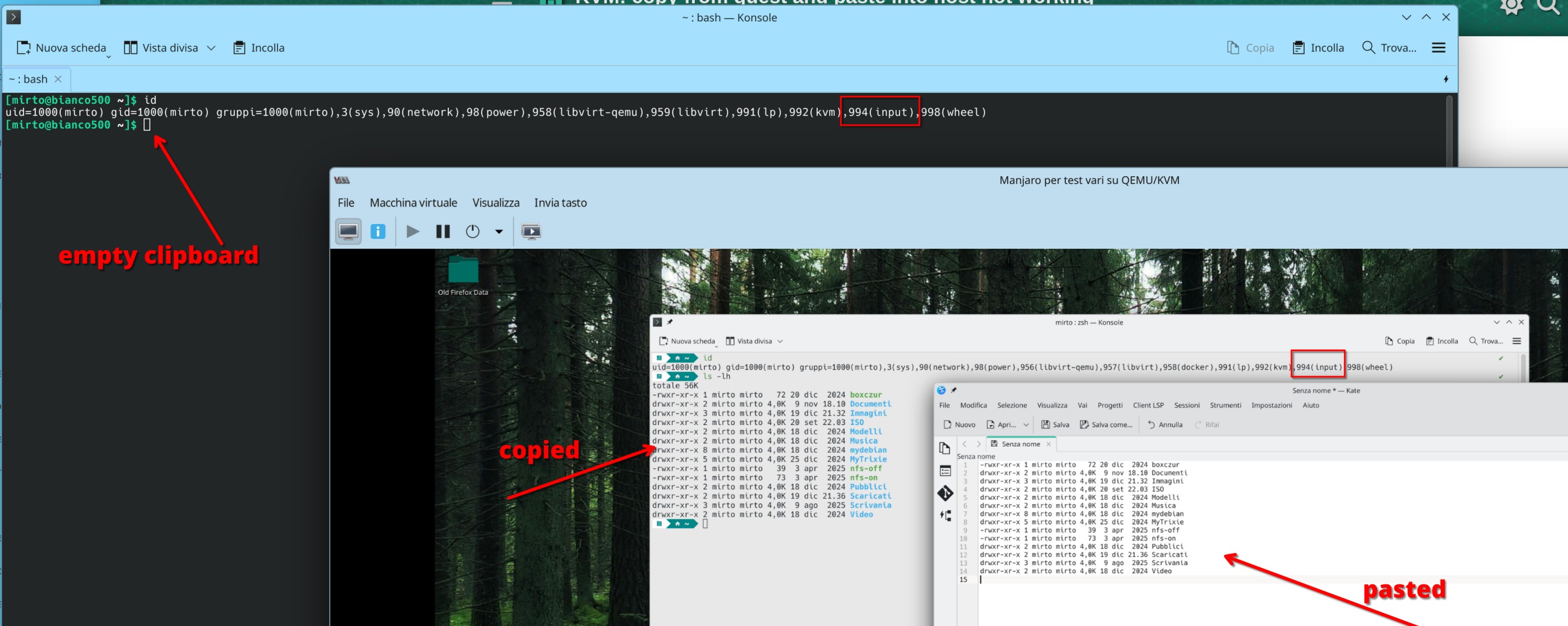
The copy/paste from a KVM guest to the host depends on the membership of the input group.

Thus for the issue at hand - a Manjaro Gnome will behave different than a Manjaro Plasma virtual machine.

Inside the Plasma guest - add the user to the input group, and the copy/paste from guest to host will be activated upon next sign-in.

sudo gpasswd -a $USER input

Remember to sign off and sign in to activate the group (or reboot).

2 Likes

This seems to be a mess.

copy-paste by just highlighting text with the mouse works normally
when host and guest are running x11

It only works for host to guest when guest is running wayland - not the other way around.
(no copy paste from guest to host)

And it only works when using the context menu -
when explicitly selecting “copy” and then “paste” on the other side.
Just highlighting text isn’t enough anymore.

My host is Xfce4 - can’t run wayland there, can’t explore this further.

Am I glad not to be forced to use wayland. :wink:

1 Like

No luck
Installed wl-clipboard rebooted and tried: nothing changed

Your issue is group membership - See my comment above :up_arrow:

Your guest user is not member of input group.

Check the output of groups command when signed in.

2 Likes

Thanks but:
added my user to the group input on host and guest then rebooted.

Nothing changed

I didn’t say anything about the host user - only the guest.

It is a mystery then.

As I promised above I tested with a minimal Plasma and precisely that change - adding the guest user to input group - made the difference between working and not working.

1 Like

Oh SORRY, my host desktop is KDE but on guest is xfce!

Graphics on guest:

$ inxi -G
Graphics:
  Device-1: Red Hat Virtio 1.0 GPU driver: virtio-pci v: 1
  Display: unspecified server: X.org v: 1.21.1.18 driver: X: loaded: modesetting gpu: virtio-pci
    tty: 189x52 resolution: 1280x800
  API: EGL v: 1.5 drivers: swrast platforms: surfaceless,device
  API: OpenGL v: 4.5 vendor: mesa v: 25.2.3-arch1.2 note: console (EGL sourced)
    renderer: llvmpipe (LLVM 20.1.8 256 bits)
  Info: Tools: api: eglinfo,glxinfo de: xfce4-display-settings x11: xprop,xrandr

On both my host and guest my desktop user is not in group input and package “spice-vdagent” is only installed on my guest.

On guest:

$ pacman -Q |grep spice
spice-vdagent 0.22.1-4

On host:

$ pacman -Q |grep spice
qemu-audio-spice 10.2.0-1
qemu-chardev-spice 10.2.0-1
qemu-ui-spice-app 10.2.0-1
qemu-ui-spice-core 10.2.0-1
spice 0.16.0-2
spice-gtk 0.42-5
spice-protocol 0.14.5-1