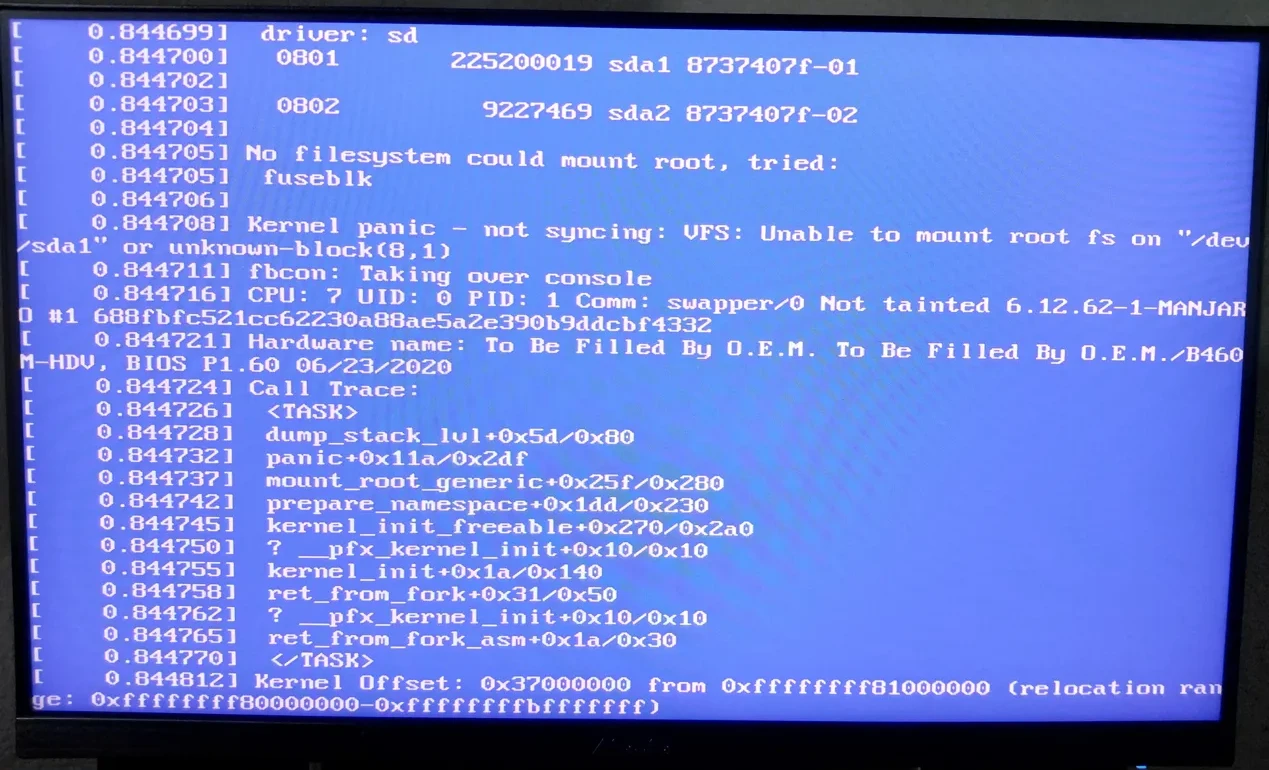
System:
Kernel: 6.6.119-1-MANJARO arch: x86_64 bits: 64 compiler: gcc v: 15.2.1
clocksource: tsc avail: hpet,acpi_pm
parameters: BOOT_IMAGE=/@/boot/vmlinuz-6.6-x86_64
root=UUID=9e40c458-fb8c-41c9-8473-df1d639a2bd6 rw rootflags=subvol=@
quiet apparmor=1 security=apparmor
resume=UUID=e1098956-513c-4552-99e9-3066c75e8288 udev.log_priority=3
Desktop: KDE Plasma v: 6.5.4 tk: Qt v: N/A info: frameworks v: 6.20.0
wm: kwin_x11 vt: 2 dm: SDDM Distro: Manjaro base: Arch Linux
Machine:
Type: Desktop Mobo: ASRock model: B460M-HDV serial:
uuid: Firmware: BIOS vendor: American Megatrends
v: P1.60 date: 06/23/2020
Battery:
Message: No system battery data found. Is one present?
Memory:
System RAM: total: 16 GiB available: 15.55 GiB used: 6.65 GiB (42.8%)
Message: For most reliable report, use superuser + dmidecode.
Array-1: capacity: 32 GiB slots: 2 modules: 2 EC: None
max-module-size: 16 GiB note: est.
Device-1: ChannelA-DIMM0 type: DDR4 detail: synchronous size: 8 GiB
speed: 2667 MT/s volts: note: check curr: 1 min: 1 max: 1 width (bits):
data: 64 total: 64 manufacturer: 8313 part-no: CL22-22-22 D4-3200
serial: N/A
Device-2: ChannelB-DIMM0 type: DDR4 detail: synchronous size: 8 GiB
speed: 2667 MT/s volts: note: check curr: 1 min: 1 max: 1 width (bits):
data: 64 total: 64 manufacturer: 8313 part-no: CL22-22-22 D4-3200
serial: N/A
PCI Slots:
Permissions: Unable to run dmidecode. Root privileges required.
CPU:
Info: model: Intel Core i5-10400F bits: 64 type: MT MCP arch: Comet Lake
gen: core 10 level: v3 note: check built: 2020 process: Intel 14nm family: 6
model-id: 0xA5 (165) stepping: 3 microcode: 0x100
Topology: cpus: 1x dies: 1 clusters: 6 cores: 6 threads: 12 tpc: 2
smt: enabled cache: L1: 384 KiB desc: d-6x32 KiB; i-6x32 KiB L2: 1.5 MiB
desc: 6x256 KiB L3: 12 MiB desc: 1x12 MiB
Speed (MHz): avg: 800 min/max: 800/4300 scaling: driver: intel_cpufreq
governor: schedutil cores: 1: 800 2: 800 3: 800 4: 800 5: 800 6: 800 7: 800
8: 800 9: 800 10: 800 11: 800 12: 800 bogomips: 69629
Flags: 3dnowprefetch abm acpi adx aes aperfmperf apic arat
arch_capabilities arch_perfmon art avx avx2 bmi1 bmi2 bts clflush
clflushopt cmov constant_tsc cpuid cpuid_fault cx16 cx8 de ds_cpl dtes64
dtherm dts epb ept ept_ad erms est f16c flexpriority flush_l1d fma fpu
fsgsbase fxsr ht ibpb ibpb_exit_to_user ibrs ibrs_enhanced ida intel_pt
invpcid lahf_lm lm mca mce md_clear mmx monitor movbe mpx msr mtrr
nonstop_tsc nopl nx pae pat pbe pcid pclmulqdq pdcm pdpe1gb pebs pge pln
pni popcnt pse pse36 pts rdrand rdseed rdtscp rep_good sdbg sep smap smep
ss ssbd sse sse2 sse4_1 sse4_2 ssse3 stibp syscall tm tm2 tpr_shadow tsc
tsc_adjust tsc_deadline_timer vme vmx vnmi vpid x2apic xgetbv1 xsave
xsavec xsaveopt xsaves xtopology xtpr
Vulnerabilities:
Type: gather_data_sampling mitigation: Microcode
Type: indirect_target_selection mitigation: Aligned branch/return thunks
Type: itlb_multihit status: KVM: VMX disabled
Type: l1tf status: Not affected
Type: mds status: Not affected
Type: meltdown status: Not affected
Type: mmio_stale_data mitigation: Clear CPU buffers; SMT vulnerable
Type: reg_file_data_sampling status: Not affected
Type: retbleed mitigation: Enhanced IBRS
Type: spec_rstack_overflow status: Not affected
Type: spec_store_bypass mitigation: Speculative Store Bypass disabled via
prctl
Type: spectre_v1 mitigation: usercopy/swapgs barriers and __user pointer
sanitization
Type: spectre_v2 mitigation: Enhanced / Automatic IBRS; IBPB:
conditional; PBRSB-eIBRS: SW sequence; BHI: SW loop, KVM: SW loop
Type: srbds mitigation: Microcode
Type: tsa status: Not affected
Type: tsx_async_abort status: Not affected
Type: vmscape mitigation: IBPB before exit to userspace
Graphics:
Device-1: NVIDIA GA104 [GeForce RTX 3060 Ti] vendor: EVGA driver: nvidia
v: 580.119.02 alternate: nouveau,nvidia_drm non-free: 550-580.xx+
status: current (as of 2025-11; EOL~2026-12-xx) arch: Ampere code: GAxxx
process: TSMC n7 (7nm) built: 2020-2023 pcie: gen: 2 speed: 5 GT/s
lanes: 16 link-max: gen: 4 speed: 16 GT/s ports: active: none
off: DP-1,HDMI-A-1 empty: DP-2,DP-3 bus-ID: 01:00.0 chip-ID: 10de:2486
class-ID: 0300
Display: x11 server: X.Org v: 21.1.21 with: Xwayland v: 24.1.9
compositor: kwin_x11 driver: X: loaded: nvidia
gpu: nv_platform,nvidia,nvidia-nvswitch display-ID: :0 screens: 1
Screen-1: 0 s-res: 3840x1080 s-dpi: 92 s-size: 1060x301mm (41.73x11.85")
s-diag: 1102mm (43.38")
Monitor-1: DP-1 note: disabled pos: primary,right model: ASUS VA24E
serial: built: 2023 res: mode: 1920x1080 hz: 60 scale: 100% (1)
dpi: 93 gamma: 1.2 chroma: red: x: 0.639 y: 0.333 green: x: 0.314 y: 0.620
blue: x: 0.145 y: 0.051 white: x: 0.314 y: 0.329
size: 527x296mm (20.75x11.65") diag: 604mm (23.8") ratio: 16:9
modes: 1920x1080, 1680x1050, 1280x1024, 1440x900, 1280x960, 1152x864,
1280x720, 1024x768, 800x600, 640x480
Monitor-2: HDMI-A-1 mapped: HDMI-0 note: disabled pos: left
model: VY249HGE serial: built: 2024 res: mode: 1920x1080 hz: 60
scale: 100% (1) dpi: 93 gamma: 1.2 chroma: red: x: 0.659 y: 0.333 green:
x: 0.298 y: 0.608 blue: x: 0.145 y: 0.059 white: x: 0.314 y: 0.329
size: 527x296mm (20.75x11.65") diag: 604mm (23.8") ratio: 16:9
modes: 1920x1080, 1680x1050, 1280x1024, 1440x900, 1280x960, 1152x864,
1280x720, 1440x576, 1024x768, 1440x480, 800x600, 720x576, 720x480,
640x480
API: EGL v: 1.5 hw: drv: nvidia platforms: device: 0 drv: nvidia device: 2
drv: swrast gbm: drv: nvidia surfaceless: drv: nvidia x11: drv: nvidia
inactive: wayland,device-1
API: OpenGL v: 4.6.0 compat-v: 4.5 vendor: nvidia mesa v: 580.119.02
glx-v: 1.4 direct-render: yes renderer: NVIDIA GeForce RTX 3060 Ti/PCIe/SSE2
memory: 7.81 GiB
API: Vulkan v: 1.4.328 layers: 8 device: 0 type: discrete-gpu name: NVIDIA
GeForce RTX 3060 Ti driver: nvidia v: 580.119.02 device-ID: 10de:2486
surfaces: N/A
Info: Tools: api: clinfo, eglinfo, glxinfo, vulkaninfo
de: kscreen-console,kscreen-doctor gpu: nvidia-settings,nvidia-smi
wl: wayland-info x11: xdpyinfo, xprop, xrandr
Audio:
Device-1: Intel Comet Lake PCH-V cAVS vendor: ASRock driver: snd_hda_intel
v: kernel alternate: snd_soc_avs,snd_sof_pci_intel_cnl bus-ID: 00:1f.3
chip-ID: 8086:a3f0 class-ID: 0403
Device-2: NVIDIA GA104 High Definition Audio vendor: EVGA
driver: snd_hda_intel v: kernel pcie: gen: 3 speed: 8 GT/s lanes: 16
link-max: gen: 4 speed: 16 GT/s bus-ID: 01:00.1 chip-ID: 10de:228b
class-ID: 0403
Device-3: Jieli GAMING HEADSET B2 driver: hid-generic,snd-usb-audio,usbhid
type: USB rev: 1.1 speed: 12 Mb/s lanes: 1 mode: 1.1 bus-ID: 1-10.3:8
chip-ID: 3634:4155 class-ID: 0300 serial:
API: ALSA v: k6.6.119-1-MANJARO status: kernel-api with: aoss
type: oss-emulator tools: alsactl,alsamixer,amixer
Server-1: sndiod v: N/A status: off tools: aucat,midicat,sndioctl
Server-2: JACK v: 1.9.22 status: off tools: N/A
Server-3: PipeWire v: 1.4.9 status: active with: 1: pipewire-pulse
status: active 2: pipewire-media-session status: active 3: pipewire-alsa
type: plugin tools: pactl,pw-cat,pw-cli
Network:
Device-1: Intel Ethernet I219-V vendor: ASRock driver: e1000e v: kernel
port: N/A bus-ID: 00:1f.6 chip-ID: 8086:0d55 class-ID: 0200
IF: eno1 state: up speed: 100 Mbps duplex: full mac:
IP v4: type: dynamic noprefixroute scope: global
broadcast:
IP v6: type: noprefixroute scope: link
Device-2: Microsoft Xbox 360 Wireless Adapter driver: xpad type: USB
rev: 2.0 speed: 12 Mb/s lanes: 1 mode: 1.1 bus-ID: 1-6:5 chip-ID: 045e:0719
class-ID: ff00 serial:
Info: services: NetworkManager, systemd-timesyncd, wpa_supplicant
WAN IP:
Bluetooth:
Message: No bluetooth data found.
Logical:
Message: No logical block device data found.
RAID:
Message: No RAID data found.
Drives:
Local Storage: total: 2.04 TiB used: 190.58 GiB (9.1%)
SMART Message: Unable to run smartctl. Root privileges required.
ID-1: /dev/nvme0n1 maj-min: 259:0 vendor: Kingston model: SNV2S2000G
size: 1.82 TiB block-size: physical: 512 B logical: 512 B speed: 63.2 Gb/s
lanes: 4 tech: SSD serial: fw-rev: SBM02103 temp: 28.9 C
scheme: GPT
ID-2: /dev/sda maj-min: 8:0 vendor: Patriot model: Blast size: 223.57 GiB
block-size: physical: 512 B logical: 512 B speed: 6.0 Gb/s tech: SSD
serial: fw-rev: 12.2 scheme: MBR
Message: No optical or floppy data found.
Partition:
ID-1: / raw-size: 214.77 GiB size: 214.77 GiB (100.00%)
used: 190.58 GiB (88.7%) fs: btrfs dev: /dev/sda1 maj-min: 8:1 label: N/A
uuid: 9e40c458-fb8c-41c9-8473-df1d639a2bd6
ID-2: /home raw-size: 214.77 GiB size: 214.77 GiB (100.00%)
used: 190.58 GiB (88.7%) fs: btrfs dev: /dev/sda1 maj-min: 8:1 label: N/A
uuid: 9e40c458-fb8c-41c9-8473-df1d639a2bd6
ID-3: /var/cache raw-size: 214.77 GiB size: 214.77 GiB (100.00%)
used: 190.58 GiB (88.7%) fs: btrfs dev: /dev/sda1 maj-min: 8:1 label: N/A
uuid: 9e40c458-fb8c-41c9-8473-df1d639a2bd6
ID-4: /var/log raw-size: 214.77 GiB size: 214.77 GiB (100.00%)
used: 190.58 GiB (88.7%) fs: btrfs dev: /dev/sda1 maj-min: 8:1 label: N/A
uuid: 9e40c458-fb8c-41c9-8473-df1d639a2bd6
Swap:
Kernel: swappiness: 60 (default) cache-pressure: 100 (default) zswap: yes
compressor: zstd max-pool: 20%
ID-1: swap-1 type: partition size: 8.8 GiB used: 256 KiB (0.0%)
priority: -2 dev: /dev/sda2 maj-min: 8:2 label: swap
uuid: e1098956-513c-4552-99e9-3066c75e8288
Unmounted:
ID-1: /dev/nvme0n1p1 maj-min: 259:1 size: 1.82 TiB fs: ext4 label: N/A
uuid: facff623-48bd-4452-923c-6acdf73f975d
USB:
Hub-1: 1-0:1 info: hi-speed hub with single TT ports: 12 rev: 2.0
speed: 480 Mb/s (57.2 MiB/s) lanes: 1 mode: 2.0 chip-ID: 1d6b:0002
class-ID: 0900
Device-1: 1-1:2 info: Shenzhen Rapoo Gaming Keyboard type: keyboard,HID
driver: hid-generic,usbhid interfaces: 3 rev: 2.0 speed: 12 Mb/s (1.4 MiB/s)
lanes: 1 mode: 1.1 power: 350mA chip-ID: 24ae:4005 class-ID: 0300
Device-2: 1-2:3 info: Razer USA DeathAdder V2 Mini type: mouse,keyboard
driver: hid-generic,usbhid interfaces: 3 rev: 2.0 speed: 12 Mb/s (1.4 MiB/s)
lanes: 1 mode: 1.1 power: 500mA chip-ID: 1532:008c class-ID: 0300
Hub-2: 1-5:4 info: Genesys Logic Hub ports: 4 rev: 2.0
speed: 480 Mb/s (57.2 MiB/s) lanes: 1 mode: 2.0 power: 100mA
chip-ID: 05e3:0608 class-ID: 0900
Hub-3: 1-5.4:6 info: Genesys Logic Hub ports: 4 rev: 2.0
speed: 480 Mb/s (57.2 MiB/s) lanes: 1 mode: 2.0 power: 100mA
chip-ID: 05e3:0608 class-ID: 0900
Device-1: 1-6:5 info: Microsoft Xbox 360 Wireless Adapter type: WiFi
driver: xpad interfaces: 8 rev: 2.0 speed: 12 Mb/s (1.4 MiB/s) lanes: 1
mode: 1.1 power: 260mA chip-ID: 045e:0719 class-ID: ff00 serial:
Hub-4: 1-10:7 info: Genesys Logic Hub ports: 4 rev: 2.0
speed: 480 Mb/s (57.2 MiB/s) lanes: 1 mode: 2.0 power: 100mA
chip-ID: 05e3:0608 class-ID: 0900
Device-1: 1-10.3:8 info: Jieli GAMING HEADSET B2 type: audio,HID
driver: hid-generic,snd-usb-audio,usbhid interfaces: 5 rev: 1.1
speed: 12 Mb/s (1.4 MiB/s) lanes: 1 mode: 1.1 power: 100mA
chip-ID: 3634:4155 class-ID: 0300 serial:
Hub-5: 2-0:1 info: super-speed hub ports: 8 rev: 3.0
speed: 5 Gb/s (596.0 MiB/s) lanes: 1 mode: 3.2 gen-1x1 chip-ID: 1d6b:0003
class-ID: 0900
Sensors:
System Temperatures: cpu: 29.0 C mobo: N/A gpu: nvidia temp: 44 C
Fan Speeds (rpm): N/A gpu: nvidia fan: 41%
Repos:
Packages: 2057 pm: pacman pkgs: 2036 libs: 542 tools: pamac,yay pm: flatpak
pkgs: 0 pm: snap pkgs: 21
Active pacman repo servers in: /etc/pacman.d/mirrorlist
1: https://mirror.telepoint.bg/manjaro/stable/$repo/$arch
2: https://quantum-mirror.hu/mirrors/pub/manjaro/stable/$repo/$arch
3: https://mirrors.eric.ovh/manjaro/stable/$repo/$arch
4: https://coresite.mm.fcix.net/manjaro/stable/$repo/$arch
5: https://nocix.mm.fcix.net/manjaro/stable/$repo/$arch
6: https://mirrors.atlas.net.co/manjaro/stable/$repo/$arch
7: https://mirrors.gigenet.com/manjaro/stable/$repo/$arch
8: https://mirror.aarnet.edu.au/pub/manjaro/stable/$repo/$arch
Processes:
CPU top: 5 of 373
1: cpu: 8.9% command: firefox pid: 2968 mem: 884.8 MiB (5.5%)
2: cpu: 7.5% command: opera pid: 2391 mem: 200.4 MiB (1.2%)
3: cpu: 6.5% command: Xorg pid: 1435 mem: 184.9 MiB (1.1%)
4: cpu: 3.9% command: opera pid: 4869 mem: 303.2 MiB (1.9%)
5: cpu: 3.5% command: firefox pid: 3323 mem: 638.3 MiB (4.0%)
Memory top: 5 of 373
1: mem: 884.8 MiB (5.5%) command: firefox pid: 2968 cpu: 8.9%
2: mem: 669.6 MiB (4.2%) command: plasmashell pid: 1911 cpu: 0.2%
3: mem: 638.3 MiB (4.0%) command: firefox pid: 3323 cpu: 3.5%
4: mem: 475.9 MiB (2.9%) command: steamwebhelper pid: 7886 cpu: 0.5%
5: mem: 463.9 MiB (2.9%) command: opera pid: 2357 cpu: 1.8%
Info:
Processes: 373 Power: uptime: 1h 22m states: freeze,mem,disk suspend: deep
avail: s2idle wakeups: 0 hibernate: platform avail: shutdown, reboot,
suspend, test_resume image: 6.21 GiB services: org_kde_powerdevil,upowerd
Init: systemd v: 258 default: graphical tool: systemctl
Compilers: clang: 21.1.6 gcc: 15.2.1 Shell: Zsh v: 5.9 default: Bash
v: 5.3.8 running-in: yakuake inxi: 3.3.40
    Disk /dev/sda: 223.57 GiB, 240057409536 bytes, 468862128 sectors
    Disk model: Patriot Blast
    Units: sectors of 1 * 512 = 512 bytes
    Sector size (logical/physical): 512 bytes / 512 bytes
    I/O size (minimum/optimal): 512 bytes / 512 bytes
    Disklabel type: dos
    Disk identifier: 0x8737407f

    Device Boot Start End Sectors Size Id Type
    /dev/sda1 * 2048 450402085 450400038 214.8G 83 Linux
    /dev/sda2 450402086 468857024 18454939 8.8G 82 Linux swap / Solaris

    Disk /dev/nvme0n1: 1.82 TiB, 2000398934016 bytes, 3907029168 sectors
    Disk model: KINGSTON SNV2S2000G
    Units: sectors of 1 * 512 = 512 bytes
    Sector size (logical/physical): 512 bytes / 512 bytes
    I/O size (minimum/optimal): 512 bytes / 512 bytes
    Disklabel type: gpt
    Disk identifier: E95EAA25-7D61-48ED-A043-0CB9489F4AA9

    Device Start End Sectors Size Type
    /dev/nvme0n1p1 2048 3907022847 3907020800 1.8T Linux filesystem

    Disk /dev/loop2: 330.35 MiB, 346394624 bytes, 676552 sectors
    Units: sectors of 1 * 512 = 512 bytes
    Sector size (logical/physical): 512 bytes / 512 bytes
    I/O size (minimum/optimal): 512 bytes / 512 bytes

    Disk /dev/loop0: 4 KiB, 4096 bytes, 8 sectors
    Units: sectors of 1 * 512 = 512 bytes
    Sector size (logical/physical): 512 bytes / 512 bytes
    I/O size (minimum/optimal): 512 bytes / 512 bytes

    Disk /dev/loop3: 332.13 MiB, 348262400 bytes, 680200 sectors
    Units: sectors of 1 * 512 = 512 bytes
    Sector size (logical/physical): 512 bytes / 512 bytes
    I/O size (minimum/optimal): 512 bytes / 512 bytes

    Disk /dev/loop4: 104.23 MiB, 109289472 bytes, 213456 sectors
    Units: sectors of 1 * 512 = 512 bytes
    Sector size (logical/physical): 512 bytes / 512 bytes
    I/O size (minimum/optimal): 512 bytes / 512 bytes

    Disk /dev/loop5: 55.49 MiB, 58183680 bytes, 113640 sectors
    Units: sectors of 1 * 512 = 512 bytes
    Sector size (logical/physical): 512 bytes / 512 bytes
    I/O size (minimum/optimal): 512 bytes / 512 bytes

    Disk /dev/loop6: 55.49 MiB, 58183680 bytes, 113640 sectors
    Units: sectors of 1 * 512 = 512 bytes
    Sector size (logical/physical): 512 bytes / 512 bytes
    I/O size (minimum/optimal): 512 bytes / 512 bytes

    Disk /dev/loop7: 63.77 MiB, 66871296 bytes, 130608 sectors
    Units: sectors of 1 * 512 = 512 bytes
    Sector size (logical/physical): 512 bytes / 512 bytes
    I/O size (minimum/optimal): 512 bytes / 512 bytes

    Disk /dev/loop8: 63.77 MiB, 66871296 bytes, 130608 sectors
    Units: sectors of 1 * 512 = 512 bytes
    Sector size (logical/physical): 512 bytes / 512 bytes
    I/O size (minimum/optimal): 512 bytes / 512 bytes

    Disk /dev/loop9: 73.91 MiB, 77500416 bytes, 151368 sectors
    Units: sectors of 1 * 512 = 512 bytes
    Sector size (logical/physical): 512 bytes / 512 bytes
    I/O size (minimum/optimal): 512 bytes / 512 bytes

    Disk /dev/loop10: 73.95 MiB, 77545472 bytes, 151456 sectors
    Units: sectors of 1 * 512 = 512 bytes
    Sector size (logical/physical): 512 bytes / 512 bytes
    I/O size (minimum/optimal): 512 bytes / 512 bytes

    Disk /dev/loop11: 66.84 MiB, 70090752 bytes, 136896 sectors
    Units: sectors of 1 * 512 = 512 bytes
    Sector size (logical/physical): 512 bytes / 512 bytes
    I/O size (minimum/optimal): 512 bytes / 512 bytes

    Disk /dev/loop12: 66.84 MiB, 70090752 bytes, 136896 sectors
    Units: sectors of 1 * 512 = 512 bytes
    Sector size (logical/physical): 512 bytes / 512 bytes
    I/O size (minimum/optimal): 512 bytes / 512 bytes

    Disk /dev/loop13: 164.82 MiB, 172830720 bytes, 337560 sectors
    Units: sectors of 1 * 512 = 512 bytes
    Sector size (logical/physical): 512 bytes / 512 bytes
    I/O size (minimum/optimal): 512 bytes / 512 bytes

    Disk /dev/loop14: 164.82 MiB, 172830720 bytes, 337560 sectors
    Units: sectors of 1 * 512 = 512 bytes
    Sector size (logical/physical): 512 bytes / 512 bytes
    I/O size (minimum/optimal): 512 bytes / 512 bytes

    Disk /dev/loop15: 218.39 MiB, 228999168 bytes, 447264 sectors
    Units: sectors of 1 * 512 = 512 bytes
    Sector size (logical/physical): 512 bytes / 512 bytes
    I/O size (minimum/optimal): 512 bytes / 512 bytes

    Disk /dev/loop16: 218.39 MiB, 228999168 bytes, 447264 sectors
    Units: sectors of 1 * 512 = 512 bytes
    Sector size (logical/physical): 512 bytes / 512 bytes
    I/O size (minimum/optimal): 512 bytes / 512 bytes

    Disk /dev/loop17: 349.7 MiB, 366682112 bytes, 716176 sectors
    Units: sectors of 1 * 512 = 512 bytes
    Sector size (logical/physical): 512 bytes / 512 bytes
    I/O size (minimum/optimal): 512 bytes / 512 bytes

    Disk /dev/loop18: 516.01 MiB, 541073408 bytes, 1056784 sectors
    Units: sectors of 1 * 512 = 512 bytes
    Sector size (logical/physical): 512 bytes / 512 bytes
    I/O size (minimum/optimal): 512 bytes / 512 bytes

    Disk /dev/loop19: 516.2 MiB, 541278208 bytes, 1057184 sectors
    Units: sectors of 1 * 512 = 512 bytes
    Sector size (logical/physical): 512 bytes / 512 bytes
    I/O size (minimum/optimal): 512 bytes / 512 bytes

    Disk /dev/loop20: 618.26 MiB, 648290304 bytes, 1266192 sectors
    Units: sectors of 1 * 512 = 512 bytes
    Sector size (logical/physical): 512 bytes / 512 bytes
    I/O size (minimum/optimal): 512 bytes / 512 bytes

    Disk /dev/loop21: 669.79 MiB, 702320640 bytes, 1371720 sectors
    Units: sectors of 1 * 512 = 512 bytes
    Sector size (logical/physical): 512 bytes / 512 bytes
    I/O size (minimum/optimal): 512 bytes / 512 bytes

    Disk /dev/loop22: 81.26 MiB, 85209088 bytes, 166424 sectors
    Units: sectors of 1 * 512 = 512 bytes
    Sector size (logical/physical): 512 bytes / 512 bytes
    I/O size (minimum/optimal): 512 bytes / 512 bytes

    Disk /dev/loop23: 91.69 MiB, 96141312 bytes, 187776 sectors
    Units: sectors of 1 * 512 = 512 bytes
    Sector size (logical/physical): 512 bytes / 512 bytes
    I/O size (minimum/optimal): 512 bytes / 512 bytes

    Disk /dev/loop24: 116.48 MiB, 122138624 bytes, 238552 sectors
    Units: sectors of 1 * 512 = 512 bytes
    Sector size (logical/physical): 512 bytes / 512 bytes
    I/O size (minimum/optimal): 512 bytes / 512 bytes

    Disk /dev/loop25: 139.75 MiB, 146534400 bytes, 286200 sectors
    Units: sectors of 1 * 512 = 512 bytes
    Sector size (logical/physical): 512 bytes / 512 bytes
    I/O size (minimum/optimal): 512 bytes / 512 bytes

    Disk /dev/loop26: 394.98 MiB, 414167040 bytes, 808920 sectors
    Units: sectors of 1 * 512 = 512 bytes
    Sector size (logical/physical): 512 bytes / 512 bytes
    I/O size (minimum/optimal): 512 bytes / 512 bytes

    Disk /dev/loop27: 290.77 MiB, 304898048 bytes, 595504 sectors
    Units: sectors of 1 * 512 = 512 bytes
    Sector size (logical/physical): 512 bytes / 512 bytes
    I/O size (minimum/optimal): 512 bytes / 512 bytes

    Disk /dev/loop28: 128.9 MiB, 135163904 bytes, 263992 sectors
    Units: sectors of 1 * 512 = 512 bytes
    Sector size (logical/physical): 512 bytes / 512 bytes
    I/O size (minimum/optimal): 512 bytes / 512 bytes

    Disk /dev/loop29: 128.9 MiB, 135163904 bytes, 263992 sectors
    Units: sectors of 1 * 512 = 512 bytes
    Sector size (logical/physical): 512 bytes / 512 bytes
    I/O size (minimum/optimal): 512 bytes / 512 bytes

    Disk /dev/loop30: 50.77 MiB, 53235712 bytes, 103976 sectors
    Units: sectors of 1 * 512 = 512 bytes
    Sector size (logical/physical): 512 bytes / 512 bytes
    I/O size (minimum/optimal): 512 bytes / 512 bytes

    Disk /dev/loop31: 107.73 MiB, 112963584 bytes, 220632 sectors
    Units: sectors of 1 * 512 = 512 bytes
    Sector size (logical/physical): 512 bytes / 512 bytes
    I/O size (minimum/optimal): 512 bytes / 512 bytes

    Disk /dev/loop32: 50.93 MiB, 53399552 bytes, 104296 sectors
    Units: sectors of 1 * 512 = 512 bytes
    Sector size (logical/physical): 512 bytes / 512 bytes
    I/O size (minimum/optimal): 512 bytes / 512 bytes

    Disk /dev/loop33: 107.71 MiB, 112943104 bytes, 220592 sectors
    Units: sectors of 1 * 512 = 512 bytes
    Sector size (logical/physical): 512 bytes / 512 bytes
    I/O size (minimum/optimal): 512 bytes / 512 bytes

    Disk /dev/loop34: 10.46 MiB, 10973184 bytes, 21432 sectors
    Units: sectors of 1 * 512 = 512 bytes
    Sector size (logical/physical): 512 bytes / 512 bytes
    I/O size (minimum/optimal): 512 bytes / 512 bytes

    Disk /dev/loop35: 451.31 MiB, 473235456 bytes, 924288 sectors
    Units: sectors of 1 * 512 = 512 bytes
    Sector size (logical/physical): 512 bytes / 512 bytes
    I/O size (minimum/optimal): 512 bytes / 512 bytes

    Disk /dev/loop36: 484.13 MiB, 507645952 bytes, 991496 sectors
    Units: sectors of 1 * 512 = 512 bytes
    Sector size (logical/physical): 512 bytes / 512 bytes
    I/O size (minimum/optimal): 512 bytes / 512 bytes

    Disk /dev/loop37: 104.98 MiB, 110080000 bytes, 215000 sectors
    Units: sectors of 1 * 512 = 512 bytes
    Sector size (logical/physical): 512 bytes / 512 bytes
    I/O size (minimum/optimal): 512 bytes / 512 bytes
[ -d /sys/firmware/efi ] && echo UEFI || echo BIOS returns only BIOS text
and no i am not dual booting