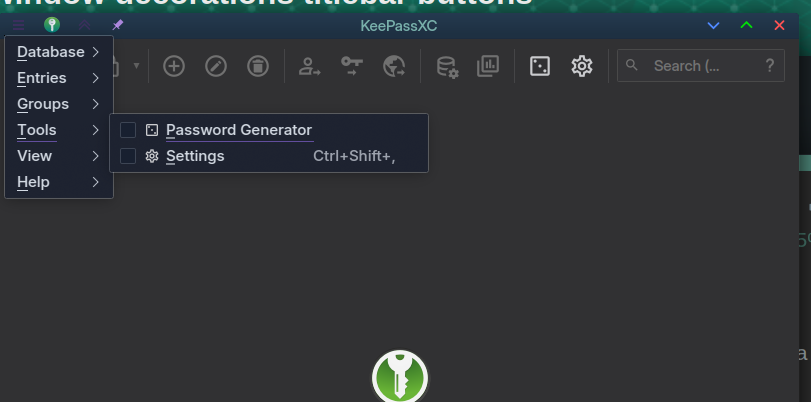
Adding an “Application Menu” icon to the titlebar in the KDE system settings/window decorations menu results in the menubar in KeePassXC disappearing.
Steps to reproduce:
Open KeePassXC and note the menubar is visible. Close KeePassXC.
Navigate to “System Settings/Appearance and Style/Colours & Themes/Window Decorations”.
Select “Configure Titlebar buttons”.
Drag the “Application Menu” button to the titlebar area next to the “On all desktops” pin icon.
Select “Apply”
Open KeePassXC and note the menubar is missing. Of note you can’t access it with shortcuts either unless the menubar is disabled in KeePassXC settings. In this case the menubar remains invisible but the menus display but I believe they’re supposed to pop into view when activated.
I logged an issue with KeePassXC (https://github.com/keepassxreboot/keepassxc/issues/13060) but they deny it is their problem. Can anyone recommend where I go from here? Where do I report the issue to KDE? I can’t find the appropriate repository.
KeePassXC - Version 2.7.11
Revision: 01e5b6e

Qt 5.15.18

ManjaroLinux 26.0.2 Anh-Linh (stable branch)
CPU architecture: x86_64
Kernel: linux 6.18.8-1-MANJARO
The Application Menu button and the Global Menu widget are both alternatives to the application’s own in-window menu, and so if you either add the Global Menu widget to a panel or the Application Menu button to the window title bar, then the application will no longer show its menu inside the window itself.
In other words, there is nothing to report. It all works as intended.
Notes:
gtk3-based applications no longer honor this behavior in Plasma.
gtk4-based applications have never supported this in Plasma.
gtk2-based applications still support it, but gtk2 is deprecated and has been dropped from the repositories.
Damn it, sorry I was unclear. In KeePassXC the normal menubar AND the one in the titlebar do not show. Thus the menbar is completely inaccessible after the titlebar options are edited.
You mean that if you add the Application Menu button to the title bar and you click that button, nothing shows?
Hmm… I think I have an idea why… It’s still a qt5 application, and if you’ve removed most of the qt5 support from Plasma, then it won’t show its menu either.
I am seeing a similar behavior here on account of some Plasma 5 applications now that I’ve removed most of the Plasma 5 support libraries.
Nope. If I add the Application Menu button to the titlebar, neither the application menu button or menubar appear in KeePassXC. Both are missing - making using KeePassXC next to impossible. I did find I could sort of work around it (but it isn’t ideal) is to disable the menubar within KeePassXC which allows you to hit ALT+F to open the menu but the menubar still doesn’t show up, nor does it become visible as would normally be the case if it were hidden and you hit ALT+F.
I thought I was using Qt5?
qmake -v
QMake version 3.1
Using Qt version 5.15.18 in /usr/lib
Remember your golden shortcuts: CtrlShift, gets your settings… handy if you hide something you can’t get back, then… CtrlAlt, keyboard shortcuts (not with Keepassxc).
So as always, assuming I’m right, mark it solved and stop slapping yourself upside the head Don’t worry, we’ve all been there
Actually, I tried numerous combinations and also went back and forth testing with the added titlebar menu and without. The application menu does not function at all when the menubar icon is added to the titlebar
Ctrl+Shift+, in KeePassXC opens the database configuration, not the application configuration. So this is not always golden. And is exactly why I want the menubar in the titlebar in the first place - if I can’t remember the shortcut keys the menu will still be accessible.
So the problem still exists; doesn’t have a useful workaround. @Aragorn mentioned about Qt5 vs Qt6 so I’ve been looking into that and I suspect that is the issue. KeePassXC is Qt5 and they’ve been dragging their feet upgrading to Qt6. I found a discussion about this and have added this issue but I don’t expect this to be resolved any time soon if there is no other way to resolve it.
Ok, something’s definitely off there - I made no tweaks to those shortcuts, and that’s the basic shortcut for Plasma and it works for keepassxc for me…
Likewise with the menu added to the titlebar, AltD pulls it up for me.
Did you test this with a new USER?
Is this a ‘native’ Plasma installation? Are there any other desktops installed?
Ctrl/ brought up this:
file:///usr/share/keepassxc/docs/KeePassXC_KeyboardShortcuts.html
So CtrlShift,is indeed the keepassxc shortcut for Database settings and for some reason it’s over-riding the Plasma setting for YOU, but not for ME… testing with a new user verifies this behaviour for a clean set up Plasma account.
Then perhaps there is a conflict with shortcuts because if you open the Database dropdown you’ll see KeePassXC has defined Ctrl+Shift+, for the database configuration not the application settings which are in the tools menu and are mapped to Ctrl+,
Alt+D (or anything in the menubar) does not work on my system after putting the menubar icon in the titlebar. And yes I have tried a new user and on a completely fresh install with all updates and only KeePassXC installed additional.
Yes - no other DEs installed.
That’s handy but whilst I love keyboard shortcuts, not all programs work the same or allow you to redefine them. Which is why I want a backup solution of putting the menubar in the titlebar. Additionally if you refer to this list you’ll see that Ctrl+Shift+, is mapped to open the database settings not the main application settings. But this is all beside the point that KeePassXC is broken on KDE 6.5 when adding a menubar dropdown to the titlebar.
You keep getting confused between Database settings and Application settings. They’re different. But again me not remembering every keyboard shortcut for every program is not the problem; the problem is functionality that should work does not.
Apparently the devs know this is an issue (Qt5) and that:
KeePassXC is about to get last-rited, respectively masked for removal, on Gentoo due to this iusse. Ubuntu and ArchLinux will follow soon. Please keep this great piece of software alive. Thank you very much!
Plasma 6, its window decorations and its widgets are all qt6-based. I’ve been seeing similar compatibility problems here as well — most notably with electron-based applications — where applications that used to export their menu via dbus no longer do so.
Yes, this is the standard shortcut for Application Settings in Plasma…
system-wide (global) shortcuts in KDE Plasma take priority over application-specific shortcuts like the one in KeePassXC
This is one reason I suggest you test a new USER, because your system isn’t standard.
There are similar issues listed:
It is a simple, logical, and excellent idea to test this with a fresh USER… I tested this with my own USER ben, and it works perfectly - this thread is creating a mountain out of a tiny pimple.
The fact that I installed keepassxc, set the menu, and that it works perfectly well on my 9 year old installation suggests that it really isn’t their problem. Where to go from here is to own the issue and find out what it is in your data that caused it.
Does anyone else have the ability to replicate this issue?
Is this likely an issue with Stable and not Testing?
I’ve said it already that I hadn’t removed any libraries but you’ve alluded more than once that this is the issue.
Anyway, the helpful folk over on the KDE forum solved it almost immediately. I needed plasma5-integration installed which has NEVER been installed on this build and is not installed by default on Manjaro KDE.
It is a Critical Integration component for Qt5 applications, so that many very common packages would also be broken - and it’s a key part of the upgrade from Plasma 5 to Plasma 6…
However, IT IS POSSIBLE that you opted to deny it’s replacement at that time when prompted to replace plasma-integration with plasma5-integration during an upgrade.
This was some time in 2024:
So whilst you might not have explicitly removed it, you might have inadvertently denied it during a system update.
Except I installed Manjaro on 23rd December 2025! And the output of the desktopfs-pkgs.txt and rootfs-pkgs.txt above show this isn’t installed with a fresh install.

 Don’t worry, we’ve all been there