I recently discovered that, whatever theme I chose, menu transparency doesn´t work. Other things are ok, transparency in background windows and so on. Did I miss something or did something change?
Greetings
Andreas
I recently discovered that, whatever theme I chose, menu transparency doesn´t work. Other things are ok, transparency in background windows and so on. Did I miss something or did something change?
Greetings
Andreas
I believe to have read that it’s a bug, and that it was fixed in a later Plasma version than what we currently carry in the repos — probably in Plasma 6.6.
Hi, thanks for the answer! Then I´ll wait:-)
Open System Settings → Window Management → Desktop Effects & uncheck the “Blur” option in the appearance section:
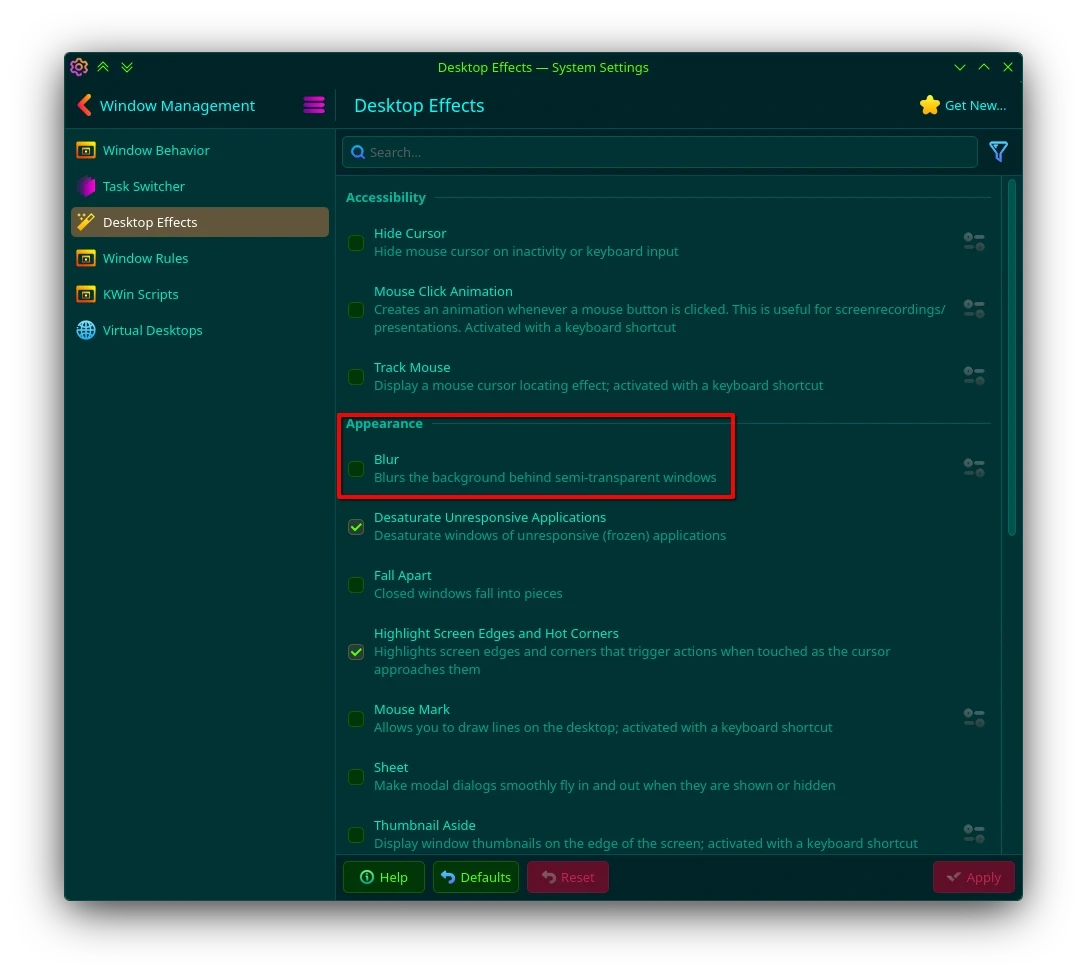
Apply the change and your application launcher background should be transparent again, as it is on my system:
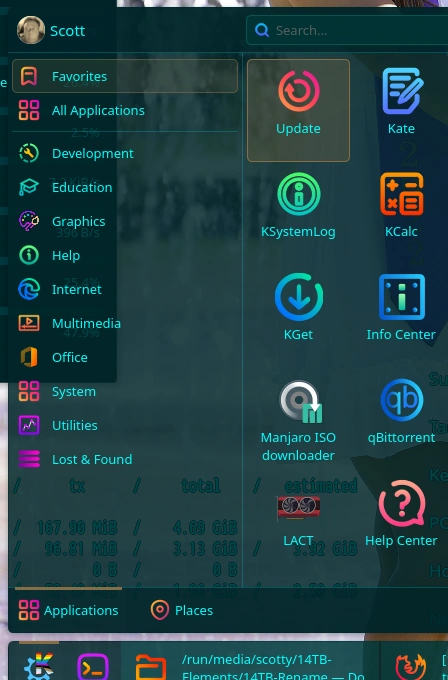
Here it is… 
Try the Oxygen DSK plasma theme. It touts itself as a more transparent extension to the original Oxygen theme. It IS very transparent.
I can’t find Oxygen DSK via the System Settings “Get New” button, the KDE Store, or Google. The only one I can find with a similar name is Oxygen DSX - KDE Store. However, that theme was designed for Plasma 4, and hasn’t been updated since April, 2016.
If you can find the one designed for Plasma 6, please provide a link to it.
My bad. You are correct it is Oxygen DSX. I got it by going to settings manager, then plasma styles, then opened the get new styles to download it from what the down load menu presented. I hope this helps.
Ah yes - I see it now. Still, you should be aware that the theme hasn’t been updated since 2016-04-15, and it was written for Plasma 4. So it may cause issues due to some incompatibilities.
I switched back to breeze a year or two ago after the theme I had installed via the “Get New” menu and been using for several years starting causing issues. Can’t remember what theme it was, but I know it was much more up-to-date than yours.
I wasn’t able to move any widgets on my desktop, or add any new ones. The screen would just turn black for a few seconds whenever I tried, and when the desktop returned, none of the changes I had made were there. It drove me crazy for a few weeks (I can be very patient sometimes), & I thought it was a Plasma 5 or 6 issue (I’m not sure if it was before or after the switch in May 2024), so I kept waiting for the Plasma team to roll out a fix. When I realised after several updates that the issue probably wasn’t a Plasma bug as no-one had implemented a fix, I decided to switch back to the inbuilt Plasma breeze theme. The issue immediately went away.
So, if you have any issues with your desktop doing strange stuff, make sure to test if the issue also occurs after switching to breeze or breath.
Sometimes you need someone to point out that you have a problem. Disabling blur also helped here. 
btw. i also switched back from Sweet after realising its spammed my journal especially the SDDM part.
Nice icon set it looks a bit like candy icons, but a little more refined. I like it. what’s the name?
BeautyLine v2.4:
Transparency and Blur was always working for me under KDE.
Only 3 month ago there was a color bug with Transparency+Blur, which was fixed from KDE, just 2 weeks later with KDE 6.4 or 6.5 (if i remember correctly).
Your problem which you face, must be Theme related… since im using a really old Win7OS Global Theme layout, there is no problem with Transparency/Blur at the moment.
I believe it may be. My theme also extensive uses translucency and blur, and I’m not seeing any problem with that either.
Of course, I am not using the traditional KickOff menu or the cascading application launcher menu. I’m using the Application Dashboard instead, but it also heavily uses translucency and blur.