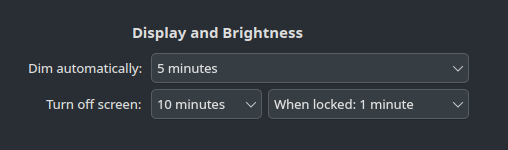
I have recently switched from stable to testing release (following the instructions on Manjaro Wiki) and I noticed a strange behavior with screen dimming.
When PC resumed from sleep the display brightness was not restored. It stayed as it was just before the PC goes to sleep. [EDIT] Meaning, it retained the dim state not the normal brightness setting [/EDIT]
I checked the settings in KDE but nothing indicated something different compared to stable release which I was using for more than two months.
Finally I ended up replacing ddcutil with the Dev version (2.2.7) from git. Now the problem seems solved.
I think it would be nice to include the latest dev version into AUR just in case.
You shouldn’t use the AUR if you aren’t familar with the build process and don’t check the build files, ie, the PKGBUILD script. Notice there are two AUR entries ddcutil-git and ddcutil-dev-git for whatever it is worth - please do yourself a favour and read the PKGBUILD scripts.
I didn’t use AUR, I just cloned the repo locally and built it. As for the first AUR package it uses 2.2.0-dev the second one it’s not obvious to me what it does but I think it always clones the latest stable.
But in any case, what’s your suggestion for someone who faces an issue with the functionality of the system ?
Try running the following command when the dimming issue occurs:
systemctl --user restart plasma-powerdevil
Note: I haven’t tested it for dimming, as I don’t have my screen dim automatically. However, the brightness control sometimes becomes disabled in my system tray, and the above command always brings it back.
well, for what it worth, before replacing ddcutil (which eventually solved the problem) I had to logout in order to restore brightness which probably does what you suggest. But I think that dealing with the root cause of the problem is the best solution.
I have red too many posts all over the internet complaining about ddcutil, is there any alternative ?
So it was restored or how should it behave? I mean restoring means restore the last brightness value - last before going to sleep. Should it recall some other value? Also i’m on unstable and i don’t see this issue.
That means you won’t be able to adjust your brightness via the brightness widget in the system tray; the Night Light feature shouldn’t be affected as it only changes the color temperature, not the brightness.
Yes I tried that and the problem remained. Only logout and login again restored brightness. Nevertheless, I didn’t change the brightness using the widget but rather the OSD menu of the display.
My monitor doesn’t support ddc/ci. Anyway the dim state should go away when hitting a key or moving the mouse. So, you’re saying this isn’t the case. The monitor keeps the dimmed state as its new brightness setting? I can’t reproduce this on my system.
The reason why I mentioned restarting the plasma-powerdevil service is that it seems to have issues detecting some screens properly when resuming the system from sleep or hibernate. Maybe it only happens for certain screen models, or possibly it depends on how they are connected (mine is connected via HDMI, and I often lose the brightness setting upon resuming).
So, plasma-powerdevil can successfully detect the screen to dim it before eventually suspending or hibernating the system. However if the screen has powered down, then it can’t detect the current brightness of the screen when resumed, so it stays dimmed. Restarting the plasma-powerdevil service should fix that, as the screen is now properly powered up and the system can now detect its brightness.
Maybe also browse through your journal for powerdevil-related entries, especially ones after you have just resumed your system:
Could you please help me understand something that I just noticed?
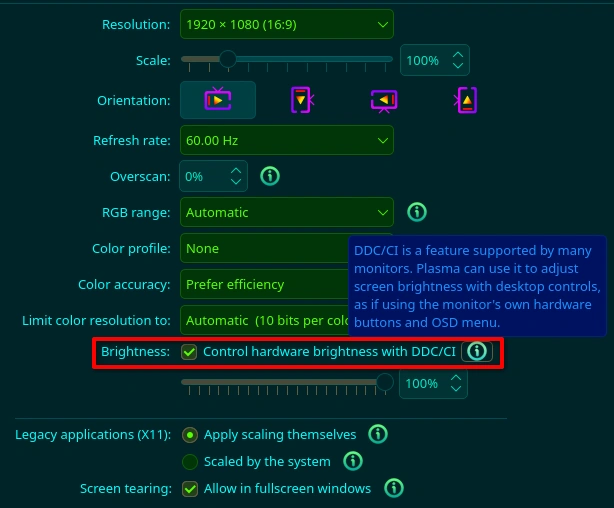
I just disabled “Control hardware brightness with DDC/CI” and I’m now able to change brightness using the widget which wasn’t possible with the above setting enabled. Is this the expected behavior or the other way around ?
I use a HDMI to DVI cable to connect my monitor (GPU → HDMI → DVI → Monitor) but that same setup had no issues with the manjaro stable with ddcutil 2.2.6. Everything started as soon as I switched to Manjaro Testing with ddcutil 2.2.6.
Most likely the upcoming DDCUtil will fix it. From its changelog:
ddcutil Release Candidate 2.2.7-rc1 is now available for testing. It contains several important bug fixes for KDE PowerDevil in the handling of display connection and disconnection and transient loss of access permissions for /dev/i2c devices. It can be downloaded from the githut ddcutil repository For details, see the announcement: FR: print 'Failed to find connector name for' to stderr · Issue #598 · rockowitz/ddcutil · GitHub.
For me it is solved already as I installed 2.2.7-dev from git but given that the only thing changed between stable and testing is the KDE plasma it may be well assumed that it’s finally their (KDE) problem not ddcutil as I initially thought.