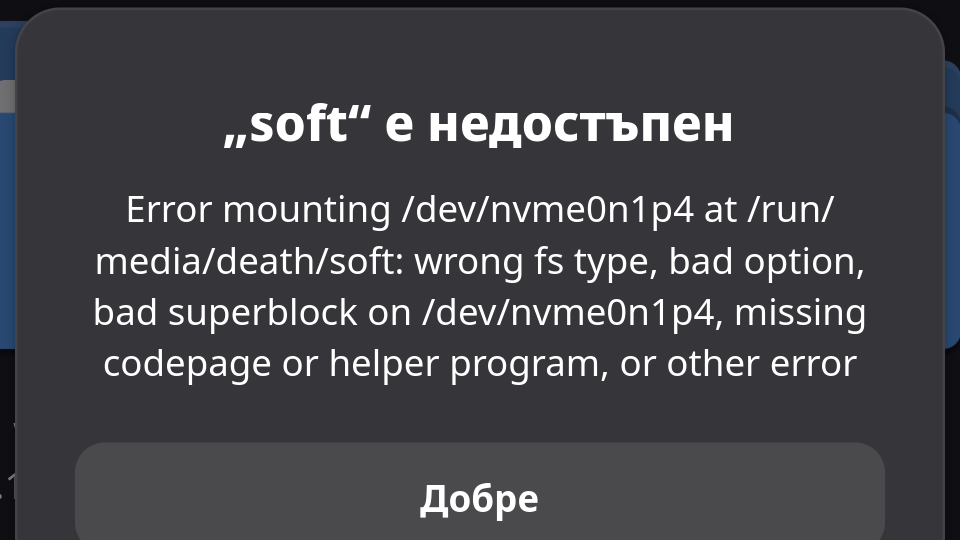
I recently encountered an issue where Manjaro refused to mount my NTFS partition, showing an error about a “bad superblock” or “wrong fs type” (similar to the one in the image). Interestingly, the same drive worked fine on other distros like Bazzite.
The issue is that the new ntfs3 kernel driver is very strict about the “dirty bit” (improperly unmounted flag). If you want to keep using the new driver without blacklisting it, you can fix this directly from the terminal:
sudo ntfsfix -d /dev/nvme0n1p4
(Note: Replace /dev/nvme0n1p4 with your actual partition identifier)
What this does: It clears the dirty flag and the journal, allowing the ntfs3 driver to mount the drive again.
Warning: Use this only if you are sure the drive is physically healthy. If there is actual filesystem corruption, this might hide the symptoms. For a more permanent fix, disable “Fast Startup” in Windows.
I have unlisted your topic as the use of ntfsfix is not a recommended solution – use the official chkdsk tool, instead, from within a Windows environment – additionally, this topic is more than covered already in available Tutorials.
Microsoft’s chkdsk is the only recommended tool to correct errors on the proprietary NTFS filesystem.
See the following Primer for more information:
While this is true, it should only be considered after exhausting all repair options offered by chkdsk – as you have said “Use this only if you are sure the drive is physically healthy”.
Note that under normal circumstances toggling the dirty bit off with some other random tool is not recommended, as this can prevent chkdsk from properly discovering and correcting errors.
It’s unfortunate, but no Linux tool that I’m aware of can adequately and safely be used with an ntfs filesystem.
Perhaps that will change in the future – the community could potentially benefit from a well-made utility to safely handle ntfs, apfs and other proprietary formats – but until that time, “it is what it is”.
Disabling Fast Startup is indeed recommended, and it will help prevent a range of contributors to filesystem damage, but it is not a permanent fix to anything, really – it’s only preventative.
The best recommendation for anyone using an NTFS filesystem, whether in Windows or Linux, is to regularly run the basic chkdsk scan from an administrative command prompt in a Windows environment:
Example:
chkdsk /f x:
I hope this is helpful.
Nonetheless, thanks for sharing your experiences.
Keep in mind that Support topics are meant for those seeking help, rather than for posting random tidbits of information.
For future reference, the Tutorials section is more appropriate, which is available for TL3 (Trust Level 3) members, and above, though, any contributions are strictly subject to peer approval.
Thank you for this info. I use NTFS for store my files only, because other file systems have veird owner, write protected and other things and when i reinstall with some distro, i get problems with file write access. What FS is recommended for store files? So i can get rid of the NTFS…
Well, exfat is arguably compatible with Windows, macOS and Linux (for temporary storage purposes only). From your comments, that would solve annoyances with permissions, as exfat doesn’t support them.
Microsoft’s ntfs of course supports Windows permissions and is quite a robust journaling filesystem, which includes features that support recovery of damaged files, for example – exfat doesn’t support that – in fact, it doesn’t support any advanced features, at all.
It’s nonetheless popular for transferring files between different Operating Systems, due to the relative convenience of not having to deal with permissions, and that each OS supports it.
That’s as far as the convenience extends, however. For long term or general storage I’d always recommend ntfs in preference to exfat.
However, it’s your choice – you need to weigh up the convenience of exfat against the added security that ntfs provides for your stored data.
If Windows wasn’t in the mix, my preference would be to just use a native Linux filesystem like ext4, and be done with it.
Hi again. I don’t need Windows really. So i thinking for any FS that will be good for storage my files across my linux Distro’s. Before i was using ext4, but has some permissions and file owner problems. So i switch to NTFS. But i don’t really like it.
The obvious resolve is to stop blaming the filesystems, and learn how to handle permissions appropriately.
Both ext4 and ntfs employ a permissions scheme – the problem remains in that ntfs is incompatible with Linux permissions, and vice-versa. It’s recommended to use a native Linux filesystem unless one has a distinct need for anything else.