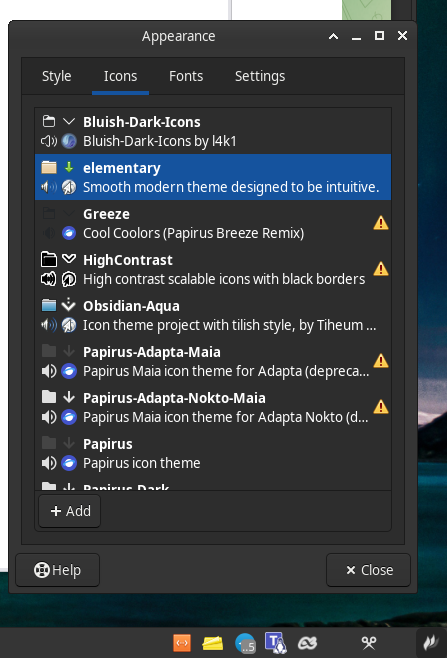
I was trying to fix a missing Dropbox tray icon in XFCE, and took my troubleshooting to ChatGPT, because I am not a very techy, but that might have been a big mistake. Anyway now it seems no icon theme works, not even Papirus, most of them default to white icons, both in system tray, on desktop etc.


How can I fix this mess?
System:
  Kernel: 6.12.28-1-MANJARO arch: x86_64 bits: 64 compiler: gcc v: 15.1.1
    clocksource: tsc avail: acpi_pm
    parameters: BOOT_IMAGE=/boot/vmlinuz-6.12-x86_64
    root=UUID=b6c21d4b-a4fa-481d-ad44-4eefb4cc6387 rw quiet splash apparmor=1
    security=apparmor udev.log_priority=3
  Desktop: Xfce v: 4.20.1 tk: Gtk v: 3.24.48 wm: xfwm4 v: 4.20.0
    with: albert,xfce4-panel tools: xfce4-screensaver vt: 7 dm: LightDM v: 1.32.0
    Distro: Manjaro base: Arch Linux
Machine:
  Type: Desktop System: ASUS product: N/A v: N/A serial: <superuser required>
  Mobo: ASUSTeK model: PRIME B760-PLUS D4 v: Rev 1.xx
    serial: <superuser required> part-nu: SKU uuid: <superuser required>
    UEFI: American Megatrends v: 1658 date: 05/22/2024
CPU:
  Info: model: 13th Gen Intel Core i5-13400F bits: 64 type: MST AMCP
    arch: Raptor Lake gen: core 13 level: v3 note: check built: 2022+
    process: Intel 7 (10nm) family: 6 model-id: 0xBF (191) stepping: 2
    microcode: 0x3A
  Topology: cpus: 1x dies: 1 clusters: 7 cores: 10 threads: 16 mt: 6 tpc: 2
    st: 4 smt: enabled cache: L1: 864 KiB desc: d-4x32 KiB, 6x48 KiB; i-6x32
    KiB, 4x64 KiB L2: 9.5 MiB desc: 6x1.2 MiB, 1x2 MiB L3: 20 MiB
    desc: 1x20 MiB
  Speed (MHz): avg: 800 min/max: 800/4600:3300 scaling: driver: intel_pstate
    governor: powersave cores: 1: 800 2: 800 3: 800 4: 800 5: 800 6: 800 7: 800
    8: 800 9: 800 10: 800 11: 800 12: 800 13: 800 14: 800 15: 800 16: 800
    bogomips: 79888
  Flags: avx avx2 ht lm nx pae sse sse2 sse3 sse4_1 sse4_2 ssse3 vmx
  Vulnerabilities:
  Type: gather_data_sampling status: Not affected
  Type: itlb_multihit status: Not affected
  Type: l1tf status: Not affected
  Type: mds status: Not affected
  Type: meltdown status: Not affected
  Type: mmio_stale_data status: Not affected
  Type: reg_file_data_sampling mitigation: Clear Register File
  Type: retbleed status: Not affected
  Type: spec_rstack_overflow status: Not affected
  Type: spec_store_bypass mitigation: Speculative Store Bypass disabled via
    prctl
  Type: spectre_v1 mitigation: usercopy/swapgs barriers and __user pointer
    sanitization
  Type: spectre_v2 mitigation: Enhanced / Automatic IBRS; IBPB: conditional;
    PBRSB-eIBRS: SW sequence; BHI: BHI_DIS_S
  Type: srbds status: Not affected
  Type: tsx_async_abort status: Not affected
Graphics:
  Device-1: Advanced Micro Devices [AMD/ATI] Lexa PRO [Radeon
    540/540X/550/550X / RX 540X/550/550X] vendor: XFX Pine driver: amdgpu
    v: kernel arch: GCN-4 code: Arctic Islands process: GF 14nm built: 2016-20
    pcie: gen: 3 speed: 8 GT/s lanes: 8 ports: active: DP-1,HDMI-A-1
    empty: DVI-D-1 bus-ID: 01:00.0 chip-ID: 1002:699f class-ID: 0300
    temp: 49.0 C
  Display: x11 server: X.org v: 1.21.1.16 compositor: xfwm4 v: 4.20.0 driver:
    X: loaded: amdgpu unloaded: modesetting alternate: fbdev,vesa dri: radeonsi
    gpu: amdgpu display-ID: :0.0 note: <missing: xdpyinfo/xrandr>
  Monitor-1: DP-1 model: Idek Iiyama PL2492H serial: <filter> built: 2023
    res: 1920x1080 dpi: 93 gamma: 1.2 size: 527x296mm (20.75x11.65")
    diag: 604mm (23.8") ratio: 16:9 modes: max: 1920x1080 min: 720x400
  Monitor-2: HDMI-A-1 model: Idek Iiyama PL2492H serial: <filter> built: 2023
    res: 1920x1080 dpi: 93 gamma: 1.2 size: 527x296mm (20.75x11.65")
    diag: 604mm (23.8") ratio: 16:9 modes: max: 1920x1080 min: 720x400
  API: EGL v: 1.5 hw: drv: amd radeonsi platforms: device: 0 drv: radeonsi
    device: 1 drv: swrast gbm: drv: kms_swrast surfaceless: drv: radeonsi x11:
    drv: radeonsi inactive: wayland
  API: OpenGL v: 4.6 compat-v: 4.5 vendor: amd mesa v: 25.0.5-arch1.1
    glx-v: 1.4 direct-render: yes renderer: AMD Radeon RX 550 / 550 Series
    (radeonsi polaris12 ACO DRM 3.61 6.12.28-1-MANJARO) device-ID: 1002:699f
    memory: 3.91 GiB unified: no
  Info: Tools: api: eglinfo,glxinfo de: xfce4-display-settings x11: xprop
Audio:
  Device-1: Intel Raptor Lake High Definition Audio vendor: ASUSTeK
    driver: snd_hda_intel v: kernel alternate: snd_soc_avs,snd_sof_pci_intel_tgl
    bus-ID: 00:1f.3 chip-ID: 8086:7a50 class-ID: 0403
  Device-2: Advanced Micro Devices [AMD/ATI] Baffin HDMI/DP Audio [Radeon RX
    550 640SP / 560/560X] vendor: XFX Pine driver: snd_hda_intel v: kernel
    pcie: gen: 3 speed: 8 GT/s lanes: 8 bus-ID: 01:00.1 chip-ID: 1002:aae0
    class-ID: 0403
  Device-3: Logitech Headset H390 driver: hid-generic,snd-usb-audio,usbhid
    type: USB rev: 1.1 speed: 12 Mb/s lanes: 1 mode: 1.1 bus-ID: 1-7.2.3:13
    chip-ID: 046d:0a44 class-ID: 0300
  API: ALSA v: k6.12.28-1-MANJARO status: kernel-api with: aoss
    type: oss-emulator tools: alsactl,alsamixer,amixer
  Server-1: JACK v: 1.9.22 status: off tools: N/A
  Server-2: PipeWire v: 1.4.2 status: active with: 1: pipewire-pulse
    status: active 2: wireplumber status: active 3: pipewire-alsa type: plugin
    tools: pactl,pw-cat,pw-cli,wpctl
Network:
  Device-1: Realtek RTL8125 2.5GbE vendor: ASUSTeK driver: r8169 v: kernel
    pcie: gen: 2 speed: 5 GT/s lanes: 1 port: 3000 bus-ID: 04:00.0
    chip-ID: 10ec:8125 class-ID: 0200
  IF: eno1 state: up speed: 1000 Mbps duplex: full mac: <filter>
  Info: services: NetworkManager, smbd, systemd-timesyncd
RAID:
  Hardware-1: Intel Volume Management Device NVMe RAID Controller driver: vmd
    v: 0.6 port: N/A bus-ID: 00:0e.0 chip-ID: 8086:467f rev: class-ID: 0104
Drives:
  Local Storage: total: 3.91 TiB used: 655.61 GiB (16.4%)
  SMART Message: Required tool smartctl not installed. Check --recommends
  ID-1: /dev/nvme0n1 maj-min: 259:0 model: Predator SSD GM7 2TB
    size: 1.86 TiB block-size: physical: 512 B logical: 512 B speed: 63.2 Gb/s
    lanes: 4 tech: SSD serial: <filter> fw-rev: SN13683 temp: 38.9 C
    scheme: GPT
  ID-2: /dev/sda maj-min: 8:0 vendor: Samsung model: SSD 870 QVO 1TB
    size: 931.51 GiB block-size: physical: 512 B logical: 512 B speed: 6.0 Gb/s
    tech: SSD serial: <filter> fw-rev: 2B6Q
  ID-3: /dev/sdb maj-min: 8:16 vendor: Samsung model: SSD 860 EVO 250GB
    size: 232.89 GiB block-size: physical: 512 B logical: 512 B speed: 6.0 Gb/s
    tech: SSD serial: <filter> fw-rev: 1B6Q scheme: MBR
  ID-4: /dev/sdc maj-min: 8:32 vendor: Western Digital
    model: WD10EZEX-00ZF5A0 size: 931.51 GiB block-size: physical: 4096 B
    logical: 512 B speed: 6.0 Gb/s tech: N/A serial: <filter> fw-rev: 0A80
    scheme: MBR
Partition:
  ID-1: / raw-size: 1.86 TiB size: 1.83 TiB (98.37%) used: 346.56 GiB (18.5%)
    fs: ext4 dev: /dev/nvme0n1p2 maj-min: 259:2
  ID-2: /boot/efi raw-size: 300 MiB size: 299.4 MiB (99.80%)
    used: 320 KiB (0.1%) fs: vfat dev: /dev/nvme0n1p1 maj-min: 259:1
Swap:
  Alert: No swap data was found.
Sensors:
  System Temperatures: cpu: 28.0 C mobo: N/A gpu: amdgpu temp: 49.0 C
  Fan Speeds (rpm): N/A gpu: amdgpu fan: 102
Info:
  Memory: total: 32 GiB available: 31.16 GiB used: 4.86 GiB (15.6%)
  Processes: 405 Power: uptime: 1h 14m states: freeze,mem,disk suspend: deep
    avail: s2idle wakeups: 0 hibernate: platform avail: shutdown, reboot,
    suspend, test_resume image: 12.44 GiB services: upowerd Init: systemd
    v: 257 default: graphical tool: systemctl
  Packages: 1316 pm: dpkg pkgs: 0 pm: pacman pkgs: 1281 libs: 379
    tools: pamac,yay pm: appimage pkgs: 0 pm: flatpak pkgs: 21 pm: snap pkgs: 14
    Compilers: gcc: 15.1.1 Shell: Bash v: 5.2.37 running-in: alacritty
    inxi: 3.3.38
Edited by Moderator in order to correct the formatting