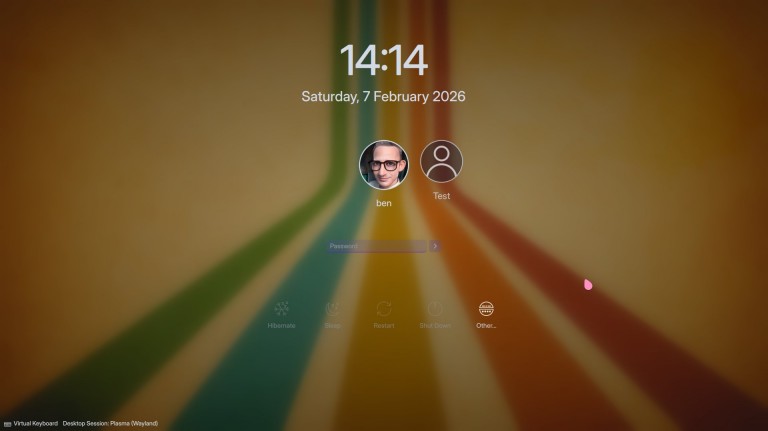
Originally released in 2016, I have completely modernized the Elegant Manjaro Linux SDDM theme to meet today’s standards while keeping the classic elegance you love.
Rebuilt from the ground up with Qt 6, it is now faster and smoother. Whether you are on a standard laptop or a 4K monitor, it scales perfectly.
However, SDDM won’t be supported for much longer (I think) and we’ll change to the much newer Plasma login manager, which is already available in the repositories:
plasma-login-manager is specific to Plasma, and therefore it won’t work (well) with LXQt, Cutefish, or other qt-based desktop environments.
plasma-login-manager is specific to systemd — it uses logind under the hood — and therefore it’s not an option for people running FreeBSD and siblings, given that systemd itself is specific to GNU/Linux.
The only reason why Plasma is moving away from sddm is that sddm is not a KDE project. They have no control over its development, and its scope is wider than Wayland and Plasma.
sddm also contains code for supporting other desktop envirnments and for running on X11. This makes it difficult to work with for KDE, because it duplicates a lot of unnecessary code.
It’ll still be supported in both Manjaro and Arch. It is KDE themselves who are moving away from sddm, but both sddm and its use in Manjaro will still be supported. After all, people running LXQt need a display server too.
Thanks. I can confirm that SDDM is not going anywhere soon. It is an independent project that will continue to be supported for the foreseeable future, especially on systemd-free distributions and other Qt-based DEs.
I installed Plasma Login Manager as soon as it reached (Manjaro) Stable – perhaps it’s imagination, or wishful thinking – but, it does indeed provide a faster, smoother login experience.
Certainly I’m looking forward to it being truly production-ready; at this time, there are several missing conveniences that many of us take for granted in SDDM – setting Numpad=on doesn’t currently work, for example.
This is no longer needed. If you have systemd-numlockontty from the AUR installed — see the instructions farther down — then NumLock will be on at the Plasma Login screen already, given that plasma-login-manager relies on logind, and thus, on systemd.
And of course, it’ll have NumLock activated in all ttys as well, except for tty12, which is (or should be) the read-only system logger output console.
You can also easily see this difference if, after logging in, you open up a terminal window and type…
who
Earlier, with sddm, you would see at least two logins for yourself, one of them being at a tty (for sddm). With plasma-login-manager, you no longer have this tty login, unless of course you are effectively also logged in at a tty.
In order to install and activate systemd-numlockontty…
Additional information: If you open up the Plasma System Settings and click on the “Keyboard” section, there will be a Key Bindings button at the top right. Clicking this button will allow you to set a number of options, among which “Compatbility Options”.
In there, you will see an option to allow the numeric keypad to always enter digits, regardless of whether the NumLock key is on or off, and regardless of whether the Shift key is held down or not. This is how macOS behaves, and with this option — which I myself personally prefer — you can have the same behavior in Plasma.
Yes, I just slapped an Atari style paper behind it a joke on ‘modern’. I used to have an Amiga Workbench splash screen, but that got wiped along with Plymouth
Yet another method is to install mkinitcpio-sd-numlock from the AUR and add the sd-numlock hook to /etc/mkinitcpio.conf, right after the sd-vconsole hook.
Or, for those who still use the old base and udev hooks, there’s mkinitcpio-numlock — also from the AUR — and then they can add the numlock hook to /etc/mkinitcpio.conf, right after the consolefont hook.