It’s been a while since I did it but I’m starting only now to notice the performance issues, especially when searching for a program in the launcher.
Basically, when I tried installing Plasma 6 I think, I used the command they provided that also installed hundreds of accessory programs with it. Is there a way to.. remove them all? Without affecting my Manjaro install in any other way? What are my steps?
I can’t find the Plasma installation guide that I followed am I doomed to a fresh install?
You’ve possibly installed some of the KDE -meta packages, of which there are quite a few in the repos:
❯ pacman -Ss -- kde -meta
extra/kde-accessibility-meta 25.08-1
    Meta package for KDE accessibility applications
extra/kde-applications-meta 25.08-1
    Meta package for KDE Applications
extra/kde-development-environment-meta 20241108-1
    Metapackage to install a full KDE development environment
extra/kde-education-meta 25.08-1
    Meta package for KDE education applications
extra/kde-games-meta 25.08-1
    Meta package for KDE games
extra/kde-graphics-meta 25.08-1
    Meta package for KDE graphics applications
extra/kde-multimedia-meta 25.08-1
    Meta package for KDE multimedia applications
extra/kde-network-meta 25.08-1
    Meta package for KDE network applications
extra/kde-office-meta 25.08-1
    Meta package for KDE office applications
extra/kde-pim-meta 25.08-1
    Meta package for KDE PIM applications
extra/kde-sdk-meta 25.08-1
    Meta package for KDE SDK applications
extra/kde-system-meta 25.08-1
    Meta package for KDE system applications
extra/kde-utilities-meta 25.08-1
    Meta package for KDE utilities applications
extra/kdevelop-meta 25.08-1
    Meta package for KDevelop
extra/plasma-meta 6.6-2
    Meta package to install KDE Plasma
These packages, such as kde-games-meta, will draw in a lot of packages:
If you do have KDE -meta packages on your system, you might be able to completely remove some of them & their dependent packages. However, some of those -meta packages will have dependencies that you want to keep on your system, so you should carefully check each one using pamac info before removing them.
To see if any KDE -meta packages are installed, could you please post the output of:
Since your description is kinda vague, i think the first thing is to recover your steps so that you know what you did, undoing it is the easy part.
So start with the logs. In case you default shell is bash, look also at .bashhistory. Note that if you use many terminal windows at the same time, part of that history will be in temporary files .bashhistory-xxxxx, so make your hidden files visible first.
Doomed? How long do you expect this to take, and how much time is it worth?
How many lessons are you willing to learn?
Too many snapshots are a great idea when you’re hammering your system. Keep ONE from last week, but keep 2-3 hourly snapshots for recent times - then you can roll back they system (not the USER data).
back-in-time (or similar) can similarly snapshot your USER data - taking incremental backups, and it’s fine to do this on an hourly basis.
The first can rewind your system, the second can rewind any configs you messed up.
Reinstalling is a good way to leave bloat behind - you can decide piece by piece what to copy to your new config as you install applications (it’s good to keep a pkglist handy to remember what to install).
Restoring backups can take a couple more minutes, but you can also just copy back/restore targeted folders.
Reinstalling is the ultimate spring clean - the amount of work involved depends very much on what you do, for me it’s a half day to get to 95% completion, then a day or two more to iron out the creases.
You can download entire web pages as Markdown documents.
Ya, you can’t find the Plasma installation guide… that’s just criminal - you can be flogged for such behavior
I like this extension to grab web pages and save them to my ‘Notes’ folder.
pacman -Ss -- kde -meta | grep -i Installed -A 1
extra/kde-accessibility-meta 25.08-1 [installed]
    Meta package for KDE accessibility applications
extra/kde-applications-meta 25.08-1 [installed]
    Meta package for KDE Applications
--
extra/kde-education-meta 25.08-1 [installed]
    Meta package for KDE education applications
extra/kde-games-meta 25.08-1 [installed]
    Meta package for KDE games
extra/kde-graphics-meta 25.08-1 [installed]
    Meta package for KDE graphics applications
extra/kde-multimedia-meta 25.08-1 [installed]
    Meta package for KDE multimedia applications
extra/kde-network-meta 25.08-1 [installed]
    Meta package for KDE network applications
extra/kde-office-meta 25.08-1 [installed]
    Meta package for KDE office applications
extra/kde-pim-meta 25.08-1 [installed]
    Meta package for KDE PIM applications
extra/kde-sdk-meta 25.08-1 [installed]
    Meta package for KDE SDK applications
extra/kde-system-meta 25.08-1 [installed]
    Meta package for KDE system applications
extra/kde-utilities-meta 25.08-1 [installed]
    Meta package for KDE utilities applications
extra/kdevelop-meta 25.08-1 [installed]
    Meta package for KDevelop
Thank you all for the replies! It will take me some time to dig through the history of commands.
Hint: if you indeed installed some metapackage like kde-applications-meta, uninstall just it. Then all its dependencies will become orphans and you can just clean all orphans with one command or 1 click in pamac.
This won’t affect apps that you have previously manually installed, even if they are kde apps (because they will be explicitly installed and not orphans).
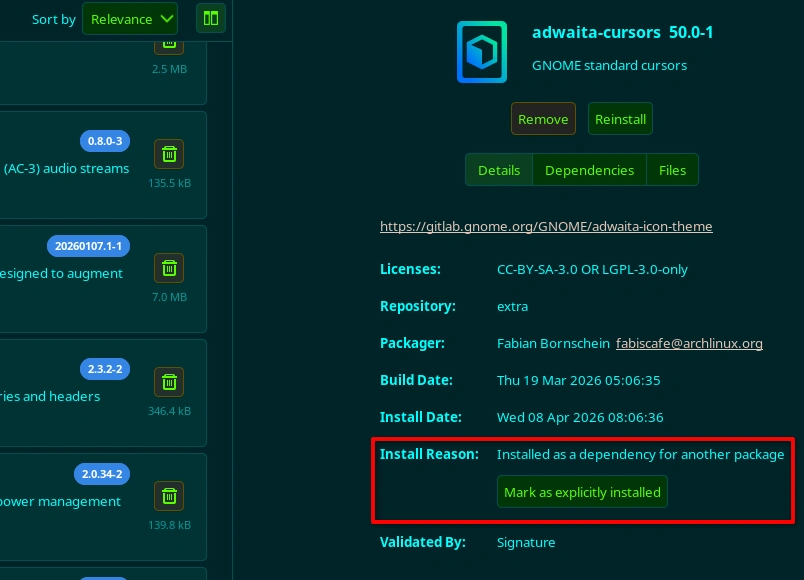
Further to @Teo’s post (which I concur with as probably being the simplest & quickest way to remove the bloat from your system), in pamac’s GUI you can manually change packages that you want to keep, but which were installed as dependencies of other packages, to “explicitly installed”.
I don’t have any orphan packages, so I just found another package installed as a dependency for this screenshot:
So, after you remove one or more -meta packages, you can open the Installed → Orphans section of pamac-manager (the GUI), browse for packages you want to retain, mark them as “explicitly installed”, and then remove the rest of the orphans.
You can also use the CLI to mark packages as explicitly installed via pacman:
sudo pacman -D --asexplicit the-package-names
pacman -D --help
❯ pacman -D --help
usage:  pacman {-D --database} <options> <package(s)>
options:
  -b, --dbpath <path>  set an alternate database location
  -k, --check          test local database for validity (-kk for sync databases)
  -q, --quiet          suppress output of success messages
  -r, --root <path>    set an alternate installation root
  -v, --verbose        be verbose
      --arch <arch>    set an alternate architecture
      --asdeps         mark packages as non-explicitly installed
      --asexplicit     mark packages as explicitly installed
      --cachedir <dir> set an alternate package cache location
      --color <when>   colorize the output
      --config <path>  set an alternate configuration file
      --confirm        always ask for confirmation
      --debug          display debug messages
      --disable-download-timeout
                       use relaxed timeouts for download
      --disable-sandbox
                       disables all sandbox features used for the downloader process
      --disable-sandbox-filesystem
                       disables the filesystem part of the downloader process sandbox
      --disable-sandbox-syscalls
                       disables the syscalls part of the downloader process sandbox
      --gpgdir <path>  set an alternate home directory for GnuPG
      --hookdir <dir>  set an alternate hook location
      --logfile <path> set an alternate log file
      --noconfirm      do not ask for any confirmation
      --sysroot        operate on a mounted guest system (root-only)
Are we to assume from this comment that the bloat also consists of Desktop Environments (and perhaps their application suites) that you have installed in addition to KDE Plasma?
That’s what i was thinking but i didn’t want to vocalize my thoughts before he admits what he actually did.
Because it doesn’t really makes sense to install a DE in manjaro. It is already there. If one wants to install from scratch there is arch proper.
Let’s stay positive and hope it’s just some metapackage. Otherwise… it will be “fun”.
If it were me, I’d possibly save a list of installed applications for reference only; not for the purposes of reinstalling them; and start from scratch.
Of course, that would be relatively simple (for me) as I have /home on a separate partition; the OP would otherwise need to save /home content elsewhere and restore it after performing a fresh Manjaro install.
This would at least maintain many of their settings, but could also require a careful (manual) cleanup of their configuration; removing undesired directories within the ~/.config/ hierarchy, for example.
Thank you so much for the reply! It’s fair to assume that I don’t know what I’m doing 50% of the times and that I probably picked a distro above my pay grade. Lmao
If it is your first linux after winboze, maybe it is better to start with something more forgiving mistakes like Mint for example. Not that you cannot use manjaro but you have to be prepared to read more documentation or it will not forgive you.
 am I doomed to a fresh install?
 You can download entire web pages as Markdown documents.


 )
)