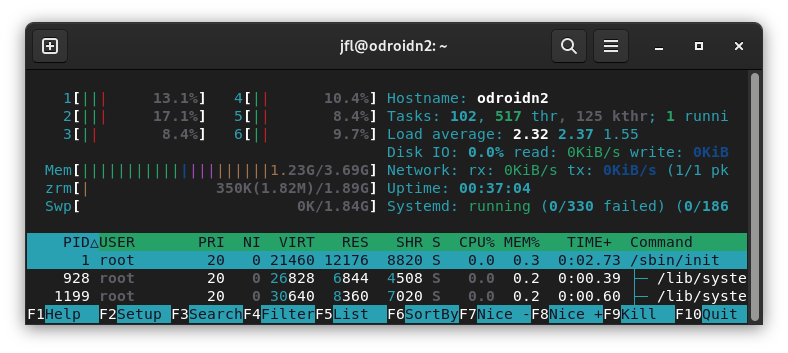
Fedora 38 Workstation with kernel 6.1.38-zrle-koop-3pole
[jfl@fedora ~]$ lsmod|grep v4l2
v4l2_mem2mem           45056  1 meson_vdec
Fedora 38 Workstation with kernel 6.1.38-zrle-koop-3pole
[jfl@fedora ~]$ lsmod|grep v4l2
v4l2_mem2mem 45056 1 meson_vdec
[ray@jellyfin ~]$ lsmod | grep v4l
bcm2835_v4l2           40960  0
videobuf2_vmalloc      12288  1 bcm2835_v4l2
bcm2835_mmal_vchiq     36864  3 bcm2835_codec,bcm2835_v4l2,bcm2835_isp
v4l2_mem2mem           49152  2 bcm2835_codec,rpivid_hevc
videobuf2_v4l2         32768  5 bcm2835_codec,bcm2835_v4l2,rpivid_hevc,v4l2_mem2mem,bcm2835_isp
videodev              307200  6 bcm2835_codec,videobuf2_v4l2,bcm2835_v4l2,rpivid_hevc,v4l2_mem2mem,bcm2835_isp
videobuf2_common       73728  9 bcm2835_codec,videobuf2_vmalloc,videobuf2_dma_contig,videobuf2_v4l2,bcm2835_v4l2,rpivid_hevc,v4l2_mem2mem,videobuf2_memops,bcm2835_isp
mc                     65536  7 videodev,bcm2835_codec,videobuf2_v4l2,videobuf2_common,rpivid_hevc,v4l2_mem2mem,bcm2835_isp
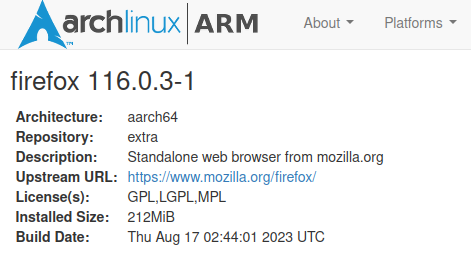
ARCH is up to 116.0.3-1 now.
Fedora_38_Workstation kernel 6.4.10-200.fc38
[jfl@fedora ~]$ lsmod|grep v4l2
v4l2_mem2mem           45056  1 meson_vdec
videobuf2_v4l2         36864  2 meson_vdec,v4l2_mem2mem
videobuf2_common       81920  5 meson_vdec,videobuf2_dma_contig,videobuf2_v4l2,v4l2_mem2mem,videobuf2_memops
videodev              339968  3 meson_vdec,videobuf2_v4l2,v4l2_mem2mem
mc                     77824  4 videodev,videobuf2_v4l2,videobuf2_common,v4l2_mem2mem
[jfl@fedora ~]$ uname -a
Linux fedora 6.4.10-200.fc38.aarch64 #1 SMP PREEMPT_DYNAMIC Fri Aug 11 12:41:15 UTC 2023 aarch64 GNU/Linux
Fedora 38 Workstation with kernel 6.1.38-zrle-koop-3pole
[jfl@fedora ~]$ lsmod|grep v4l2
v4l2_mem2mem           45056  1 meson_vdec
The interesting part is after installing “mpv” on Fedora 38 Workstation (Gnome) not sure is related, but now Firefox 116.0.2 can stream Bib Buck Bunny mp4. The cpu resources use is higher than Manjaro-Arm-Gnome-linux-aml-6.1.42-1/linux-odroid-6.4.0-1 or aml-s9xx-box-Lunar-6.4.7-meson64.
I have been doing a lot of reading today in the PR threads for firefox regarding V4L2 and learned some interesting things. My tests were with ffmpeg-rpi installed with no ffmpeg6 installed. If you start firefox with this it opens up a lot of debugging info in the terminal:
MOZ_GFX_DEBUG=1 MOZ_LOG="PlatformDecoderModule:5" firefox
For the rpi at first start up look for v4l2test probing device '/dev/video10'
v4l2test probing device '/dev/video10'
v4l2test driver bcm2835-codec card bcm2835-codec-decode bus_info platform:bcm2835-codec version 394496
V4L2_SPLANE
FALSE
V4L2_MPLANE
TRUE
V4L2_CAPTURE_FMTS
 YU12 YV12 NV12 NV21 NC12 RGBP
V4L2_OUTPUT_FMTS
 H264 MJPG
V4L2_SUPPORTED
TRUE
Since lines fly by fast here is a snippet playing the big buck bunny mp4 for a short period using h264_v4l2m2m:
[h264_v4l2m2m @ 0xffff9e25ab00] probing device /dev/video10
[h264_v4l2m2m @ 0xffff9e25ab00] driver ‘bcm2835-codec’ on card ‘bcm2835-codec-decode’ in mplane mode
[h264_v4l2m2m @ 0xffff9e25ab00] Using device /dev/video10
[h264_v4l2m2m @ 0xffff9e25ab00] driver ‘bcm2835-codec’ on card ‘bcm2835-codec-decode’ in mplane mode
[h264_v4l2m2m @ 0xffff9e25ab00] requesting formats: output=H264 capture=YU12
[Utility 121164: MediaPDecoder #1]: V/PlatformDecoderModule ProcessDecode: mDuration=23219µs ; mTime=0µs ; mTimecode=0µs
[Utility 121164: MediaPDecoder #1]: V/PlatformDecoderModule ProcessDecode: mDuration=23219µs ; mTime=0µs ; mTimecode=0µs
[Utility 121164: MediaPDecoder #1]: D/PlatformDecoderModule FFMPEG: Packet decoded: [{0,44100}, {1024,44100}] (23219us, 1024 frames)
[Child 121445: MediaPDecoder #5]: V/PlatformDecoderModule AudioTrimmer[ffff80cb2050] ::HandleDecodedResult: sample[{0,44100}, {1024,44100}] (decoded[{0,44100}, {1024,44100}] no trimming needed
[h264_v4l2m2m @ 0xffff9e25ab00] output: H264 16 buffers initialized: 0000x0000, sizeimage 00524288, bytesperline 00000000
[h264_v4l2m2m @ 0xffff9e25ab00] Driver ‘bcm2835-codec’: Quirks=0
[h264_v4l2m2m @ 0xffff9e25ab00] check_profile: Control supported: 0x990a6b
[RDD 121163: MediaPDecoder #1]: D/PlatformDecoderModule FFMPEG: V4L2 FFmpeg init successful
[Child 121445: RemVidChild]: D/PlatformDecoderModule RemoteMediaDataDecoder[ffff829fad60] ::operator(): ffff829fad60 RemoteDecoderChild has been initialized - description: ffmpeg video decoder (RDD remote), process: rdd, codec: h264
[RDD 121163: MediaPDecoder #1]: V/PlatformDecoderModule ProcessDecode: mDuration=33333µs ; mTime=0µs ; mTimecode=18446744073709518283µs
[h264_v4l2m2m @ 0xffff9e25ab00] output set status 1074026002 (ON) OK
[h264_v4l2m2m @ 0xffff9e25ab00] — output pre VIDIOC_QBUF: index 0, ts=0.000001 count=0
[h264_v4l2m2m @ 0xffff9e25ab00] — output VIDIOC_QBUF: index 0, ts=0.000001 count=1
[RDD 121163: MediaPDecoder #1]: V/PlatformDecoderModule ProcessDecode: mDuration=33333µs ; mTime=100000µs ; mTimecode=0µs
[h264_v4l2m2m @ 0xffff9e25ab00] — output pre VIDIOC_QBUF: index 1, ts=0.000002 count=1
[h264_v4l2m2m @ 0xffff9e25ab00] — output VIDIOC_QBUF: index 1, ts=0.000002 count=2
[RDD 121163: MediaPDecoder #1]: V/PlatformDecoderModule ProcessDecode: mDuration=33333µs ; mTime=33333µs ; mTimecode=33333µs
[h264_v4l2m2m @ 0xffff9e25ab00] — output pre VIDIOC_QBUF: index 0, ts=0.000003 count=0
[h264_v4l2m2m @ 0xffff9e25ab00] — output VIDIOC_QBUF: index 0, ts=0.000003 count=1
[h264_v4l2m2m @ 0xffff9e25ab00] Dq event 5
[h264_v4l2m2m @ 0xffff9e25ab00] V4L2 capture changed: alloc=0 (32x32) → (480x368)
[h264_v4l2m2m @ 0xffff9e25ab00] Source change: SAR: 1/1, wxh 480x368 crop 480x360 @ 0,0, reinit=1
[h264_v4l2m2m @ 0xffff9e25ab00] reinit context
[h264_v4l2m2m @ 0xffff9e25ab00] capture: YU12 20 buffers initialized: 0480x0368, sizeimage 00264960, bytesperline 00000480
[h264_v4l2m2m @ 0xffff9e25ab00] — capture VIDIOC_QBUF: index 0, ts=0.000000 count=1
[h264_v4l2m2m @ 0xffff9e25ab00] — capture VIDIOC_QBUF: index 1, ts=0.000000 count=2
[h264_v4l2m2m @ 0xffff9e25ab00] — capture VIDIOC_QBUF: index 2, ts=0.000000 count=3
[h264_v4l2m2m @ 0xffff9e25ab00] — capture VIDIOC_QBUF: index 3, ts=0.000000 count=4
[h264_v4l2m2m @ 0xffff9e25ab00] — capture VIDIOC_QBUF: index 4, ts=0.000000 count=5
[h264_v4l2m2m @ 0xffff9e25ab00] — capture VIDIOC_QBUF: index 5, ts=0.000000 count=6
[h264_v4l2m2m @ 0xffff9e25ab00] — capture VIDIOC_QBUF: index 6, ts=0.000000 count=7
[h264_v4l2m2m @ 0xffff9e25ab00] — capture VIDIOC_QBUF: index 7, ts=0.000000 count=8
[h264_v4l2m2m @ 0xffff9e25ab00] — capture VIDIOC_QBUF: index 8, ts=0.000000 count=9
[h264_v4l2m2m @ 0xffff9e25ab00] — capture VIDIOC_QBUF: index 9, ts=0.000000 count=10
[h264_v4l2m2m @ 0xffff9e25ab00] — capture VIDIOC_QBUF: index 10, ts=0.000000 count=11
[h264_v4l2m2m @ 0xffff9e25ab00] — capture VIDIOC_QBUF: index 11, ts=0.000000 count=12
[h264_v4l2m2m @ 0xffff9e25ab00] — capture VIDIOC_QBUF: index 12, ts=0.000000 count=13
[h264_v4l2m2m @ 0xffff9e25ab00] — capture VIDIOC_QBUF: index 13, ts=0.000000 count=14
[h264_v4l2m2m @ 0xffff9e25ab00] — capture VIDIOC_QBUF: index 14, ts=0.000000 count=15
[h264_v4l2m2m @ 0xffff9e25ab00] — capture VIDIOC_QBUF: index 15, ts=0.000000 count=16
[h264_v4l2m2m @ 0xffff9e25ab00] — capture VIDIOC_QBUF: index 16, ts=0.000000 count=17
[h264_v4l2m2m @ 0xffff9e25ab00] — capture VIDIOC_QBUF: index 17, ts=0.000000 count=18
[h264_v4l2m2m @ 0xffff9e25ab00] — capture VIDIOC_QBUF: index 18, ts=0.000000 count=19
[h264_v4l2m2m @ 0xffff9e25ab00] — capture VIDIOC_QBUF: index 19, ts=0.000000 count=20
[h264_v4l2m2m @ 0xffff9e25ab00] capture set status 1074026002 (ON) OK
[RDD 121163: MediaPDecoder #2]: V/PlatformDecoderModule ProcessDecode: mDuration=33333µs ; mTime=66666µs ; mTimecode=66666µs
[h264_v4l2m2m @ 0xffff9e25ab00] — output pre VIDIOC_QBUF: index 0, ts=0.000004 count=0
[h264_v4l2m2m @ 0xffff9e25ab00] — output VIDIOC_QBUF: index 0, ts=0.000004 count=1
[h264_v4l2m2m @ 0xffff9e25ab00] Decode running
[RDD 121163: MediaPDecoder #2]: D/PlatformDecoderModule FFMPEG: Frame decode finished, time 0.35 ms averange decode time 0.35 ms decoded 1 frames
[RDD 121163: MediaPDecoder #2]: D/PlatformDecoderModule FFMPEG: V4L2 Got one frame output with pts=0 dts=0 duration=33333 opaque=-9223372036854775808
[Utility 121164: MediaPDecoder #1]: D/PlatformDecoderModule FFMPEG: FFmpegDataDecoder: flushing buffers
[Utility 121164: MediaPDecoder #2]: D/PlatformDecoderModule FFMPEG: FFmpegDataDecoder: shutdown
I also learned this:
I think for the moment you'll need media.hardware-video-decoding.force-enabled
rockchip devices are using v4l2-request rather than v4l2-m2m for decoders (So maybe other devices also?)
I also saw where a guy had this working on his pine phone pro.
$ lsmod | grep v4l2
bcm2835_v4l2 40960 0
v4l2_mem2mem 40960 2 bcm2835_codec,rpivid_hevc
bcm2835_mmal_vchiq 36864 3 bcm2835_codec,bcm2835_v4l2,bcm2835_isp
videobuf2_vmalloc 12288 1 bcm2835_v4l2
videobuf2_v4l2 32768 5 bcm2835_codec,bcm2835_v4l2,rpivid_hevc,v4l2_mem2mem,bcm2835_isp
videodev 290816 6 bcm2835_codec,videobuf2_v4l2,bcm2835_v4l2,rpivid_hevc,v4l2_mem2mem,bcm2835_isp
videobuf2_common 69632 9 bcm2835_codec,videobuf2_vmalloc,videobuf2_dma_contig,videobuf2_v4l2,bcm2835_v4l2,rpivid_hevc,v4l2_mem2mem,videobuf2_memops,bcm2835_isp
mc 61440 7 videodev,bcm2835_codec,videobuf2_v4l2,videobuf2_common,rpivid_hevc,v4l2_mem2mem,bcm2835_isp
For the fun of it, streamed Big Buck Bunny mp4 on Firefox-ESR-115.1.0esr-1 on Debian Sid (kernel-6.0.10-meson64) with ffmpeg-7:4.4.2-0ubuntu0.22.04.1 (from Jammy Repo).
Surprised that the cpu resources used is lower than Firefox-116.0.1 on Manjaro-Arm-KDE-6.1.42-1 and ffmpeg-m2m.
Debian Sid, Firefox-ESR-115.1.0esr-1 & ffmpeg-7:4.4.2-0ubuntu0.22.04.1
Manjaro-Arm-KDE, Firefox-116.0.1 & ffmpeg-m2m
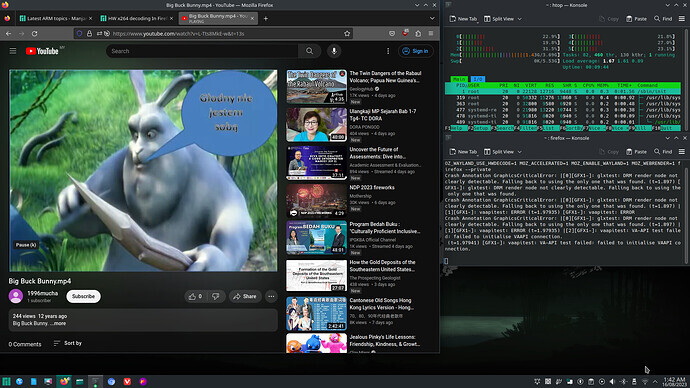
Please do not take this as Debian vs Manjaro. Looks like without vpu acceleration enabled, Firefox 116 doesn’t seem to perform better than Firefox-115 at least based on streaming Youtube.
im not to build, just give a try add ‘ac_add_option --enable-v4l2|v4l2m2m|v4l2-m2m’ been kick off, not supported.
ps. firefox-117.b9
in /usr/lib/firefox, ./v4l2test -d /dev/video10
V4L2_SPLANE
FALSE
V4L2_MPLANE
TRUE
V4L2_CAPTURE_FMTS
YU12 YV12 NV12 NV21 NC12 RGBP
V4L2_OUTPUT_FMTS
H264 MJPG
V4L2_SUPPORTED
TRUE
Does this means you are able to have vpu hw acceleration streaming video on Firefox 117-b9?
no, found v4l2test from 116.
firefox found --enable-openmax option & ffmpeg --enable-omx.
does this do any good?
On 32bit OS.
does means not supported for 64bit kernel?
ok, removed ffmpeg6.
old question, how to confirm v4l2 work?
playing YT-480p CPU 60% up/down.
See my post #85 above. Start firefox with:
MOZ_GFX_DEBUG=1 MOZ_LOG="PlatformDecoderModule:5" firefox
Look for the debug lines that start with [h264_v4l2m2m @ showing it is using v4l2m2m. They go by really fast so I start and stop the mp4 video really fast to see them. Actually I just hovered over the video on youtbe for a second with out clicking on it.
got some message captured, don’t know what its means?
[h264_v4l2m2m @ 0xffffa4f8e800] capture: Buffer requeue
[h264_v4l2m2m @ 0xffffa4f8e800] --- capture VIDIOC_QBUF: index 18, ts=0.000324 count=9
[h264_v4l2m2m @ 0xffffa4f8e800] capture: Buffer requeue
[h264_v4l2m2m @ 0xffffa4f8e800] --- capture VIDIOC_QBUF: index 1, ts=0.000322 count=10
[RDD 4892: MediaPDecoder #3]: D/PlatformDecoderModule FFMPEG: Frame decode finished, time 1.24 ms averange decode time 1.87 ms decoded 344 frames
[RDD 4892: MediaPDecoder #3]: D/PlatformDecoderModule FFMPEG: V4L2 Got one frame output with pts=11433333 dts=11433333 duration=33333 opaque=-9223372036854775808type or paste code here
Means it’s working.
ha, forgot to mention, captured form 117-b9 not 116.
build through night about 10 hours on Pi4, ‘./mach build’.
so, 116 NEWS was fake?