I have the impression that there are two parallel plasmashell instances running.
When launching Plasma 6 X11 from SDDM, I have to exit and enter the desktop once or twice for the desktop to be fully responsive (keyboard shortcuts not working, emacs can’t connect to a systemd server session).
Instances
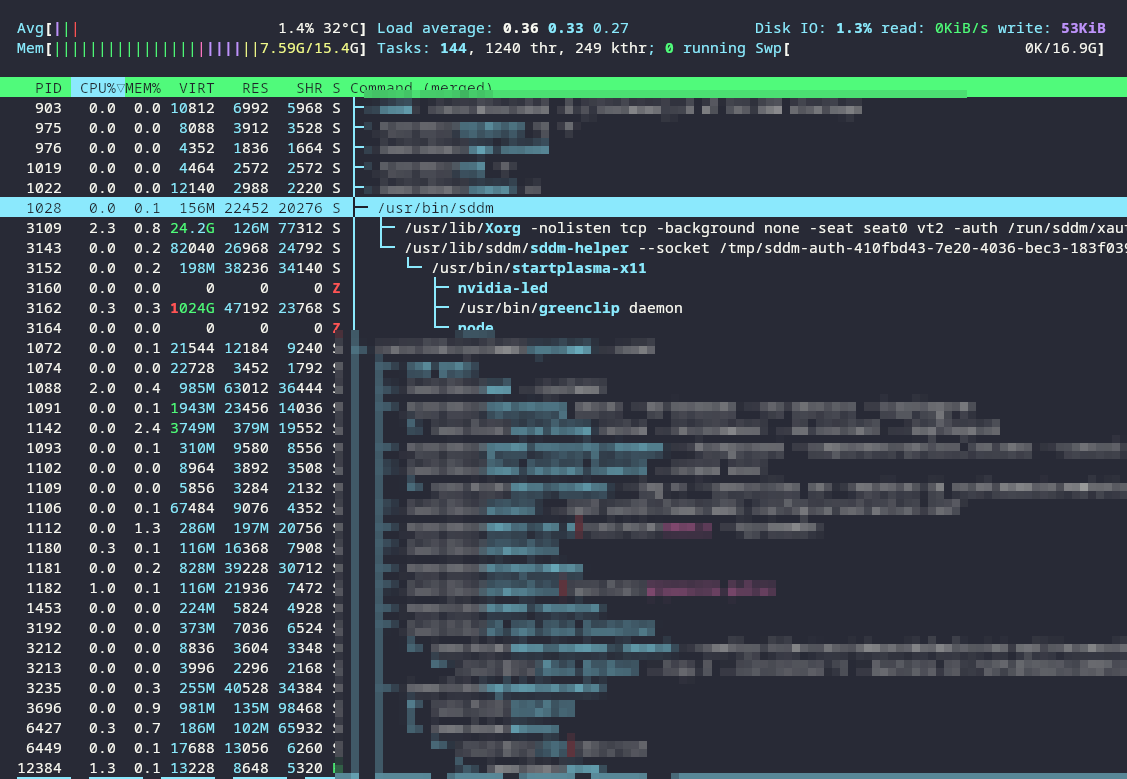
- The proper one via SDDM (see picture #1)
- The wayland duplicate instance launched by systemd in user mode (see picture #2)
- After a restart, after completing SDDM login (or even with disabled SDDM) I have
kwin_wayland_wrapperrunning - It appears to be direct child of
/usr/lib/systemd/systemd --user
- After a restart, after completing SDDM login (or even with disabled SDDM) I have
Plan
I think what I need to do is disable the systemd-user services that launch plasma with wayland. But systemctl --user disable plasma-kwin_wayland.service fails as it’s a descedant of another unit.

  UNIT                                            LOAD   ACTIVE SUB     DESCRIPTION
  app-geoclue\x2ddemo\x2dagent@autostart.service  loaded active running Geoclue Demo agent
  app-greenclip@autostart.service                 loaded active running greenclip manager clipboard
  app-kaccess@autostart.service                   loaded active running Accessibility
  app-org.kde.discover.notifier@autostart.service loaded active running Discover
  app-pamac\x2dtray\x2dplasma@autostart.service   loaded active running Update Notifier Tray Icon
  app-zeitgeist\x2ddatahub@autostart.service      loaded active running Zeitgeist Datahub
  aria2cd.service                                 loaded active running Aria2 Daemon
  at-spi-dbus-bus.service                         loaded active running Accessibility services bus
  dbus-:1.3-org.kde.kdeconnect@1.service          loaded active running dbus-:1.3-org.kde.kdeconnect@1.service
  dbus-:1.84-org.a11y.atspi.Registry@0.service    loaded active running dbus-:1.84-org.a11y.atspi.Registry@0.service
  dbus-broker.service                             loaded active running D-Bus User Message Bus
  dconf.service                                   loaded active running User preferences database
  emacs.service                                   loaded active running Emacs text editor
  gnome-keyring-daemon.service                    loaded active running GNOME Keyring daemon
  gvfs-daemon.service                             loaded active running Virtual filesystem service
  mpd.service                                     loaded active running Music Player Daemon
  pipewire-pulse.service                          loaded active running PipeWire PulseAudio
  pipewire.service                                loaded active running PipeWire Multimedia Service
  plasma-gmenudbusmenuproxy.service               loaded active running Proxies GTK DBus menus to a Plasma readable format
  plasma-kactivitymanagerd.service                loaded active running KActivityManager Activity manager Service
  plasma-kded6.service                            loaded active running KDE Daemon 6
  plasma-kglobalaccel.service                     loaded active running KDE Global Shortcuts Server
  plasma-krunner.service                          loaded active running KRunner
  plasma-kscreen.service                          loaded active running KScreen
  plasma-ksmserver.service                        loaded active running KDE Session Management Server
  plasma-kwin_x11.service                         loaded active running KDE Window Manager
  plasma-plasmashell.service                      loaded active running KDE Plasma Workspace
  plasma-polkit-agent.service                     loaded active running KDE PolicyKit Authentication Agent
  plasma-powerdevil.service                       loaded active running Powerdevil
  plasma-xdg-desktop-portal-kde.service           loaded active running Xdg Desktop Portal For KDE
  plasma-xembedsniproxy.service                   loaded active running Handle legacy xembed system tray icons
  syncthing.service                               loaded active running Syncthing - Open Source Continuous File Synchronization
  wireplumber.service                             loaded active running Multimedia Service Session Manager
  xdg-desktop-portal.service                      loaded active running Portal service
  xdg-document-portal.service                     loaded active running flatpak document portal service
  xdg-permission-store.service                    loaded active running sandboxed app permission store
  zeitgeist-fts.service                           loaded active running Zeitgeist full-text search indexer
  zeitgeist.service                               loaded active running Zeitgeist activity log service

Legend: LOAD   → Reflects whether the unit definition was properly loaded.
        ACTIVE → The high-level unit activation state, i.e. generalization of SUB.
        SUB    → The low-level unit activation state, values depend on unit type.

38 loaded units listed.
System:
  Kernel: 6.9.0-1-MANJARO arch: x86_64 bits: 64 compiler: gcc v: 13.2.1
    clocksource: tsc avail: hpet,acpi_pm
    parameters: BOOT_IMAGE=/boot/vmlinuz-6.9-x86_64
    root=UUID=241227a5-8577-4d5e-8e22-a7a71811402d rw acpi_osi=!
    "acpi_osi=Windows 2015" quiet splash
    resume=UUID=1b3384a0-ba34-41af-86aa-c7969bda3901 udev.log_priority=3
  Desktop: KDE Plasma v: 6.0.4 tk: Qt v: N/A info: frameworks v: 6.1.0
    wm: kwin_x11 with: krunner tools: avail: light-locker, xlock, xscreensaver
    vt: 2 dm: SDDM Distro: Manjaro base: Arch Linux
Machine:
  Type: Desktop Mobo: ASRock model: B660M-ITX/ac serial: <superuser required>
    uuid: <superuser required> UEFI: American Megatrends LLC. v: 5.03
    date: 09/06/2022
Battery:
  Device-1: hidpp_battery_0 model: Logitech Performance MX serial: <filter>
    charge: 10% (should be ignored) rechargeable: yes status: discharging
CPU:
  Info: model: 12th Gen Intel Core i5-12600K bits: 64 type: MST AMCP
    arch: Alder Lake gen: core 12 level: v3 note: check built: 2021+
    process: Intel 7 (10nm ESF) family: 6 model-id: 0x97 (151) stepping: 2
    microcode: 0x34
  Topology: cpus: 1x cores: 10 mt: 6 tpc: 2 st: 4 threads: 16 smt: enabled
    cache: L1: 864 KiB desc: d-4x32 KiB, 6x48 KiB; i-6x32 KiB, 4x64 KiB
    L2: 9.5 MiB desc: 6x1.2 MiB, 1x2 MiB L3: 20 MiB desc: 1x20 MiB
  Speed (MHz): avg: 816 high: 991 min/max: 800/4900:3600 scaling:
    driver: intel_pstate governor: powersave cores: 1: 800 2: 800 3: 991 4: 800
    5: 800 6: 868 7: 800 8: 800 9: 800 10: 801 11: 800 12: 800 13: 800 14: 800
    15: 800 16: 800 bogomips: 118000
  Flags: avx avx2 ht lm nx pae sse sse2 sse3 sse4_1 sse4_2 ssse3 vmx
  Vulnerabilities:
  Type: gather_data_sampling status: Not affected
  Type: itlb_multihit status: Not affected
  Type: l1tf status: Not affected
  Type: mds status: Not affected
  Type: meltdown status: Not affected
  Type: mmio_stale_data status: Not affected
  Type: reg_file_data_sampling mitigation: Clear Register File
  Type: retbleed status: Not affected
  Type: spec_rstack_overflow status: Not affected
  Type: spec_store_bypass mitigation: Speculative Store Bypass disabled via
    prctl
  Type: spectre_v1 mitigation: usercopy/swapgs barriers and __user pointer
    sanitization
  Type: spectre_v2 mitigation: Enhanced / Automatic IBRS; IBPB:
    conditional; RSB filling; PBRSB-eIBRS: SW sequence; BHI: BHI_DIS_S
  Type: srbds status: Not affected
  Type: tsx_async_abort status: Not affected
Graphics:
  Device-1: NVIDIA GP106 [GeForce GTX 1060 6GB] driver: nvidia v: 550.78
    alternate: nouveau,nvidia_drm non-free: 545.xx+ status: current (as of
    2024-04; EOL~2026-12-xx) arch: Pascal code: GP10x process: TSMC 16nm
    built: 2016-2021 pcie: gen: 3 speed: 8 GT/s lanes: 16 bus-ID: 01:00.0
    chip-ID: 10de:1c03 class-ID: 0300
  Display: x11 server: X.Org v: 21.1.13 with: Xwayland v: 23.2.6
    compositor: kwin_x11 driver: X: loaded: N/A failed: nvidia gpu: nvidia
    display-ID: :0 screens: 1
  Screen-1: 0 s-res: 2560x1440 s-dpi: 122 s-size: 533x302mm (20.98x11.89")
    s-diag: 613mm (24.12")
  Monitor-1: Unknown-1 mapped: HDMI-0 res: 2560x1440 hz: 60 dpi: 124
    size: 526x296mm (20.71x11.65") modes: 800x600
  API: EGL v: 1.5 hw: drv: nvidia platforms: device: 0 drv: nvidia device: 2
    drv: swrast gbm: drv: kms_swrast surfaceless: drv: nvidia x11: drv: nvidia
    inactive: wayland,device-1
  API: OpenGL v: 4.6.0 compat-v: 4.5 vendor: nvidia mesa v: 550.78
    glx-v: 1.4 direct-render: yes renderer: NVIDIA GeForce GTX 1060
    6GB/PCIe/SSE2 memory: 5.86 GiB
  API: Vulkan v: 1.3.279 layers: 5 device: 0 type: discrete-gpu name: NVIDIA
    GeForce GTX 1060 6GB driver: nvidia v: 550.78 device-ID: 10de:1c03
    surfaces: xcb,xlib
Audio:
  Device-1: Intel Alder Lake-S HD Audio vendor: ASRock driver: snd_hda_intel
    v: kernel alternate: snd_soc_avs,snd_sof_pci_intel_tgl bus-ID: 00:1f.3
    chip-ID: 8086:7ad0 class-ID: 0403
  Device-2: NVIDIA GP106 High Definition Audio driver: snd_hda_intel
    v: kernel pcie: gen: 3 speed: 8 GT/s lanes: 16 bus-ID: 01:00.1
    chip-ID: 10de:10f1 class-ID: 0403
  Device-3: GYROCOM C&C NuForce µDAC 2
    driver: hid-generic,snd-usb-audio,usbhid type: USB rev: 1.1 speed: 12 Mb/s
    lanes: 1 mode: 1.1 bus-ID: 1-5.2:7 chip-ID: 1852:db96 class-ID: 0102
  API: ALSA v: k6.9.0-1-MANJARO status: kernel-api with: aoss
    type: oss-emulator tools: alsactl,alsamixer,amixer
  Server-1: sndiod v: N/A status: off tools: aucat,midicat,sndioctl
  Server-2: JACK v: 1.9.22 status: off tools: N/A
  Server-3: PipeWire v: 1.0.5 status: active with: 1: pipewire-pulse
    status: active 2: wireplumber status: active 3: pipewire-alsa type: plugin
    tools: pactl,pw-cat,pw-cli,wpctl
Network:
  Device-1: Intel Alder Lake-S PCH CNVi WiFi driver: iwlwifi v: kernel
    bus-ID: 00:14.3 chip-ID: 8086:7af0 class-ID: 0280
  IF: wlp0s20f3 state: down mac: <filter>
  Device-2: Intel Ethernet I219-V vendor: ASRock driver: e1000e v: kernel
    port: N/A bus-ID: 00:1f.6 chip-ID: 8086:1a1d class-ID: 0200
  IF: enp0s31f6 state: up speed: 100 Mbps duplex: full mac: <filter>
  Info: services: NetworkManager, sshd, systemd-timesyncd
Bluetooth:
  Device-1: Intel Bluetooth 9460/9560 Jefferson Peak (JfP) driver: btusb
    v: 0.8 type: USB rev: 2.0 speed: 12 Mb/s lanes: 1 mode: 1.1 bus-ID: 1-14:6
    chip-ID: 8087:0aaa class-ID: e001
  Report: rfkill ID: hci0 rfk-id: 0 state: down bt-service: enabled,running
    rfk-block: hardware: no software: yes address: see --recommends
Drives:
  Local Storage: total: 1.37 TiB used: 375.85 GiB (26.8%)
  SMART Message: Unable to run smartctl. Root privileges required.
  ID-1: /dev/nvme0n1 maj-min: 259:0 vendor: Intel model: SSDPEKNW010T8
    size: 953.87 GiB block-size: physical: 512 B logical: 512 B speed: 31.6 Gb/s
    lanes: 4 tech: SSD serial: <filter> fw-rev: 002C temp: 40.9 C scheme: GPT
  ID-2: /dev/sda maj-min: 8:0 vendor: Kingston model: SA400S37480G
    size: 447.13 GiB block-size: physical: 512 B logical: 512 B speed: 6.0 Gb/s
    tech: SSD serial: <filter> fw-rev: 66C5 scheme: GPT
Partition:
  ID-1: / raw-size: 429.9 GiB size: 422.08 GiB (98.18%)
    used: 375.85 GiB (89.0%) fs: ext4 dev: /dev/sda2 maj-min: 8:2
  ID-2: /boot/efi raw-size: 300 MiB size: 299.4 MiB (99.80%)
    used: 316 KiB (0.1%) fs: vfat dev: /dev/sda1 maj-min: 8:1
Swap:
  Kernel: swappiness: 60 (default) cache-pressure: 100 (default) zswap: yes
    compressor: zstd max-pool: 20%
  ID-1: swap-1 type: partition size: 16.93 GiB used: 0 KiB (0.0%)
    priority: -2 dev: /dev/sda3 maj-min: 8:3
Sensors:
  System Temperatures: cpu: 43.0 C mobo: N/A gpu: nvidia temp: 52 C
  Fan Speeds (rpm): fan-1: 853 fan-2: 369 fan-3: 0 fan-4: 0 fan-5: 0
    fan-7: 0 gpu: nvidia fan: 0%
Info:
  Memory: total: 16 GiB note: est. available: 15.39 GiB used: 7.98 GiB (51.9%)
  Processes: 398 Power: uptime: 2h 5m states: freeze,mem,disk suspend: deep
    avail: s2idle wakeups: 0 hibernate: platform avail: shutdown, reboot,
    suspend, test_resume image: 6.14 GiB services: org_kde_powerdevil,upowerd
    Init: systemd v: 255 default: graphical tool: systemctl
  Packages: 3220 pm: pacman pkgs: 3211 libs: 617 tools: octopi,pamac,yay,yup
    pm: flatpak pkgs: 9 Compilers: clang: 17.0.6 gcc: 13.2.1 Shell: Zsh v: 5.9
    running-in: kitty inxi: 3.3.34
6.9.0-1-MANJARO