Related topic: [How To] Basic System Security
What is OpenSnitch
OpenSnitch - Github is an application firewall.
Before you move on to installing and configuring the service - here is what to expect.
All network connections will now need your supervision and for each connection you will need to allow/deny the connection.
You will be very surprised - paranoid even - when you learn about the amount of traffic that is generated on your network.
In the default configuration - the action (that is, without your active involvment) will be Deny with a default 12h expiration.
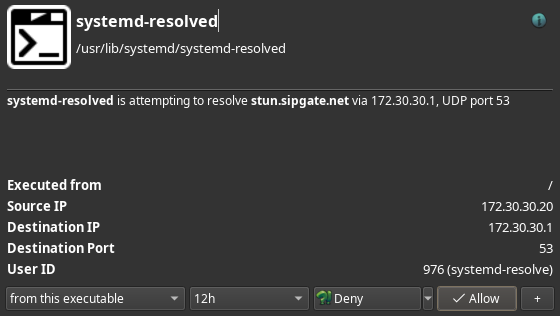
You are given a number of options, allowing you to fine tune the connection.
Carefully consider what you are doing, but don’t be afraid, rules are default temporary with a 12h lifetime.
In the main GUI you have the option to disable monitoring - this can be quite useful in the early exploration of the applications capabilities.
The defaults can be set in the settings dialog available from the main GUI.
If you want the main GUI to be available on boot, you can do so from the taskbar icon’s right click event.
The application is very extensive and does provide you with a tool to have granular control of outgoing network traffic.
Installation
 Installation commands assumes your system is fully up-to-date
That is, you have run sudo pacman -Syu before installing any new packages.
sudo pacman -S opensnitch
Enable and starting the service daemon
sudo systemctl enable --now opensnitchd.service
Start the OpenSnitch application from your systems launcher and begin your journey.