Help me fix sound in skyrim mods

Hello! I installed multiple mods on Skyrim using Limo and the absolute majority of sound affecting mods does not work.
Some things I noticed:

  • the game itself has no problem with sound and I never had to fix Skyrim vanilla sound.
  • any follower mod with their voiced dialogue does not have these problems. These types of mods usually have just several files in a mod folder, no dedicated sound folder.
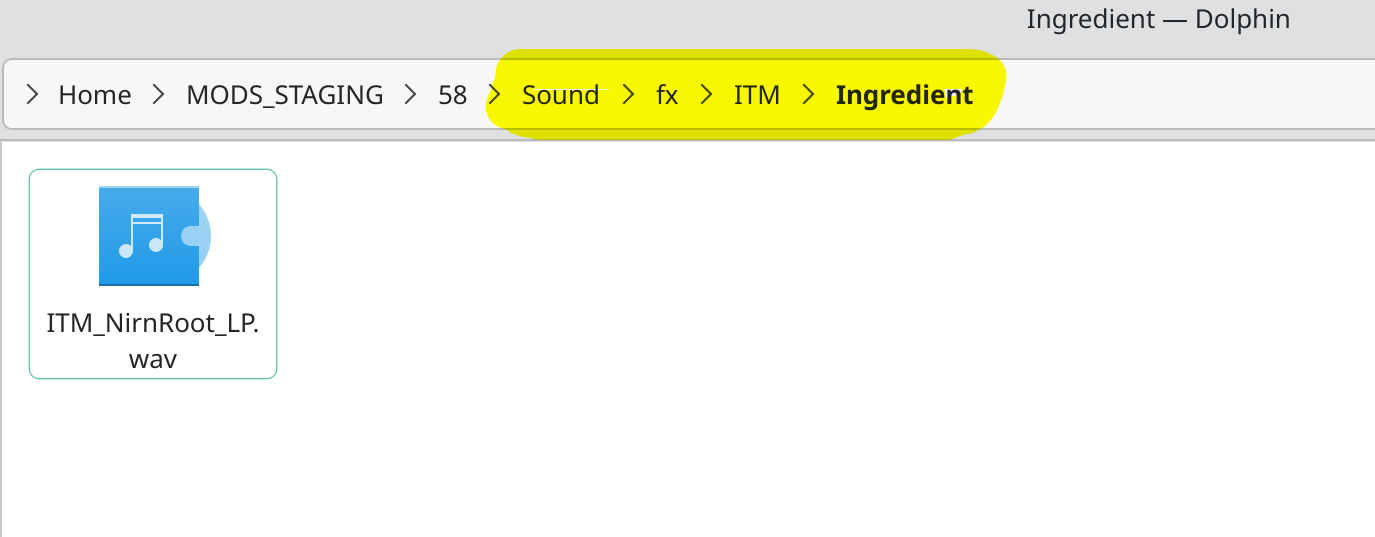
  • all the mods that do not work have dedicated sound folder and the file itself is located either in it or in several inner folders. for example here is the mod that was supposed to replace nirn root sound:

    the sound file has a path of several folders.

I am pretty sure that is what causing the problem, but i don’t want to mess with path to files blindly.

I also have a mod that replaces a sound that isn’t attached to an object - a music replacer for when you die. That mod put the sound file into a “music” folder and it works. Only those that have “sound” folder do not.

My system:

OS: Manjaro Linux x86_64
Kernel: 6.12.73-1-MANJARO
Packages: 1446 (pacman), 12 (flatpak)
Shell: bash 5.3.9

Any help will be appreciated!

No you probably don’t. It would most likely break the mod or potentially the whole game.

And there’s nothing wrong with a few hundred subfolders, if the situation requires it. But this is literally just a few, and it’s very common.

So you are running this through proton or wine?

There’s not much to go on. But I’m curious what kind of wav file those are in this particular mod.

What is the output of:

ffmpeg -i /really/long/path/to/file.wav

proton/proton experimental/ge - tried all of these with the same result

Input #0, wav, from '/home/user/MODS_STAGING/58/Sound/fx/ITM/Ingredient/ITM_NirnRoot_LP.wav':
  Metadata:
    encoder         : Lavf54.63.104
  Duration: 00:00:07.63, bitrate: 1411 kb/s
  Stream #0:0: Audio: pcm_s16le ([1][0][0][0] / 0x0001), 44100 Hz, stereo, s16, 1411 kb/s

Many sources say Skyrim needs mono sound files, and it’s not even picky about bit rate.

These files are stereo..

tried to convert to mono - did not help

i must admit i got distracted with path files because there were previous issues with deploying things on limo connected to it. i finally did what i was supposed to do from the start: tried to play the .wav files from the mods that didn’t work and discovered that they all don’t work as in no sound while playing.
i checked the mods that do work and all of them have different file types, no .wavs
i sent myself the nirn root .wav file and it plays on my phone, which proves that the file itself is fine.
also multiple tests like that showed no issues too

ffprobe -hide_banner /home/user/MODS_STAGING/58/Sound/fx/ITM/Ingredient/ITM_NirnRoot_LP.wav
Input #0, wav, from '/home/user/MODS_STAGING/58/Sound/fx/ITM/Ingredient/ITM_NirnRoot_LP.wav':
  Metadata:
    encoder         : Lavf54.63.104
  Duration: 00:00:07.63, bitrate: 1411 kb/s
  Stream #0:0: Audio: pcm_s16le ([1][0][0][0] / 0x0001), 44100 Hz, 2 channels, s16, 1411 kb/s

however these do not have neither sound nor any errors on my computer

It was a guess, I saw posts like this:

https://www.reddit.com/r/skyrimmods/comments/d1398g/skyrim_audio/

Your phone, and the Bethesda in-house coded engine to play audio, are two very different beasts.

aplay file.wav as a test on the PC you’re running it on, might be a little more useful, but still.

Focusing on the wav files may also be a red herring, too.

It could be something as simple as case sensitivity for the paths.

  • /home/user/MODS_STAGING/58/Sound/fx/ITM/Ingredient
  • /home/user/MODS_STAGING/58/Sound/FX/ITM/Ingredient

Both the same on Windows, not on a Linux FS.

(But I’ve only done a bit with proton.)

1 Like

Have a look here;

and here;

and here;

and especially, here:

From your description your issue seems to be with Skyrim rather than Manjaro.

From a brief Internet search it seems issues similar to this are common between versions of the game where a given mod is intended for a specific version of the game, for example.


Note that this topic may be closed without further comment.
Before anything, do you know for a fact these mods work proper on Windows? If no, this is your first step, confirm that point.