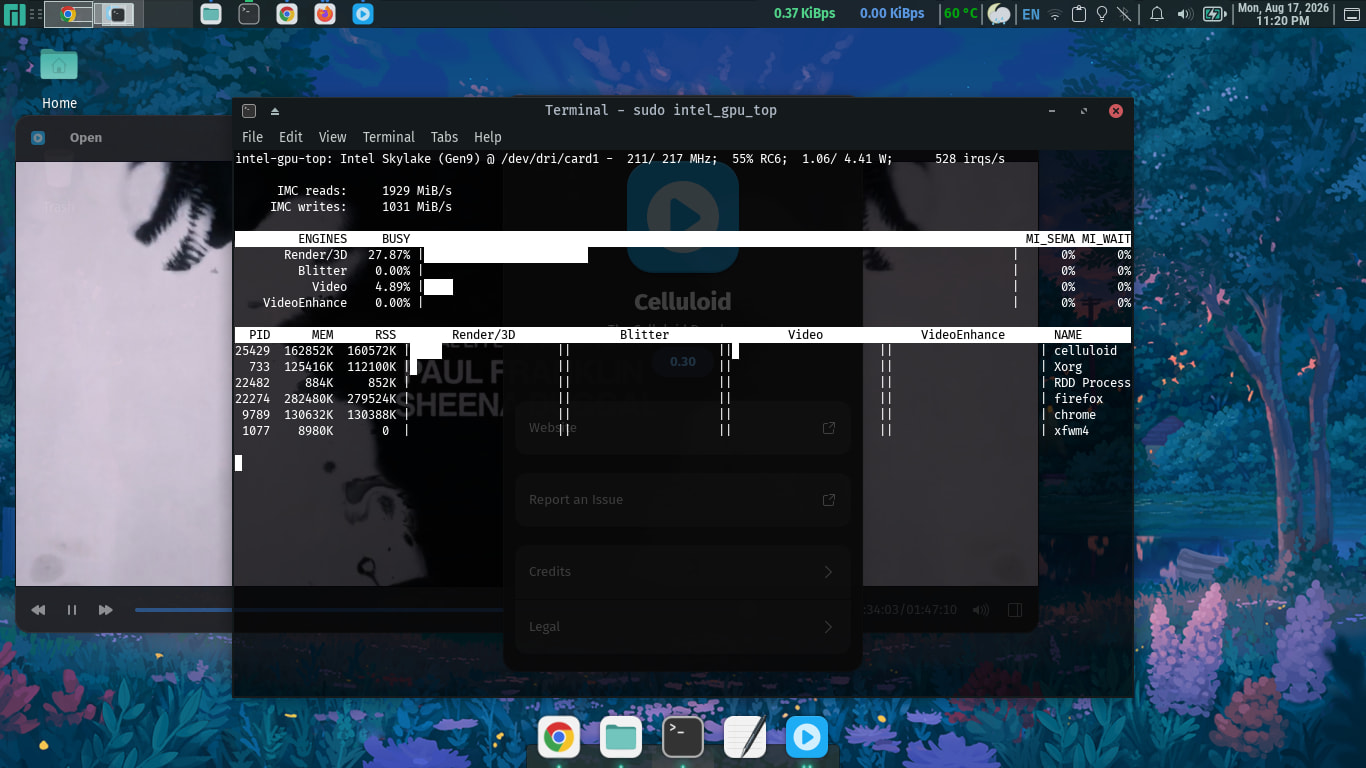
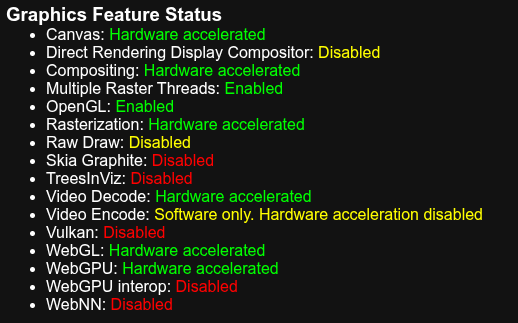
I have tried all the known launch flags and both iHD and i965 Vaapi drivers in /etc/environment. I also added i915 to the module. But none have worked so far.
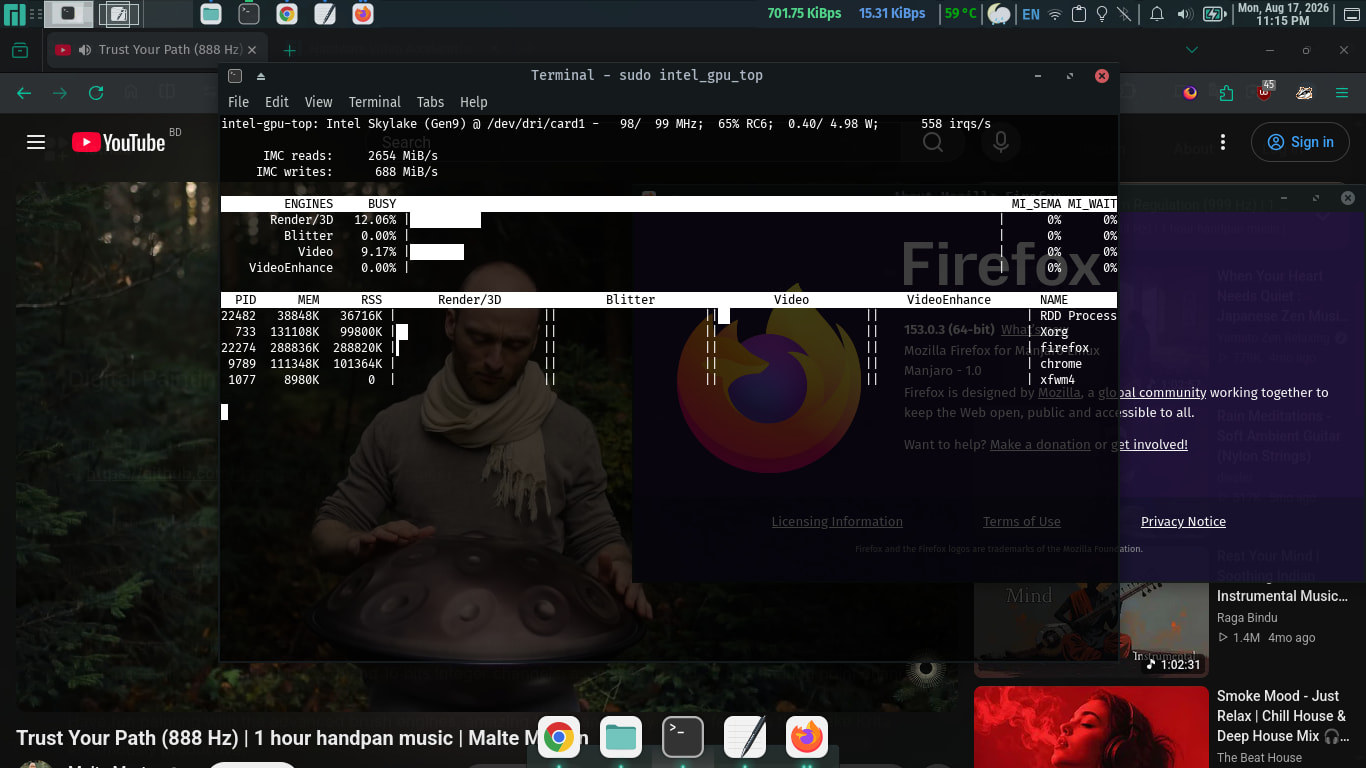
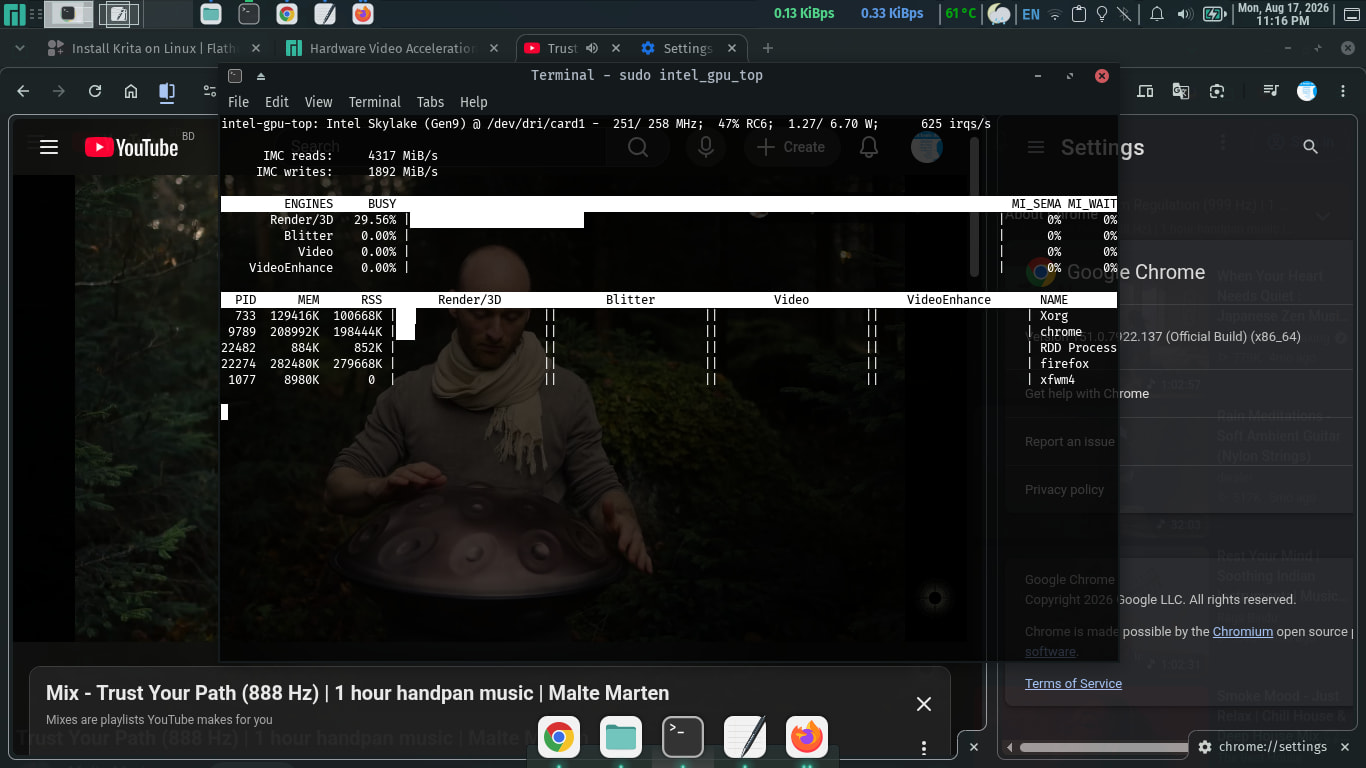
Hardware Video Decoding(Intel Vaapi) is only working for Firefox and not for Brave, Chromium or Google Chrome.
I also tried blocking VP8, VP9, and AV1. It allowed VAAPI in Firefox only, but Chromium-based browsers still failed.
These launch commands don’t work either.
--enable-features=VaapiVideoDecoder,VaapiIgnoreDriverChecks,VaapiVideoDecodeLinuxGL --ignore-gpu-blocklist
I also used MX Linux XFCE on the same PC, but VAAPI previously worked in Chromium-based browsers. Not any more.
My System Specifications:
inxi -Fxxz
System:
  Kernel: 6.18.44-1-MANJARO arch: x86_64 bits: 64 compiler: gcc v: 16.1.1
  Desktop: Xfce v: 4.20.2 tk: Gtk v: 3.24.52 wm: xfwm4 dm: LightDM
    Distro: Manjaro base: Arch Linux
Machine:
  Type: Laptop System: Dell product: Inspiron 5459 v: N/A
    serial: <superuser required> Chassis: type: 10 serial: <superuser required>
  Mobo: Dell model: 0F1J0W v: A00 serial: <superuser required> part-nu: 06B2
    Firmware: UEFI vendor: Dell v: 1.9.0 date: 09/07/2020
Battery:
  ID-1: BAT0 charge: 21.8 Wh (100%) condition: 21.8/32.6 Wh (66.9%)
    volts: 16.57 min: 14.8 model: SMP DELL VN3N047 serial: <filter> charging:
    status: full control: start: 75% end: 80% cycles: N/A
CPU:
  Info: dual core model: Intel Core i7-6500U bits: 64 type: MT MCP
    arch: Skylake rev: 3 cache: L1: 128 KiB L2: 512 KiB L3: 4 MiB
  Speed (MHz): avg: 2700 min/max: 400/3100 cores: 1: 2700 2: 2700 3: 2700
    4: 2700 bogomips: 20799
  Flags-basic: avx avx2 ht lm nx pae sse sse2 sse3 sse4_1 sse4_2 ssse3 vmx
Graphics:
  Device-1: Intel Skylake-U GT2 [HD Graphics 520] vendor: Dell driver: i915
    v: kernel arch: Gen-9 ports: active: eDP-1 empty: HDMI-A-1 bus-ID: 00:02.0
    chip-ID: 8086:1916
  Device-2: Advanced Micro Devices [AMD/ATI] Sun XT [Radeon HD
    8670A/8670M/8690M / R5 M330 M430 Radeon 520 Mobile] vendor: Dell
    driver: N/A arch: GCN-1 pcie: speed: 8 GT/s lanes: 4 bus-ID: 01:00.0
    chip-ID: 1002:6660
  Device-3: Microdia Integrated Webcam HD driver: uvcvideo type: USB
    rev: 2.0 speed: 480 Mb/s lanes: 1 bus-ID: 1-5:3 chip-ID: 0c45:6712
  Display: x11 server: X.Org v: 21.1.24 compositor: xfwm4 v: 4.20.0 driver:
    X: loaded: modesetting alternate: fbdev,vesa dri: iris gpu: i915
    display-ID: :0.0 screens: 1
  Screen-1: 0 s-res: 1366x768 s-dpi: 96
  Monitor-1: eDP-1 model: ChiMei InnoLux 0x14c3 res: 1366x768 hz: 60
    dpi: 112 diag: 354mm (13.9")
  API: EGL v: 1.5 platforms: device: 0 drv: iris device: 1 drv: swrast gbm:
    drv: iris surfaceless: drv: iris x11: drv: iris inactive: wayland
  API: OpenGL v: 4.6 vendor: intel mesa v: 26.1.6-arch1.1 glx-v: 1.4
    direct-render: yes renderer: Mesa Intel HD Graphics 520 (SKL GT2)
    device-ID: 8086:1916
  API: Vulkan v: 1.4.357 surfaces: N/A device: 0 type: integrated-gpu
    driver: mesa intel device-ID: 8086:1916
  Info: Tools: api: clinfo, eglinfo, glxinfo, vulkaninfo
    de: xfce4-display-settings gpu: gputop, intel_gpu_top, lsgpu
    x11: xdpyinfo, xprop, xrandr
Audio:
  Device-1: Intel Sunrise Point-LP HD Audio vendor: Dell driver: snd_hda_intel
    v: kernel bus-ID: 00:1f.3 chip-ID: 8086:9d70
  API: ALSA v: k6.18.44-1-MANJARO status: kernel-api with: aoss
    type: oss-emulator
  Server-1: sndiod v: N/A status: off
  Server-2: JACK v: 1.9.22 status: off
  Server-3: PipeWire v: 1.6.8 status: active with: 1: pipewire-pulse
    status: active 2: wireplumber status: active 3: pipewire-alsa type: plugin
Network:
  Device-1: Intel Wireless 3160 driver: iwlwifi v: kernel pcie:
    speed: 2.5 GT/s lanes: 1 bus-ID: 02:00.0 chip-ID: 8086:08b3
  IF: wlp2s0 state: up mac: <filter>
  Device-2: Realtek RTL810xE PCI Express Fast Ethernet vendor: Dell
    driver: r8169 v: kernel pcie: speed: 2.5 GT/s lanes: 1 port: d000
    bus-ID: 03:00.0 chip-ID: 10ec:8136
  IF: enp3s0 state: down mac: <filter>
Bluetooth:
  Device-1: Intel Bluetooth wireless interface driver: btusb v: 0.8 type: USB
    rev: 2.0 speed: 12 Mb/s lanes: 1 bus-ID: 1-8:5 chip-ID: 8087:07dc
  Report: rfkill ID: hci0 rfk-id: 0 state: down bt-service: enabled,running
    rfk-block: hardware: no software: yes address: see --recommends
Drives:
  Local Storage: total: 931.51 GiB used: 96.05 GiB (10.3%)
  ID-1: /dev/sda vendor: Samsung model: ST1000LM024 HN-M101MBB
    size: 931.51 GiB speed: 6.0 Gb/s serial: <filter>
Partition:
  ID-1: / size: 209.58 GiB used: 24.81 GiB (11.8%) fs: ext4 dev: /dev/sda1
  ID-2: /boot size: 1.9 GiB used: 162.1 MiB (8.3%) fs: ext4 dev: /dev/sda6
  ID-3: /boot/efi size: 499 MiB used: 58.4 MiB (11.7%) fs: vfat
    dev: /dev/sda2
Swap:
  ID-1: swap-1 type: zram size: 3.79 GiB used: 467.2 MiB (12.0%) priority: 100
    dev: /dev/zram0
  ID-2: swap-2 type: partition size: 8 GiB used: 0 KiB (0.0%) priority: -2
    dev: /dev/sda7
Sensors:
  System Temperatures: cpu: 58.0 C pch: 52.0 C mobo: 58.0 C sodimm: 45.0 C
  Fan Speeds (rpm): cpu: 4146
Info:
  Memory: total: 8 GiB note: est. available: 7.58 GiB used: 2.67 GiB (35.3%)
  Processes: 266 Power: uptime: 47m wakeups: 0 Init: systemd v: 261
    default: graphical
  Packages: 1534 pm: pacman pkgs: 1521 pm: flatpak pkgs: 13 Compilers:
    gcc: 16.1.1 Shell: Zsh v: 5.9.2 running-in: xfce4-terminal inxi: 3.3.41
VAAPI related Info:
LIBVA_DRIVER_NAME=iHD vainfo --display x11
Trying display: x11
vainfo: VA-API version: 1.24 (libva 2.24.0)
vainfo: Driver version: Intel iHD driver for Intel(R) Gen Graphics - 26.2.4 ()
vainfo: Supported profile and entrypoints
      VAProfileNone                   :	VAEntrypointVideoProc
      VAProfileNone                   :	VAEntrypointStats
      VAProfileMPEG2Simple            :	VAEntrypointVLD
      VAProfileMPEG2Simple            :	VAEntrypointEncSlice
      VAProfileMPEG2Main              :	VAEntrypointVLD
      VAProfileMPEG2Main              :	VAEntrypointEncSlice
      VAProfileH264Main               :	VAEntrypointVLD
      VAProfileH264Main               :	VAEntrypointEncSlice
      VAProfileH264Main               :	VAEntrypointFEI
      VAProfileH264Main               :	VAEntrypointEncSliceLP
      VAProfileH264High               :	VAEntrypointVLD
      VAProfileH264High               :	VAEntrypointEncSlice
      VAProfileH264High               :	VAEntrypointFEI
      VAProfileH264High               :	VAEntrypointEncSliceLP
      VAProfileVC1Simple              :	VAEntrypointVLD
      VAProfileVC1Main                :	VAEntrypointVLD
      VAProfileVC1Advanced            :	VAEntrypointVLD
      VAProfileJPEGBaseline           :	VAEntrypointVLD
      VAProfileJPEGBaseline           :	VAEntrypointEncPicture
      VAProfileH264ConstrainedBaseline:	VAEntrypointVLD
      VAProfileH264ConstrainedBaseline:	VAEntrypointEncSlice
      VAProfileH264ConstrainedBaseline:	VAEntrypointFEI
      VAProfileH264ConstrainedBaseline:	VAEntrypointEncSliceLP
      VAProfileVP8Version0_3          :	VAEntrypointVLD
      VAProfileVP8Version0_3          :	VAEntrypointEncSlice
      VAProfileHEVCMain               :	VAEntrypointVLD
      VAProfileHEVCMain               :	VAEntrypointEncSlice
      VAProfileHEVCMain               :	VAEntrypointFEI
LIBVA_DRIVER_NAME=i965 vainfo --display x11
Trying display: x11
vainfo: VA-API version: 1.24 (libva 2.24.0)
vainfo: Driver version: Intel i965 driver for Intel(R) Skylake - 2.4.5
vainfo: Supported profile and entrypoints
      VAProfileMPEG2Simple            :	VAEntrypointVLD
      VAProfileMPEG2Simple            :	VAEntrypointEncSlice
      VAProfileMPEG2Main              :	VAEntrypointVLD
      VAProfileMPEG2Main              :	VAEntrypointEncSlice
      VAProfileH264ConstrainedBaseline:	VAEntrypointVLD
      VAProfileH264ConstrainedBaseline:	VAEntrypointEncSlice
      VAProfileH264ConstrainedBaseline:	VAEntrypointEncSliceLP
      VAProfileH264ConstrainedBaseline:	VAEntrypointFEI
      VAProfileH264ConstrainedBaseline:	VAEntrypointStats
      VAProfileH264Main               :	VAEntrypointVLD
      VAProfileH264Main               :	VAEntrypointEncSlice
      VAProfileH264Main               :	VAEntrypointEncSliceLP
      VAProfileH264Main               :	VAEntrypointFEI
      VAProfileH264Main               :	VAEntrypointStats
      VAProfileH264High               :	VAEntrypointVLD
      VAProfileH264High               :	VAEntrypointEncSlice
      VAProfileH264High               :	VAEntrypointEncSliceLP
      VAProfileH264High               :	VAEntrypointFEI
      VAProfileH264High               :	VAEntrypointStats
      VAProfileH264MultiviewHigh      :	VAEntrypointVLD
      VAProfileH264MultiviewHigh      :	VAEntrypointEncSlice
      VAProfileH264StereoHigh         :	VAEntrypointVLD
      VAProfileH264StereoHigh         :	VAEntrypointEncSlice
      VAProfileVC1Simple              :	VAEntrypointVLD
      VAProfileVC1Main                :	VAEntrypointVLD
      VAProfileVC1Advanced            :	VAEntrypointVLD
      VAProfileNone                   :	VAEntrypointVideoProc
      VAProfileJPEGBaseline           :	VAEntrypointVLD
      VAProfileJPEGBaseline           :	VAEntrypointEncPicture
      VAProfileVP8Version0_3          :	VAEntrypointVLD
      VAProfileVP8Version0_3          :	VAEntrypointEncSlice
      VAProfileHEVCMain               :	VAEntrypointVLD
      VAProfileHEVCMain               :	VAEntrypointEncSlice
Images of browsers utilising VAAPI/Software Rendering
MPV, VLC and Celluloid utilise VAAPI perfectly.