Gwenview crashed on mp4, mjpg files

It worked fine, but after some system update, probably around 1-2 months ago gwenvire crashes when I tr to play mp4 video files. Other video players are fine (vlc, mpv).

Error message is like this:

[h264 @ 0x562d31e53180] Device does not support the VK_KHR_video_decode_queue extension!
[h264 @ 0x562d31e53180] Failed setup for format vulkan: hwaccel initialisation returned error.
Segmentation fault (core dumped) gwenview

I checked if the phonon-qt6 packages are installed. But have no idea what else can be wrong.

P.

We can begin with some system info;

inxi -zv8 | grep -vE 'MAC|UUID|IP'

A sort mirrors and sync and upgrade dance couldnt hurt;

sudo pacman-mirrors --fasttrack --api --timeout 3 && sudo pacman-mirrors

Throw in some Journal:

journalctl -p3 -xb --no-hostname

Check Vulkan:d

vulkaninfo | grep VK_KHR_video_encode_queue
  • :light_bulb: Test with a new user (no config) to verify.

That crash message means Gwenview is trying to use Vulkan’s VK_KHR_video_decode_queue extension for hardware-accelerated video decoding via Vulkan, but not all devices or drivers expose it.

We have no idea what hardware you have.

I have phonon-qt6-vlc and phonon-qt6 both installed which switches video from Vlkan-based backens to VLC, VLC is more broadly compatible… but you say you have them already.

3 Likes

I managed to get rid of the

messages by installing some driver package (vulkan-intel or something similiar). Now only

Segmentation fault (core dumped) gwenview

left :wink:

vulkaninfo | grep VK_KHR_video_encode_queue
nothing here, I found info, that mesa did not yet implement it.

inxi -zv8 | grep -vE 'MAC|UUID|IP'

(removed some output)

System:   Kernel: 6.16.8-1-MANJARO arch: x86_64 bits: 64 compiler: gcc v: 15.2.1     clocksource: tsc avail: acpi_pm     parameters: BOOT_IMAGE=/boot/vmlinuz-6.16-x86_64     acpi_osi=Linux   Desktop: KDE Plasma v: 6.3.6 tk: Qt v: N/A info: frameworks v: 6.18.0     wm: kwin_wayland with: krunner vt: 1 dm: SDDM Distro: Manjaro     base: Arch Linux Machine:   Type: Laptop System: Dream Machines product: NS5x_NS7xPU v: N/A     serial: <superuser required> Chassis: type: 10 serial: <superuser required>   Mobo: Dream Machines model: NS5x_NS7xPU serial: <superuser required>     uuid: <superuser required> UEFI: INSYDE v: 1.07.07TDES1 date: 06/08/2022 ….
CPU:   Info: model: 12th Gen Intel Core i5-1240P bits: 64 type: MST AMCP     arch: Alder Lake level: v3 note: check built: 2021+     process: Intel 7 (10nm ESF) family: 6 model-id: 0x9A (154) stepping: 3     microcode: 0x437 …..
Graphics:   Device-1: Intel Alder Lake-P Integrated Graphics vendor: CLEVO/KAPOK     driver: i915 v: kernel alternate: xe arch: Xe process: Intel 10nm     built: 2021-22+ ports: active: HDMI-A-1,eDP-1     empty: DP-1, DP-2, DP-3, DP-4 bus-ID: 0000:00:02.0 chip-ID: 8086:4626     class-ID: 0300   Device-2: Chicony USB2.0 Camera driver: uvcvideo type: USB rev: 2.0     speed: 480 Mb/s lanes: 1 mode: 2.0 bus-ID: 3-7:2 chip-ID: 04f2:b6f9     class-ID: 0e02 serial: <filter>   Display: wayland server: X.org v: 1.21.1.18 with: Xwayland v: 24.1.8     compositor: kwin_wayland driver: X: loaded: modesetting     alternate: fbdev,vesa dri: iris gpu: i915 d-rect: 4480x2520 display-ID: 0   Monitor-1: HDMI-A-1 pos: top-right model: AOC Q2790 serial: <filter>     built: 2019 res: mode: 2560x1440 hz: 60 scale: 100% (1) dpi: 109 gamma: 1.2     chroma: red: x: 0.655 y: 0.337 green: x: 0.322 y: 0.612 blue: x: 0.153     y: 0.059 white: x: 0.314 y: 0.329 size: 597x336mm (23.5x13.23")     diag: 685mm (27") ratio: 16:9 modes: 2560x1440, 1920x1080, 1280x1440,     1680x1050, 1280x1024, 1440x900, 1280x960, 1280x720, 1024x768, 832x624,     800x600, 720x576, 720x480, 640x480, 720x400   Monitor-2: eDP-1 pos: bottom-l model: AU Optronics 0x489d built: 2019 res:     mode: 1920x1080 hz: 60 scale: 100% (1) dpi: 128 gamma: 1.2 chroma: red:     x: 0.576 y: 0.345 green: x: 0.349 y: 0.580 blue: x: 0.161 y: 0.125 white:     x: 0.314 y: 0.329 size: 381x214mm (15x8.43") diag: 437mm (17.2")     ratio: 16:9 modes: 1920x1080   EDID-Warnings: 1: parse_edid: unknown flag 0   API: EGL v: 1.5 hw: drv: intel iris platforms: device: 0 drv: iris     device: 1 drv: swrast gbm: drv: iris surfaceless: drv: iris wayland:     drv: iris x11: drv: iris   API: OpenGL v: 4.6 compat-v: 4.5 vendor: intel mesa v: 25.2.3-arch1.2     glx-v: 1.4 direct-render: yes renderer: Mesa Intel Graphics (ADL GT2)     device-ID: 8086:4626 memory: 30.32 GiB unified: yes display-ID: :1.0   API: Vulkan v: 1.4.321 layers: 9 device: 0 type: integrated-gpu name: Intel     Graphics (ADL GT2) driver: mesa intel v: 25.2.3-arch1.2     device-ID: 8086:4626 surfaces: N/A   Info: Tools: api: clinfo, eglinfo, glxinfo, vulkaninfo     de: kscreen-console,kscreen-doctor gpu: gputop, intel_gpu_top, lsgpu     wl: wayland-info x11: xdpyinfo, xprop, xrandr 

IMHO this Intel Iris xe support iplus wayland s problematic since the beginning, some small issue, desktop glitches, small things but annoying. But above is something new.

Fck, I checked with fresh KDE user, why it works??! So it’s clean time, any suggestions?

mv ./.config/gwenviewrc ./.config/gwenviewrc-backup

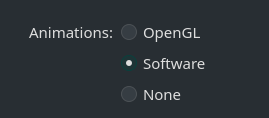
was enough, gwenview plays video again. Some setting, gfx related I guess:

Switch to Opengl and crash.

You might also want to try switching to the linux617 kernel, as the Intel xe driver should load & work automatically:

  • Another significant milestone with the Intel Xe driver code for Linux 6.17 is that Intel is dropping the “force_probe” requirement for Panther Lake graphics. This is basically promoting Panther Lake out of being an experimental target. Thus with Linux 6.17 you will now find the Xe3 Panther Lake graphics enabled out-of-the-box. This is great news with Ubuntu 25.10, Fedora 43, and others expected to ship with Linux 6.17.
1 Like

Great news, finally I would say. But in Manjaro 6.17 is still rc only, will wait a bit.

linux617 in Stable branch isn’t release candidate. I actually checked yesterday before I posted the recommendation to switch to it. Although I think the version in Stable branch yesterday may have been 6.17.0 (the first official release). It was definitely not an RC version.

Here’s confirmation of the versions currently in each branch:

mbn info linux617 -q | grep -Ev 'Name|Repository|Packager'
Branch         : unstable
Version        : 6.17.1-1
Build Date     : Mon 06 Oct 2025 22:21:47 
Branch         : testing
Version        : 6.17.1-1
Build Date     : Mon 06 Oct 2025 22:21:47 
Branch         : stable
Version        : 6.17.1-0
Build Date     : Tue 07 Oct 2025 18:57:35 

mbn can be found in the manjaro-check-repos package

Anyway, I was running the linux617 release candidates as my daily driver for approximately 2 months before the official release. Apart from an issue with the first RC version (6.17.0rc0-1 spammed the journal with amdgpu errors/warnings - it was fixed in 6.17.0rc0-3), my Testing branch system encountered no other issues:

scotty65's linux617 installation log
paclog --package=linux617
[2025-08-04T17:33:12+1000] [ALPM] installed linux617 (6.17.0rc0-1)
[2025-08-08T09:01:04+1000] [ALPM] upgraded linux617 (6.17.0rc0-1 -> 6.17.0rc0-3)
[2025-08-12T09:15:50+1000] [ALPM] upgraded linux617 (6.17.0rc0-3 -> 6.17.0rc1-1)
[2025-08-16T08:47:29+1000] [ALPM] upgraded linux617 (6.17.0rc1-1 -> 6.17.0rc1-4)
[2025-08-25T08:58:15+1000] [ALPM] upgraded linux617 (6.17.0rc1-4 -> 6.17.0rc2-2)
[2025-08-27T08:29:04+1000] [ALPM] upgraded linux617 (6.17.0rc2-2 -> 6.17.0rc3-2)
[2025-08-30T19:20:53+1000] [ALPM] upgraded linux617 (6.17.0rc3-2 -> 6.17.0rc3-4)
[2025-09-02T16:34:01+1000] [ALPM] upgraded linux617 (6.17.0rc3-4 -> 6.17.0rc4-1)
[2025-09-10T17:07:32+1000] [ALPM] upgraded linux617 (6.17.0rc4-1 -> 6.17.0rc5-1)
[2025-09-18T20:12:08+1000] [ALPM] upgraded linux617 (6.17.0rc5-1 -> 6.17.0rc6-1)
[2025-09-24T08:17:45+1000] [ALPM] upgraded linux617 (6.17.0rc6-1 -> 6.17.0rc7-1)
[2025-09-29T16:12:50+1000] [ALPM] upgraded linux617 (6.17.0rc7-1 -> 6.17.0-0)
[2025-10-02T09:12:29+1000] [ALPM] upgraded linux617 (6.17.0-0 -> 6.17.0-1)
[2025-10-07T19:12:45+1100] [ALPM] upgraded linux617 (6.17.0-1 -> 6.17.1-1)
2 Likes

I just use the simplest kernel install soft which is MAnjaro Settings Manager, there still is

I guess mirrrors did not update yet.

But important is Xe experience will be better soon.

This topic was automatically closed 3 days after the last reply. New replies are no longer allowed.