Mainboard: GigaByte B650 Aorus Elite AX V1.2.
Updated Bios from FB8 to FB9.
GigaByte Bios Description: “Secure Boot is enabled as system default”
O.k., I disabled SB.
But in “BIOS bootmenu” there was no manjaro boot-option any longer…
Booted into something like rescue only…
Had to boot by latest Live-Medium, using F12 for boot sequence.
Gparted told the EFI partition is unreadable.
Then manjaro-checkroot found the EFI Partition,
grub-install and update-grub renewed the Grub-bootloader.
After booting successfully
I had to do another update-grubl to correct the language to german…
.
That never happened with my Asus boards.
.
Seems GigaByte hates Linux? Looks like “Computer-Sabotage”. 
Hi @GaVenga,
I have a Gigabyte motherboard myself, and can’t really remember that I had to reinstall grub after updating the UEFI/BIOS.
Scratch this.
I think, perhaps, you grub coonfig relies on device paths (/dev/xxx) which might change after an update. That is why I use UUIDs in mine.
In your /etc/fstab.
As I do. The only entry in Bios-Boot-menu was “UEFI-OS”.
If selected on my ASUS-Boards, this boots manjaro.
On Gigabyte this goes to a unknown screen like Grub-rescue
(I can’t remember exactly)…
<==> Grub killed?
In that case

I have no idea.
Is that is any consolation, it is not only gigabyte. My lenovo Insyde UEFI makes the same. Many OEMs reset the nvram/efi variables on update. That means, default settings and one has to disable secure boot again. It also means all custom boot entries will be gone (as a rule of a thumb everything that is not windows).
There is no way around this, one just has to know and be prepared: csm, raid and secureboot disable in the settings and then boot into live usb and restore grub.
It’s okay. On Wednesday night I did a BIOS update on my primary system with an Asrock B550 Taichi (3.40 –> 3.90) which caused my Windows install to commit suicide.
I hadn’t used that partition in almost a year (and even then it was only to update it). I did updates, turned off Bit-Locker as you’re supposed to before a BIOS update, and rebooted to the flash. Update done, Manjaro tested and okay, I booted Windows to find it wanted me to create a new PIN.
Turns out there’s no way to proceed past this point without connecting to the internet. I had forgotten to turn off Proton VPN’s Advanced Kill Switch which allows internet access only when connected through ProtonVPN. It had never occured to me that Windows would insist on internet access before login, and that this would trigger ProtonVPN’s kill switch.
Oh well. Since I used it only once a year to update it, and there’s no real data there, it’s no big deal. No need to replace it, or to recover that 512 GB partition for other use since I have 12TB across two SSDs in this machine. Plenty of remaining space.
I’m treating it as a gift from Santa Claus, instead of the usual coal. 
It’s an improvement, actually, since I can’t use the coal.
EDIT: It occurred to me that now I could comment out GRUB_DISABLE_OS_PROBER=false. Job done and tested. Time for a second cup. 
As @Teo suggests, when BIOS firmware is updated, you’re effectively working with a blank slate – everything, including the boot list needs to be reset/rebuilt – “UEFI-OS” (is generic) but should point to your newly installed Grub efi stub.
Sometimes it has to be manually selected in BIOS.
In any case, I might have just installed rEFInd to quickly be able to boot and work around the problem;
sudo pacman -S refind
sudo refind-install
Once safely booting to the kernel stub with rEFInd, I could then focus on the Grub issue in relative comfort.
Chroot in live mode, and do an efibootmgr.
I’m 100% sure it’s gonna be empty (BootCurrent not pointing to any *.efi)
In that case you gotta add efi record back manually:
Or if your uefi (“bios” menu) supports it, manually edit the BBS priority (at least thats how it’s called on my MSI mobo) - it’s responsible for the currently installed EFI files priority, and not to be confused with boot order, cause people usually do.
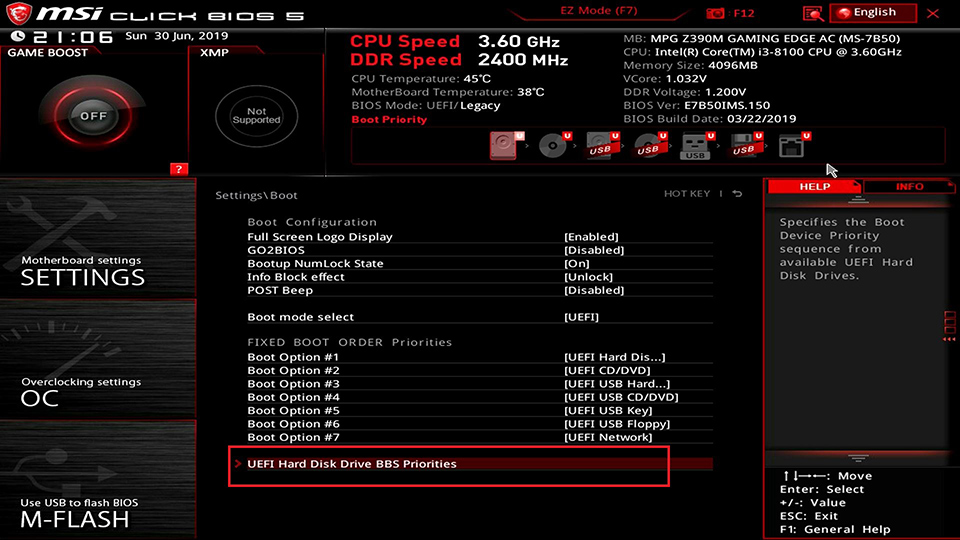
Yours could be called different.
Or before doing all the above you can also try pressing F9/10/whatever during boot to go into bbs/efi selector, look for Manjaro entry, and if you’re lucky it should be there, go press enter on it. Once you’re inside your system, do a sudo install-grub and sudo update-grub and confirm there’s now an EFI record via efibootmgr that points to (value of BootCurrent) Manjaro’s boot manager grub*.efi or shim*.efi . Reboot and this time it should autoboot into Manjaro, without any further manual intervention.
GL
You are forgetting not every UEFI out there is that fancy, so for the rest of us that do not have such msi board, live usb is still needed.
[1]
If installed and recently run, install-grub script may mitigate this altogether and the user might not notice that he is now booting from the fallback since it will be the same. This however, cannot be guaranteed in all cases, so just keep a live usb handy.
Footnotes ↩︎
No I’m not…


Yes this is what I started my reply with.
Does this mean that ASUS is doing sloppy work? 
(never had this problem with ASUS boards — until now 