Getting errors when trying to update with pacman from the terminal but not when using Gnome GUI

Hi, I need help fixing my father computer which runs Manjaro. My father usually uses Gnome GUI package installer to update the system. Recently he was sometimes getting a weird graphical issue, usually when he watches some YouTube videos and all of a sudden many small pixelated area on the screen appear. Then after restarting the computer the problem goes away and usually doesn’t come back until a about a day of using the computer. I suspected that this problem might be related to some Nvidia drivers not being updated, he showed me that in the Gnome GUI package installer it says Your system is up to date, but it seems like this was like that without many update for a long time, so I also tried sudo pacman -Syu from the terminal, and then I get this error:

error: core: missing required signature
error: extra: missing required signature
error: multilib: missing required signature
:: Synchronizing package databases...
 core                                                                                               150.4 KiB   251 KiB/s 00:01 [#############################################################################] 100%
error: failed retrieving file 'core.db.sig' from mirrors.eric.ovh : The requested URL returned error: 404
error: failed to synchronize all databases (failed to retrieve some files)

I would really appreciate any suggestions how to solve this.

Try this… :backhand_index_pointing_down:

sudo rm -rf /etc/pacman.d/gnupg
sudo pacman-key --init && sudo pacman-key --populate archlinux manjaro && sudo pacman -Syu
3 Likes
sudo rm -rf /etc/pacman.d/gnupg
sudo pacman-key --init
sudo pacman-key --populate archlinux manjaro
sudo pacman -Syu

Beaten to it by the boss…

2 Likes

Have you tried to refresh the list of mirrors?

sudo pacman-mirrors -c germany
or
sudo pacman-mirrors -f


There where/are a couple of .pacnew files
One of which is to update /etc/pacman.conf (the file is /etc/pacman.conf.pacnew)

one of the changes is that
SigLevel = PackageRequired
for each repo is no longer in that file by default

and another is:
DownloadUser = alpm
which was not in the file previously

But I have not merged this file yet myself - and everything still works.

3 Likes

I got this error after trying the second command:

sudo pacman-key --init && sudo pacman-key --populate archlinux manjaro && sudo pacman -Syu                                                                                                   ✔  10s  
gpg: /etc/pacman.d/gnupg/trustdb.gpg: trustdb created
gpg: no ultimately trusted keys found
gpg: starting migration from earlier GnuPG versions
gpg: porting secret keys from '/etc/pacman.d/gnupg/secring.gpg' to gpg-agent
gpg: migration succeeded
==> Generating pacman master key. This may take some time.
gpg: Generating pacman keyring master key...
gpg: directory '/etc/pacman.d/gnupg/openpgp-revocs.d' created
gpg: revocation certificate stored as '/etc/pacman.d/gnupg/openpgp-revocs.d/09FA9B8AB337A9D15D1DB0C009418F9409DF443F.rev'
gpg: Done
==> Updating trust database...
gpg: marginals needed: 3  completes needed: 1  trust model: pgp
gpg: depth: 0  valid:   1  signed:   0  trust: 0-, 0q, 0n, 0m, 0f, 1u
==> Appending keys from archlinux.gpg...
==> Appending keys from manjaro.gpg...
==> Locally signing trusted keys in keyring...
  -> Locally signed 23 keys.
==> Importing owner trust values...
gpg: setting ownertrust to 4
gpg: inserting ownertrust of 4
gpg: setting ownertrust to 4
gpg: inserting ownertrust of 4
gpg: setting ownertrust to 4
gpg: inserting ownertrust of 4
gpg: setting ownertrust to 4
==> Disabling revoked keys in keyring...
  -> Disabled 45 keys.
==> Updating trust database...
gpg: Note: third-party key signatures using the SHA1 algorithm are rejected
gpg: (use option "--allow-weak-key-signatures" to override)
gpg: marginals needed: 3  completes needed: 1  trust model: pgp
gpg: depth: 0  valid:   1  signed:  21  trust: 0-, 0q, 0n, 0m, 0f, 1u
gpg: depth: 1  valid:  21  signed:  85  trust: 0-, 0q, 0n, 21m, 0f, 0u
gpg: depth: 2  valid:  72  signed:  19  trust: 72-, 0q, 0n, 0m, 0f, 0u
gpg: next trustdb check due at 2026-03-13
error: core: missing required signature
error: extra: missing required signature
error: multilib: missing required signature
:: Synchronizing package databases...
 core                                                                                               150.4 KiB  64.5 KiB/s 00:02 [#############################################################################] 100%
error: failed retrieving file 'core.db.sig' from mirrors.eric.ovh : The requested URL returned error: 404
error: failed to synchronize all databases (failed to retrieve some files)

I tried it yesterday in different ways and I also tried this as you suggested and got this output:

sudo pacman-mirrors -c germany                                                                                                                                                              1 ✘  7s  
::INFO Downloading mirrors from Manjaro
::INFO => Mirror pool: https://repo.manjaro.org/mirrors.json
::INFO => Mirror status: https://repo.manjaro.org/status.json
::INFO Using default mirror file
::INFO Querying mirrors - This may take some time
  2.099 Germany        : https://mirror.alpix.eu/manjaro/
  1.303 Germany        : http://ftp.uni-kl.de/pub/linux/manjaro/
  0.712 Germany        : https://ftp.gwdg.de/pub/linux/manjaro/
  0.624 Germany        : https://mirror.23m.com/manjaro/
  0.691 Germany        : https://ftp.halifax.rwth-aachen.de/manjaro/
  2.141 Germany        : https://ftp.tu-chemnitz.de/pub/linux/manjaro/
  0.631 Germany        : https://mirror.netcologne.de/manjaro/
  3.655 Germany        : https://ftp.rz.tu-bs.de/pub/mirror/manjaro.org/repos/
  ..... Germany        : https://manjaro.kurdy.org/

::ERROR Connection 403 Client Error: Forbidden for url: https://manjaro.kurdy.org/stable/core/x86_64/core.db.tar.gz

::INFO Writing mirror list
::Germany         : https://mirror.23m.com/manjaro/stable
::Germany         : https://mirror.netcologne.de/manjaro/stable
::Germany         : https://ftp.halifax.rwth-aachen.de/manjaro/stable
::Germany         : https://ftp.gwdg.de/pub/linux/manjaro/stable
::Germany         : http://ftp.uni-kl.de/pub/linux/manjaro/stable
::Germany         : https://mirror.alpix.eu/manjaro/stable
::Germany         : https://ftp.tu-chemnitz.de/pub/linux/manjaro/stable
::Germany         : https://ftp.rz.tu-bs.de/pub/mirror/manjaro.org/repos/stable
::INFO Mirror list generated and saved to: /etc/pacman.d/mirrorlist

and I still get the same error when trying to sudo pacman -Syu.

read @ Nachlese post :wink:
you have a too old pacman.conf :wink: since a long time *.sig are not required.


Please note that you have not updated for quite some time. before update, prepare an ISO on a USB key for a chroot; and there may be quite a few pacnew files that need to be managed.

4 Likes

In regards to the second part, I’m not sure I understand. Do I need to change the file /etc/pacman.conf? And I also don’t think I have this file. I have /etc/pacman.d.

You should normally have had a pacman.conf.pacnew file when the changes were introduced — actually, there should have been several by now.

The idea of a .pacnew file is that you compare it to the existing configuration file and then merge the suggestions from the .pacnew into your existing configuation file.

You probably have loads of .pacnews by now. Check with… :backhand_index_pointing_down:

pacdiff -o

You do or at least should have an /etc/pacman.conf. If you do not, then you must have deleted it.

2 Likes

This is the output I get from pacdiff -o:

pacdiff -o                                                                                                                                                                                           ✔ 
/usr/share/icons/default/index.theme.pacnew
/etc/hosts.pacnew
/etc/passwd.pacnew
/etc/shells.pacnew
/etc/gdm/custom.conf.pacsave
/etc/locale.gen.pacnew
/etc/default/grub.pacnew
/etc/pamac.conf.pacnew
/etc/mkinitcpio.conf.pacnew
/etc/pacman.conf.pacnew
/etc/makepkg.conf.d/fortran.conf.pacnew
/etc/makepkg.conf.d/rust.conf.pacnew
/etc/pacman-mirrors.conf.pacnew
/etc/default/useradd.pacnew

2 Likes

Btw, we had some issue in the past that was solved by installing pipewire. I don’t remember exactly what we did there and whether it’s related, but here is what happened at that time: Intermittent issue playing video files after update - #54 by michael-novak

So depending on how you’re setup… I’d go with dolphin, /etc/hosts.pacnew and select that and /etc/hosts and open them with Meld.

Sometimes the differences are really minimal, maybe just an adjustment of layout or spelling in a comment…

You must end up removing the pacnew…

2 Likes

[root tip] [How To] Mitigate and prevent GPGME error when syncing your system

Manually setting a specific known good mirror may solve the issue

Example:

sudo pacman-mirrors --api --url https://mirror.easyname.at/manjaro/

Technically there is little difference between Pamac GUI and pacman terminal.

1 Like

I’m sorry if these are stupid questions, I’m just not a very advanced user: What is dolphin and what is Meld and what do I need to do with them and the files you mentioned?

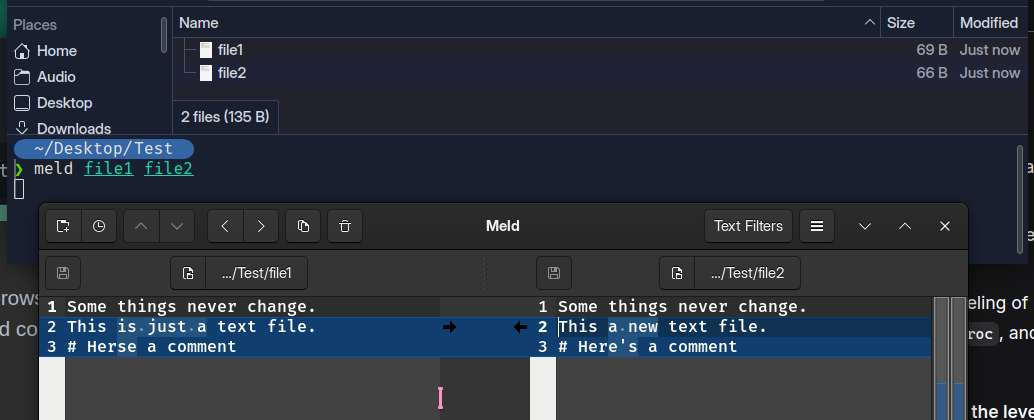
Dolphin is just a file browser, and ‘meld’ is a software to help you compare and combine two files:

Let’s say we have ‘file1’ and ‘file2’ - file2 being the ‘pacnew’ file.

Locate it in a file manager or terminal, then use meld to compare the two:

In this case, I should click the small black arrows to move the version I wish to keep to the other side - then save and quit; removing the pacnew (file2).

Only differences are highlighted.

1 Like

Thank you for the patience and explanation. I personally usually edit files with vim, so I opened both /etc/hosts and /etc/hosts.pacnew with vim in two different terminals and I indeed can see they are a bit different. Both are small files so I don’t mind manually editing them, instead of using a software like meld, but if you think it’s really important to use something like meld, I can try to open them with meld. Now, what are the changes that I need to do?

You must read and understand them one by one.

For a terminal workflow you might do better with vimdiff - it’s designed for viewing and merging differences.

Just take the usual precautions - snapshot/backup first.

If you can’t decide, then the pacnew should be the better file.

1 Like

In /etc/hosts I have:

# Standard host addresses
127.0.0.1  localhost
::1        localhost ip6-localhost ip6-loopback
ff02::1    ip6-allnodes
ff02::2    ip6-allrouters
# This host address
127.0.1.1  gideon-pc

And in /etc/hosts.pacnew I have:

# Static table lookup for hostnames.
# See hosts(5) for details.
127.0.0.1        localhost
::1              localhost

I never edited these files so I don’t know what there should be there. This was just a pretty basic GUI installation of Manjaro, there wasn’t any complicated configuration, my father mainly use this computer for web browsing.

These .pacnew files are just the defaults - the new defaults.
Nothing in them is tailored to your machine.

They get created when the actual file is different from the new default.

Be very careful with /etc/passwd

/etc/locale.gen can likely be left alone

/etc/mkinitcpio.conf.pacnew introduces new HOOKS - change to systemd based initrd
you do not need to touch it (yet)

1 Like

Is there some detailed guide that explain for all the different such config files everything you need to know, so I could know what to do when I edit them?

Not in any centralized way, but you could consult the Arch Wiki. It’s one of the best sources of information regarding GNU/Linux on the internet, and considering that Manjaro is Arch-based, you should definitely bookmark that in your browser.

2 Likes