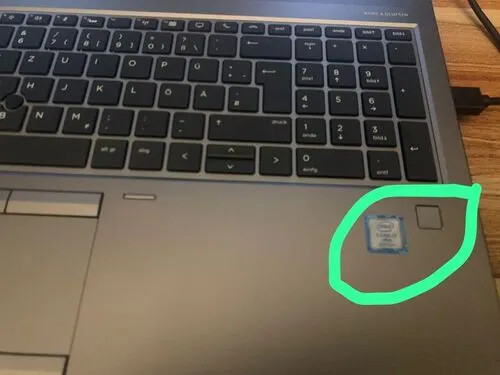
Hi I got my fingerprintreader working using this link.
That works fine when logging into Gnome or doing a sudo.
However, when I do a software update or install, using the Software Install App, I first have to type my password and then do a fingerprint.
I have been looking in the /etc/pam.d/ directory, but cannor find what to change.
@Mirdarthos thank you, I tried option 4.4 Fingerprint authentication is not taking effect in the Polkit agent., logged out and in, but when trying to install new software, got the password pop-up…
If you want to prompt for fingerprint and password input at the same time, you can use pam-fprint-grosshackAUR. This may be needed for some graphical programs which do not allow blank password input, such as Gnome’s built-in polkit agent. To use this package, add the following lines to the top of any files required…
My device does have a fingerprint reader, but lsusb doesn’t show it at all
Bus 001 Device 001: ID 1d6b:0002 Linux Foundation 2.0 root hub
Bus 001 Device 002: ID 24ae:2015 Shenzhen Rapoo Technology Co., Ltd. Rapoo 2.4G Wireless Device
Bus 001 Device 003: ID 04f2:b669 Chicony Electronics Co., Ltd HP HD Camera
Bus 001 Device 004: ID 8087:0029 Intel Corp. AX200 Bluetooth
Bus 002 Device 001: ID 1d6b:0003 Linux Foundation 3.0 root hub
delivers an empty result. Same if running with sudo to gather all details. Same if using grep fprint.
While asking KI it seem to be that it is simply not working:
HP ZBook fingerprint readers generally lack native Linux driver support , with most models using Validity Sensors or Synaptics chips that fail to function under standard Linux distributions like Ubuntu, Fedora, or RHEL.
** Hardware Compatibility : Specific models such as the HP ZBook 17 G3 and ZBook 15 G5 utilize Validity Sensors VFS495 or Synaptics VFS7552 sensors, which are frequently reported as unsupported or “failed” on Linux hardware databases.*
** Software Limitations : While the fprintd daemon is available on many systems, users often encounter errors like “No devices available” because the kernel lacks the necessary drivers to communicate with the specific USB device ID (e.g., 138a:003f ).*
** Workarounds : Some users have reported limited success using third-party tools like validity-sensors-tools or community-maintained drivers, though these often require manual compilation and may not work reliably across all kernel versions.*
** Confirmed Failures : Recent reports from 2023 and 2025 indicate that newer models like the ZBook Power G11 also struggle with detection, with the sensor sometimes not appearing in lsusb or lspci outputs at all.*
HP does not officially provide Linux drivers for these fingerprint sensors, and support relies entirely on the open-source community’s ability to reverse-engineer the hardware.
EDIT: Honestly i even did not verify if it would work with Microsoft Windows. The first action done when i got the device was deleting the Windows partition
Well, it’s not a big deal. Fingerprint reader would be more a “nice-to-have” for me. I was looking more for the power of the device compared to the pricing. The ZBooks are created as “mobile workstations” and for hardly affordable for home users. But refurbished devices are delivering a very good value/price ratio. I am not a gamer, so i don’t need a high end GPU.
I’m not either and my GPU is 10+ years old by now.
But price definitely plays a (huge) role in my decision, and yes, the fingerprint reader is somewhat of a nice-to-have. I would, personally, not have bothered with it. Like you. Like my onboard WiFi. I’ve disabled it in UEFI and don’t care for it. I like the stability and speed of my cable too much to give a single…