Hello Mates,
I can’t precise when, but at certain moment I start to face and error massage during system updates, and due to time out it consumes a lot of time. Initially it didn’t bother me much but now it’s. Tried some command lines here and there but nothing worked.
Anyone has any idea?
Note: everything is working fine on my desktop, during the update the same, before the error is ok and after too. I think the error and relate time out is the only one issue.
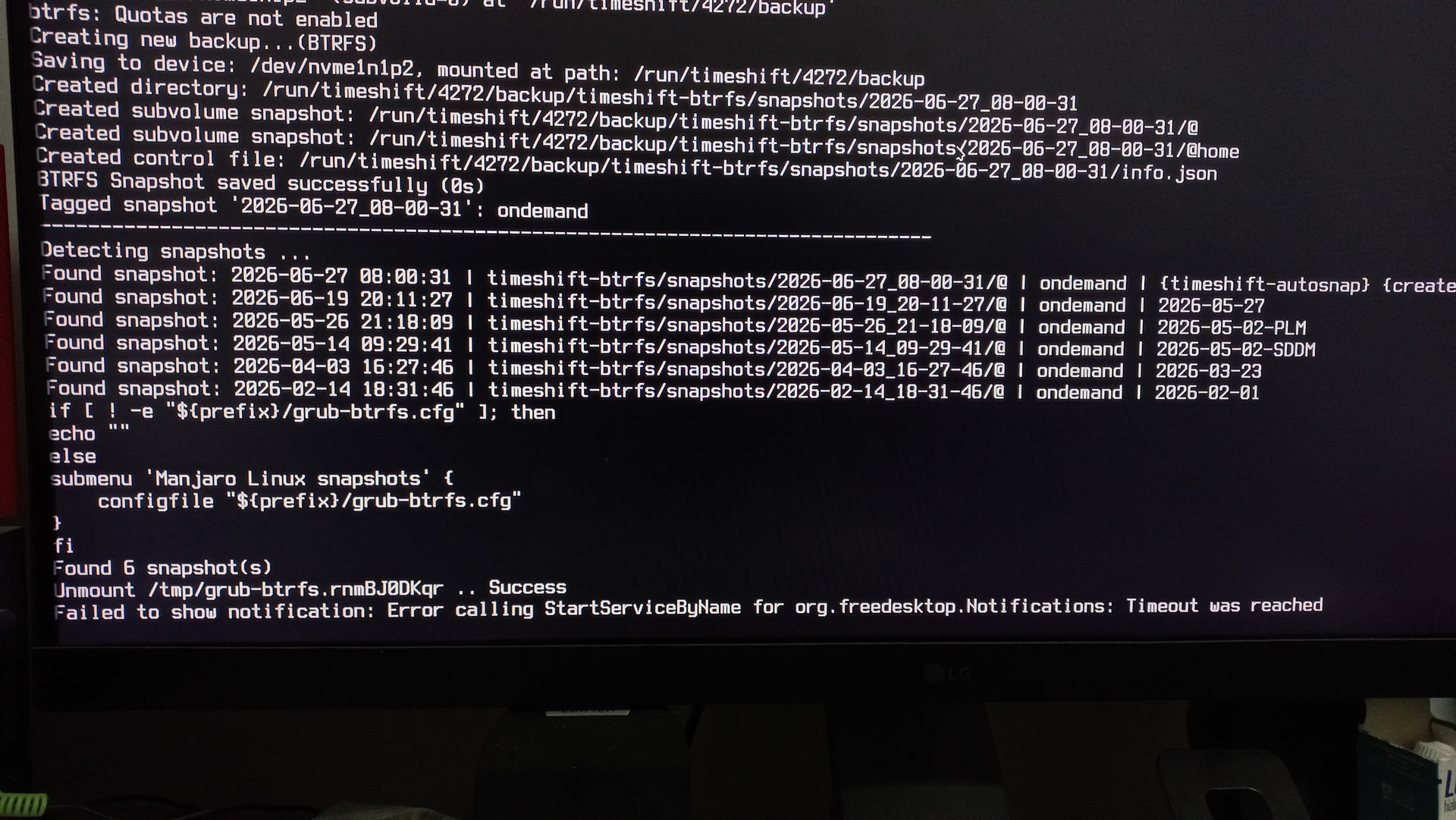
Below the error massage and related screenshot:
Failed to show notification: Error calling StartServiceByName for org.freedesktop.Notifications: Timeout was reached
System:
  Kernel: 7.0.13-1-MANJARO arch: x86_64 bits: 64 compiler: gcc v: 16.1.1
    clocksource: tsc avail: hpet,acpi_pm
    parameters: BOOT_IMAGE=/@/boot/vmlinuz-7.0-x86_64
    root=UUID=b86dea1e-749d-4c9d-b695-26fd02b51cd6 rw rootflags=subvol=@ quiet
    splash resume=UUID=c3e3ab56-e0d8-40e6-beee-81c2e0c66d08
    udev.log_priority=3
  Desktop: KDE Plasma v: 6.6.5 tk: Qt v: N/A info: frameworks v: 6.27.0
    wm: kwin_wayland vt: 2 dm: N/A Distro: Manjaro base: Arch Linux
Machine:
  Type: Desktop Mobo: MACHINIST model: E5-MR9A v: V1.0
    serial: <superuser required> uuid: <superuser required> Firmware: UEFI
    vendor: American Megatrends v: 5.11 date: 10/25/2022
Battery:
  Message: No system battery data found. Is one present?
Memory:
  System RAM: total: 32 GiB available: 31.18 GiB used: 4.14 GiB (13.3%)
  Message: For most reliable report, use superuser + dmidecode.
  Array-1: capacity: 256 GiB note: check slots: 4 modules: 4
    EC: Multi-bit ECC max-module-size: 64 GiB note: est.
  Device-1: DIMM_A1 type: DDR4 detail: synchronous size: 8 GiB
    speed: 2400 MT/s volts: curr: 1 min: 1.14 max: 1.26 width (bits): data: 72
    total: 72 manufacturer: Hynix Semiconductor part-no: HMA41GR7AFR4N-UH
    serial: <filter>
  Device-2: DIMM_B1 type: DDR4 detail: synchronous size: 8 GiB
    speed: 2400 MT/s volts: curr: 1 min: 1.14 max: 1.26 width (bits): data: 72
    total: 72 manufacturer: Hynix Semiconductor part-no: HMA41GR7AFR4N-UH
    serial: <filter>
  Device-3: DIMM_C1 type: DDR4 detail: synchronous size: 8 GiB
    speed: 2400 MT/s volts: curr: 1 min: 1.14 max: 1.26 width (bits): data: 72
    total: 72 manufacturer: Hynix Semiconductor part-no: HMA41GR7AFR4N-UH
    serial: <filter>
  Device-4: DIMM_D1 type: DDR4 detail: synchronous size: 8 GiB
    speed: 2400 MT/s volts: curr: 1 min: 1.14 max: 1.26 width (bits): data: 72
    total: 72 manufacturer: Hynix Semiconductor part-no: HMA41GR7AFR4N-UH
    serial: <filter>
CPU:
  Info: model: Intel Xeon E5-2667 v4 bits: 64 type: MT MCP arch: Broadwell
    level: v3 note: check built: 2015-18 process: Intel 14nm family: 6
    model-id: 0x4F (79) stepping: 1 microcode: 0xB000040
  Topology: cpus: 1x dies: 1 clusters: 8 cores: 8 threads: 16 tpc: 2
    smt: enabled cache: L1: 512 KiB desc: d-8x32 KiB; i-8x32 KiB L2: 2 MiB
    desc: 8x256 KiB L3: 25 MiB desc: 1x25 MiB
  Speed (MHz): avg: 1197 min/max: 1200/3600 scaling: driver: intel_cpufreq
    governor: schedutil cores: 1: 1197 2: 1197 3: 1197 4: 1197 5: 1197 6: 1197
    7: 1197 8: 1197 9: 1197 10: 1197 11: 1197 12: 1197 13: 1197 14: 1197
    15: 1197 16: 1197 bogomips: 102173
  Flags: 3dnowprefetch abm acpi adx aes aperfmperf apic arat arch_perfmon
    avx avx2 bmi1 bmi2 bts cat_l3 cdp_l3 clflush cmov constant_tsc cpuid
    cpuid_fault cqm cqm_llc cqm_mbm_local cqm_mbm_total cqm_occup_llc cx16 cx8
    dca de ds_cpl dtes64 dtherm dts epb ept ept_ad erms est f16c flexpriority
    flush_l1d fma fpu fsgsbase fxsr hle ht ibpb ibrs ida intel_ppin intel_pt
    invpcid lahf_lm lm mca mce md_clear mmx monitor movbe msr mtrr nonstop_tsc
    nopl nx pae pat pbe pcid pclmulqdq pdcm pdpe1gb pebs pge pln pni popcnt
    pse pse36 pti pts rdrand rdseed rdt_a rdtscp rep_good rtm sdbg sep smap
    smep smx ss ssbd sse sse2 sse4_1 sse4_2 ssse3 stibp syscall tm tm2
    tpr_shadow tsc tsc_adjust tsc_deadline_timer vme vmx vnmi vpid x2apic
    xsave xsaveopt xtopology xtpr
  Vulnerabilities:
  Type: gather_data_sampling status: Not affected
  Type: ghostwrite status: Not affected
  Type: indirect_target_selection status: Not affected
  Type: itlb_multihit status: KVM: Split huge pages
  Type: l1tf mitigation: PTE Inversion; VMX: conditional cache flushes, SMT
    vulnerable
  Type: mds mitigation: Clear CPU buffers; SMT vulnerable
  Type: meltdown mitigation: PTI
  Type: mmio_stale_data mitigation: Clear CPU buffers; SMT vulnerable
  Type: old_microcode status: Not affected
  Type: reg_file_data_sampling status: Not affected
  Type: retbleed status: Not affected
  Type: spec_rstack_overflow status: Not affected
  Type: spec_store_bypass mitigation: Speculative Store Bypass disabled via
    prctl
  Type: spectre_v1 mitigation: usercopy/swapgs barriers and __user pointer
    sanitization
  Type: spectre_v2 mitigation: Retpolines; IBPB: conditional; IBRS_FW;
    STIBP: conditional; RSB filling; PBRSB-eIBRS: Not affected; BHI: Not
    affected
  Type: srbds status: Not affected
  Type: tsa status: Not affected
  Type: tsx_async_abort mitigation: Clear CPU buffers; SMT vulnerable
  Type: vmscape mitigation: IBPB before exit to userspace
Graphics:
  Device-1: Advanced Micro Devices [AMD/ATI] Navi 10 [Radeon RX 5600 OEM/5600
    XT / 5700/5700 XT] vendor: Micro-Star MSI driver: amdgpu v: kernel
    arch: RDNA-1 code: Navi-1x process: TSMC n7 (7nm) built: 2019-20 pcie:
    gen: 4 speed: 16 GT/s lanes: 16 ports: active: DP-2
    empty: DP-1,DP-3,HDMI-A-1 bus-ID: 05:00.0 chip-ID: 1002:731f class-ID: 0300
  Display: wayland server: X.org v: 1.21.1.23 with: Xwayland v: 24.1.12
    compositor: kwin_wayland driver: X: loaded: amdgpu
    unloaded: modesetting,radeon alternate: fbdev,vesa dri: radeonsi
    gpu: amdgpu display-ID: 0
  Monitor-1: DP-2 model: LG (GoldStar) ULTRAGEAR serial: <filter> built: 2022
    res: mode: 2560x1440 hz: 120 scale: 100% (1) dpi: 93 gamma: 1.2
    size: 697x392mm (27.44x15.43") diag: 800mm (31.5") ratio: 16:9 modes:
    max: 2560x1440 min: 640x480
  API: EGL v: 1.5 hw: drv: amd radeonsi platforms: device: 0 drv: radeonsi
    device: 1 drv: swrast gbm: drv: radeonsi surfaceless: drv: radeonsi wayland:
    drv: radeonsi x11: drv: radeonsi
  API: OpenGL v: 4.6 vendor: amd mesa v: 26.1.2-arch1.2 glx-v: 1.4
    direct-render: yes renderer: AMD Radeon RX 5700 XT (radeonsi navi10 ACO DRM
    3.64 7.0.13-1-MANJARO) device-ID: 1002:731f memory: 7.81 GiB unified: no
    display-ID: :0.0
  API: Vulkan v: 1.4.350 layers: 6 device: 0 type: discrete-gpu name: AMD
    Radeon RX 5700 XT (RADV NAVI10) driver: mesa radv v: 26.1.2-arch1.2
    device-ID: 1002:731f surfaces: N/A
  Info: Tools: api: clinfo, eglinfo, glxinfo, vulkaninfo
    de: kscreen-console,kscreen-doctor wl: wayland-info
    x11: xdpyinfo, xprop, xrandr
Audio:
  Device-1: Intel 8 Series/C220 Series High Definition Audio
    driver: snd_hda_intel v: kernel bus-ID: 00:1b.0 chip-ID: 8086:8c20
    class-ID: 0403
  Device-2: Advanced Micro Devices [AMD/ATI] Navi 10 HDMI Audio
    driver: snd_hda_intel v: kernel pcie: gen: 4 speed: 16 GT/s lanes: 16
    bus-ID: 05:00.1 chip-ID: 1002:ab38 class-ID: 0403
  API: ALSA v: k7.0.13-1-MANJARO status: kernel-api with: aoss
    type: oss-emulator tools: alsactl,alsamixer,amixer
  Server-1: sndiod v: N/A status: off tools: aucat,midicat,sndioctl
  Server-2: JACK v: 1.9.22 status: off tools: N/A
  Server-3: PipeWire v: 1.6.6 status: active with: 1: pipewire-pulse
    status: active 2: wireplumber status: active 3: pipewire-alsa type: plugin
    tools: pactl,pw-cat,pw-cli,wpctl
Network:
  Device-1: Realtek RTL8111/8168/8211/8411 PCI Express Gigabit Ethernet
    driver: r8169 v: kernel pcie: gen: 1 speed: 2.5 GT/s lanes: 1 port: d000
    bus-ID: 08:00.0 chip-ID: 10ec:8168 class-ID: 0200
  IF: enp8s0 state: up speed: 1000 Mbps duplex: full mac: <filter>
  IP v4: <filter> type: dynamic noprefixroute scope: global
    broadcast: <filter>
  IP v6: <filter> type: noprefixroute scope: global
  IP v6: <filter> type: noprefixroute scope: link
  IF-ID-1: virbr0 state: down mac: <filter>
  IP v4: <filter> scope: global broadcast: <filter>
  Info: services: NetworkManager,systemd-timesyncd
  WAN IP: <filter>
Bluetooth:
  Message: No bluetooth data found.
Logical:
  Message: No logical block device data found.
RAID:
  Message: No RAID data found.
Drives:
  Local Storage: total: 2.73 TiB used: 1.76 TiB (64.5%)
  SMART Message: Unable to run smartctl. Root privileges required.
  ID-1: /dev/nvme0n1 maj-min: 259:0 vendor: Western Digital
    model: WD Blue SN570 500GB size: 465.76 GiB block-size: physical: 512 B
    logical: 512 B speed: 31.6 Gb/s lanes: 4 tech: SSD serial: <filter>
    fw-rev: 234100WD temp: 30.9 C scheme: GPT
  ID-2: /dev/nvme1n1 maj-min: 259:2 vendor: Western Digital
    model: WD Blue SN570 500GB size: 465.76 GiB block-size: physical: 512 B
    logical: 512 B speed: 31.6 Gb/s lanes: 4 tech: SSD serial: <filter>
    fw-rev: 234100WD temp: 31.9 C scheme: GPT
  ID-3: /dev/nvme2n1 maj-min: 259:6 model: X16 Plus SSD 2TB size: 1.82 TiB
    block-size: physical: 512 B logical: 512 B speed: 63.2 Gb/s lanes: 4
    tech: SSD serial: <filter> fw-rev: SN11273 temp: 39.9 C scheme: GPT
  Message: No optical or floppy data found.
Partition:
  ID-1: / raw-size: 431.17 GiB size: 431.17 GiB (100.00%)
    used: 132.76 GiB (30.8%) fs: btrfs dev: /dev/nvme1n1p2 maj-min: 259:4
    label: N/A uuid: b86dea1e-749d-4c9d-b695-26fd02b51cd6
  ID-2: /boot/efi raw-size: 300 MiB size: 299.4 MiB (99.80%)
    used: 664 KiB (0.2%) fs: vfat dev: /dev/nvme1n1p1 maj-min: 259:3 label: N/A
    uuid: CA9D-13A4
  ID-3: /home raw-size: 431.17 GiB size: 431.17 GiB (100.00%)
    used: 132.76 GiB (30.8%) fs: btrfs dev: /dev/nvme1n1p2 maj-min: 259:4
    label: N/A uuid: b86dea1e-749d-4c9d-b695-26fd02b51cd6
  ID-4: /home/<filter>/GAMES raw-size: 465.76 GiB size: 457.38 GiB (98.20%)
    used: 184.7 GiB (40.4%) fs: ext4 dev: /dev/nvme0n1p1 maj-min: 259:1
    label: GAMES uuid: b5780269-0438-4193-9b38-7df4aaf9b229
  ID-5: /home/<filter>/HDD-2TB raw-size: 1.82 TiB size: 1.79 TiB (98.37%)
    used: 1.45 TiB (81.0%) fs: ext4 dev: /dev/nvme2n1p1 maj-min: 259:7
    label: NVME-2TB uuid: ec1ddfe0-4768-4618-93f3-bfbbafeb12a4
  ID-6: /var/cache raw-size: 431.17 GiB size: 431.17 GiB (100.00%)
    used: 132.76 GiB (30.8%) fs: btrfs dev: /dev/nvme1n1p2 maj-min: 259:4
    label: N/A uuid: b86dea1e-749d-4c9d-b695-26fd02b51cd6
  ID-7: /var/log raw-size: 431.17 GiB size: 431.17 GiB (100.00%)
    used: 132.76 GiB (30.8%) fs: btrfs dev: /dev/nvme1n1p2 maj-min: 259:4
    label: N/A uuid: b86dea1e-749d-4c9d-b695-26fd02b51cd6
Swap:
  Kernel: swappiness: 60 (default) cache-pressure: 100 (default) zswap: yes
    compressor: zstd max-pool: 20%
  ID-1: swap-1 type: partition size: 34.3 GiB used: 0 KiB (0.0%) priority: -1
    dev: /dev/nvme1n1p3 maj-min: 259:5 label: swap
    uuid: c3e3ab56-e0d8-40e6-beee-81c2e0c66d08
Unmounted:
  Message: No unmounted partitions found.
USB:
  Hub-1: 1-0:1 info: full speed or root hub ports: 2 rev: 2.0
    speed: 480 Mb/s (57.2 MiB/s) lanes: 1 mode: 2.0 chip-ID: 1d6b:0002
    class-ID: 0900
  Hub-2: 1-1:2 info: Intel Integrated Rate Matching Hub ports: 6 rev: 2.0
    speed: 480 Mb/s (57.2 MiB/s) lanes: 1 mode: 2.0 chip-ID: 8087:8008
    class-ID: 0900
  Hub-3: 2-0:1 info: hi-speed hub with single TT ports: 15 rev: 2.0
    speed: 480 Mb/s (57.2 MiB/s) lanes: 1 mode: 2.0 chip-ID: 1d6b:0002
    class-ID: 0900
  Device-1: 2-1:2 info: SINO WEALTH Gaming KB type: keyboard,HID
    driver: hid-generic,usbhid interfaces: 2 rev: 1.1 speed: 12 Mb/s (1.4 MiB/s)
    lanes: 1 mode: 1.1 power: 500mA chip-ID: 258a:002a class-ID: 0300
  Device-2: 2-2:3 info: [Maxxter] USB GAMING MOUSE type: mouse,keyboard
    driver: hid-generic,usbhid interfaces: 2 rev: 1.1 speed: 1.5 Mb/s (183 KiB/s)
    lanes: 1 mode: 1.0 power: 100mA chip-ID: 18f8:0fc0 class-ID: 0301
  Hub-4: 3-0:1 info: full speed or root hub ports: 2 rev: 2.0
    speed: 480 Mb/s (57.2 MiB/s) lanes: 1 mode: 2.0 chip-ID: 1d6b:0002
    class-ID: 0900
  Hub-5: 3-1:2 info: Intel Integrated Rate Matching Hub ports: 8 rev: 2.0
    speed: 480 Mb/s (57.2 MiB/s) lanes: 1 mode: 2.0 chip-ID: 8087:8000
    class-ID: 0900
  Hub-6: 4-0:1 info: super-speed hub ports: 6 rev: 3.0
    speed: 5 Gb/s (596.0 MiB/s) lanes: 1 mode: 3.2 gen-1x1 chip-ID: 1d6b:0003
    class-ID: 0900
Sensors:
  System Temperatures: cpu: 26.0 C mobo: N/A gpu: amdgpu temp: 35.0 C
    mem: 38.0 C
  Fan Speeds (rpm): N/A gpu: amdgpu fan: 838
Info:
  Processes: 376 Power: uptime: 5m states: freeze,mem,disk suspend: deep
    avail: s2idle wakeups: 0 hibernate: platform avail: shutdown, reboot,
    suspend, test_resume image: 12.4 GiB services: org_kde_powerdevil,
    power-profiles-daemon, upowerd Init: systemd v: 260 default: graphical
    tool: systemctl
  Packages: 1573 pm: pacman pkgs: 1526 libs: 457 tools: pamac pm: flatpak
    pkgs: 47 Compilers: gcc: 16.1.1 Shell: Zsh v: 5.9.1 running-in: konsole
    inxi: 3.3.40

