Hi everyone, after the penultimate update (I hoped the last one would fix it), when I opened Dolphin and right-clicked to select “new folder,” the window froze. The other windows are operational, and when I reopen the folder, it’s created.
The right-click menu opens correctly.
If I do it from the Dolphin main menu, it works fine.
Any suggestions?
2 Likes
I’ve noticed the same thing happening on my Testing branch system, but it only happens when creating a directory on my EXT4 external drive, not on my home/root SSD.
It looks like a bug has been reported:
A temporary workaround is to just create directories via a terminal. If you press the F4 key while in the directory in dolphin, the konsole terminal window should open in the current directory. You can then use the mkdir command to create the new directory, which will appear instantly without freezing the Dolphin window.
1 Like
I have no issues on my computer. Neither when I try creating a directory locally, nor when I try to do it on my “server” using SSHFS.
So that might mean something, or help narrow it down a bit.
We’re waiting for @mevin’s fix to come through. You won’t see the freeze unless you take the specific action - the simplest method is as follows:
-
Open Dolphin,
dolphin ~will open your home… -
Now enter a folder, and then use Alt↑ to go back up - don’t select or deselect anything. (previously with the focus shenanigans you had to press Escape to ensure nothing was selected so that a newly created folder wouldn’t appear out of view in a selected folder).
CtrlShiftN to create a new folder - name it 0000 for easy locating, but you won’t see it…
Dolphin’s now frozen, but if you kill it, reopen it and you’ll find your folder there.
Kill it (use CtrlShiftEsc to get a kill cursor) and then reopen it with MetaE.
Your folder will be there…
So for now let’s use some good habits, you can hit F4 to get the embedded (synchronised) terminal, or if you prefer you can use ShiftF4 for an external terminal (I get Kitty).
Then you can do what you like - I have an alias/abbreviation so that ‘mkdir’ is more verbal:
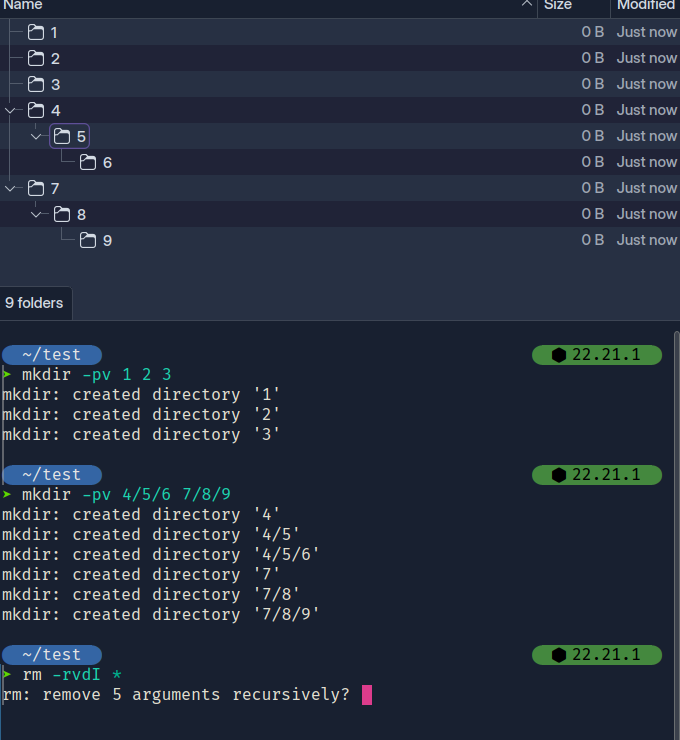
mkdir -pv 1 2 3
- Creates three folders in the main view.
mkdir 1/2 3/4
- Creates two visible folders 1 and 3 with 2 and 4 nested inside.
3 Likes
Yes, I can create folders but when you’re used to doing it with the right button after you’ve worked on it for a while, perhaps moving other folders, it’s a little annoying.
I hope they can fix it.
Thanks anyway for your in-depth response.
I’m on Arch and I am affected by this as well.
1 Like
Oddly, I am not. Not on any of my Installs. Stable, Testing, and Unstable. I have not been able to duplicate the issue.
Stable is Ext4, Testing is Ext4, unstable is btrfs.
And you’re sure you followed exactly?
- Enter folder,
- Return using Alt↑ to go up without selecting the folder (though it should be marked with an outline as the active folder).
I did exactly what the OP described, as the problem.
I do however get the freeze if I create a new Directory using CTRL SHIFT N
This is very odd. I do not get the errors people speak of. Neither from Shift-Ctrl-N, nor from Right-Click > “New Folder”, or navigating with Alt-↑ afterwards either. It runs just fine as far as I can detect.
Then again, I have made modifications to most settings to remove things like that +/- sign showing up to select more or fewer files, as well as generally make it far less “Plasma”, e.g. I always have this “rename dialog” showing up, instead of renaming stuff in the directory view. Of course, it could also be some other kind of setting in my system that makes it work, but what that might be, I have no idea.
I’d try and switch off a few of those “extra fancy” things in Dolphin and see if that helps. <joke>Persistence is future…or however they put it. 8)</joke>
Another thing to try is showing that Terminal thing (F4, I believe) and use mkdir from there.
Oh, and which directory view is used? I always use “Compact” and sometimes “Details”. Never icons or previews or things like that. <joke>I want a good and capable file manager, not a computer game. 8)</joke>
I mostly use Nemo, although it is rather finicky at the moment, since Wayland hit us. But I assume it will be corrected given time (some alert dialog boxes make it crash). Reason being that there are a few things that Doplhin, to my knowledge, doesn’t do. For instance scripting. In Nemo I have my scripts under the right-click menu, very convenient, and you can perform various tasks on selected objects, or just to create a bunch of specially named directories, which I use quite often. Been doing this for years and I’m too old to change. 8)
Sure, you have to really try hard to make it happen 
It’s all to do with people complaining that they expect a folder to be created INSIDE another folder if they have a folder selected in the view - which I never actually expected a ‘create new folder’ to do - if it were a context click, I’d want ‘create a new folder inside selected’ to appear - but I never remember it actually occurring before.
It’s just so much faster to hit F4 and type in with the name you want - as many as you want, in any configuration you want…
The popup is annoying, if you type ‘1 2 3’ instead of 3 folders, you get only one with the name ‘1 2 3’ (which is correct for a GUI) as opposed to 1/2/3 which will nest them.
So in the GUI, how do you create three separate folders? and how do you do that inside another folder - say ‘Pics/jpeg /gif /png’ or something?
Then after all the thinking, just - when did you last ever actually need to do that? 'cos we end up thinking of so many scenarios it’s ridiculous.
Hopefully soon it will go back to using the view as the destination for new folders and ignore selections again… 'cos having to Escape every time to deselect is a bit silly too.
1 Like
I believe this is yet another expectation that Linux should work as Windows typically does – in the tree view of Windows Explorer, when a directory is selected in the left-hand pane, a new directory can be created via the context menu – in Linux, this works much the same, or can be configured to work similarly – in MacOS, forget about the idea.
Why it might crash is anyone’s guess; I can only state with any certainty that I haven’t yet experienced the issue.
Well not really - but just about every GUI file browser has the same bug - when you ‘create folder’ it just throws it in the visible directory - not consistent with a context click, and the argument is basically that the button and shortcut should do the same thing - if you select a folder.
It’s just not really something I can remember having an issue with, and until I saw the bug and started reading it, I would have simply dismissed it.
When using an Android phone, you have very distinctive labels for actions, and those labels are accurate to the context - so it would state ‘make a folder inside (selected)’ if that were available; so really, the ‘bug’ is that the GUI leads to indeterminate situations where you’re damned if you do, and damned if you don’t make it work logically, or the ‘legacy’ way.
I’m not sure about the future - but when this bug is cleared, I think clicking, or doing a keyboard shortcut, when you have a folder selcted (not simply marked active) will create a folder inside… so you might have to de-select the folder to avoid that.
I’m not sure why you’d do that, I never do - unless I’m using commands to create whatever tree I find useful… I find the GUI clumbsy for anything other than just creating a folder in the view - and if I want a folder inside another, I’ll hit Enter to go in there and make it wherever I am…
The devs are considering also fringe cases - but I don’t see any issue that can’t be fixed by modifying your behaviour to fit the model; I think they’re trying to fix something that doesn’t need fixing instead of working hard to get my mouse gestures working again 
Same here, extremely annoying bug. Seems to occur mostly when trying to create a new directory while that same instance is copying files in the background (at least for me).
Seems to be fixed in version 25.12.1. Really hope this update makes it to stable soon.
2 Likes
The just-released KDE Gear 25.12.1 contains the fix:
dolphin
- Dolphinview: do not get view properties if we do not apply dynamic view. Commit. Fixes bug #508402.
- DolphinView: observeCreatedDirectory take into account last / of m_url. Commit. Fixes bug #513345.
- Dolphintabbpage: Allow migration for users with the old session file format. Commit. Fixes bug #513466.
dolphin v25.12.1 is already in Unstable branch:
mbn info dolphin -q | grep -Ev 'Name|Repository|Packager'
Branch         : archlinux
Version        : 25.12.1-1
Build Date     : Wed 07 Jan 2026 08:13:05
Branch         : unstable
Version        : 25.12.1-1
Build Date     : Wed 07 Jan 2026 08:13:05
Branch         : testing
Version        : 25.12.0-1
Build Date     : Sat 06 Dec 2025 02:58:04
Branch         : stable
Version        : 25.12.0-1
Build Date     : Sat 06 Dec 2025 02:58:04
mbn can be found in the manjaro-check-repos package
Edit 2026-01-09T08:46:00Z:
Testing branch has just updated dolphin to v25.12.1-1 and I have successfully created several directories on my external drive via the right-click menu without dolphin freezing. So it looks like v25.12.1 has fixed the issue.
If @cpit doesn’t want to wait until the fix reaches Stable branch, switching to Testing branch is a simple process:
sudo pacman-mirrors --api --set-branch testing
After you changed the branch, rebuild the mirrorlist and update your packages:
sudo pacman-mirrors --continent && sudo pacman -Syyu
There is no way to selectively update just a single package to a newer version on Manjaro / Arch, right?
Well, if you want to go and break things, be our guest.
2 Likes
A better option would be to switch to Testing branch so that you can use the fixed version of dolphin, and when v25.12.1 makes its way into Stable branch, switch back to Stable branch (although you will find that Testing is very stable anyway - with more frequent updates than Stable branch).
To switch back to Stable branch:
sudo pacman-mirrors --api --set-branch stable
and then:
sudo pacman-mirrors --continent && sudo pacman -Syyuu
Note the extra u in the last command. This enables package downgrades for the switch back to a less up-to-date branch, such as Unstable->Testing/Stable or Testing->Stable.
2 Likes
It’s interesting that this is considered ‘breaking things’ on Manjaro while being perfectly normal on most other distros. Or, maybe slightly more fitting: it’s interesting that this can only be achieved by ‘breaking things’ on Manjaro.
Well, Manjaro is a curated rolling-release, which means that all of our packages are attuned to one another. dolphin is part of the KDE Frameworks, and updating dolphin alone without updating the rest of the Frameworks would lead to breakage.
Of course, as @scotty65 says, you are free to switch to the Testing branch or even the Unstable branch. The Testing branch is curated as well, although the Unstable branch isn’t really — not by the Manjaro Team, that is, although it will have gone through some preliminary testing by Arch.
3 Likes