Hello community,
After the years I switched my main to Linux (Manjaro KDE) I noticed discrepancies in the reported “total VRAM used” versus the amount of “process reserved VRAM”.
On my old 6700XT there was always about a ~400Mb diff. between the two.
Last week I updated to a 9070XT and I noticed on a fresh boot the VRAM usage difference doubled to ~900Mb, with no changes to auto run applications.
Here is a amdgpu_top screenshot that shows the discrepancy.
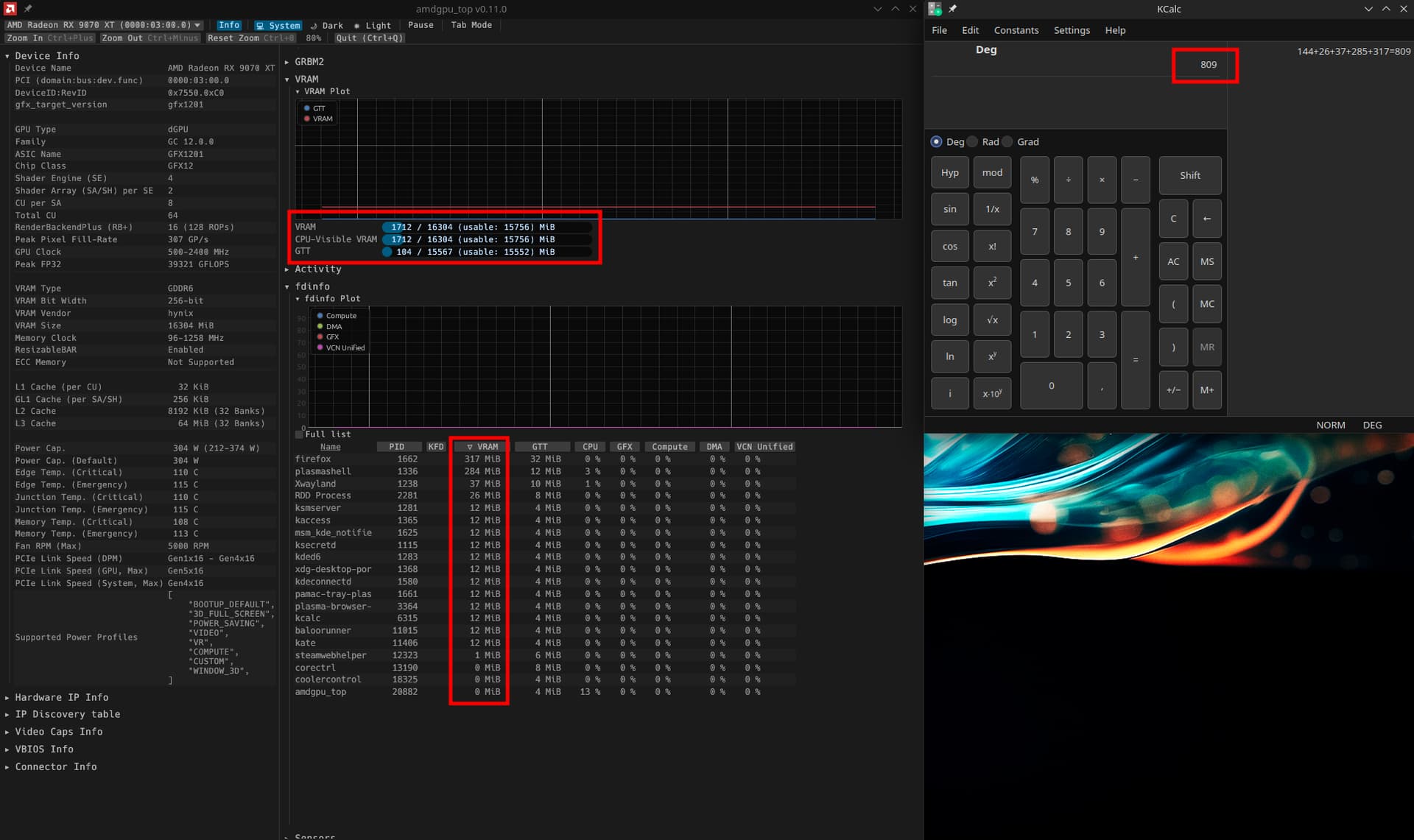
Running amdgpu_top as root discloses kwin_wayland is using an amount of VRAM, but only ~350Mb. So this leaves about 550Mb that remains unclear to me what is reserving this.
- Can anyone clarify what is reserving this extra VRAM
- Is there a way to track it down or lower it?
- Or is this some (longstanding) bug in KDE/kwin/MESA/amdgpu?
Another related oddity.
After a resume from suspend, this unknown reserved VRAM amount is lower.
The total idle VRAM usage for my current system, is still higher then is was with my AM4 and 6700XT. Which I deem as odd.
Does this warrant making an issue on KDE/kwin/MESA/amdgpu issue trackers? If yes which ones?
inxi -zv8 system info
System:
  Kernel: 6.16.8-1-MANJARO arch: x86_64 bits: 64 compiler: gcc v: 15.2.1
    clocksource: tsc avail: hpet,acpi_pm
    parameters: BOOT_IMAGE=/boot/vmlinuz-6.16-x86_64
    root=UUID=c2c92475-3f6d-43c2-9ed5-ce58e4c5b93f rw plymouth.enable=0
    disablehooks=plymouth quiet splash udev.log_priority=3
    video=DP-1:3440x1440MR@160 amd_pstate=active amd_prefcore=enable
    amdgpu.ppfeaturemask=0xffffffff
  Desktop: KDE Plasma v: 6.3.6 tk: Qt v: N/A info: frameworks v: 6.18.0
    wm: kwin_wayland vt: 1 dm: SDDM Distro: Manjaro base: Arch Linux
Machine:
  Type: Desktop Mobo: Micro-Star model: MAG B850M MORTAR WIFI (MS-7E61) v: 1.0
    serial: <superuser required> uuid: <superuser required> Firmware: UEFI
    vendor: American Megatrends LLC. v: 1.A45 date: 09/10/2025
Battery:
  Message: No system battery data found. Is one present?
Memory:
  System RAM: total: 32 GiB available: 30.4 GiB used: 9.74 GiB (32.0%)
  Message: For most reliable report, use superuser + dmidecode.
  Array-1: capacity: 128 GiB slots: 4 modules: 2 EC: None
    max-module-size: 32 GiB note: est.
  Device-1: DIMMA1 type: no module installed
  Device-2: DIMMA2 type: DDR5 detail: synchronous unbuffered (unregistered)
    size: 16 GiB speed: 6000 MT/s volts: note: check curr: 1 min: 1 max: 1
    width (bits): data: 64 total: 64 manufacturer: N/A
    part-no: IR-6400D564L32S/16G serial: <filter>
  Device-3: DIMMB1 type: no module installed
  Device-4: DIMMB2 type: DDR5 detail: synchronous unbuffered (unregistered)
    size: 16 GiB speed: 6000 MT/s volts: note: check curr: 1 min: 1 max: 1
    width (bits): data: 64 total: 64 manufacturer: N/A
    part-no: IR-6400D564L32S/16G serial: <filter>
PCI Slots:
  Permissions: Unable to run dmidecode. Root privileges required.
CPU:
  Info: model: AMD Ryzen 7 7800X3D bits: 64 type: MT MCP arch: Zen 4 gen: 4
    level: v4 note: check built: 2022+ process: TSMC n5 (5nm) family: 0x19 (25)
    model-id: 0x61 (97) stepping: 2 microcode: 0xA60120C
  Topology: cpus: 1x dies: 1 clusters: 1 cores: 8 threads: 16 tpc: 2
    smt: enabled cache: L1: 512 KiB desc: d-8x32 KiB; i-8x32 KiB L2: 8 MiB
    desc: 8x1024 KiB L3: 96 MiB desc: 1x96 MiB
  Speed (MHz): avg: 3794 min/max: 426/4201 boost: enabled scaling:
    driver: amd-pstate-epp governor: powersave cores: 1: 3794 2: 3794 3: 3794
    4: 3794 5: 3794 6: 3794 7: 3794 8: 3794 9: 3794 10: 3794 11: 3794 12: 3794
    13: 3794 14: 3794 15: 3794 16: 3794 bogomips: 134400
  Flags: 3dnowprefetch abm adx aes amd_lbr_pmc_freeze amd_lbr_v2 aperfmperf
    apic arat avic avx avx2 avx512_bf16 avx512_bitalg avx512_vbmi2
    avx512_vnni avx512_vpopcntdq avx512bw avx512cd avx512dq avx512f
    avx512ifma avx512vbmi avx512vl bmi1 bmi2 bpext cat_l3 cdp_l3 clflush
    clflushopt clwb clzero cmov cmp_legacy constant_tsc cpb cppc cpuid cqm
    cqm_llc cqm_mbm_local cqm_mbm_total cqm_occup_llc cr8_legacy cx16 cx8 de
    decodeassists erms extapic extd_apicid f16c flush_l1d flushbyasid fma fpu
    fsgsbase fsrm fxsr fxsr_opt gfni ht hw_pstate ibpb ibrs ibrs_enhanced ibs
    invpcid irperf lahf_lm lbrv lm mba mca mce misalignsse mmx mmxext monitor
    movbe msr mtrr mwaitx nonstop_tsc nopl npt nrip_save nx ospke osvw
    overflow_recov pae pat pausefilter pclmulqdq pdpe1gb perfctr_core
    perfctr_llc perfctr_nb perfmon_v2 pfthreshold pge pku pni popcnt pse
    pse36 rapl rdpid rdpru rdrand rdseed rdt_a rdtscp rep_good sep sha_ni
    skinit smap smca smep ssbd sse sse2 sse4_1 sse4_2 sse4a ssse3 stibp
    succor svm svm_lock syscall tce topoext tsc tsc_scale umip user_shstk
    v_spec_ctrl vaes vgif vmcb_clean vme vmmcall vnmi vpclmulqdq wbnoinvd wdt
    x2avic xgetbv1 xsave xsavec xsaveerptr xsaveopt xsaves xtopology
  Vulnerabilities:
  Type: gather_data_sampling status: Not affected
  Type: ghostwrite status: Not affected
  Type: indirect_target_selection status: Not affected
  Type: itlb_multihit status: Not affected
  Type: l1tf status: Not affected
  Type: mds status: Not affected
  Type: meltdown status: Not affected
  Type: mmio_stale_data status: Not affected
  Type: old_microcode status: Not affected
  Type: reg_file_data_sampling status: Not affected
  Type: retbleed status: Not affected
  Type: spec_rstack_overflow mitigation: Safe RET
  Type: spec_store_bypass mitigation: Speculative Store Bypass disabled via
    prctl
  Type: spectre_v1 mitigation: usercopy/swapgs barriers and __user pointer
    sanitization
  Type: spectre_v2 mitigation: Enhanced / Automatic IBRS; IBPB:
    conditional; STIBP: always-on; PBRSB-eIBRS: Not affected; BHI: Not
    affected
  Type: srbds status: Not affected
  Type: tsa mitigation: Clear CPU buffers
  Type: tsx_async_abort status: Not affected
  Type: vmscape mitigation: IBPB before exit to userspace
Graphics:
  Device-1: Advanced Micro Devices [AMD/ATI] Navi 48 [Radeon RX 9070/9070
    XT/9070 GRE] vendor: Sapphire driver: amdgpu v: kernel arch: RDNA-4
    code: Navi-4x process: TSMC n4 (4nm) built: 2025+ pcie: gen: 5
    speed: 32 GT/s lanes: 16 ports: active: DP-1 empty: DP-2, HDMI-A-1,
    HDMI-A-2, Writeback-1 bus-ID: 03:00.0 chip-ID: 1002:7550 class-ID: 0300
  Device-2: Advanced Micro Devices [AMD/ATI] Raphael vendor: Micro-Star MSI
    driver: amdgpu v: kernel arch: RDNA-2 code: Navi-2x process: TSMC n7 (7nm)
    built: 2020-22 pcie: gen: 4 speed: 16 GT/s lanes: 16 ports: active: none
    empty: HDMI-A-3,Writeback-2 bus-ID: 11:00.0 chip-ID: 1002:164e
    class-ID: 0300 temp: 29.0 C
  Display: wayland server: X.org v: 1.21.1.18 with: Xwayland v: 24.1.8
    compositor: kwin_wayland driver: X: loaded: amdgpu
    unloaded: modesetting,radeon alternate: fbdev,vesa dri: radeonsi
    gpu: amdgpu display-ID: 0
  Monitor-1: DP-1 model: AOC CU34G2XP serial: <filter> built: 2024 res:
    mode: 3440x1440 hz: 160 scale: 100% (1) dpi: 110 gamma: 1.2 chroma: red:
    x: 0.678 y: 0.310 green: x: 0.271 y: 0.663 blue: x: 0.153 y: 0.067 white:
    x: 0.314 y: 0.329 size: 797x334mm (31.38x13.15") diag: 864mm (34")
    modes: 3440x1440, 2560x1080, 1920x1200, 1920x1080, 1600x1200, 1680x1050,
    1280x1024, 1440x900, 1280x800, 1280x720, 1024x768, 832x624, 800x600,
    720x576, 720x480, 640x480, 720x400
  EDID-Warnings: 1: parse_edid: unhandled CEA mode 75 2: parse_edid:
    unhandled CEA mode 76 3: parse_edid: unhandled CEA mode 89 4: parse_edid:
    unhandled CEA mode 90 5: parse_edid: unknown tag 112
  API: EGL v: 1.5 hw: drv: amd radeonsi platforms: device: 0 drv: radeonsi
    device: 1 drv: radeonsi device: 2 drv: swrast gbm: drv: radeonsi
    surfaceless: drv: radeonsi wayland: drv: radeonsi x11: drv: radeonsi
  API: OpenGL v: 4.6 compat-v: 4.5 vendor: amd mesa v: 25.2.3-arch1.2
    glx-v: 1.4 direct-render: yes renderer: AMD Radeon RX 9070 XT (radeonsi
    gfx1201 LLVM 20.1.8 DRM 3.64 6.16.8-1-MANJARO) device-ID: 1002:7550
    memory: 15.62 GiB unified: no display-ID: :1.0
  API: Vulkan v: 1.4.321 layers: 10 device: 0 type: discrete-gpu name: AMD
    Radeon RX 9070 XT (RADV GFX1201) driver: mesa radv v: 25.2.3-arch1.2
    device-ID: 1002:7550 surfaces: N/A device: 1 type: integrated-gpu name: AMD
    Radeon Graphics (RADV RAPHAEL_MENDOCINO) driver: mesa radv
    v: 25.2.3-arch1.2 device-ID: 1002:164e surfaces: N/A
  Info: Tools: api: clinfo, eglinfo, glxinfo, vulkaninfo
    de: kscreen-console,kscreen-doctor gpu: amdgpu_top,corectrl wl: wayland-info
    x11: xdpyinfo, xprop, xrandr
Audio:
  Device-1: Advanced Micro Devices [AMD/ATI] Navi 48 HDMI/DP Audio
    driver: snd_hda_intel v: kernel pcie: gen: 5 speed: 32 GT/s lanes: 16
    bus-ID: 03:00.1 chip-ID: 1002:ab40 class-ID: 0403
  Device-2: Advanced Micro Devices [AMD/ATI] Radeon High Definition Audio
    [Rembrandt/Strix] vendor: Micro-Star MSI driver: snd_hda_intel v: kernel
    pcie: gen: 4 speed: 16 GT/s lanes: 16 bus-ID: 11:00.1 chip-ID: 1002:1640
    class-ID: 0403
  Device-3: Advanced Micro Devices [AMD] Family 17h/19h/1ah HD Audio
    driver: N/A alternate: snd_hda_intel pcie: gen: 4 speed: 16 GT/s lanes: 16
    bus-ID: 11:00.6 chip-ID: 1022:15e3 class-ID: 0403
  Device-4: Micro Star USB Audio driver: hid-generic,snd-usb-audio,usbhid
    type: USB rev: 2.0 speed: 480 Mb/s lanes: 1 mode: 2.0 bus-ID: 1-12:7
    chip-ID: 0db0:cc78 class-ID: 0300
  Device-5: Texas Instruments PCM2902 Audio Codec
    driver: hid-generic,snd-usb-audio,usbhid type: USB rev: 1.1 speed: 12 Mb/s
    lanes: 1 mode: 1.1 bus-ID: 1-5.1:4 chip-ID: 08bb:2902 class-ID: 0300
  API: ALSA v: k6.16.8-1-MANJARO status: kernel-api with: aoss
    type: oss-emulator tools: alsactl,alsamixer,amixer
  Server-1: PipeWire v: 1.4.8 status: active with: 1: pipewire-pulse
    status: active 2: pipewire-media-session status: active 3: pipewire-alsa
    type: plugin 4: pw-jack type: plugin tools: pactl,pw-cat,pw-cli
Network:
  Device-1: Realtek RTL8126 5GbE vendor: Micro-Star MSI driver: r8169
    v: kernel pcie: gen: 3 speed: 8 GT/s lanes: 1 port: e000 bus-ID: 0c:00.0
    chip-ID: 10ec:8126 class-ID: 0200
  IF: enp12s0 state: up speed: 1000 Mbps duplex: full mac: <filter>
  IP v4: <filter> type: noprefixroute scope: global broadcast: <filter>
  IP v6: <filter> type: noprefixroute scope: link
  Device-2: Qualcomm WCN785x Wi-Fi 7 320MHz 2x2 [FastConnect 7800]
    vendor: Foxconn Band Simultaneous Wireless driver: ath12k_pci v: N/A
    modules: ath12k pcie: gen: 3 speed: 8 GT/s lanes: 1 link-max: lanes: 2
    bus-ID: 0d:00.0 chip-ID: 17cb:1107 class-ID: 0280
  IF: wlp13s0 state: down mac: <filter>
  Info: services: NetworkManager, smbd, systemd-timesyncd, wpa_supplicant
  WAN IP: <filter>
Bluetooth:
  Device-1: Foxconn / Hon Hai driver: btusb v: 0.8 type: USB rev: 1.1
    speed: 12 Mb/s lanes: 1 mode: 1.1 bus-ID: 1-11:5 chip-ID: 0489:e10a
    class-ID: e001
  Report: rfkill ID: hci0 rfk-id: 2 state: down bt-service: disabled
    rfk-block: hardware: no software: no address: see --recommends
Logical:
  Message: No logical block device data found.
RAID:
  Message: No RAID data found.
Drives:
  Local Storage: total: 6.41 TiB used: 2.59 TiB (40.4%)
  SMART Message: Unable to run smartctl. Root privileges required.
  ID-1: /dev/nvme0n1 maj-min: 259:3 vendor: Lexar model: SSD NM620 1TB
    size: 953.87 GiB block-size: physical: 512 B logical: 512 B speed: 31.6 Gb/s
    lanes: 4 tech: SSD serial: <filter> fw-rev: V1.23 temp: 19.9 C scheme: GPT
  ID-2: /dev/nvme1n1 maj-min: 259:0 vendor: Reletech model: M.2 SSD 1024GB
    size: 953.87 GiB block-size: physical: 512 B logical: 512 B speed: 31.6 Gb/s
    lanes: 4 tech: SSD serial: <filter> fw-rev: ECFM32.1 temp: 24.9 C
    scheme: GPT
  ID-3: /dev/sda maj-min: 8:0 vendor: Samsung model: SSD 860 EVO 2TB
    size: 1.82 TiB block-size: physical: 512 B logical: 512 B speed: 6.0 Gb/s
    tech: SSD serial: <filter> fw-rev: 3B6Q scheme: GPT
  ID-4: /dev/sdb maj-min: 8:16 vendor: Samsung model: SSD 860 EVO 2TB
    size: 1.82 TiB block-size: physical: 512 B logical: 512 B speed: 6.0 Gb/s
    tech: SSD serial: <filter> fw-rev: 3B6Q scheme: GPT
  ID-5: /dev/sdc maj-min: 8:32 vendor: Seagate model: ST1000DM010-2EP102
    size: 931.51 GiB block-size: physical: 4096 B logical: 512 B type: USB
    rev: 3.0 spd: 5 Gb/s lanes: 1 mode: 3.2 gen-1x1 tech: HDD rpm: 7200
    serial: <filter> fw-rev: 0104 scheme: MBR
  Message: No optical or floppy data found.
Partition:
  ID-1: / raw-size: 857.7 GiB size: 843.16 GiB (98.31%)
    used: 384.52 GiB (45.6%) fs: ext4 dev: /dev/nvme1n1p2 maj-min: 259:2
    label: N/A uuid: c2c92475-3f6d-43c2-9ed5-ce58e4c5b93f
  ID-2: /boot/efi raw-size: 300 MiB size: 299.4 MiB (99.80%)
    used: 320 KiB (0.1%) fs: vfat dev: /dev/nvme1n1p1 maj-min: 259:1 label: N/A
    uuid: 4A19-EA19
  ID-3: /mnt/data raw-size: 858.48 GiB size: 843.93 GiB (98.31%)
    used: 307.73 GiB (36.5%) fs: ext4 dev: /dev/nvme0n1p1 maj-min: 259:4
    label: DATA uuid: 74423f52-a944-4f61-9500-f4bc683c2cef
  ID-4: /mnt/data2 raw-size: 1.64 TiB size: 1.61 TiB (98.37%)
    used: 597.08 GiB (36.2%) fs: ext4 dev: /dev/sdb1 maj-min: 8:17 label: DATA2
    uuid: 4de3dfe5-98c9-438d-9fef-7bd41d5bf67f
  ID-5: /mnt/data3 raw-size: 1.64 TiB size: 1.61 TiB (98.37%)
    used: 774.35 GiB (46.9%) fs: ext4 dev: /dev/sda1 maj-min: 8:1 label: DATA3
    uuid: e14912f2-9e23-418f-9a32-6eca47b43d8f
  ID-6: /mnt/storage raw-size: 755.73 GiB size: 755.73 GiB (100.00%)
    used: 586.06 GiB (77.5%) fs: ntfs dev: /dev/sdc1 maj-min: 8:33
    label: STORAGE uuid: B0A0696BA069394C
Swap:
  Kernel: swappiness: 10 (default 60) cache-pressure: 100 (default) zswap: yes
    compressor: zstd max-pool: 20%
  ID-1: swap-1 type: file size: 8 GiB used: 0 KiB (0.0%) priority: -2
    file: /swapfile
Unmounted:
  ID-1: /dev/sdc2 maj-min: 8:34 size: 175.78 GiB fs: ext4
    label: STORAGE_BACKUP uuid: b2548556-eb55-44c4-bc73-91b7499dee60
USB:
  Hub-1: 1-0:1 info: hi-speed hub with single TT ports: 12 rev: 2.0
    speed: 480 Mb/s (57.2 MiB/s) lanes: 1 mode: 2.0 chip-ID: 1d6b:0002
    class-ID: 0900
  Hub-2: 1-5:2 info: Genesys Logic Hub ports: 4 rev: 2.1
    speed: 480 Mb/s (57.2 MiB/s) lanes: 1 mode: 2.0 chip-ID: 05e3:0610
    class-ID: 0900
  Device-1: 1-5.1:4 info: Texas Instruments PCM2902 Audio Codec
    type: audio,HID driver: hid-generic,snd-usb-audio,usbhid interfaces: 4
    rev: 1.1 speed: 12 Mb/s (1.4 MiB/s) lanes: 1 mode: 1.1 power: 100mA
    chip-ID: 08bb:2902 class-ID: 0300
  Device-2: 1-5.3:6 info: Sharkoon SHARK Force 3 type: mouse,keyboard
    driver: hid-generic,usbhid interfaces: 2 rev: 1.1 speed: 12 Mb/s (1.4 MiB/s)
    lanes: 1 mode: 1.1 power: 100mA chip-ID: 30fa:1440 class-ID: 0300
  Device-3: 1-5.4:8 info: SONiX USB DEVICE type: keyboard,mouse
    driver: hid-generic,usbhid interfaces: 2 rev: 2.0 speed: 12 Mb/s (1.4 MiB/s)
    lanes: 1 mode: 1.1 power: 100mA chip-ID: 320f:500c class-ID: 0301
  Device-4: 1-10:3 info: Micro Star MYSTIC LIGHT type: HID
    driver: hid-generic,usbhid interfaces: 1 rev: 1.1 speed: 12 Mb/s (1.4 MiB/s)
    lanes: 1 mode: 1.1 power: 100mA chip-ID: 0db0:0076 class-ID: 0300
    serial: <filter>
  Device-5: 1-11:5 info: Foxconn / Hon Hai type: bluetooth driver: btusb
    interfaces: 2 rev: 1.1 speed: 12 Mb/s (1.4 MiB/s) lanes: 1 mode: 1.1
    power: 100mA chip-ID: 0489:e10a class-ID: e001
  Device-6: 1-12:7 info: Micro Star USB Audio type: audio,HID
    driver: hid-generic,snd-usb-audio,usbhid interfaces: 8 rev: 2.0
    speed: 480 Mb/s (57.2 MiB/s) lanes: 1 mode: 2.0 power: 100mA
    chip-ID: 0db0:cc78 class-ID: 0300
  Hub-3: 2-0:1 info: super-speed hub ports: 5 rev: 3.1
    speed: 20 Gb/s (2.33 GiB/s) lanes: 2 mode: 3.2 gen-2x2 chip-ID: 1d6b:0003
    class-ID: 0900
  Hub-4: 2-5:2 info: Genesys Logic GL3523 Hub ports: 4 rev: 3.2
    speed: 5 Gb/s (596.0 MiB/s) lanes: 1 mode: 3.2 gen-1x1 chip-ID: 05e3:0620
    class-ID: 0900
  Hub-5: 3-0:1 info: hi-speed hub with single TT ports: 2 rev: 2.0
    speed: 480 Mb/s (57.2 MiB/s) lanes: 1 mode: 2.0 chip-ID: 1d6b:0002
    class-ID: 0900
  Hub-6: 4-0:1 info: super-speed hub ports: 2 rev: 3.1
    speed: 10 Gb/s (1.16 GiB/s) lanes: 1 mode: 3.2 gen-2x1 chip-ID: 1d6b:0003
    class-ID: 0900
  Device-1: 4-2:2 info: JMS578 based SATA bridge type: mass storage
    driver: uas interfaces: 1 rev: 3.0 speed: 5 Gb/s (596.0 MiB/s) lanes: 1
    mode: 3.2 gen-1x1 power: 8mA chip-ID: 0080:a001 class-ID: 0806
    serial: <filter>
  Hub-7: 5-0:1 info: hi-speed hub with single TT ports: 2 rev: 2.0
    speed: 480 Mb/s (57.2 MiB/s) lanes: 1 mode: 2.0 chip-ID: 1d6b:0002
    class-ID: 0900
  Hub-8: 6-0:1 info: super-speed hub ports: 2 rev: 3.1
    speed: 10 Gb/s (1.16 GiB/s) lanes: 1 mode: 3.2 gen-2x1 chip-ID: 1d6b:0003
    class-ID: 0900
  Hub-9: 7-0:1 info: hi-speed hub with single TT ports: 1 rev: 2.0
    speed: 480 Mb/s (57.2 MiB/s) lanes: 1 mode: 2.0 chip-ID: 1d6b:0002
    class-ID: 0900
  Hub-10: 8-0:1 info: Linux Foundation 3.0 root hub ports: N/A rev: 3.0
    speed: 5 Gb/s (596.0 MiB/s) lanes: 1 mode: 3.2 gen-1x1 chip-ID: 1d6b:0003
    class-ID: 0900
Sensors:
  System Temperatures: cpu: 34.4 C mobo: 28.0 C
  Fan Speeds (rpm): fan-1: 505 fan-2: 0 fan-3: 0 fan-4: 0 fan-13: 623
    fan-14: 0 fan-15: 0 fan-16: 616
  GPU: device: amdgpu temp: 22.0 C mem: 48.0 C fan: 0 watts: 25.00
    device: amdgpu temp: 30.0 C
  Power: 12v: N/A 5v: N/A 3.3v: N/A vbat: 3.14
Repos:
  Packages: pm: pacman pkgs: 1657 libs: 504 tools: pamac pm: flatpak pkgs: 0
  Active pacman repo servers in: /etc/pacman.d/mirrorlist
    1: https://ftp.rz.tu-bs.de/pub/mirror/manjaro.org/repos/stable/$repo/$arch
    2: https://ftp.gwdg.de/pub/linux/manjaro/stable/$repo/$arch
    3: https://manjaro.kurdy.org/stable/$repo/$arch
    4: https://mirror.alpix.eu/manjaro/stable/$repo/$arch
Processes:
  CPU top: 5 of 537
  1: cpu: 65.6% command: firefox pid: 73201 mem: 1197.9 MiB (3.8%)
  2: cpu: 20.7% command: firefox pid: 74803 mem: 589.9 MiB (1.8%)
  3: cpu: 11.9% command: firefox pid: 73487 mem: 480.3 MiB (1.5%)
  4: cpu: 10.8% command: firefox pid: 73989 mem: 416.9 MiB (1.3%)
  5: cpu: 10.7% command: firefox pid: 73534 mem: 478.4 MiB (1.5%)
  Memory top: 5 of 537
  1: mem: 1197.9 MiB (3.8%) command: firefox pid: 73201 cpu: 65.6%
  2: mem: 845.2 MiB (2.7%) command: ./steamwebhelper pid: 12293 cpu: 0.0%
  3: mem: 594.8 MiB (1.9%) command: plasmashell pid: 1336 cpu: 0.4%
  4: mem: 589.9 MiB (1.8%) command: firefox pid: 74803 cpu: 20.7%
  5: mem: 577.6 MiB (1.8%) command: firefox pid: 73715 cpu: 10.3%
Info:
  Processes: 537 Power: uptime: 19h 50m states: freeze,mem,disk suspend: deep
    avail: s2idle wakeups: 1 hibernate: platform avail: shutdown, reboot,
    suspend, test_resume image: 12.14 GiB services: org_kde_powerdevil,
    power-profiles-daemon, upowerd Init: systemd v: 257 default: graphical
    tool: systemctl
  Compilers: clang: 20.1.8 gcc: 15.2.1 Shell: Bash v: 5.3.3
    running-in: konsole inxi: 3.3.40

