Hi,
I’ve searched the forum and online for this but don’t see anything. When I hit the ctrl key once or twice it switches to desktop 3. I’ve tried switching off various settings for shortcuts to desktop 3 but none change the behavior. Sometimes when just hitting a shortcut that involves ctrl it goes to desktop 3. I would like to disable this and only use ctrl + F3 to get to that desktop. Thanks for any ideas or help.
Please provide your system information in accordance with forum presentational guidelines. These details may be useful to those who might wish to help.
See the Mini-HowTo’s (below). 
Regards.
[Mini-HowTo] Provide System Information
Basic details provided by *-fetch type apps might give enough information for someone wishing to buy a computer, however, for Support purposes it’s best to ask your system directly.
Output of the inxi command will generate more useful and detailed information for those who may wish to help:
Suggested inxi command (use either):
inxi -zv8 |
(short-form) |
inxi --filter --verbosity=8 |
(long-form) |
- man inxi (The
inximanual)
Command output should be presented as pre-formatted text in accordance with forum guidelines. 
Running inxi within a chroot environment
- Add
--color=0to the long-form command, or… - Change the short-form command to
inxi -zv8c0
Your privacy is respected
[Mini-HowTo] Present code or command output
Note: Grave accent (or, backtick) characters are used.
For inline code or to show a single command:
- please follow this simple example:
code here.
For multi-line command output:
- place text beween two rows of three (```) backtick characters to form a scrollable text box, or …
- use the </> button in the Compose window to achieve the same result.
The empty row between these rows of backtick characters is where to paste any multi-line command output (such as inxi).
An example of a pre-formatted text enclosure:
What is a Quark?

A. In Physics, an elementary particle and fundamental constituent of matter.
B. A character from the Star Trek: "Deep Space Nine" television series.
C. A soft, creamy, usually unsalted cheese traditional to central Europe.
Your inxi output is incomplete. Try again. 
Make sure your inxi output is presented as pre-formatted text.
Instructions have already been provided.
The simplest way is to add three backtick characters before and after the text.
Code, commands or command output that you provide should always be formatted as such; and takes minimal effort.
The end result will be something like this!
2 Likes
So far i can’t even find out which desktop we are talking about. I would also suggest you consider whether you can really know which information is relevant.
This sounds odd, because the ctrl key is a modifier - it shouldn’t do anything without hitting another key at the same time.
Are we talking about the Plasma desktop then?
Manjaro KDE Plasma has multiple desktops you can work on. My pc has 4. Using Ctrl F1, F2, F3, F4 switches between the desktops. However, if I hit ctrl or ctrl ctrl it switches from desktop 1 to 3 or 2 to 3. I would like to disable the ctrl shortcut since I use that key for so many other shortcuts. So foar, in my searches online and in the shortcuts menu of system settings, I can’t see any way to do that.
The term “desktop” is bit short. It may refer to “desktop environment” or as you use the term to a “virtual desktop” which is the Plasma name for what you mean. But without knowing whether you’re using Gnome, XFCE, Plasma or any other of the dozens or more desktops out there we are missing relevant information, aren’t we?
Yes, that is what i tried to say - it’s a modifier key so normally it shouldn’t act on its own. And if so one would be in trouble. But i’m still wondering how it could work to assign the ctrl key itself as shortcut key 
Ok learned something new: this works indeed
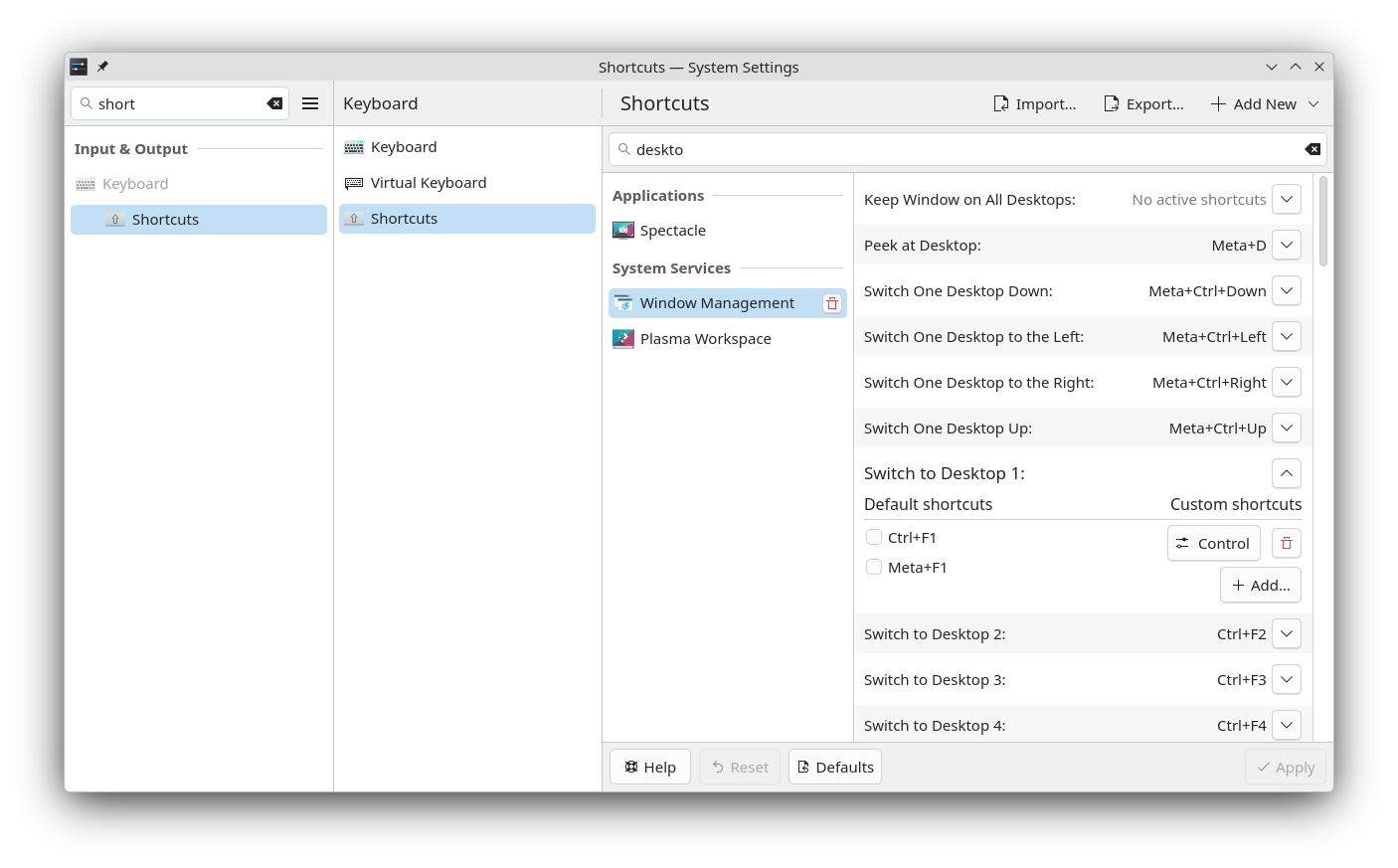
but one could simply delete the binding again. You looked at this already I guess?
Yes I did.
I’m afraid the instructions don’t make sense to me beyond entering the terminal command especially the part that says ‘The end result will be something like this!’ Is there a link to the instructions?
System:
  Kernel: 6.12.91-1-MANJARO arch: x86_64 bits: 64 compiler: gcc v: 16.1.1
    clocksource: tsc avail: hpet,acpi_pm
    parameters: BOOT_IMAGE=/@/boot/vmlinuz-6.12-x86_64
    root=UUID=904e1871-6030-4ae7-8a13-607f57591bcd rw rootflags=subvol=@
    quiet splash udev.log_priority=3 btusb.enable_autosuspend=n
  Desktop: KDE Plasma v: 6.6.5 tk: Qt v: N/A info: frameworks v: 6.26.0
    wm: kwin_wayland vt: 1 dm: SDDM Distro: Manjaro base: Arch Linux
Machine:
  Type: Desktop System: GEEKOM product: A8 v: N/A serial: <superuser required>
  Mobo: N/A model: A8 serial: <superuser required> part-nu: GEEKOM A8
    uuid: <superuser required> Firmware: UEFI vendor: American Megatrends LLC.
    v: 0.61 date: 08/12/2025
Battery:
  Device-1: hidpp_battery_0 model: Logitech MX Vertical Advanced Ergonomic
    Mouse serial: <filter> charge: 100% (should be ignored) rechargeable: yes
    status: full
Memory:
  System RAM: total: 32 GiB available: 27.18 GiB used: 8.79 GiB (32.3%)
  Message: For most reliable report, use superuser + dmidecode.
  Array-1: capacity: 64 GiB slots: 2 modules: 2 EC: None
    max-module-size: 32 GiB note: est.
  Device-1: Channel-A DIMM 0 type: DDR5 detail: synchronous unbuffered
    (unregistered) size: 16 GiB speed: 5600 MT/s volts: note: check curr: 1
    min: 1 max: 1 width (bits): data: 64 total: 64 manufacturer: N/A
    part-no: WPBS56D508SWB-16G serial: <filter>
  Device-2: Channel-B DIMM 0 type: DDR5 detail: synchronous unbuffered
    (unregistered) size: 16 GiB speed: 5600 MT/s volts: note: check curr: 1
    min: 1 max: 1 width (bits): data: 64 total: 64 manufacturer: N/A
    part-no: WPBS56D508SWB-16G serial: <filter>
PCI Slots:
  Permissions: Unable to run dmidecode. Root privileges required.
CPU:
  Info: model: AMD Ryzen 7 8745HS w/ Radeon 780M Graphics bits: 64
    type: MT MCP arch: Zen 4 gen: 4 level: v4 note: check built: 2022+
    process: TSMC n5 (5nm) family: 0x19 (25) model-id: 0x75 (117) stepping: 2
    microcode: 0xA705208
  Topology: cpus: 1x dies: 1 clusters: 1 cores: 8 threads: 16 tpc: 2
    smt: enabled cache: L1: 512 KiB desc: d-8x32 KiB; i-8x32 KiB L2: 8 MiB
    desc: 8x1024 KiB L3: 16 MiB desc: 1x16 MiB
  Speed (MHz): avg: 1113 min/max: 400/4966 boost: enabled scaling:
    driver: amd-pstate-epp governor: powersave cores: 1: 1113 2: 1113 3: 1113
    4: 1113 5: 1113 6: 1113 7: 1113 8: 1113 9: 1113 10: 1113 11: 1113 12: 1113
    13: 1113 14: 1113 15: 1113 16: 1113 bogomips: 121430
  Flags: 3dnowprefetch abm adx aes amd_lbr_v2 aperfmperf apic arat avx avx2
    avx512_bf16 avx512_bitalg avx512_vbmi2 avx512_vnni avx512_vpopcntdq
    avx512bw avx512cd avx512dq avx512f avx512ifma avx512vbmi avx512vl bmi1
    bmi2 bpext cat_l3 cdp_l3 clflush clflushopt clwb clzero cmov cmp_legacy
    constant_tsc cpb cppc cpuid cqm cqm_llc cqm_mbm_local cqm_mbm_total
    cqm_occup_llc cr8_legacy cx16 cx8 de decodeassists erms extapic
    extd_apicid f16c flush_l1d flushbyasid fma fpu fsgsbase fsrm fxsr
    fxsr_opt gfni ht hw_pstate ibpb ibrs ibrs_enhanced ibs invpcid irperf
    lahf_lm lbrv lm mba mca mce misalignsse mmx mmxext monitor movbe msr mtrr
    mwaitx nonstop_tsc nopl npt nrip_save nx ospke osvw overflow_recov pae
    pat pausefilter pclmulqdq pdpe1gb perfctr_core perfctr_llc perfctr_nb
    perfmon_v2 pfthreshold pge pku pni popcnt pse pse36 rapl rdpid rdpru
    rdrand rdseed rdt_a rdtscp rep_good sep sha_ni skinit smap smca smep ssbd
    sse sse2 sse4_1 sse4_2 sse4a ssse3 stibp succor svm svm_lock syscall tce
    topoext tsc tsc_scale umip user_shstk v_spec_ctrl vaes vgif vmcb_clean
    vme vmmcall vnmi vpclmulqdq wbnoinvd wdt x2apic x2avic xgetbv1 xsave
    xsavec xsaveerptr xsaveopt xsaves xtopology
  Vulnerabilities:
  Type: gather_data_sampling status: Not affected
  Type: indirect_target_selection status: Not affected
  Type: itlb_multihit status: Not affected
  Type: l1tf status: Not affected
  Type: mds status: Not affected
  Type: meltdown status: Not affected
  Type: mmio_stale_data status: Not affected
  Type: reg_file_data_sampling status: Not affected
  Type: retbleed status: Not affected
  Type: spec_rstack_overflow mitigation: Safe RET
  Type: spec_store_bypass mitigation: Speculative Store Bypass disabled via
    prctl
  Type: spectre_v1 mitigation: usercopy/swapgs barriers and __user pointer
    sanitization
  Type: spectre_v2 mitigation: Enhanced / Automatic IBRS; IBPB:
    conditional; STIBP: always-on; PBRSB-eIBRS: Not affected; BHI: Not
    affected
  Type: srbds status: Not affected
  Type: tsa mitigation: Clear CPU buffers
  Type: tsx_async_abort status: Not affected
  Type: vmscape mitigation: IBPB before exit to userspace
Graphics:
  Device-1: Advanced Micro Devices [AMD/ATI] HawkPoint1 driver: amdgpu
    v: kernel arch: RDNA-3 code: Phoenix process: TSMC n4 (4nm) built: 2023+
    pcie: gen: 4 speed: 16 GT/s lanes: 16 ports: active: HDMI-A-1,HDMI-A-2
    empty: DP-1, DP-2, DP-3, DP-4, DP-5, DP-6, Writeback-1 bus-ID: 65:00.0
    chip-ID: 1002:1900 class-ID: 0300 temp: 38.0 C
  Device-2: Logitech C920 PRO HD Webcam driver: snd-usb-audio,uvcvideo
    type: USB rev: 2.1 speed: 480 Mb/s lanes: 1 mode: 2.0 bus-ID: 1-5:4
    chip-ID: 046d:08e5 class-ID: 0102
  Display: wayland server: X.org v: 1.21.1.22 with: Xwayland v: 24.1.11
    compositor: kwin_wayland driver: X: loaded: amdgpu unloaded: modesetting
    alternate: fbdev,vesa dri: radeonsi gpu: amdgpu d-rect: 4480x1440
    display-ID: 0
  Monitor-1: HDMI-A-1 pos: primary,left model: Dell S2721DS serial: <filter>
    built: 2023 res: mode: 2560x1440 hz: 60 scale: 178% (1.78) to: 1440x2560
    dpi: 110 gamma: 1.2 chroma: red: x: 0.651 y: 0.329 green: x: 0.298
    y: 0.620 blue: x: 0.149 y: 0.051 white: x: 0.314 y: 0.329
    size: 597x336mm (23.5x13.23") diag: 676mm (26.6") ratio: 16:9
    modes: 2560x1440, 1920x1200, 2048x1080, 1920x1080, 1600x1200, 1680x1050,
    1600x900, 1280x1024, 1440x900, 1280x800, 1152x864, 1280x720, 1024x768,
    800x600, 720x576, 720x480, 640x480, 720x400
  Monitor-2: HDMI-A-2 pos: right model: Dell S2319H serial: <filter>
    built: 2020 res: mode: 1920x1080 hz: 60 scale: 100% (1) dpi: 96 gamma: 1.2
    chroma: red: x: 0.651 y: 0.337 green: x: 0.318 y: 0.612 blue: x: 0.149
    y: 0.063 white: x: 0.314 y: 0.329 size: 509x286mm (20.04x11.26")
    diag: 584mm (23") ratio: 16:9 modes: 1920x1080, 1680x1050, 1600x900,
    1280x1024, 1440x900, 1280x800, 1152x864, 1280x720, 1024x768, 800x600,
    720x576, 720x480, 640x480, 720x400
  API: EGL v: 1.5 hw: drv: amd radeonsi platforms: device: 0 drv: radeonsi
    device: 1 drv: swrast gbm: drv: radeonsi surfaceless: drv: radeonsi wayland:
    drv: radeonsi x11: drv: radeonsi
  API: OpenGL v: 4.6 vendor: amd mesa v: 26.1.1-arch1.2 glx-v: 1.4
    direct-render: yes renderer: AMD Radeon 780M Graphics (radeonsi phoenix ACO
    DRM 3.61 6.12.91-1-MANJARO) device-ID: 1002:1900 memory: 3.91 GiB
    unified: yes display-ID: :1.0
  API: Vulkan v: 1.4.350 layers: 2 device: 0 type: integrated-gpu name: AMD
    Radeon 780M Graphics (RADV PHOENIX) driver: mesa radv v: 26.1.1-arch1.2
    device-ID: 1002:1900 surfaces: N/A
  Info: Tools: api: clinfo, eglinfo, glxinfo, vulkaninfo
    de: kscreen-console,kscreen-doctor wl: wayland-info x11: xdpyinfo,xprop
Audio:
  Device-1: Advanced Micro Devices [AMD/ATI] Radeon High Definition Audio
    driver: snd_hda_intel v: kernel pcie: gen: 4 speed: 16 GT/s lanes: 16
    bus-ID: 65:00.1 chip-ID: 1002:1640 class-ID: 0403
  Device-2: Advanced Micro Devices [AMD] Ryzen HD Audio
    driver: snd_hda_intel v: kernel pcie: gen: 4 speed: 16 GT/s lanes: 16
    bus-ID: 65:00.6 chip-ID: 1022:15e3 class-ID: 0403
  Device-3: Creative Pebble V3 driver: hid-generic,snd-usb-audio,usbhid
    type: USB rev: 1.1 speed: 12 Mb/s lanes: 1 mode: 1.1 bus-ID: 1-1.1:5
    chip-ID: 041e:3272 class-ID: 0300 serial: <filter>
  Device-4: Logitech C920 PRO HD Webcam driver: snd-usb-audio,uvcvideo
    type: USB rev: 2.1 speed: 480 Mb/s lanes: 1 mode: 2.0 bus-ID: 1-5:4
    chip-ID: 046d:08e5 class-ID: 0102
  API: ALSA v: k6.12.91-1-MANJARO status: kernel-api with: aoss
    type: oss-emulator tools: alsactl,alsamixer,amixer
  Server-1: sndiod v: N/A status: off tools: aucat,midicat,sndioctl
  Server-2: JACK v: 1.9.22 status: off tools: N/A
  Server-3: PipeWire v: 1.6.5 status: active with: 1: pipewire-pulse
    status: active 2: wireplumber status: active 3: pipewire-alsa type: plugin
    tools: pactl,pw-cat,pw-cli,wpctl
Network:
  Device-1: Realtek RTL8125 2.5GbE driver: r8169 v: kernel pcie: gen: 2
    speed: 5 GT/s lanes: 1 port: f000 bus-ID: 01:00.0 chip-ID: 10ec:8125
    class-ID: 0200
  IF: enp1s0 state: down mac: <filter>
  Device-2: MEDIATEK MT7922 802.11ax PCI Express Wireless Network Adapter
    vendor: AzureWave driver: mt7921e v: kernel pcie: gen: 2 speed: 5 GT/s
    lanes: 1 bus-ID: 02:00.0 chip-ID: 14c3:7922 class-ID: 0280
  IF: wlp2s0 state: up mac: <filter>
  IP v4: <filter> type: dynamic noprefixroute scope: global
    broadcast: <filter>
  IP v6: <filter> type: noprefixroute scope: link
  IF-ID-1: tailscale0 state: unknown speed: -1 duplex: full mac: N/A
  IP v4: <filter> scope: global
  IP v6: <filter> scope: global
  IP v6: <filter> virtual: stable-privacy proto kernel_ll scope: link
  Info: services: NetworkManager, systemd-timesyncd, wpa_supplicant
  WAN IP: <filter>
Bluetooth:
  Device-1: IMC Networks Wireless_Device driver: btusb v: 0.8 type: USB
    rev: 2.1 speed: 480 Mb/s lanes: 1 mode: 2.0 bus-ID: 3-1:2 chip-ID: 13d3:3585
    class-ID: e001 serial: <filter>
  Report: btmgmt ID: hci0 rfk-id: 0 state: up address: <filter> bt-v: 5.3
    lmp-v: 12 status: discoverable: no pairing: no class-ID: 6c0104
Logical:
  Message: No logical block device data found.
RAID:
  Message: No RAID data found.
Drives:
  Local Storage: total: 4.66 TiB used: 69.96 GiB (1.5%)
  SMART Message: Required tool smartctl not installed. Check --recommends
  ID-1: /dev/nvme0n1 maj-min: 259:0 model: WPBSN4M8-1TGP size: 953.87 GiB
    block-size: physical: 512 B logical: 512 B speed: 63.2 Gb/s lanes: 4
    tech: SSD serial: <filter> fw-rev: SN28087 temp: 40.9 C scheme: GPT
  ID-2: /dev/sda maj-min: 8:0 model: P3-4TB size: 3.73 TiB block-size:
    physical: 4096 B logical: 512 B type: USB rev: 3.0 spd: 5 Gb/s lanes: 1
    mode: 3.2 gen-1x1 tech: SSD serial: <filter> fw-rev: 0414 scheme: GPT
  Message: No optical or floppy data found.
Partition:
  ID-1: / raw-size: 953.57 GiB size: 953.57 GiB (100.00%)
    used: 69.96 GiB (7.3%) fs: btrfs dev: /dev/nvme0n1p2 maj-min: 259:2
    label: N/A uuid: 904e1871-6030-4ae7-8a13-607f57591bcd
  ID-2: /boot/efi raw-size: 300 MiB size: 299.4 MiB (99.80%)
    used: 664 KiB (0.2%) fs: vfat dev: /dev/nvme0n1p1 maj-min: 259:1 label: N/A
    uuid: 93A5-2E64
  ID-3: /home raw-size: 953.57 GiB size: 953.57 GiB (100.00%)
    used: 69.96 GiB (7.3%) fs: btrfs dev: /dev/nvme0n1p2 maj-min: 259:2
    label: N/A uuid: 904e1871-6030-4ae7-8a13-607f57591bcd
  ID-4: /var/cache raw-size: 953.57 GiB size: 953.57 GiB (100.00%)
    used: 69.96 GiB (7.3%) fs: btrfs dev: /dev/nvme0n1p2 maj-min: 259:2
    label: N/A uuid: 904e1871-6030-4ae7-8a13-607f57591bcd
  ID-5: /var/log raw-size: 953.57 GiB size: 953.57 GiB (100.00%)
    used: 69.96 GiB (7.3%) fs: btrfs dev: /dev/nvme0n1p2 maj-min: 259:2
    label: N/A uuid: 904e1871-6030-4ae7-8a13-607f57591bcd
Swap:
  Alert: No swap data was found.
Unmounted:
  ID-1: /dev/sda1 maj-min: 8:1 size: 3.73 TiB fs: ext4 label: External
    uuid: a203d0c9-15f4-48ae-a6fd-256b198fa180
USB:
  Hub-1: 1-0:1 info: hi-speed hub with single TT ports: 5 rev: 2.0
    speed: 480 Mb/s (57.2 MiB/s) lanes: 1 mode: 2.0 chip-ID: 1d6b:0002
    class-ID: 0900
  Hub-2: 1-1:2 info: VIA Labs USB2.0 Hub ports: 4 rev: 2.1
    speed: 480 Mb/s (57.2 MiB/s) lanes: 1 mode: 2.0 chip-ID: 2109:2211
    class-ID: 0900
  Device-1: 1-1.1:5 info: Creative Pebble V3 type: audio,HID
    driver: hid-generic,snd-usb-audio,usbhid interfaces: 3 rev: 1.1
    speed: 12 Mb/s (1.4 MiB/s) lanes: 1 mode: 1.1 power: 300mA
    chip-ID: 041e:3272 class-ID: 0300 serial: <filter>
  Device-2: 1-1.2:6 info: Dell DA20 Adapter type: billboard driver: N/A
    interfaces: 1 rev: 2.0 speed: 12 Mb/s (1.4 MiB/s) lanes: 1 mode: 1.1
    chip-ID: 413c:b080 class-ID: 1100 serial: <filter>
  Device-3: 1-2:3 info: Logitech MX Vertical Advanced Ergonomic Mouse
    type: mouse,keyboard,HID driver: logitech-hidpp-device,usbhid interfaces: 3
    rev: 2.0 speed: 12 Mb/s (1.4 MiB/s) lanes: 1 mode: 1.1 power: 500mA
    chip-ID: 046d:c08a class-ID: 0300 serial: <filter>
  Device-4: 1-5:4 info: Logitech C920 PRO HD Webcam type: video,audio
    driver: snd-usb-audio,uvcvideo interfaces: 4 rev: 2.1
    speed: 480 Mb/s (57.2 MiB/s) lanes: 1 mode: 2.0 power: 500mA
    chip-ID: 046d:08e5 class-ID: 0102
  Hub-3: 2-0:1 info: super-speed hub ports: 2 rev: 3.1
    speed: 10 Gb/s (1.16 GiB/s) lanes: 1 mode: 3.2 gen-2x1 chip-ID: 1d6b:0003
    class-ID: 0900
  Hub-4: 2-1:2 info: VIA Labs USB3.0 Hub ports: 1 rev: 3.1
    speed: 5 Gb/s (596.0 MiB/s) lanes: 1 mode: 3.2 gen-1x1 chip-ID: 2109:0211
    class-ID: 0900
  Hub-5: 3-0:1 info: hi-speed hub with single TT ports: 1 rev: 2.0
    speed: 480 Mb/s (57.2 MiB/s) lanes: 1 mode: 2.0 chip-ID: 1d6b:0002
    class-ID: 0900
  Device-1: 3-1:2 info: IMC Networks Wireless_Device type: bluetooth
    driver: btusb interfaces: 3 rev: 2.1 speed: 480 Mb/s (57.2 MiB/s) lanes: 1
    mode: 2.0 power: 100mA chip-ID: 13d3:3585 class-ID: e001 serial: <filter>
  Hub-6: 4-0:1 info: super-speed hub ports: 1 rev: 3.1
    speed: 10 Gb/s (1.16 GiB/s) lanes: 1 mode: 3.2 gen-2x1 chip-ID: 1d6b:0003
    class-ID: 0900
  Hub-7: 5-0:1 info: hi-speed hub with single TT ports: 1 rev: 2.0
    speed: 480 Mb/s (57.2 MiB/s) lanes: 1 mode: 2.0 chip-ID: 1d6b:0002
    class-ID: 0900
  Hub-8: 6-0:1 info: super-speed hub ports: 1 rev: 3.1
    speed: 10 Gb/s (1.16 GiB/s) lanes: 1 mode: 3.2 gen-2x1 chip-ID: 1d6b:0003
    class-ID: 0900
  Device-1: 6-1:2 info: JMicron / USA JMS583Gen 2 to PCIe Gen3x2 Bridge
    type: mass storage driver: uas interfaces: 1 rev: 3.0
    speed: 5 Gb/s (596.0 MiB/s) lanes: 1 mode: 3.2 gen-1x1 power: 896mA
    chip-ID: 152d:0583 class-ID: 0806 serial: <filter>
  Hub-9: 7-0:1 info: hi-speed hub with single TT ports: 1 rev: 2.0
    speed: 480 Mb/s (57.2 MiB/s) lanes: 1 mode: 2.0 chip-ID: 1d6b:0002
    class-ID: 0900
  Hub-10: 7-1:2 info: Genesys Logic Hub ports: 4 rev: 2.1
    speed: 480 Mb/s (57.2 MiB/s) lanes: 1 mode: 2.0 chip-ID: 05e3:0610
    class-ID: 0900
  Device-1: 7-1.4:3 info: Maxxter Wireless Receiver type: mouse,keyboard
    driver: hid-generic,usbhid interfaces: 2 rev: 1.1 speed: 12 Mb/s (1.4 MiB/s)
    lanes: 1 mode: 1.1 power: 50mA chip-ID: 248a:8327 class-ID: 0301
  Hub-11: 8-0:1 info: super-speed hub ports: 1 rev: 3.1
    speed: 10 Gb/s (1.16 GiB/s) lanes: 1 mode: 3.2 gen-2x1 chip-ID: 1d6b:0003
    class-ID: 0900
  Hub-12: 8-1:2 info: Genesys Logic USB3.2 Hub ports: 4 rev: 3.2
    speed: 10 Gb/s (1.16 GiB/s) lanes: 1 mode: 3.2 gen-2x1 chip-ID: 05e3:0625
    class-ID: 0900
Sensors:
  System Temperatures: cpu: 46.0 C mobo: N/A gpu: amdgpu temp: 39.0 C
  Fan Speeds (rpm): N/A
Repos:
  Packages: pm: pacman pkgs: 1792 libs: 404 tools: pamac,yay pm: flatpak
    pkgs: 0
  Active pacman repo servers in: /etc/pacman.d/mirrorlist
    1: https://ftp.halifax.rwth-aachen.de/manjaro/stable/$repo/$arch
    2: https://ftp.linux.org.tr/manjaro/stable/$repo/$arch
    3: https://nnenix.mm.fcix.net/manjaro/stable/$repo/$arch
    4: https://ohioix.mm.fcix.net/manjaro/stable/$repo/$arch
    5: https://ct.mirror.garr.it/mirrors/manjaro/stable/$repo/$arch
    6: https://codingflyboy.mm.fcix.net/manjaro/stable/$repo/$arch
    7: https://ziply.mm.fcix.net/manjaro/stable/$repo/$arch
    8: https://mirrors.ucr.ac.cr/manjaro/stable/$repo/$arch
Processes:
  CPU top: 5 of 433
  1: cpu: 5.0% command: kwin_wayland pid: 1559 mem: 357.2 MiB (1.2%)
  2: cpu: 4.5% command: firefox pid: 2138 mem: 879.0 MiB (3.1%)
  3: cpu: 4.1% command: code pid: 17027 mem: 498.9 MiB (1.7%)
  4: cpu: 3.9% command: code pid: 3673 mem: 534.8 MiB (1.9%)
  5: cpu: 2.7% command: code pid: 3605 mem: 181.7 MiB (0.6%)
  Memory top: 5 of 433
  1: mem: 2152.6 MiB (7.7%) command: baloo_file pid: 1557 cpu: 0.1%
  2: mem: 879.0 MiB (3.1%) command: firefox pid: 2138 cpu: 4.5%
  3: mem: 703.2 MiB (2.5%) command: server.bundle.js started-by: code
    pid: 17755 cpu: 0.4%
  4: mem: 660.5 MiB (2.3%) command: firefox pid: 3005 cpu: 0.5%
  5: mem: 592.9 MiB (2.1%) command: firefox pid: 2716 cpu: 0.4%
Info:
  Processes: 433 Power: uptime: 2h 35m states: freeze,mem,disk suspend: s2idle
    wakeups: 0 hibernate: platform avail: shutdown, reboot, suspend, test_resume
    image: 10.8 GiB services: org_kde_powerdevil, power-profiles-daemon,
    upowerd Init: systemd v: 260 default: graphical tool: systemctl
  Compilers: clang: 22.1.5 gcc: 16.1.1 Shell: Zsh v: 5.9 running-in: konsole
    inxi: 3.3.40
2 Likes
It would have made better sense to edit your first attempt, nonetheless it’s done. Now others shouldn’t complain that it’s difficult to read.
Regards.
Go to System Settings → Keyboard → Shortcuts and type “desktop” in the search bar.
Look for the shortcut that has “Control” assigned, click the arrow next to it, and then click the bin icon. It may be “Switch to Next Desktop”, but there are a couple of others it could be. Don’t forget to Apply the changes.
1 Like
Thanks. I added a shortcut to switch to next desktop, clicked apply. It works, but the ctrl or ctl + ctrl issue persists
Then find the shortcut and remove it, like I said to do.
got it. I deleted the Ctrl + F3 shortcut for that desktop and that did the trick. Thanks.
1 Like
Sounds like your F3 might be stuck down, or is activating randomly. Clean your keyboard and press it a few times to make sure it’s not stuck.
You can check what’s being pressed using evtest or wev, neither are installed by default.
4 Likes
This topic was automatically closed 3 days after the last reply. New replies are no longer allowed.