You can access aur.archlinux.org from web browser (which probably uses its own DNS server)
You can access aur.archlinux.org through VPN in terminal (which most likely uses its own DNS server)
You claim you changed your DNS in the system and it doesn’t help
This is where we are now.
We don’t know if your browser uses its own DNS server, you never checked, never reported back on that (you forgot I guess). You could try if this is the case, to disable the browser DNS server setting, restart browser and check again, if it then stops working when you acces aur.archlinux.org from web browser, back to the system DNS modification you did, you probably did it wrong.
Well, if you must use the nmcli instead of the GUI
then you forgot exactly what I tried to emphasize: ipv4.ignore-auto-dns must be changed from “no” to “yes”
else the servers you tried to set will only be used after the (usually two) others failed
or not at all - I don’t even know
Firefox was indeed on its default configuration, witch used an DNS (that I can’t find what is the specific server that it uses). I disabled this configuration and now I can’t access aur from my browser anymore.
Configure properly the DNS server as Nachelese described, dont get the DNS server from the router (DHCP automatic), but from your configuration you make in NetworkManager (DHCP Address Only).
and then reboot, at this point you need fail safe methods…
Your ISP has an issue with its DNS servers most likely as explained in my initial posts.
I Changed the option to Automatic(Addresses Only) and used the Cloudflare DNS servers address.
Then I reset my PC, witch when I looked it went back to default.
Then I remade the configurations and only reset the NetworkManager via terminal.
Now I can access https://aur.archlinux.org/ on Firefox without it’s default configurations of DNS, witch didn’t happened when it was only on the Automatic option.
But it still unreachable through the terminal.
I also tried the “Ignore” option for the IPV6, same results.
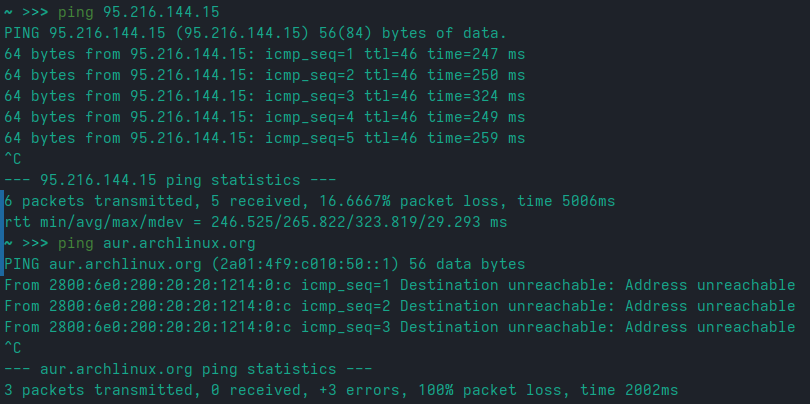
So you can not ping the AUR IP address either? Or just the domain? Again the information you provide makes no sense. If you can reach AUR from web browser without DNS override from the browser, then it should work system wide as it basically uses the system network configuration, nothing is overridden. This to me shows something is wrong in the information you give.
I think we gave all the keys to troubleshoot the issue. This seems easy to troubleshoot and fix. But we’re not on your computer and can’t do things for you.
will this wget https://aur.archlinux.org/cgit/aur.git/snapshot/proton-vpn-gtk-app.tar.gz
download the PKGBUILD (the archive in which it and the patch is contained)?
Then you could build it using makepkg
but there are quite a few additional dependencies needed as well.
--2024-05-05 19:34:25--  https://aur.archlinux.org/cgit/aur.git/snapshot/proton-vpn-gtk-app.tar.gz
Loaded CA certificate '/etc/ssl/certs/ca-certificates.crt'
Resolving aur.archlinux.org (aur.archlinux.org)... 2a01:4f9:c010:50::1
Connecting to aur.archlinux.org (aur.archlinux.org)|2a01:4f9:c010:50::1|:443... failed: No route to host
I wonder why “it” would try to use IPv6 and not IPv4.
But wonder is all I can do.
No idea.
after some time I still don’t know
but I’d probably try to disable IPv6 - first by setting it to deactivated in NetworkManager
and if that doesn’t do, system wide through a kernel option added to the grub command line ipv6.disable=1
There is another way as well - sysctl.
But that is weird that this should even be needed - it should just be a temporary measure and reverted
as it likely did work before without such mucking around.


 ).
).