Manjaro KDE Unstable, fresh install with old home dir.
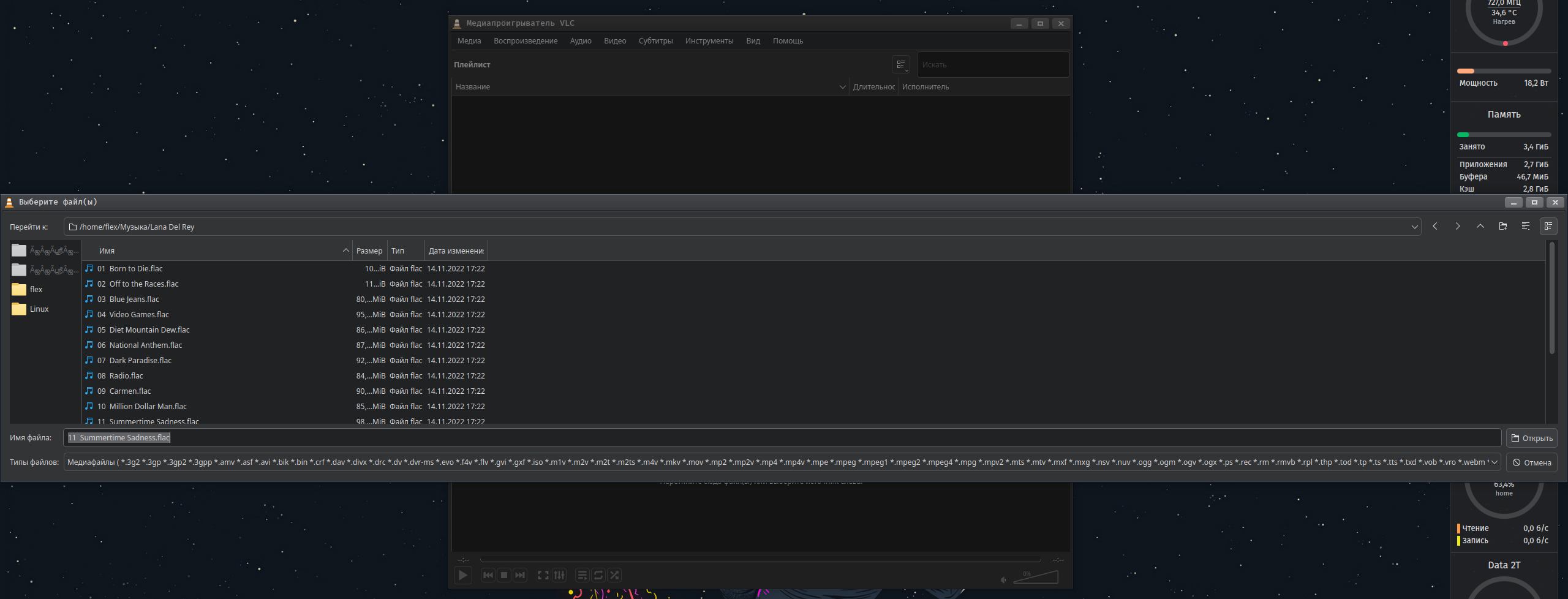
For some reason the Qt5 apps are buggy. They don’t use the Kvantum theme (kvantum-qt5 is installed), don’t use system font and their open and save dialog is broken: https://i.postimg.cc/51B1YH32/qt5-dialog.png
If I resize the dialog box, close it and open it again (without closing the program), it will open stretched again.
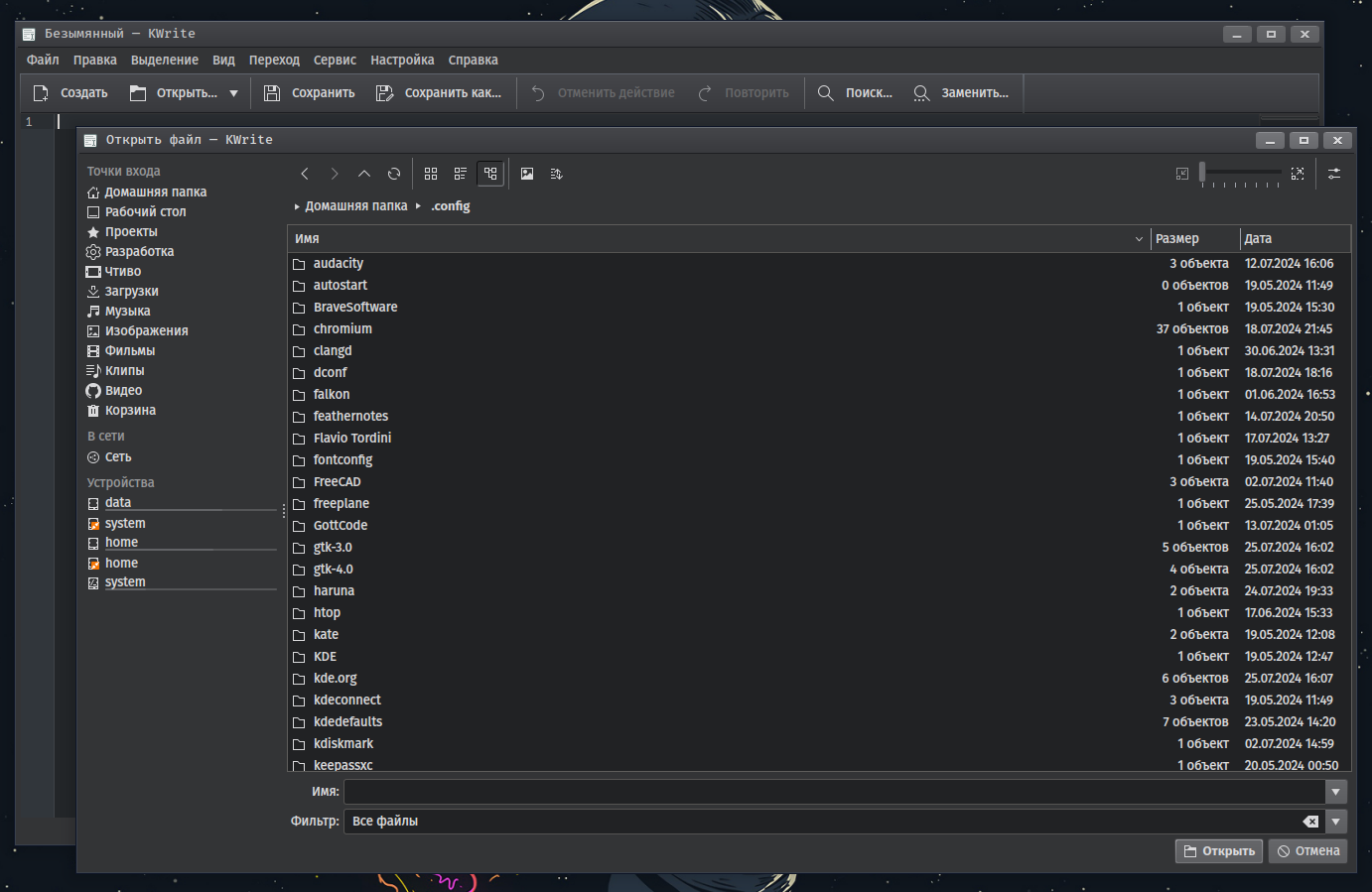
For comparison, Qt6 dialogs look normal: https://i.postimg.cc/38bSfQ2R/qt6-dialog.png
As a result, I cannot normally use VLC, KeePassXC, SMPlayer and other Qt5-programs.
What can be done, where to look?
It would be interested to know, if your Program’s running fine on Plasma 6.0
I would also find out, if this happen because you replaced Home dir.
Did you try switching between Wayland/X11, if this changed anything?
1 Like
I just checked vlc and kate - yes there is visual differences in the file dialog.
If it opens stretched on your system it must be a configuration file which has a stored value for size of dialog - most qt apps has such values.
Example for ~/.config/vlc/vlc-qt-interface.conf
[OpenDialog]
advanced=false
netMRL=172.30.30.30.5000, tcp://172.30.30.30.5000
size=@Size(526 433)
Try removing the relevant applications configuration files, and empty your ~/.cache folder.
Or It is an issue with the them in question.
Try removing kvantum-qt5 and kvantum (if used) and switch the default breeze global theme - apply everything.
1 Like
The problem remains with the default Breeze style. Deleting the file ~/.config/vlc/vlc-qt-interface.conf doesn’t help either.
The ~/.cache directory is located in tmpfs and clearing every shutdown or reboot.
I really would not like to rollback to Plasma 6.0.x, because it lacks some necessary functionality.
Can you tell me which configuration files describe the appearance and behavior of Qt5-apps in the Plasma 6/Qt6 environment? I have a backup of my old home directory when everything was working fine, I want to compare the config files, but I don’t know which ones.
I can feel you frustration - I cannot reproduce your issue on Plasma 6.1.3 (Manjaro unstable branch)
The only thing I know is that application behaviour which is not default is stored in their respective configuration files.
One thing just comes to mind - the xdg-desktop-portal-kde package - it is a package designed to minimize the gap between toolkits and their dialogs - most notably the open dialog.
It is pure speculation - I don’t even know if there is a settings section for it - if there is - it could be stored in dconf
dconf dump /
[org/gtk/settings/file-chooser]
date-format='regular'
location-mode='path-bar'
show-hidden=false
show-size-column=true
show-type-column=true
sidebar-width=203
sort-column='name'
sort-directories-first=true
sort-order='ascending'
type-format='category'
window-position=(45, 45)
window-size=(1124, 822)
Then see if there is setting for file dialog size
The data is store in ~/.config/dconf/user
There is
~/.config/xdg-desktop-portal-kdercIt contains a FileDialogSize property~/.config/vlcrccontaining a KFileDialog Setting property~/.config/QtProject.confcontains a FileDialog property
1 Like
Do you have the package breeze5 installed?
1 Like
I don’t think that package does it - I don’t have it and my dialogs has the expected layout.
1 Like
Hmmm, ~/.config/QtProject.conf is 1.3 MB in size, in old home dir this file is just 41 KB. After deleting the file, the problem with the open file dialog disappeared, the dialog became normal, and that’s already good. Thank you for the tip!
But the Kvantum style and system font are still not used in Qt5-apps, I would like to understand why.
Yes. Try removing it?
You do have kvantum-qt5 installed?
1 Like
Can we safely presume that your previous installation was also KDE Plasma?
If it wasn’t, you would no doubt have all kinds of inconsistent and/or incompatible settings remaining in your /home directories; under ~/.config for example.
1 Like
No. I wasn’t sure if it would help your situation.
Anyway, have you tried creating a new user, and seeing if the problem persists?
Also, do you have plasma5-integration package installed? This is the package that does “Qt5 Platform Theme integration plugins for the Plasma workspaces” (I mistakenly thought the breeze5 did this too, I blame this on my lack of coffee this morning 
1 Like
Oh. My. God.
This package was not installed and after installing it the problem was fixed.
So simple I had to check things like this myself.
Thanks everyone for the help!
This topic was automatically closed 3 days after the last reply. New replies are no longer allowed.