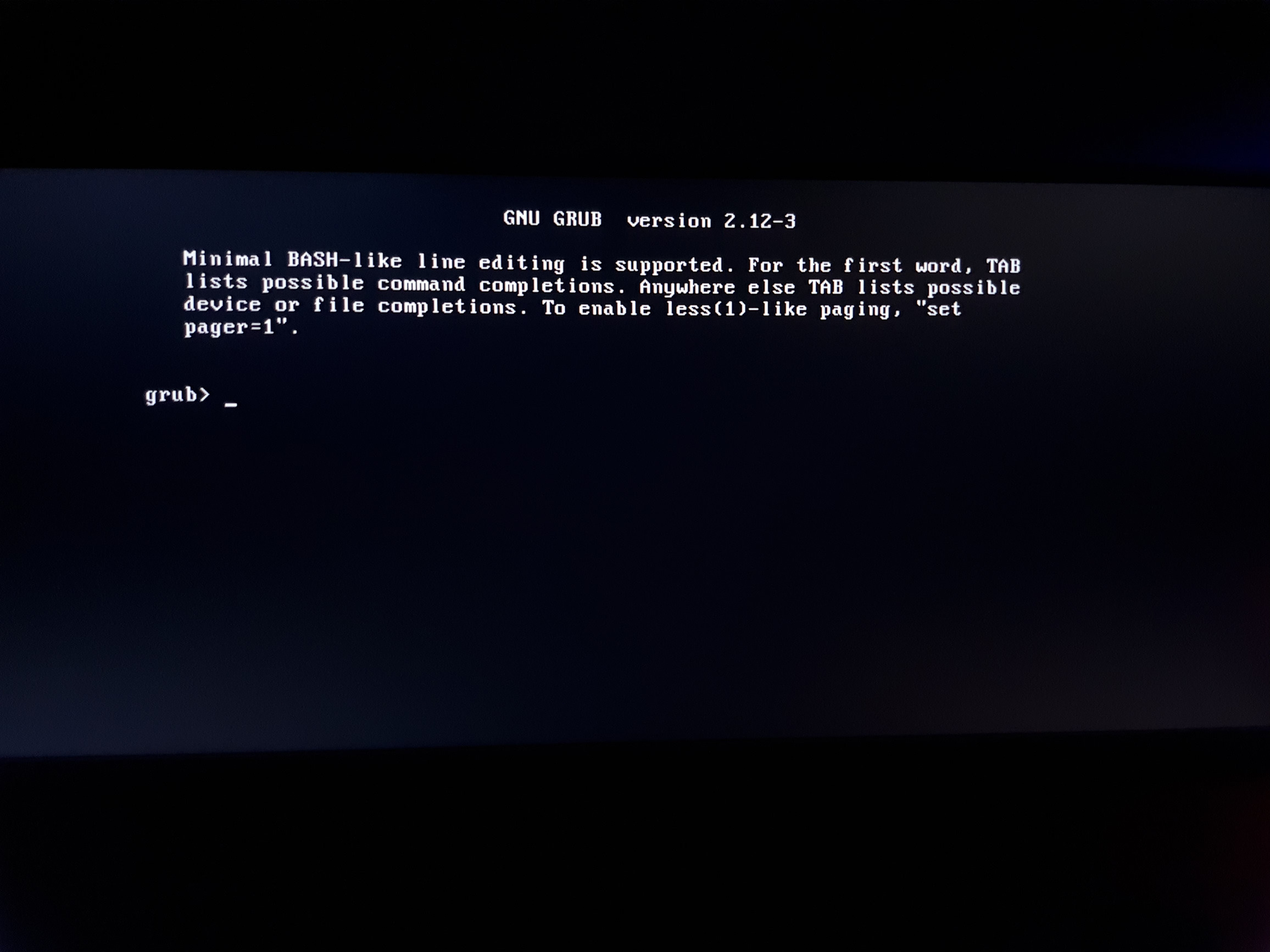
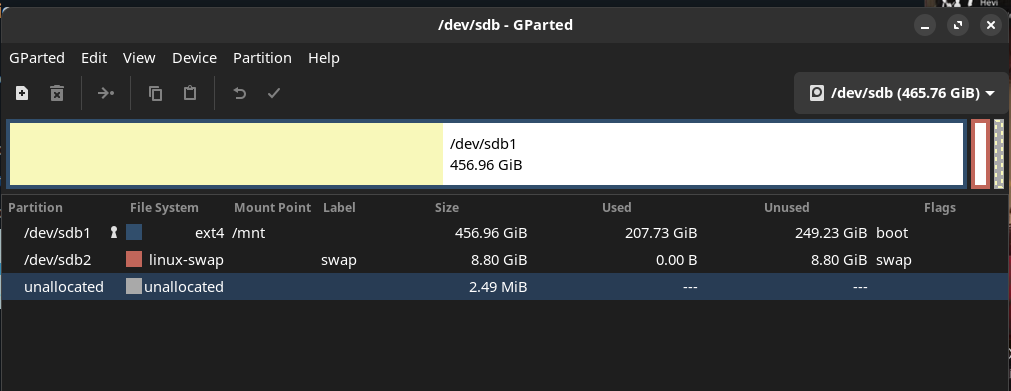
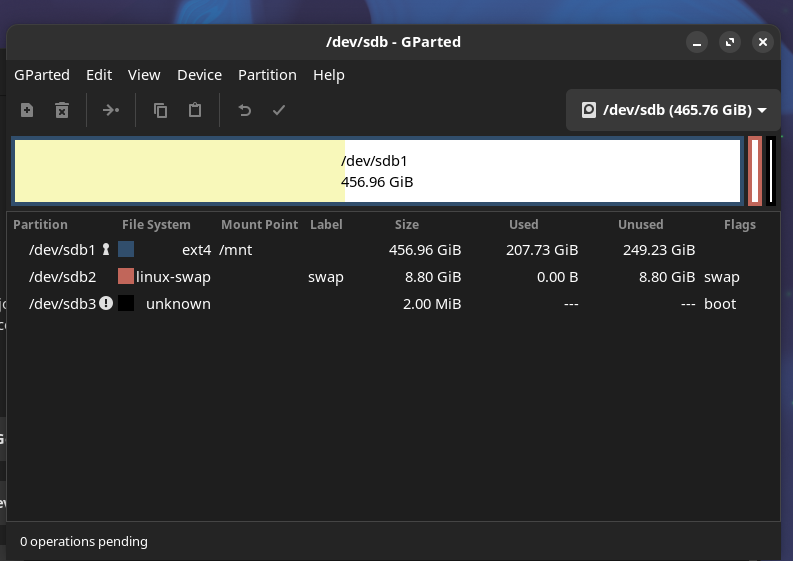
.
[manjaro-gnome /]# ls -lh /boot
total 226M
-rw-r--r-- 1 root root 180K Sep 17 18:42 amd-ucode.img
drwxr-xr-x 6 root root 4.0K Dec 13 22:21 grub
-rw------- 1 root root  31M Sep 30 11:02 initramfs-5.15-x86_64-fallback.img
-rw------- 1 root root 8.8M Sep 30 11:02 initramfs-5.15-x86_64.img
-rw------- 1 root root  39M Sep 30 11:03 initramfs-6.1-x86_64-fallback.img
-rw------- 1 root root 9.2M Sep 30 11:02 initramfs-6.1-x86_64.img
-rw------- 1 root root  38M Sep 30 11:02 initramfs-6.12-x86_64-fallback.img
-rw------- 1 root root 9.1M Sep 30 11:02 initramfs-6.12-x86_64.img
-rw------- 1 root root  36M Sep 30 11:03 initramfs-6.6-x86_64-fallback.img
-rw------- 1 root root 9.1M Sep 30 11:03 initramfs-6.6-x86_64.img
-rw-r--r-- 1 root root   23 Sep 12 21:55 linux515-x86_64.kver
-rw-r--r-- 1 root root   22 Sep 19 13:08 linux61-x86_64.kver
-rw-r--r-- 1 root root   22 Sep 19 13:11 linux612-x86_64.kver
-rw-r--r-- 1 root root   22 Sep 19 13:08 linux66-x86_64.kver
drwxr-xr-x 2 root root 4.0K Feb  6  2025 memtest86+
-rw-r--r-- 1 root root  11M Sep 30 11:02 vmlinuz-5.15-x86_64
-rw-r--r-- 1 root root  12M Sep 30 11:02 vmlinuz-6.1-x86_64
-rw-r--r-- 1 root root  14M Sep 30 11:02 vmlinuz-6.12-x86_64
-rw-r--r-- 1 root root  13M Sep 30 11:02 vmlinuz-6.6-x86_64
and nano /boot/grub/grub.cfg
#
# DO NOT EDIT THIS FILE
#
# It is automatically generated by grub-mkconfig using templates
# from /etc/grub.d and settings from /etc/default/grub
#

### BEGIN /etc/grub.d/00_header ###
insmod part_gpt
insmod part_msdos
if [ -s $prefix/grubenv ]; then
  load_env
fi
if [ "${next_entry}" ] ; then
   set default="${next_entry}"
   set next_entry=
   save_env next_entry
   set boot_once=true
else
   set default="${saved_entry}"
fi

if [ x"${feature_menuentry_id}" = xy ]; then
  menuentry_id_option="--id"
else
  menuentry_id_option=""
fi

export menuentry_id_option

if [ "${prev_saved_entry}" ]; then
  set saved_entry="${prev_saved_entry}"
  save_env saved_entry
  set prev_saved_entry=
  save_env prev_saved_entry
  set boot_once=true
fi

function savedefault {
  if [ -z "${boot_once}" ]; then
    saved_entry="${chosen}"
    save_env saved_entry
  fi
}

function load_video {
  if [ x$feature_all_video_module = xy ]; then
    insmod all_video
  else
    insmod efi_gop
    insmod efi_uga
    insmod ieee1275_fb
    insmod vbe
    insmod vga
    insmod video_bochs
    insmod video_cirrus
  fi
}

set menu_color_normal=light-gray/black
set menu_color_highlight=green/black

if [ x$feature_default_font_path = xy ] ; then
   font=unicode
else
insmod part_msdos
insmod ext2
set root='hd1,msdos1'
if [ x$feature_platform_search_hint = xy ]; then
  search --no-floppy --fs-uuid --set=root --hint-bios=hd1,msdos1 --hint-efi=hd1,msdos1 --hint-bareme>
else
  search --no-floppy --fs-uuid --set=root d6ecda09-ff35-416a-9f44-94f281802154
fi
    font="/usr/share/grub/unicode.pf2"
fi

if loadfont $font ; then
  set gfxmode=auto
  load_video
  insmod gfxterm
fi
terminal_input console
terminal_output gfxterm
if [ x$feature_timeout_style = xy ] ; then
  set timeout_style=hidden
  set timeout=5
# Fallback hidden-timeout code in case the timeout_style feature is
# unavailable.
elif sleep --interruptible 5 ; then
  set timeout=0
fi
### END /etc/grub.d/00_header ###

### BEGIN /etc/grub.d/10_linux ###
menuentry 'Manjaro Linux' --class manjaro --class gnu-linux --class gnu --class os $menuentry_id_opt>
        savedefault
        load_video
        set gfxpayload=keep
        insmod gzio
        insmod part_msdos
        insmod ext2
        set root='hd1,msdos1'
        if [ x$feature_platform_search_hint = xy ]; then
          search --no-floppy --fs-uuid --set=root --hint-bios=hd1,msdos1 --hint-efi=hd1,msdos1 --hin>
        else
          search --no-floppy --fs-uuid --set=root d6ecda09-ff35-416a-9f44-94f281802154
        fi
        linux   /boot/vmlinuz-6.12-x86_64 root=UUID=d6ecda09-ff35-416a-9f44-94f281802154 rw  nvidia_>
        initrd  /boot/amd-ucode.img /boot/initramfs-6.12-x86_64.img
}
submenu 'Advanced options for Manjaro Linux' $menuentry_id_option 'gnulinux-advanced-d6ecda09-ff35-4>
        menuentry 'Manjaro Linux (Kernel: 6.12.48-1-MANJARO x64)' --class manjaro --class gnu-linux >
        savedefault
                load_video
                set gfxpayload=keep
                insmod gzio
                insmod part_msdos
                insmod ext2
                set root='hd1,msdos1'
                if [ x$feature_platform_search_hint = xy ]; then
                  search --no-floppy --fs-uuid --set=root --hint-bios=hd1,msdos1 --hint-efi=hd1,msdo>
                else
                  search --no-floppy --fs-uuid --set=root d6ecda09-ff35-416a-9f44-94f281802154
                fi
                linux   /boot/vmlinuz-6.12-x86_64 root=UUID=d6ecda09-ff35-416a-9f44-94f281802154 rw >
                initrd  /boot/amd-ucode.img /boot/initramfs-6.12-x86_64.img
        }
        menuentry 'Manjaro Linux (Kernel: 6.12.48-1-MANJARO x64 - fallback initramfs)' --class manja>
                load_video
                set gfxpayload=keep
                insmod gzio
                insmod part_msdos
                insmod ext2
                set root='hd1,msdos1'
                if [ x$feature_platform_search_hint = xy ]; then
                  search --no-floppy --fs-uuid --set=root --hint-bios=hd1,msdos1 --hint-efi=hd1,msdo>
                else
                  search --no-floppy --fs-uuid --set=root d6ecda09-ff35-416a-9f44-94f281802154
                fi
                linux   /boot/vmlinuz-6.12-x86_64 root=UUID=d6ecda09-ff35-416a-9f44-94f281802154 rw >
                initrd  /boot/initramfs-6.12-x86_64-fallback.img
        }
        menuentry 'Manjaro Linux (Kernel: 6.6.107-1-MANJARO x64)' --class manjaro --class gnu-linux >
        savedefault
                load_video
                set gfxpayload=keep
                insmod gzio
                insmod part_msdos
                insmod ext2
                set root='hd1,msdos1'
                if [ x$feature_platform_search_hint = xy ]; then
                  search --no-floppy --fs-uuid --set=root --hint-bios=hd1,msdos1 --hint-efi=hd1,msdo>
                else
                  search --no-floppy --fs-uuid --set=root d6ecda09-ff35-416a-9f44-94f281802154
                fi
                linux   /boot/vmlinuz-6.6-x86_64 root=UUID=d6ecda09-ff35-416a-9f44-94f281802154 rw  >
                initrd  /boot/amd-ucode.img /boot/initramfs-6.6-x86_64.img
        }
        menuentry 'Manjaro Linux (Kernel: 6.6.107-1-MANJARO x64 - fallback initramfs)' --class manja>
                load_video
                set gfxpayload=keep
                insmod gzio
                insmod part_msdos
                insmod ext2
                set root='hd1,msdos1'
                if [ x$feature_platform_search_hint = xy ]; then
                  search --no-floppy --fs-uuid --set=root --hint-bios=hd1,msdos1 --hint-efi=hd1,msdo>
                else
                  search --no-floppy --fs-uuid --set=root d6ecda09-ff35-416a-9f44-94f281802154
                fi
                linux   /boot/vmlinuz-6.6-x86_64 root=UUID=d6ecda09-ff35-416a-9f44-94f281802154 rw  >
                initrd  /boot/amd-ucode.img /boot/initramfs-6.6-x86_64.img
        }
        menuentry 'Manjaro Linux (Kernel: 6.6.107-1-MANJARO x64 - fallback initramfs)' --class manja>
                load_video
                set gfxpayload=keep
                insmod gzio
                insmod part_msdos
                insmod ext2
                set root='hd1,msdos1'
                if [ x$feature_platform_search_hint = xy ]; then
                  search --no-floppy --fs-uuid --set=root --hint-bios=hd1,msdos1 --hint-efi=hd1,msdo>
                else
                  search --no-floppy --fs-uuid --set=root d6ecda09-ff35-416a-9f44-94f281802154
                fi
                linux   /boot/vmlinuz-6.6-x86_64 root=UUID=d6ecda09-ff35-416a-9f44-94f281802154 rw  >
                initrd  /boot/initramfs-6.6-x86_64-fallback.img
        }
        menuentry 'Manjaro Linux (Kernel: 6.1.153-1-MANJARO x64)' --class manjaro --class gnu-linux >
        savedefault
                load_video
                set gfxpayload=keep
                insmod gzio
                insmod part_msdos
                insmod ext2
                set root='hd1,msdos1'
                if [ x$feature_platform_search_hint = xy ]; then
                  search --no-floppy --fs-uuid --set=root --hint-bios=hd1,msdos1 --hint-efi=hd1,msdo>
                else
                  search --no-floppy --fs-uuid --set=root d6ecda09-ff35-416a-9f44-94f281802154
                fi
                linux   /boot/vmlinuz-6.1-x86_64 root=UUID=d6ecda09-ff35-416a-9f44-94f281802154 rw  >
                initrd  /boot/amd-ucode.img /boot/initramfs-6.1-x86_64.img
        }
        menuentry 'Manjaro Linux (Kernel: 6.1.153-1-MANJARO x64 - fallback initramfs)' --class manja>
                load_video
                set gfxpayload=keep
                insmod gzio
                insmod part_msdos
                insmod ext2
                set root='hd1,msdos1'
                if [ x$feature_platform_search_hint = xy ]; then
                  search --no-floppy --fs-uuid --set=root --hint-bios=hd1,msdos1 --hint-efi=hd1,msdo>
                else
                  search --no-floppy --fs-uuid --set=root d6ecda09-ff35-416a-9f44-94f281802154
                fi
                linux   /boot/vmlinuz-6.1-x86_64 root=UUID=d6ecda09-ff35-416a-9f44-94f281802154 rw  >
                initrd  /boot/initramfs-6.1-x86_64-fallback.img
        }
        menuentry 'Manjaro Linux (Kernel: 5.15.193-1-MANJARO x64)' --class manjaro --class gnu-linux>
        savedefault
                load_video
                set gfxpayload=keep
                insmod gzio
                insmod part_msdos
                insmod ext2
                set root='hd1,msdos1'
                if [ x$feature_platform_search_hint = xy ]; then
                  search --no-floppy --fs-uuid --set=root --hint-bios=hd1,msdos1 --hint-efi=hd1,msdo>
                else
                  search --no-floppy --fs-uuid --set=root d6ecda09-ff35-416a-9f44-94f281802154
                fi
                linux   /boot/vmlinuz-5.15-x86_64 root=UUID=d6ecda09-ff35-416a-9f44-94f281802154 rw >
                initrd  /boot/amd-ucode.img /boot/initramfs-5.15-x86_64.img
        }
        menuentry 'Manjaro Linux (Kernel: 5.15.193-1-MANJARO x64 - fallback initramfs)' --class manj>
                load_video
                set gfxpayload=keep
                insmod gzio
                insmod part_msdos
                insmod ext2
                set root='hd1,msdos1'
                if [ x$feature_platform_search_hint = xy ]; then
                  search --no-floppy --fs-uuid --set=root --hint-bios=hd1,msdos1 --hint-efi=hd1,msdo>
                else
                  search --no-floppy --fs-uuid --set=root d6ecda09-ff35-416a-9f44-94f281802154
                fi
                linux   /boot/vmlinuz-5.15-x86_64 root=UUID=d6ecda09-ff35-416a-9f44-94f281802154 rw >
                initrd  /boot/initramfs-5.15-x86_64-fallback.img
        }
}

### END /etc/grub.d/10_linux ###

### BEGIN /etc/grub.d/15_ostree ###
### END /etc/grub.d/15_ostree ###

### BEGIN /etc/grub.d/20_linux_xen ###
### END /etc/grub.d/20_linux_xen ###

### BEGIN /etc/grub.d/25_bli ###
if [ "$grub_platform" = "efi" ]; then
  insmod bli
fi
### END /etc/grub.d/25_bli ###

### BEGIN /etc/grub.d/30_os-prober ###
### END /etc/grub.d/30_os-prober ###

### BEGIN /etc/grub.d/30_uefi-firmware ###
if [ "$grub_platform" = "efi" ]; then
        menuentry 'UEFI Firmware Settings' $menuentry_id_option 'uefi-firmware' {
                fwsetup
                }
fi
### END /etc/grub.d/30_uefi-firmware ###

### BEGIN /etc/grub.d/35_fwupd ###
### END /etc/grub.d/35_fwupd ###

### BEGIN /etc/grub.d/40_custom ###
# This file provides an easy way to add custom menu entries.  Simply type the
# menu entries you want to add after this comment.  Be careful not to change
# the 'exec tail' line above.
### END /etc/grub.d/40_custom ###

### BEGIN /etc/grub.d/41_custom ###
if [ -f  ${config_directory}/custom.cfg ]; then
  source ${config_directory}/custom.cfg
elif [ -z "${config_directory}" -a -f  $prefix/custom.cfg ]; then
  source $prefix/custom.cfg
fi
### END /etc/grub.d/41_custom ###

### BEGIN /etc/grub.d/41_snapshots-btrfs ###
### END /etc/grub.d/41_snapshots-btrfs ###

### BEGIN /etc/grub.d/60_memtest86+ ###
if [ "${grub_platform}" == "pc" ]; then
    menuentry "Memory Tester (memtest86+)" --class memtest86 --class gnu --class tool {
        search --fs-uuid --no-floppy --set=root --hint-bios=hd1,msdos1 --hint-efi=hd1,msdos1 --hint->
        linux16 /boot/memtest86+/memtest.bin
    }
fi
### END /etc/grub.d/60_memtest86+ ###
I am (almost) pretty sure that I use Legacy/BIOS, it was a mistake in the installation, since that I don`t make any changes.