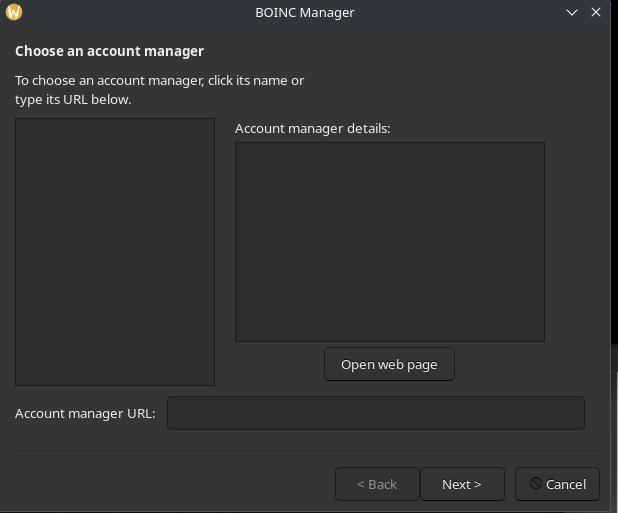
BOINC cannot add new project or account manager

I installed BOINC from Add/Remove Software

When I try to add an account manager (science united). Nothing is shown.

There is also no project show.

I manage to add science united by adding the url to the account manager url field manually.

BTW. Why I cannot a a photo or link to a photo or even a url in htis post? I think it help to explain the problem with a screenshot.

Brand new users are not permitted to post images or active URLs to prevent spam

Inactive URLs can be posted in pre-formatted text format using Ctrl+E or </> button:

https://forum.manjaro.org/t/boinc-cannot-add-new-project-or-accountt-manager

Screenshots can be uploaded to a 3rd party site and URLs posted in pre-formatted text format

New users usually get a basic user badge within a week or two and can post active links and screenshots

3 Likes

I think it help to explain the problem with a screenshot.

I suggest running boincmgr from the terminal to see if any network or connection errors appear. Then just copy the information from the terminal here, because giving advice blindly without any additional details wouldn’t be proper in my opinion

2 Likes

If I ran the boincmgr command from a terminal. I got a boinc advanced view windows, the connection status is "‘Disconnected’ with error message “BOINC Manager - Connection Error” and “gui_rpcauth.cfg not found. See Accessing BOINC on Linux ”

If I double click the BOINC Manager icon in the All Applications list in the menu bar. I got a running BOINC instance. It actually completed some tasks already.

Back to my original question of the projects and account manager is not showing up. This is a minor issue. As I can manually add the account manager url. But I hope your team can see this issue exist.

Until your forum privileges are greater, you are still able to post a URL, but in a format such as this:

https://forum.manjaro.org

This will allow others to copy/paste the URL, if they wish.


Regarding images, there are (free) public image hosting services, such as the following example, which may help.

Paste your image to the site, and return the URL here, as just shown (above).


A working example with an image just uploaded:

https://pasteboard.co/7ANLod0WlgP5.gif

Regards.

1 Like

@fckwan was granted Basic User badge 16 hours ago and can now post images or active links

1 Like

I tried the BOINC Add project and add account manager function. It is working again,

Please consider this issue resolved.

1 Like

This was the original issue. Notie the account manager fields are all empty.

What did you do ? I have the same problem.

I did not do anything special. I just report this issue on Oct 26, 2025.

Set up the accont manager url by typing it in manually. I notice that the BOINC accepted the account manager url and successfully completed some task.

On Oct 27, 2025. I just tried to check the add project field and I noticed that the projects are showing up. Then I try to remove the account manager and add it again. Then the account manager information show up.

I thought it just take longer time to retrieve those projects and account manager informatioon. Either you can wait longer or manually type in the information.

1 Like

This topic was automatically closed 3 days after the last reply. New replies are no longer allowed.