Hello. How do I add flatpak software to the Applications Shortcuts tab in the Keyboard package?
I am trying to add Floorp to Applications Shortcuts however, I get the following error message.
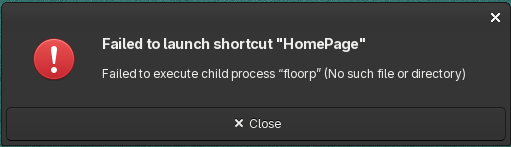
Is there a way around this please?
What exactly are you writing as application name?
Try one.ablaze.floorp or flatpak run one.ablaze.floorp
Create a file with a text editor and name as floorp.desktop. Modify with your information , based on the template below. Place in /home/your user name/.local/share/applications/
[Desktop Entry]
Version=1.0
Type=Application
Name=Floorp
Comment=
Exec=path to executeable
Icon=path to executeable/icon.png
Path=path to directory
NoDisplay=false
Categories=Network;WebBrowser;
Terminal=false
StartupNotify=false
@Teo
Thank you for replying. This is the command within the application when I installed it.
/usr/bin/flatpak run --branch=stable --arch=x86_64 --command=floorp --file-forwarding one.ablaze.floorp @@u %u @@
I assume there is a variable that is incorrect?
@jrichard326
Thank you for replying. This will make the software package compatible with Application Shortcuts?
Mod edit: Consecutive posts merged, @mentions added.
Looks correct at first glance. BUT if it doesn’t run, try without the command part.
Thank you for the suggestions. Both of the commands you mentioned work.
Is this the norm with every flatpak software package? I need to know specific commands like the two you mentioned?
Thank you to everyone else too for the replies.
The naming convention is different.
flatpak run xxx.xxxxx.xxxx
Although in my case xxx.xxxxx.xxxx works too.
You can see the real name of the flatpaks with flatpak list.
Great  Thank you once again.