MLXQt
23 August 2025 06:33
1
Hi,
Can’t open squashfs image: Bad address
Cannot mount AppImage, please check your FUSE setup.FUSE · AppImage/AppImageKit Wiki · GitHub
If i try ./Shotcut.AppImage i get this:
fuse: memory allocation failed
Usage: squashfuse [options] ARCHIVE MOUNTPOINT
I tried to extract manually and run it but it gave error.
bsdtar -xf ./Shotcut.AppImage -C /home/HOMENAME/Shotcut/squash-root
So i tried file and i got this:
file Shotcut.AppImage
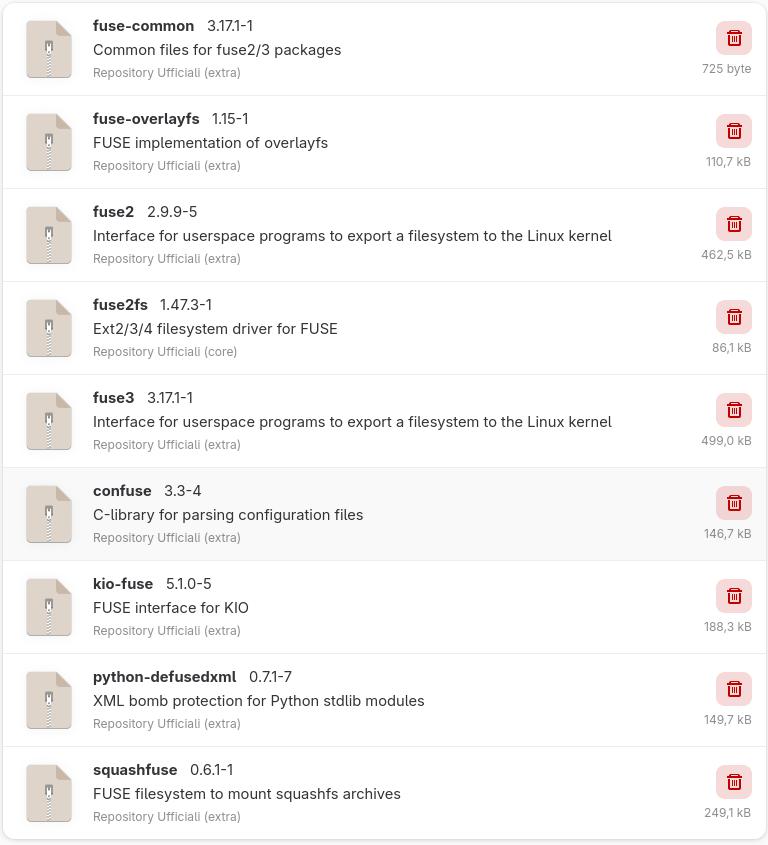
My fuse packages are these:
Anybody has any idea?
P.S.: if you need some info please post the terminal command too.
Teo
23 August 2025 07:25
2
Where did you get the appimage from, so we can test?
I have tried both versions from their website - the AppImage and the portable tar
Both work.
runningsha1sum shotcut-linux-x86_64-250816.AppImageaffb782656eb0a3415b5cf6b17f2abf17b911426 shotcut-linux-x86_64-250816.AppImage
I have these things installed - Xfce4 in a VM:
pacman -Ss fuse | grep installed
extra/fuse-common 3.17.1-1 [installed]
extra/fuse2 2.9.9-5 [installed]
extra/fuse3 3.17.1-1 [installed]
extra/mtpfs 1.1-5 [installed]
./shotcut-linux-x86_64-250816.AppImage --appimage-extract
2 Likes
MLXQt:
Anybody has any idea?
I am fairly certain this is a file error - rename the file - download again, verify the download using checksum.
The reason I suggest rename is to prevent the system from using the disk space released when you delete the .appimage file.
Manjaro LXQt is not an Official edition of Manjaro, nor is it listed as a Community edition, unless it’s perhaps an older unsupported edition.
Could you please clarify?
Additionally, please provide system information as described (below).
Regards.
System Information
inxi -zv8c0
There is a discrepancy here:
in your screenshot, the version of squashfuse is 0.6.1-1
the error message says:
… different version
How come?
I don’t even have this installed - and everything works.
My conclusion would be:
MLXQt
24 August 2025 07:00
7
From the website: Shotcut - Download
Why aren’t you using the package from the repo and be done with it?
sudo pacman -S shotcut
2 Likes
MLXQt
24 August 2025 07:24
11
Cause the repo version is bad, Shotcut appimage works better.
If you say so. It works fine here.
MLXQt
24 August 2025 07:27
13
I don’t know how came, that’s why i’m here for help. The version installed is the one shown in the pic.
Actually: it doesn’t work at all at the moment for you
How about this:
There is a discrepancy here:
in your screenshot, the version of squashfuse is 0.6.1-1
(from the extra repo)
the error message says:
… different version
How come?
AUR?
I don’t even have this installed - and everything works.
My conclusion would be:
rermove it
The version of squashfuse you have is from long ago - can’t be had anywhere.
The error message you posted says something different.
1 Like
If maybe you try to do what I suggested:
Do you have AppImage-Launcher installed?
MLXQt
24 August 2025 07:40
18
I already removed it and it didn’t work.
You removed squashfuse and still get that error?
That would be very strange.
MLXQt
24 August 2025 07:47
20
No, i removed squashfuse and the imageapp doesn’t load.
So:
from a terminal?
Make it executable first:
chmod ug+x ./shotcut-linux-x86_64-250816.AppImage
Ben
24 August 2025 08:02
22
shotcut-bin is also available via AUR, a slightly fresher version.
Shotcut version 25.08.16 appimage
⮞ ./shotcut-linux-x86_64-250816.AppImage
libDeckLinkAPI.so: cannot open shared object file: No such file or directory
---
formats:
- a64
- ac3
- ac4
- adts
- adx
- aea
- aiff
- alp
- amr
- amv
- apm
- apng
- aptx
- aptx_hd
- argo_asf
- argo_cvg
- asf
- ass
- ast
- asf_stream
- au
- avi
- avif
- avm2
- avs2
- avs3
- bit
- caf
- cavsvideo
- codec2
- codec2raw
- crc
- dash
- data
- daud
- dfpwm
- dirac
- dnxhd
- dts
- dv
- eac3
- evc
- f4v
- ffmetadata
- fifo
- filmstrip
- fits
- flac
- flv
- framecrc
- framehash
- framemd5
- g722
- g723_1
- g726
- g726le
- gif
- gsm
- gxf
- h261
- h263
- h264
- hash
- hds
- hevc
- hls
- iamf
- ico
- ilbc
- image2
- image2pipe
- ipod
- ircam
- ismv
- ivf
- jacosub
- kvag
- latm
- lc3
- lrc
- m4v
- md5
- matroska
- matroska
- microdvd
- mjpeg
- mlp
- mmf
- mov
- mp2
- mp3
- mp4
- mpeg
- vcd
- mpeg1video
- dvd
- svcd
- mpeg2video
- vob
- mpegts
- mpjpeg
- mxf
- mxf_d10
- mxf_opatom
- null
- nut
- obu
- oga
- ogg
- ogv
- oma
- opus
- alaw
- mulaw
- vidc
- f64be
- f64le
- f32be
- f32le
- s32be
- s32le
- s24be
- s24le
- s16be
- s16le
- s8
- u32be
- u32le
- u24be
- u24le
- u16be
- u16le
- u8
- psp
- rawvideo
- rcwt
- rm
- roq
- rso
- rtp
- rtp_mpegts
- rtsp
- sap
- sbc
- scc
- film_cpk
- segment
- stream_segment,ssegment
- smjpeg
- smoothstreaming
- sox
- spx
- spdif
- srt
- streamhash
- sup
- swf
- tee
- 3g2
- 3gp
- mkvtimestamp_v2
- truehd
- tta
- ttml
- uncodedframecrc
- vc1
- vc1test
- voc
- vvc
- w64
- wav
- webm
- webm_dash_manifest
- webm_chunk
- webp
- webvtt
- wsaud
- wtv
- wv
- yuv4mpegpipe
- alsa
- fbdev
- oss
- pulse
- sdl,sdl2
- video4linux2,v4l2
- xv
...
---
audio_codecs:
- comfortnoise
- s302m
- aac
- ac3
- ac3_fixed
- alac
- aptx
- aptx_hd
- dca
- dfpwm
- eac3
- flac
- g723_1
- mlp
- mp2
- mp2fixed
- nellymoser
- opus
- real_144
- sbc
- sonic
- sonicls
- truehd
- tta
- vorbis
- wavpack
- wmav1
- wmav2
- pcm_alaw
- pcm_bluray
- pcm_dvd
- pcm_f32be
- pcm_f32le
- pcm_f64be
- pcm_f64le
- pcm_mulaw
- pcm_s8
- pcm_s8_planar
- pcm_s16be
- pcm_s16be_planar
- pcm_s16le
- pcm_s16le_planar
- pcm_s24be
- pcm_s24daud
- pcm_s24le
- pcm_s24le_planar
- pcm_s32be
- pcm_s32le
- pcm_s32le_planar
- pcm_s64be
- pcm_s64le
- pcm_u8
- pcm_u16be
- pcm_u16le
- pcm_u24be
- pcm_u24le
- pcm_u32be
- pcm_u32le
- pcm_vidc
- roq_dpcm
- adpcm_adx
- adpcm_argo
- g722
- g726
- g726le
- adpcm_ima_amv
- adpcm_ima_alp
- adpcm_ima_apm
- adpcm_ima_qt
- adpcm_ima_ssi
- adpcm_ima_wav
- adpcm_ima_ws
- adpcm_ms
- adpcm_swf
- adpcm_yamaha
- libmp3lame
- libopus
- libvorbis
- anull
...
---
video_codecs:
- a64multi
- a64multi5
- alias_pix
- amv
- apng
- asv1
- asv2
- avrp
- avui
- bitpacked
- bmp
- cfhd
- cinepak
- cljr
- dnxhd
- dpx
- dvvideo
- dxv
- exr
- ffv1
- ffvhuff
- fits
- flashsv
- flashsv2
- flv
- gif
- h261
- h263
- h263p
- huffyuv
- jpeg2000
- jpegls
- ljpeg
- magicyuv
- mjpeg
- mpeg1video
- mpeg2video
- mpeg4
- msmpeg4v2
- msmpeg4
- msrle
- msvideo1
- pam
- pbm
- pcx
- pfm
- pgm
- pgmyuv
- phm
- png
- ppm
- prores
- prores_aw
- prores_ks
- qoi
- qtrle
- r10k
- r210
- rawvideo
- roqvideo
- rpza
- rv10
- rv20
- sgi
- smc
- snow
- speedhq
- sunrast
- svq1
- targa
- tiff
- utvideo
- v210
- v308
- v408
- v410
- vbn
- vc2
- wbmp
- wrapped_avframe
- wmv1
- wmv2
- xbm
- xface
- xwd
- y41p
- yuv4
- zlib
- zmbv
- hdr
- libaom-av1
- libsvtav1
- libtheora
- libvpx
- libvpx-vp9
- libwebp_anim
- libwebp
- libx264
- libx264rgb
- libx265
- h263_v4l2m2m
- av1_nvenc
- h264_nvenc
- h264_v4l2m2m
- h264_vaapi
- hevc_nvenc
- hevc_v4l2m2m
- hevc_vaapi
- mjpeg_vaapi
- mpeg2_vaapi
- mpeg4_v4l2m2m
- vp8_v4l2m2m
- vp8_vaapi
- vp9_vaapi
- vnull
...
Shotcut-bin (AUR) loaded up well enough, but the integration is dodgy (e.g. mouse cursor fails when passing over the window).
Shotcut version 25.07.26 (repo) also loads up really quickly (and better integrated with the system)