Was this AI-found?
AI-assisted. The starting insight — that splice() hands page-cache pages into the crypto subsystem and that scatterlist page provenance might be an under-explored bug class — came from human research by Taeyang Lee at Xint.
From there, Xint Code scaled the audit across the entire crypto/ subsystem in roughly an hour. Copy Fail was the highest-severity finding in the run.
– Copy Fail — CVE-2026-31431
 With the rapid evolution of AI - this is just the beginning…
 Don’t panic
 Avoid untrusted code, scripts or apps, in any form.
Local Privilege Escalation Vulnerability
On 29 April 2026, a high local privilege escalation vulnerability in the Linux kernel, tracked as CVE-2026-31431 and named “Copy Fail”, was publicly disclosed. The vulnerability affects Manjaro Linux since 2017. A public proof-of-concept exploit has been released.
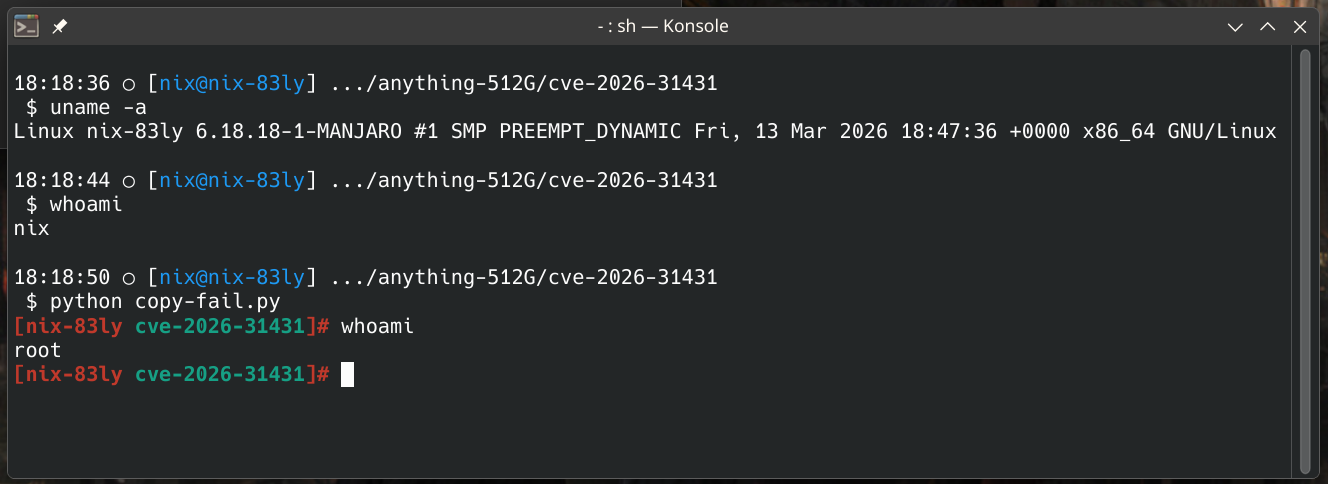
Unpatched kernel
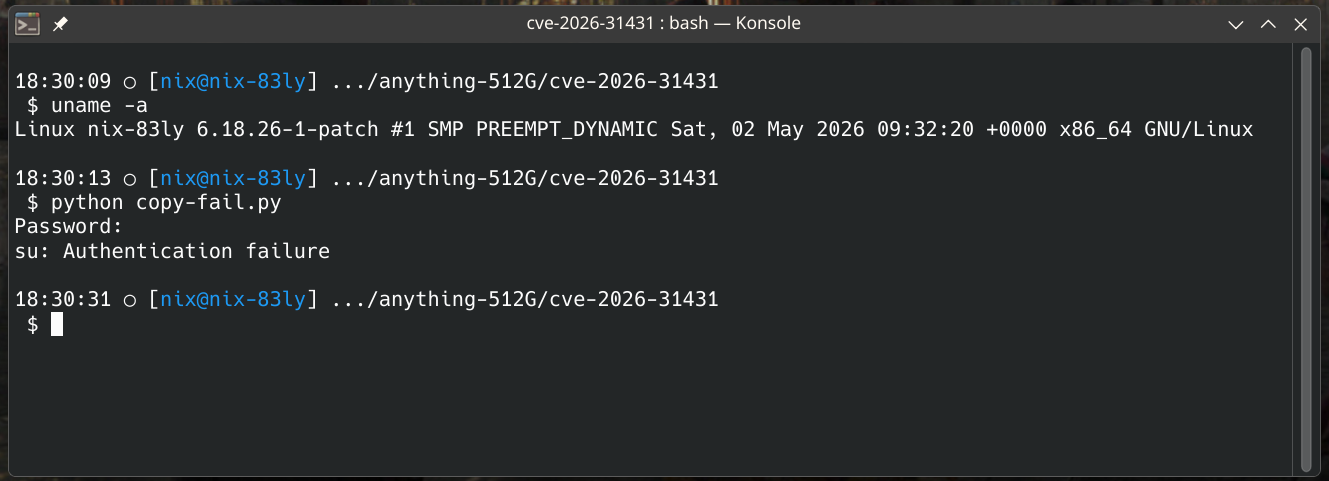
Patched kernel
All kernels built before this incident is vulnerable
The release manager has patched most of the kernels and released them to the testing and unstable branches.
[Testing Update] 2026-05-01 - Kernels (CVE-2026-31431), NVIDIA, LibreOffice, Mesa, Deepin - #2 by discobot
And with this comment 2026-05-01T22:00:00Z stable branch has been updated as well
No longer needed - kept for historical purpose
Temporary Mitigation
Disable the algif_aead kernel module persistently on all affected systems until a patched kernel is available:
# echo "install algif_aead /bin/false" > /etc/modprobe.d/disable-algif.conf
# rmmod algif_aead 2>/dev/null || true
This workaround does not affect dm-crypt /LUKS, kTLS , IPsec/XFRM, OpenSSL, GnuTLS, NSS, or SSH. It may affect applications explicitly configured to use the afalg engine or that bind aead/skcipher/hash sockets directly. Exposure can be assessed with lsof | grep AF_ALG .
– CERT-EU - High Vulnerability in the Linux Kernel (“Copy Fail”)
If you want to check, if the mitigation will affect your system - first sync lsof-package to your system pacman -Syu lsof.
The check will tell if applying the temporary mitigation will affect your daily operation. If it is empty - you are safe to apply the mitigation.
What you can do
Choose a mitigation that works for you
-
apply the mitigation
sudo su
echo "install algif_aead /bin/false" > /etc/modprobe.d/disable-algif.conf
rmmod algif_aead 2>/dev/null || true
exit
-
switch branch
sudo pacman-mirrors -aS testing && sudo pacman -Syyu
-
build custom kernel
[How To] Compile a custom Manjaro kernel
-
use the provided community kernel Linux 6.18.26
Alert your system administrator
If you are part of a multi-user system running on Manjaro stable branch and kernel 6.18.18 consider informing the administrator responsible for the server you are connecting to.
Community kernel
No longer needed
Summary
Only Linux 6.18.26 is available as community patch
Use the kernel on your own responsibility.
No efforts has been made to ensure compatibility with any extra-modules
No efforts has been made to ensure compatibility with Nvidia GPU drivers
The kernel exist side-by-side with the official 6.18 kernel and must be maintained separately.
No updates to the patch will be provided
You must manually switch back when stable branch receives the patched kernels.
You can get the community kernel for stable branch from https://manjaro.dk/kernel/.
sudo pacman -U https://manjaro.dk/kernel/linux618-patch-6.18.26-1-x86_64.pkg.tar.zst
A header package is also available should you require it.
The packages are signed using a valid Manjaro Linux signing key.
The key belongs to Frede Hundewadt AKA @ManjaroDevOps.
Revert your chosen mitigation
-
Removing the mitigation is a simple as removing the file created
sudo rm /etc/modprobe.d/disable-algif.conf
reboot
-
switching branch
-
building a custom kernel
- select which kernel to boot from grub menu
- remove the custom kernel
-
community kernel
- select which kernel to boot from grub menu
- remove the community kernel
25 Likes
Thanks for giving prominence to this!
Two suggestions:
-
Because the 618 kernel that is currently available in testing (6.18.26) works perfectly on the rest of the stable distro, please make as soon as possible a stable update with that kernel. There is no need for a huge update to stable. Even updating just linux618 and linux612 alone (the two more recent LTS and recommented kernels) will do.
-
As an alternative approach to the issue, those wishing to remain on stable rather than disabling the algif_aead may consider manually downloading linux618-6.18.26-1-x86_64.pkg.tar.zst and linux618-headers-6.18.26-1-x86_64.pkg.tar.zst from some manjaro mirror and install them. This has the advantage that when stable updates the kernel, the system will at some point automatically align to the “stable” kernel. This avoids the risk of forgetting to remove the file disabling algif_aead once a new kernel makes that mitigation unnecessary.
2 Likes
I thought of that - I wouldn’t do it - at least not with any important production systems.
I would switch branch instead
As linux618 depends on coreutils and coreutils depends on glibc and glibc is newer on testing and unstable it may introduce hard to figure out issues.
Dependency info
 $ pamac info linux618
Name                  : linux618
Version               : 6.18.26-1
...
Depends On            : coreutils initramfs kmod
...
 $ pamac info coreutils
Name                  : coreutils
Version               : 9.11-1
...
Depends On            : acl attr glibc gmp libcap openssl
...
 $ mbn info coreutils -q
...
Branch         : unstable
Name           : coreutils
Version        : 9.11-1
Repository     : core
Build Date     : Mon 20 Apr 2026 16:58:00
Packager       : Tobias Powalowski <tpowa@archlinux.org>
Branch         : testing
Name           : coreutils
Version        : 9.11-1
Repository     : core
Build Date     : Mon 20 Apr 2026 16:58:00
Packager       : Tobias Powalowski <tpowa@archlinux.org>
Branch         : stable
Name           : coreutils
Version        : 9.10-1
Repository     : core
Build Date     : Wed 04 Feb 2026 17:59:19
Packager       : Tobias Powalowski <tpowa@archlinux.org>
 $ mbn info glibc -q
...
Branch         : unstable
Name           : glibc
Version        : 2.43+r22+g8362e8ce10b2-1
Repository     : core
Build Date     : Tue 21 Apr 2026 12:13:48
Packager       : Frederik Schwan <freswa@archlinux.org>
Branch         : testing
Name           : glibc
Version        : 2.43+r22+g8362e8ce10b2-1
Repository     : core
Build Date     : Tue 21 Apr 2026 12:13:48
Packager       : Frederik Schwan <freswa@archlinux.org>
Branch         : stable
Name           : glibc
Version        : 2.43+r5+g856c426a7534-1
Repository     : core
Build Date     : Mon 09 Feb 2026 12:31:58
Packager       : Frederik Schwan <freswa@archlinux.org>
2 Likes
Updating the kernel to a later patch level of the same kernel generation should not have any repercussions on account of glibc or coreutils.
It should be perfectly safe to push out a kernel-only update. We’ve done it before, and quite frankly, I don’t understand why we’re not doing it now, other than that one particular individual who shall not be named is being lazy.
9 Likes
Getting the patched kernel update to stable is probably the ideal solution. Since people will be able to see that there’s an update and protect themselves immediately. Especially since not everyone visits the forums regularly or follows the latest Linux news…
10 Likes
I second this (= the comment of @Randomname123). That is what I would expect from the line “Taking the raw power and flexibility of Arch Linux and making it more accessible for a greater audience” on the home page. 
The solutions that are currently provided (switching to testing branch / downloading and installing a newer kernel / compiling and installing a newer kernel) require a bit of sysadmin skills. Which are within my reach but I wonder if these skills can be considered “making it more accessible for a greater audience”…
But of course, thank you for providing solutions 
(edit: reworded the message)
3 Likes
So to be clear. If I run lsof | grep AF_ALG and it returns nothing,
then my system is safe and I don’t need to do the “Temporary Mitigation”?
No - it means that you will get no issues with external programs when you apply the temporary mitigation.
You are advised to apply the mitigation AND it should not influence day-to-day operations.
3 Likes
Thanks that clears it up. One more question regarding the quote:
For one I see it’s prefixed with the comment sign, I assume we need to run these uncommitted.
But when I do, I’m getting an error:
$ echo "install algif_aead /bin/false" > /etc/modprobe.d/disable-algif.conf
zsh: permission denied: /etc/modprobe.d/disable-algif.conf
Even when running with sudo, the same error persists:
$ sudo echo "install algif_aead /bin/false" > /etc/modprobe.d/disable-algif.conf.
Is there another way to execute this command?
The mentioned text is quoted from third party
When in context of cmdline the # signifies root context, so to execute the commands
sudo su
echo "install algif_aead /bin/false" > /etc/modprobe.d/disable-algif.conf
rmmod algif_aead 2>/dev/null || true
exit
5 Likes
Thanks again! This has worked!
1 Like
I don’t understand how to check if I have this vulnerability on my computer.
No need to check - all kernels on stable branch is affected.
No it will not. None of the suggested mitigation require special sysadmin skills
3 Likes
Hi @ManjaroDevOps , Will the Stable Update that contains the patched kernel also provide instructions for undoing the Temporary Mitigation? (and maybe also for the other temporary solutions)
Thank you for your reply.
If i switch to testing can i switch back to stable at a later date?
1 Like
In theory, that should always be possible to switch back, although there may be some caveats if there have been changes at the level of packaging — e.g. package splits, package replacements in the repos, et al.
And with Stable still on Plasma 6.5 while Testing is on Plasma 6.6, this currently does hold true for a number of packages.
4 Likes
Thanks, So as i run 2 Hard drives one as root/os/etc and the other as Home folder i could just format the first drive and reinstall the whole os leaving the 2 drive (Home) intact.
This worked when my 1st drive failed not long ago and i replaced with a new drive, Install a fresh Manjaro install and the only problem is finding all the extra Apps/Libs/etc i need once up and running.
Well, I don’t really know how this works with Snaps, FlatPaks and AppImages — I presume they have their own utilities for listing which ones you’ve got installed — but on account of repo and AUR packages, you can run the following two commands… 
pacman -Qnq > pkgs-repo.txt
pacman -Qmq > pkgs-aur.txt
And then once you’ve got your new installation up and running, you can reinstall the desired packages with…
sudo pacman -Syu < pkgs-repo.txt
pamac build < pkgs-aur.txt
Of course, what this will not do is restore any custom modifications you’ve made to system-wide configuration files under /etc — e.g. /etc/pam.d — so it’s always best to (as root) make a complete backup of your /etc directory on a POSIX-compatible filesystem, or to create a tarball of it — tar preserves permissions and ownership.
4 Likes