After I start qBittorrent, the whole system halts

I have a strange issue with qBittorrent. After I start qBittorrent, the whole system halts: first, my network and Bluetooth die, and after a while, everything becomes unresponsive

Here is my setup:

System:
  Kernel: 6.6.40-1-MANJARO arch: x86_64 bits: 64 compiler: gcc v: 14.1.1
  Desktop: KDE Plasma v: 6.0.5 Distro: Manjaro base: Arch Linux
Machine:
  Type: Laptop System: HP product: HP ProBook 455 G7 v: SBKPF
    serial: <superuser required>
  Mobo: HP model: 8730 v: KBC Version 13.2B.00 serial: <superuser required>
    UEFI: HP v: S79 Ver. 01.16.00 date: 02/02/2024
CPU:
  Info: 8-core model: AMD Ryzen 7 4700U with Radeon Graphics bits: 64
    type: MCP arch: Zen 2 rev: 1 cache: L1: 512 KiB L2: 4 MiB L3: 8 MiB
  Speed (MHz): avg: 1398 high: 1400 min/max: 1400/2000 boost: enabled cores:
    1: 1397 2: 1397 3: 1396 4: 1397 5: 1400 6: 1400 7: 1400 8: 1397
    bogomips: 31954
  Flags: avx avx2 ht lm nx pae sse sse2 sse3 sse4_1 sse4_2 sse4a ssse3 svm
Graphics:
  Device-1: AMD Renoir [Radeon Vega Series / Radeon Mobile Series]
    vendor: Hewlett-Packard driver: amdgpu v: kernel arch: GCN-5 bus-ID: 05:00.0
    temp: 45.0 C

That a log from journalctl

юли 25 19:35:44 vanrea systemd[1190]: Started qBittorrent - BitTorrent client.
юли 25 19:35:44 vanrea kded6[1313]: Registering ":1.100/StatusNotifierItem" to system tray
юли 25 19:35:44 vanrea kded6[1313]: Service  ":1.100" unregistered
юли 25 19:35:44 vanrea kded6[1313]: Registering ":1.101/StatusNotifierItem" to system tray
юли 25 19:35:44 vanrea plasmashell[1346]: QFont::setPointSizeF: Point size <= 0 (0.000000), must be greater than 0
юли 25 19:36:34 vanrea kernel: watchdog: BUG: soft lockup - CPU#6 stuck for 26s! [swapper/6:0]
юли 25 19:36:34 vanrea kernel: Modules linked in: rfcomm nft_masq nft_ct nft_reject_ipv4 nf_reject_ipv4 nft_reject nft_chain_nat nf_nat nf_conntrack nf_defrag_ipv6 nf_defrag_ipv4 nf_tables libcrc32c bridge stp>
юли 25 19:36:34 vanrea kernel:  btintel uvc videobuf2_memops vfat snd_ump hp_wmi btbcm cryptd fat snd_hda_core snd_rawmidi videobuf2_v4l2 sparse_keymap btmtk rapl pcspkr platform_profile wmi_bmof acpi_cpufreq >
юли 25 19:36:34 vanrea kernel: CPU: 6 PID: 0 Comm: swapper/6 Tainted: G           OE      6.6.40-1-MANJARO #1 bfd252e6ed3e282536601509dfc356fb9d948bbf
юли 25 19:36:34 vanrea kernel: Hardware name: HP HP ProBook 455 G7/8730, BIOS S79 Ver. 01.16.00 02/02/2024
юли 25 19:36:34 vanrea kernel: RIP: 0010:_raw_spin_unlock_irqrestore+0x1d/0x40
юли 25 19:36:34 vanrea kernel: Code: 90 90 90 90 90 90 90 90 90 90 90 90 90 f3 0f 1e fa 0f 1f 44 00 00 c6 07 00 0f 1f 00 f7 c6 00 02 00 00 74 06 fb 0f 1f 44 00 00 <65> ff 0d a4 25 a5 63 74 05 e9 d5 19 00 00 e8>
юли 25 19:36:34 vanrea kernel: RSP: 0018:ffffc90000360e78 EFLAGS: 00000206
юли 25 19:36:34 vanrea kernel: RAX: ffff88810c6f4d00 RBX: 0000000000000206 RCX: ffff88810c6f4d00
юли 25 19:36:34 vanrea kernel: RDX: ffff88810c6f4bc8 RSI: 0000000000000206 RDI: ffff88810c6f4d44
юли 25 19:36:34 vanrea kernel: RBP: ffffc90000360f40 R08: ffff88810c6f4d00 R09: 0000000000000000
юли 25 19:36:34 vanrea kernel: R10: ffff88811b110000 R11: ffff888261abb2f0 R12: ffff88810c6f4c20
юли 25 19:36:34 vanrea kernel: R13: ffff88810c6f4e60 R14: ffff88810c6f4b70 R15: ffff88810c6f4d00
юли 25 19:36:34 vanrea kernel: FS:  0000000000000000(0000) GS:ffff8885f7780000(0000) knlGS:0000000000000000
юли 25 19:36:34 vanrea kernel: CS:  0010 DS: 0000 ES: 0000 CR0: 0000000080050033
юли 25 19:36:34 vanrea kernel: CR2: 00005586841e91a8 CR3: 00000003d6a20000 CR4: 0000000000350ee0
юли 25 19:36:34 vanrea kernel: Call Trace:
юли 25 19:36:34 vanrea kernel:  <IRQ>
юли 25 19:36:34 vanrea kernel:  ? watchdog_timer_fn+0x1b1/0x220
юли 25 19:36:34 vanrea kernel:  ? __pfx_watchdog_timer_fn+0x10/0x10
юли 25 19:36:34 vanrea kernel:  ? __hrtimer_run_queues+0x132/0x2a0
юли 25 19:36:34 vanrea kernel:  ? hrtimer_interrupt+0xf8/0x230
юли 25 19:36:34 vanrea kernel:  ? __sysvec_apic_timer_interrupt+0x4d/0x140
юли 25 19:36:34 vanrea kernel:  ? sysvec_apic_timer_interrupt+0x39/0x90
юли 25 19:36:34 vanrea kernel:  ? asm_sysvec_apic_timer_interrupt+0x1a/0x20
юли 25 19:36:34 vanrea kernel:  ? _raw_spin_unlock_irqrestore+0x1d/0x40
юли 25 19:36:34 vanrea kernel:  bottom_half+0x132/0xe30 [r8152 569298d4d934a0eb18adbf69b42f09ac5c846006]
юли 25 19:36:34 vanrea kernel:  ? __napi_poll+0x2b/0x1b0
юли 25 19:36:34 vanrea kernel:  tasklet_action_common.isra.0+0xc3/0x230
юли 25 19:36:34 vanrea kernel:  handle_softirqs+0xe5/0x2e0
юли 25 19:36:34 vanrea kernel:  __irq_exit_rcu+0xa5/0xc0
юли 25 19:36:34 vanrea kernel:  common_interrupt+0x86/0xa0
юли 25 19:36:34 vanrea kernel:  </IRQ>
юли 25 19:36:34 vanrea kernel:  <TASK>
юли 25 19:36:34 vanrea kernel:  asm_common_interrupt+0x26/0x40
юли 25 19:36:34 vanrea kernel: RIP: 0010:cpuidle_enter_state+0xc6/0x430
юли 25 19:36:34 vanrea kernel: Code: 00 00 e8 5d b2 36 ff e8 b8 f3 ff ff 49 89 c5 0f 1f 44 00 00 31 ff e8 39 ae 35 ff 45 84 ff 0f 85 ae 01 00 00 fb 0f 1f 44 00 00 <45> 85 f6 0f 88 88 01 00 00 49 63 d6 48 8d 04>
юли 25 19:36:34 vanrea kernel: RSP: 0018:ffffc900001d7e90 EFLAGS: 00000246
юли 25 19:36:34 vanrea kernel: RAX: ffff8885f77b41c0 RBX: 0000000000000003 RCX: 0000000000000000
юли 25 19:36:34 vanrea kernel: RDX: 00000013aab4255e RSI: fffffffd0ead0fdd RDI: 0000000000000000
юли 25 19:36:34 vanrea kernel: RBP: ffff8881018f8c00 R08: 0000000000000002 R09: 0000000000000000
юли 25 19:36:34 vanrea kernel: R10: 0000000000000000 R11: 000000000000ffff R12: ffffffff9d74d6a0
юли 25 19:36:34 vanrea kernel: R13: 00000013aab4255e R14: 0000000000000003 R15: 0000000000000000
юли 25 19:36:34 vanrea kernel:  cpuidle_enter+0x2d/0x40
юли 25 19:36:34 vanrea kernel:  do_idle+0x1d8/0x230
юли 25 19:36:34 vanrea kernel:  cpu_startup_entry+0x2a/0x30
юли 25 19:36:34 vanrea kernel:  start_secondary+0x11e/0x140
юли 25 19:36:34 vanrea kernel:  secondary_startup_64_no_verify+0x18f/0x19b
юли 25 19:36:34 vanrea kernel:  </TASK>
юли 25 19:36:51 vanrea systemd[1]: libvirtd.service: Deactivated successfully.
юли 25 19:36:51 vanrea systemd[1]: libvirtd.service: Unit process 1166 (dnsmasq) remains running after unit stopped.
юли 25 19:36:51 vanrea systemd[1]: libvirtd.service: Unit process 1167 (dnsmasq) remains running after unit stopped.
юли 25 19:37:02 vanrea kernel: watchdog: BUG: soft lockup - CPU#6 stuck for 52s! [swapper/6:0]
юли 25 19:37:02 vanrea kernel: Modules linked in: rfcomm nft_masq nft_ct nft_reject_ipv4 nf_reject_ipv4 nft_reject nft_chain_nat nf_nat nf_conntrack nf_defrag_ipv6 nf_defrag_ipv4 nf_tables libcrc32c bridge stp>
юли 25 19:37:02 vanrea kernel:  btintel uvc videobuf2_memops vfat snd_ump hp_wmi btbcm cryptd fat snd_hda_core snd_rawmidi videobuf2_v4l2 sparse_keymap btmtk rapl pcspkr platform_profile wmi_bmof acpi_cpufreq >
юли 25 19:37:02 vanrea kernel: CPU: 6 PID: 0 Comm: swapper/6 Tainted: G           OEL     6.6.40-1-MANJARO #1 bfd252e6ed3e282536601509dfc356fb9d948bbf
юли 25 19:37:02 vanrea kernel: Hardware name: HP HP ProBook 455 G7/8730, BIOS S79 Ver. 01.16.00 02/02/2024
юли 25 19:37:02 vanrea kernel: RIP: 0010:netif_tx_unlock+0x31/0x50
юли 25 19:37:02 vanrea kernel: Code: 00 00 55 48 89 fd 53 8b 87 08 04 00 00 85 c0 74 2a 31 db 48 8d 3c 9b 48 c1 e7 06 48 03 bd 00 04 00 00 f0 80 a7 90 00 00 00 fb <e8> 8a 08 f9 ff 48 83 c3 01 3b 9d 08 04 00 00>
юли 25 19:37:02 vanrea kernel: RSP: 0018:ffffc90000360e68 EFLAGS: 00000202
юли 25 19:37:02 vanrea kernel: RAX: 0000000000000001 RBX: 0000000000000000 RCX: ffff8882822790e8
юли 25 19:37:02 vanrea kernel: RDX: 0000000000000001 RSI: 0000000000000008 RDI: ffff88810865e600
юли 25 19:37:02 vanrea kernel: RBP: ffff88810c6f4000 R08: ffff88810c6f4d00 R09: 0000000000000000
юли 25 19:37:02 vanrea kernel: R10: ffff888110c00000 R11: ffff888261abb2f0 R12: ffff88821f19b6e8
юли 25 19:37:02 vanrea kernel: R13: ffff88810c6f4e60 R14: ffff88810c6f4b70 R15: ffff88821f19b6e8
юли 25 19:37:02 vanrea kernel: FS:  0000000000000000(0000) GS:ffff8885f7780000(0000) knlGS:0000000000000000
юли 25 19:37:02 vanrea kernel: CS:  0010 DS: 0000 ES: 0000 CR0: 0000000080050033
юли 25 19:37:02 vanrea kernel: CR2: 00005586841e91a8 CR3: 00000003d6a20000 CR4: 0000000000350ee0
юли 25 19:37:02 vanrea kernel: Call Trace:
юли 25 19:37:02 vanrea kernel:  <IRQ>
юли 25 19:37:02 vanrea kernel:  ? watchdog_timer_fn+0x1b1/0x220
юли 25 19:37:02 vanrea kernel:  ? __pfx_watchdog_timer_fn+0x10/0x10
юли 25 19:37:02 vanrea kernel:  ? __hrtimer_run_queues+0x132/0x2a0
юли 25 19:37:02 vanrea kernel:  ? hrtimer_interrupt+0xf8/0x230
юли 25 19:37:02 vanrea kernel:  ? __sysvec_apic_timer_interrupt+0x4d/0x140
юли 25 19:37:02 vanrea kernel:  ? sysvec_apic_timer_interrupt+0x39/0x90
юли 25 19:37:02 vanrea kernel:  ? asm_sysvec_apic_timer_interrupt+0x1a/0x20
юли 25 19:37:02 vanrea kernel:  ? netif_tx_unlock+0x31/0x50
юли 25 19:37:02 vanrea kernel:  bottom_half+0x529/0xe30 [r8152 569298d4d934a0eb18adbf69b42f09ac5c846006]
юли 25 19:37:02 vanrea kernel:  ? __napi_poll+0x2b/0x1b0
юли 25 19:37:02 vanrea kernel:  tasklet_action_common.isra.0+0xc3/0x230
юли 25 19:37:02 vanrea kernel:  handle_softirqs+0xe5/0x2e0
юли 25 19:37:02 vanrea kernel:  __irq_exit_rcu+0xa5/0xc0
юли 25 19:37:02 vanrea kernel:  common_interrupt+0x86/0xa0
юли 25 19:37:02 vanrea kernel:  </IRQ>
юли 25 19:37:02 vanrea kernel:  <TASK>
юли 25 19:37:02 vanrea kernel:  asm_common_interrupt+0x26/0x40
юли 25 19:37:02 vanrea kernel: RIP: 0010:cpuidle_enter_state+0xc6/0x430
юли 25 19:37:02 vanrea kernel: Code: 00 00 e8 5d b2 36 ff e8 b8 f3 ff ff 49 89 c5 0f 1f 44 00 00 31 ff e8 39 ae 35 ff 45 84 ff 0f 85 ae 01 00 00 fb 0f 1f 44 00 00 <45> 85 f6 0f 88 88 01 00 00 49 63 d6 48 8d 04>
юли 25 19:37:02 vanrea kernel: RSP: 0018:ffffc900001d7e90 EFLAGS: 00000246
юли 25 19:37:02 vanrea kernel: RAX: ffff8885f77b41c0 RBX: 0000000000000003 RCX: 0000000000000000
юли 25 19:37:02 vanrea kernel: RDX: 00000013aab4255e RSI: fffffffd0ead0fdd RDI: 0000000000000000
юли 25 19:37:02 vanrea kernel: RBP: ffff8881018f8c00 R08: 0000000000000002 R09: 0000000000000000
юли 25 19:37:02 vanrea kernel: R10: 0000000000000000 R11: 000000000000ffff R12: ffffffff9d74d6a0
юли 25 19:37:02 vanrea kernel: R13: 00000013aab4255e R14: 0000000000000003 R15: 0000000000000000
юли 25 19:37:02 vanrea kernel:  cpuidle_enter+0x2d/0x40
юли 25 19:37:02 vanrea kernel:  do_idle+0x1d8/0x230
юли 25 19:37:02 vanrea kernel:  cpu_startup_entry+0x2a/0x30
юли 25 19:37:02 vanrea kernel:  start_secondary+0x11e/0x140
юли 25 19:37:02 vanrea kernel:  secondary_startup_64_no_verify+0x18f/0x19b
юли 25 19:37:02 vanrea kernel:  </TASK>
юли 25 19:37:06 vanrea kernel: rcu: INFO: rcu_preempt detected stalls on CPUs/tasks:
юли 25 19:37:06 vanrea kernel: rcu:         6-....: (1 GPs behind) idle=0c4c/1/0x4000000000000002 softirq=14062/14063 fqs=5212
юли 25 19:37:06 vanrea kernel: rcu:         (detected by 5, t=18002 jiffies, g=22413, q=16931 ncpus=8)
юли 25 19:37:06 vanrea kernel: Sending NMI from CPU 5 to CPUs 6:
юли 25 19:37:06 vanrea kernel: NMI backtrace for cpu 6
юли 25 19:37:06 vanrea kernel: CPU: 6 PID: 0 Comm: swapper/6 Tainted: G           OEL     6.6.40-1-MANJARO #1 bfd252e6ed3e282536601509dfc356fb9d948bbf
юли 25 19:37:06 vanrea kernel: Hardware name: HP HP ProBook 455 G7/8730, BIOS S79 Ver. 01.16.00 02/02/2024
юли 25 19:37:06 vanrea kernel: RIP: 0010:_raw_spin_unlock_irqrestore+0x1d/0x40
юли 25 19:37:06 vanrea kernel: Code: 90 90 90 90 90 90 90 90 90 90 90 90 90 f3 0f 1e fa 0f 1f 44 00 00 c6 07 00 0f 1f 00 f7 c6 00 02 00 00 74 06 fb 0f 1f 44 00 00 <65> ff 0d a4 25 a5 63 74 05 e9 d5 19 00 00 e8>
юли 25 19:37:06 vanrea kernel: RSP: 0018:ffffc90000360e78 EFLAGS: 00000206
юли 25 19:37:06 vanrea kernel: RAX: 0000000000000001 RBX: 0000000000000246 RCX: ffff8882822790e8
юли 25 19:37:06 vanrea kernel: RDX: ffff88810c6f4c78 RSI: 0000000000000246 RDI: ffff88810c6f4d44
юли 25 19:37:06 vanrea kernel: RBP: ffffc90000360f40 R08: ffff88810c6f4d00 R09: 0000000000000000
юли 25 19:37:06 vanrea kernel: R10: ffff888110c00000 R11: ffff888261abb2f0 R12: ffff88810c6f4c78
юли 25 19:37:06 vanrea kernel: R13: ffff88810c6f4e60 R14: ffff88810c6f4b70 R15: ffff88810c6f4d00
юли 25 19:37:06 vanrea kernel: FS:  0000000000000000(0000) GS:ffff8885f7780000(0000) knlGS:0000000000000000
юли 25 19:37:06 vanrea kernel: CS:  0010 DS: 0000 ES: 0000 CR0: 0000000080050033
юли 25 19:37:06 vanrea kernel: CR2: 00005586841e91a8 CR3: 00000003d6a20000 CR4: 0000000000350ee0
юли 25 19:37:06 vanrea kernel: Call Trace:
юли 25 19:37:06 vanrea kernel:  <NMI>
юли 25 19:37:06 vanrea kernel:  ? nmi_cpu_backtrace+0x9f/0x110
юли 25 19:37:06 vanrea kernel:  ? nmi_cpu_backtrace_handler+0x11/0x20
юли 25 19:37:06 vanrea kernel:  ? nmi_handle+0x61/0x150
юли 25 19:37:06 vanrea kernel:  ? default_do_nmi+0x40/0x100
юли 25 19:37:06 vanrea kernel:  ? exc_nmi+0x125/0x1a0
юли 25 19:37:06 vanrea kernel:  ? end_repeat_nmi+0x16/0x67
юли 25 19:37:06 vanrea kernel:  ? _raw_spin_unlock_irqrestore+0x1d/0x40
юли 25 19:37:06 vanrea kernel:  </NMI>
юли 25 19:37:06 vanrea kernel:  <IRQ>
юли 25 19:37:06 vanrea kernel:  bottom_half+0x807/0xe30 [r8152 569298d4d934a0eb18adbf69b42f09ac5c846006]
юли 25 19:37:06 vanrea kernel:  ? __napi_poll+0x2b/0x1b0
юли 25 19:37:06 vanrea kernel:  tasklet_action_common.isra.0+0xc3/0x230
юли 25 19:37:06 vanrea kernel:  handle_softirqs+0xe5/0x2e0
юли 25 19:37:06 vanrea kernel:  __irq_exit_rcu+0xa5/0xc0
юли 25 19:37:06 vanrea kernel:  common_interrupt+0x86/0xa0
юли 25 19:37:06 vanrea kernel:  </IRQ>
юли 25 19:37:06 vanrea kernel:  <TASK>
юли 25 19:37:06 vanrea kernel:  asm_common_interrupt+0x26/0x40
юли 25 19:37:06 vanrea kernel: RIP: 0010:cpuidle_enter_state+0xc6/0x430
юли 25 19:37:06 vanrea kernel: Code: 00 00 e8 5d b2 36 ff e8 b8 f3 ff ff 49 89 c5 0f 1f 44 00 00 31 ff e8 39 ae 35 ff 45 84 ff 0f 85 ae 01 00 00 fb 0f 1f 44 00 00 <45> 85 f6 0f 88 88 01 00 00 49 63 d6 48 8d 04>
юли 25 19:37:06 vanrea kernel: RSP: 0018:ffffc900001d7e90 EFLAGS: 00000246
юли 25 19:37:06 vanrea kernel: RAX: ffff8885f77b41c0 RBX: 0000000000000003 RCX: 0000000000000000
юли 25 19:37:06 vanrea kernel: RDX: 00000013aab4255e RSI: fffffffd0ead0fdd RDI: 0000000000000000
юли 25 19:37:06 vanrea kernel: RBP: ffff8881018f8c00 R08: 0000000000000002 R09: 0000000000000000
юли 25 19:37:06 vanrea kernel: R10: 0000000000000000 R11: 000000000000ffff R12: ffffffff9d74d6a0
юли 25 19:37:06 vanrea kernel: R13: 00000013aab4255e R14: 0000000000000003 R15: 0000000000000000
юли 25 19:37:06 vanrea kernel:  cpuidle_enter+0x2d/0x40
юли 25 19:37:06 vanrea kernel:  do_idle+0x1d8/0x230
юли 25 19:37:06 vanrea kernel:  cpu_startup_entry+0x2a/0x30
юли 25 19:37:06 vanrea kernel:  start_secondary+0x11e/0x140
юли 25 19:37:06 vanrea kernel:  secondary_startup_64_no_verify+0x18f/0x19b
юли 25 19:37:06 vanrea kernel:  </TASK>
юли 25 19:37:34 vanrea kernel: watchdog: BUG: soft lockup - CPU#6 stuck for 82s! [swapper/6:0]
юли 25 19:37:34 vanrea kernel: Modules linked in: rfcomm nft_masq nft_ct nft_reject_ipv4 nf_reject_ipv4 nft_reject nft_chain_nat nf_nat nf_conntrack nf_defrag_ipv6 nf_defrag_ipv4 nf_tables libcrc32c bridge stp>
юли 25 19:37:34 vanrea kernel:  btintel uvc videobuf2_memops vfat snd_ump hp_wmi btbcm cryptd fat snd_hda_core snd_rawmidi videobuf2_v4l2 sparse_keymap btmtk rapl pcspkr platform_profile wmi_bmof acpi_cpufreq >
юли 25 19:37:34 vanrea kernel: CPU: 6 PID: 0 Comm: swapper/6 Tainted: G           OEL     6.6.40-1-MANJARO #1 bfd252e6ed3e282536601509dfc356fb9d948bbf
юли 25 19:37:34 vanrea kernel: Hardware name: HP HP ProBook 455 G7/8730, BIOS S79 Ver. 01.16.00 02/02/2024
юли 25 19:37:34 vanrea kernel: RIP: 0010:memset_orig+0x30/0xb0
юли 25 19:37:34 vanrea kernel: Code: fa 40 0f b6 ce 48 b8 01 01 01 01 01 01 01 01 48 0f af c1 41 89 f9 41 83 e1 07 75 70 48 89 d1 48 c1 e9 06 74 35 0f 1f 44 00 00 <48> ff c9 48 89 07 48 89 47 08 48 89 47 10 48>
юли 25 19:37:34 vanrea kernel: RSP: 0018:ffffc90000360e68 EFLAGS: 00000213
юли 25 19:37:34 vanrea kernel: RAX: 0000000000000000 RBX: 0000000000000011 RCX: 0000000000000008
юли 25 19:37:34 vanrea kernel: RDX: 0000000000000220 RSI: 0000000000000000 RDI: ffff88811ad8c000

The things I have tried so far are:

  1. Recompiling all packages listed by pacman -Qoq /usr/lib/python3.11/.
  2. Reverting to qBittorrent version 4.6.4-1. Unfortunately, neither of these steps helped.

Hi, I might have an idea or two, but could you please post the full output of inxi -zv8? That will provide more to go on.

The symptoms suggest it may be filling up the RAM, Cache etc…

To check if this is indeed the case:

watch -n5 free -h

(Adjust the value to whatever you like, it’s in seconds).

Cheers!

Note: bear in mind it’s been many years since I used torrent programs.

1 Like

Here are the outputs

╰─ sudo inxi -zv8                      
System:
  Kernel: 6.6.40-1-MANJARO arch: x86_64 bits: 64 compiler: gcc v: 14.1.1
    clocksource: tsc avail: hpet,acpi_pm
    parameters: BOOT_IMAGE=/boot/vmlinuz-6.6-x86_64
    root=UUID=61ab2b09-ba32-4552-ac73-08f99abca03b rw quiet apparmor=1
    security=apparmor udev.log_priority=3 btusb.enable_autosuspend=n
  Desktop: KDE Plasma v: 6.0.5 tk: Qt v: N/A wm: kwin_x11 dm: SDDM
    Distro: Manjaro base: Arch Linux
Machine:
  Type: Laptop System: HP product: HP ProBook 455 G7 v: SBKPF serial: <filter>
    Chassis: type: 10 serial: <filter>
  Mobo: HP model: 8730 v: KBC Version 13.2B.00 serial: <filter>
    part-nu: 1L3H0EA#ABB uuid: 6f963481-588f-a400-ec56-96d1090594ce UEFI: HP
    v: S79 Ver. 01.17.01 date: 06/07/2024
Battery:
  ID-1: BAT0 charge: 37.2 Wh (94.9%) condition: 39.2/45.0 Wh (87.0%)
    volts: 12.8 min: 11.4 model: Hewlett-Packard Primary type: Li-ion
    serial: <filter> status: not charging cycles: 143
Memory:
  System RAM: total: 24 GiB available: 22.88 GiB used: 5.81 GiB (25.4%)
  Array-1: capacity: 32 GiB slots: 2 modules: 2 EC: None
    max-module-size: 16 GiB note: est.
  Device-1: Bottom-Slot 2(right) type: DDR4 detail: synchronous unbuffered
    (unregistered) size: 16 GiB speed: 3200 MT/s volts: curr: 1.2 min: 1.2
    max: 1.2 width (bits): data: 64 total: 64 manufacturer: Kingston
    part-no: 9905700-095.A00G serial: <filter>
  Device-2: Bottom-Slot 1(left) type: DDR4 detail: synchronous unbuffered
    (unregistered) size: 8 GiB speed: 3200 MT/s volts: curr: 1.2 min: 1.2
    max: 1.2 width (bits): data: 64 total: 64 manufacturer: Kingston
    part-no: LV32D4S2S8HD-8 serial: <filter>
PCI Slots:
  Slot: 1 type: PCIe gen: 3 status: available info: M.2 length: long
    volts: 3.3 bus-ID: 00:01.7
  Slot: 2 type: PCIe status: available info: M.2 length: long volts: 3.3
    bus-ID: 00:01.4
CPU:
  Info: model: AMD Ryzen 7 4700U with Radeon Graphics socket: FP6 bits: 64
    type: MCP arch: Zen 2 gen: 3 level: v3 note: check built: 2020-22
    process: TSMC n7 (7nm) family: 0x17 (23) model-id: 0x60 (96) stepping: 1
    microcode: 0x860010C
  Topology: cpus: 1x cores: 8 smt: <unsupported> cache: L1: 512 KiB
    desc: d-8x32 KiB; i-8x32 KiB L2: 4 MiB desc: 8x512 KiB L3: 8 MiB
    desc: 2x4 MiB
  Speed (MHz): avg: 1400 min/max: 1400/2000 boost: enabled
    base/boost: 2000/4200 scaling: driver: acpi-cpufreq governor: schedutil
    volts: 1.2 V ext-clock: 100 MHz cores: 1: 1400 2: 1400 3: 1400 4: 1400
    5: 1400 6: 1400 7: 1400 8: 1400 bogomips: 31953
  Flags: 3dnowprefetch abm adx aes aperfmperf apic arat avic avx avx2 bmi1
    bmi2 bpext cat_l3 cdp_l3 clflush clflushopt clwb clzero cmov cmp_legacy
    constant_tsc cpb cppc cpuid cqm cqm_llc cqm_mbm_local cqm_mbm_total
    cqm_occup_llc cr8_legacy cx16 cx8 de decodeassists extapic extd_apicid
    f16c flushbyasid fma fpu fsgsbase fxsr fxsr_opt ht hw_pstate ibpb ibrs
    ibs irperf lahf_lm lbrv lm mba mca mce misalignsse mmx mmxext monitor
    movbe msr mtrr mwaitx nonstop_tsc nopl npt nrip_save nx osvw
    overflow_recov pae pat pausefilter pclmulqdq pdpe1gb perfctr_core
    perfctr_llc perfctr_nb pfthreshold pge pni popcnt pse pse36 rapl rdpid
    rdpru rdrand rdseed rdt_a rdtscp rep_good sep sha_ni skinit smap smca
    smep ssbd sse sse2 sse4_1 sse4_2 sse4a ssse3 stibp succor svm svm_lock
    syscall tce topoext tsc tsc_scale umip v_spec_ctrl v_vmsave_vmload vgif
    vmcb_clean vme vmmcall wbnoinvd wdt xgetbv1 xsave xsavec xsaveerptr
    xsaveopt
  Vulnerabilities:
  Type: gather_data_sampling status: Not affected
  Type: itlb_multihit status: Not affected
  Type: l1tf status: Not affected
  Type: mds status: Not affected
  Type: meltdown status: Not affected
  Type: mmio_stale_data status: Not affected
  Type: reg_file_data_sampling status: Not affected
  Type: retbleed mitigation: untrained return thunk; SMT disabled
  Type: spec_rstack_overflow mitigation: SMT disabled
  Type: spec_store_bypass mitigation: Speculative Store Bypass disabled via
    prctl
  Type: spectre_v1 mitigation: usercopy/swapgs barriers and __user pointer
    sanitization
  Type: spectre_v2 mitigation: Retpolines; IBPB: conditional; STIBP:
    disabled; RSB filling; PBRSB-eIBRS: Not affected; BHI: Not affected
  Type: srbds status: Not affected
  Type: tsx_async_abort status: Not affected
Graphics:
  Device-1: AMD Renoir [Radeon Vega Series / Radeon Mobile Series]
    vendor: Hewlett-Packard driver: amdgpu v: kernel arch: GCN-5 code: Vega
    process: GF 14nm built: 2017-20 pcie: gen: 3 speed: 8 GT/s lanes: 16
    link-max: gen: 4 speed: 16 GT/s ports: active: DP-3,eDP-1 empty: DP-1,
    DP-2, DP-4, DP-5, HDMI-A-1 bus-ID: 05:00.0 chip-ID: 1002:1636
    class-ID: 0300 temp: 42.0 C
  Device-2: Lite-On HP HD Camera driver: uvcvideo type: USB rev: 2.0
    speed: 480 Mb/s lanes: 1 mode: 2.0 bus-ID: 3-4:2 chip-ID: 04ca:7095
    class-ID: 0e02
  Display: unspecified server: X.Org v: 21.1.13 with: Xwayland v: 24.1.1
    compositor: kwin_x11 driver: X: loaded: amdgpu unloaded: modesetting
    alternate: fbdev,vesa dri: radeonsi gpu: amdgpu display-ID: :0 screens: 1
  Screen-1: 0 s-res: 3840x1080 s-dpi: 96 s-size: 1016x285mm (40.00x11.22")
    s-diag: 1055mm (41.54")
  Monitor-1: DP-3 mapped: DisplayPort-2 pos: primary,right model: AOC 24E1W1
    serial: <filter> built: 2019 res: 1920x1080 hz: 60 dpi: 93 gamma: 1.2
    chroma: red: x: 0.635 y: 0.333 green: x: 0.318 y: 0.627 blue: x: 0.149
    y: 0.051 white: x: 0.314 y: 0.329 size: 527x296mm (20.75x11.65")
    diag: 604mm (23.8") ratio: 16:9 modes: 1920x1080, 1680x1050, 1280x1024,
    1440x900, 1280x960, 1280x720, 1024x768, 832x624, 800x600, 720x576,
    720x480, 640x480, 720x400
  Monitor-2: eDP-1 mapped: eDP pos: left model: LG Display 0x062e
    built: 2019 res: 1920x1080 hz: 60 dpi: 142 gamma: 1.2 chroma: red: x: 0.592
    y: 0.369 green: x: 0.349 y: 0.557 blue: x: 0.153 y: 0.110 white: x: 0.314
    y: 0.329 size: 344x194mm (13.54x7.64") diag: 395mm (15.5") ratio: 16:9
    modes: 1920x1080, 1680x1050, 1280x1024, 1440x900, 1280x800, 1280x720,
    1024x768, 800x600, 640x480
  EDID-Warnings: 1: parse_edid: unknown flag 2
  API: EGL v: 1.5 hw: drv: amd radeonsi platforms: device: 0 drv: radeonsi
    device: 1 drv: swrast surfaceless: drv: radeonsi x11: drv: radeonsi
    inactive: gbm,wayland
  API: OpenGL v: 4.6 compat-v: 4.5 vendor: amd mesa v: 24.1.3-manjaro1.1
    glx-v: 1.4 direct-render: yes renderer: AMD Radeon Graphics (radeonsi
    renoir LLVM 18.1.8 DRM 3.54 6.6.40-1-MANJARO) device-ID: 1002:1636
    memory: 500 MiB unified: no
  API: Vulkan v: 1.3.279 layers: N/A device: 0 type: integrated-gpu name: AMD
    Radeon Graphics (RADV RENOIR) driver: mesa radv v: 24.1.3-manjaro1.1
    device-ID: 1002:1636 surfaces: xcb,xlib
Audio:
  Device-1: AMD Renoir Radeon High Definition Audio driver: snd_hda_intel
    v: kernel pcie: gen: 3 speed: 8 GT/s lanes: 16 link-max: gen: 4
    speed: 16 GT/s bus-ID: 05:00.1 chip-ID: 1002:1637 class-ID: 0403
  Device-2: AMD ACP/ACP3X/ACP6x Audio Coprocessor vendor: Hewlett-Packard
    driver: N/A alternate: snd_pci_acp3x, snd_rn_pci_acp3x, snd_pci_acp5x,
    snd_pci_acp6x, snd_acp_pci, snd_rpl_pci_acp6x, snd_pci_ps,
    snd_sof_amd_renoir, snd_sof_amd_rembrandt, snd_sof_amd_vangogh pcie:
    gen: 3 speed: 8 GT/s lanes: 16 link-max: gen: 4 speed: 16 GT/s
    bus-ID: 05:00.5 chip-ID: 1022:15e2 class-ID: 0480
  Device-3: AMD Family 17h/19h HD Audio vendor: Hewlett-Packard
    driver: snd_hda_intel v: kernel pcie: gen: 3 speed: 8 GT/s lanes: 16
    link-max: gen: 4 speed: 16 GT/s bus-ID: 05:00.6 chip-ID: 1022:15e3
    class-ID: 0403
  Device-4: Realtek USB Audio driver: snd-usb-audio type: USB rev: 2.0
    speed: 480 Mb/s lanes: 1 mode: 2.0 bus-ID: 1-1.5:4 chip-ID: 0bda:4014
    class-ID: 0102 serial: <filter>
  API: ALSA v: k6.6.40-1-MANJARO status: kernel-api with: aoss
    type: oss-emulator tools: alsactl,alsamixer,amixer
  Server-1: sndiod v: N/A status: off tools: aucat,midicat,sndioctl
  Server-2: JACK v: 1.9.22 status: off tools: N/A
  Server-3: PipeWire v: 1.2.1 status: n/a (root, process)
    with: pipewire-media-session status: active tools: pw-cli
  Server-4: PulseAudio v: 17.0 status: active (root, process)
    with: pulseaudio-alsa type: plugin tools: pacat,pactl
Network:
  Device-1: Realtek RTL8111/8168/8211/8411 PCI Express Gigabit Ethernet
    vendor: Hewlett-Packard driver: r8169 v: kernel pcie: gen: 1 speed: 2.5 GT/s
    lanes: 1 port: 3000 bus-ID: 01:00.0 chip-ID: 10ec:8168 class-ID: 0200
  IF: enp1s0 state: down mac: <filter>
  Device-2: Intel Wi-Fi 6 AX200 driver: iwlwifi v: kernel pcie: gen: 2
    speed: 5 GT/s lanes: 1 bus-ID: 02:00.0 chip-ID: 8086:2723 class-ID: 0280
  IF: wlp2s0 state: down mac: <filter>
  Device-3: Realtek RTL8153 Gigabit Ethernet Adapter driver: r8152 type: USB
    rev: 3.0 speed: 5 Gb/s lanes: 1 mode: 3.2 gen-1x1 bus-ID: 2-1.2:3
    chip-ID: 0bda:8153 class-ID: 0000 serial: <filter>
  IF: enp5s0f3u1u2 state: up speed: N/A duplex: N/A mac: <filter>
  IP v4: <filter> type: dynamic noprefixroute scope: global
    broadcast: <filter>
  IP v6: <filter> type: noprefixroute scope: link
  IF-ID-1: tun0 state: unknown speed: 10000 Mbps duplex: full mac: N/A
  IP v4: <filter> type: noprefixroute scope: global broadcast: <filter>
  IP v6: <filter> virtual: stable-privacy proto kernel_ll scope: link
  IF-ID-2: virbr0 state: down mac: <filter>
  IP v4: <filter> scope: global broadcast: <filter>
  Info: services: NetworkManager,smbd,sshd
  WAN IP: <filter>
Bluetooth:
  Device-1: Intel AX200 Bluetooth driver: btusb v: 0.8 type: USB rev: 2.0
    speed: 12 Mb/s lanes: 1 mode: 1.1 bus-ID: 1-3:3 chip-ID: 8087:0029
    class-ID: e001
  Report: rfkill ID: hci0 rfk-id: 0 state: up address: see --recommends
Logical:
  Message: No logical block device data found.
RAID:
  Message: No RAID data found.
Drives:
  Local Storage: total: 1.38 TiB used: 968.34 GiB (68.8%)
  ID-1: /dev/nvme0n1 maj-min: 259:0 vendor: Intel model: SSDPEKNW512G8H
    size: 476.94 GiB block-size: physical: 512 B logical: 512 B speed: 31.6 Gb/s
    lanes: 4 tech: SSD serial: <filter> fw-rev: HPS1 temp: 40.9 C scheme: GPT
  SMART: yes health: PASSED on: 1y 308d 23h cycles: 2,077
    read-units: 88,920,026 [45.5 TB] written-units: 142,129,451 [72.7 TB]
  ID-2: /dev/sda maj-min: 8:0 vendor: Western Digital
    model: WDS100T2B0A-00SM50 family: WD Blue / Red / Green SSDs
    size: 931.51 GiB block-size: physical: 512 B logical: 512 B sata: 3.3
    speed: 6.0 Gb/s tech: SSD serial: <filter> fw-rev: 00WD temp: 28 C
    scheme: MBR
  SMART: yes state: enabled health: PASSED on: 2y 0d 2h cycles: 2136
  Message: No optical or floppy data found.
Partition:
  ID-1: / raw-size: 80 GiB size: 78.19 GiB (97.74%) used: 60.08 GiB (76.8%)
    fs: ext4 block-size: 4096 B dev: /dev/nvme0n1p6 maj-min: 259:6 label: N/A
    uuid: 61ab2b09-ba32-4552-ac73-08f99abca03b
  ID-2: /Storage raw-size: 850 GiB size: 850 GiB (100.00%)
    used: 777.47 GiB (91.5%) fs: ntfs block-size: 4096 B dev: /dev/sda1
    maj-min: 8:1 label: Storage uuid: 4F19F76649053C07
  ID-3: /boot/efi raw-size: 100 MiB size: 96 MiB (96.00%)
    used: 43.7 MiB (45.5%) fs: vfat block-size: 512 B dev: /dev/nvme0n1p1
    maj-min: 259:1 label: N/A uuid: DC18-77EA
  ID-4: /home raw-size: 146.82 GiB size: 143.46 GiB (97.71%)
    used: 130.74 GiB (91.1%) fs: ext4 block-size: 4096 B dev: /dev/nvme0n1p5
    maj-min: 259:5 label: N/A uuid: 41592e63-0303-4071-afdc-4b82088056b9
Swap:
  Alert: No swap data was found.
Unmounted:
  ID-1: /dev/nvme0n1p2 maj-min: 259:2 size: 16 MiB fs: N/A label: N/A
    uuid: N/A
  ID-2: /dev/nvme0n1p3 maj-min: 259:3 size: 249.51 GiB fs: ntfs label: N/A
    uuid: A492203F922017F6
  ID-3: /dev/nvme0n1p4 maj-min: 259:4 size: 499 MiB fs: ntfs label: N/A
    uuid: 9CA2B300A2B2DDC8
  ID-4: /dev/sda2 maj-min: 8:2 size: 79.51 GiB fs: ext4 label: home
    uuid: b2ccc082-967e-4ee9-9aad-d3aca2e4de6c
  ID-5: /dev/sda3 maj-min: 8:3 size: 2 GiB fs: swap label: swap
    uuid: 5fe6bd4b-9ee4-4cea-9f16-58326300ab3b
USB:
  Hub-1: 1-0:1 info: hi-speed hub with single TT ports: 4 rev: 2.0
    speed: 480 Mb/s (57.2 MiB/s) lanes: 1 mode: 2.0 chip-ID: 1d6b:0002
    class-ID: 0900
  Hub-2: 1-1:2 info: Microchip (formerly SMSC) Hub ports: 7 rev: 2.1
    speed: 480 Mb/s (57.2 MiB/s) lanes: 1 mode: 2.0 chip-ID: 0424:2807
    class-ID: 0900
  Device-1: 1-1.5:4 info: Realtek USB Audio type: audio
    driver: snd-usb-audio interfaces: 4 rev: 2.0 speed: 480 Mb/s (57.2 MiB/s)
    lanes: 1 mode: 2.0 power: 500mA chip-ID: 0bda:4014 class-ID: 0102
    serial: <filter>
  Device-2: 1-1.6:6 info: Keychron V6 type: keyboard,HID
    driver: hid-generic,usbhid interfaces: 3 rev: 2.0 speed: 12 Mb/s (1.4 MiB/s)
    lanes: 1 mode: 1.1 power: 500mA chip-ID: 3434:0360 class-ID: 0300
  Device-3: 1-1.7:7 info: Razer USA Pro Click type: mouse,keyboard
    driver: hid-generic,usbhid interfaces: 3 rev: 2.0 speed: 12 Mb/s (1.4 MiB/s)
    lanes: 1 mode: 1.1 power: 500mA chip-ID: 1532:0080 class-ID: 0301
    serial: <filter>
  Device-4: 1-3:3 info: Intel AX200 Bluetooth type: bluetooth driver: btusb
    interfaces: 2 rev: 2.0 speed: 12 Mb/s (1.4 MiB/s) lanes: 1 mode: 1.1
    power: 100mA chip-ID: 8087:0029 class-ID: e001
  Device-5: 1-4:5 info: Synaptics type: <vendor specific> driver: N/A
    interfaces: 1 rev: 2.0 speed: 12 Mb/s (1.4 MiB/s) lanes: 1 mode: 1.1
    power: 100mA chip-ID: 06cb:00df class-ID: ff00 serial: <filter>
  Hub-3: 2-0:1 info: super-speed hub ports: 2 rev: 3.1
    speed: 10 Gb/s (1.16 GiB/s) lanes: 1 mode: 3.2 gen-2x1 chip-ID: 1d6b:0003
    class-ID: 0900
  Hub-4: 2-1:2 info: Microchip (formerly SMSC) Hub ports: 7 rev: 3.1
    speed: 5 Gb/s (596.0 MiB/s) lanes: 1 mode: 3.2 gen-1x1 chip-ID: 0424:5807
    class-ID: 0900
  Device-1: 2-1.2:3 info: Realtek RTL8153 Gigabit Ethernet Adapter
    type: Network driver: r8152 interfaces: 1 rev: 3.0
    speed: 5 Gb/s (596.0 MiB/s) lanes: 1 mode: 3.2 gen-1x1 power: 256mA
    chip-ID: 0bda:8153 class-ID: 0000 serial: <filter>
  Hub-5: 3-0:1 info: hi-speed hub with single TT ports: 4 rev: 2.0
    speed: 480 Mb/s (57.2 MiB/s) lanes: 1 mode: 2.0 chip-ID: 1d6b:0002
    class-ID: 0900
  Device-1: 3-4:2 info: Lite-On HP HD Camera type: video driver: uvcvideo
    interfaces: 2 rev: 2.0 speed: 480 Mb/s (57.2 MiB/s) lanes: 1 mode: 2.0
    power: 500mA chip-ID: 04ca:7095 class-ID: 0e02
  Hub-6: 4-0:1 info: super-speed hub ports: 2 rev: 3.1
    speed: 10 Gb/s (1.16 GiB/s) lanes: 1 mode: 3.2 gen-2x1 chip-ID: 1d6b:0003
    class-ID: 0900
Sensors:
  System Temperatures: cpu: 67.5 C mobo: N/A gpu: amdgpu temp: 43.0 C
  Fan Speeds (rpm): N/A
Repos:
  Packages: 2261 pm: pacman pkgs: 2243 libs: 505 tools: pamac,yay pm: appimage
    pkgs: 0 pm: flatpak pkgs: 0 pm: snap pkgs: 18
  Active pacman repo servers in: /etc/pacman.conf
    1: https://mega.nz/linux/repo/Arch_Extra/$arch
  Active pacman repo servers in: /etc/pacman.d/mirrorlist
    1: https://mirrors.dotsrc.org/manjaro/stable/$repo/$arch
    2: https://ftp.halifax.rwth-aachen.de/manjaro/stable/$repo/$arch
    3: https://manjaro.ynh.ovh/stable/$repo/$arch
    4: https://ftp.nluug.nl/pub/os/Linux/distr/manjaro/stable/$repo/$arch
    5: https://manjaro.mirror.garr.it/manjaro/stable/$repo/$arch
    6: https://mirrors.xtom.de/manjaro/stable/$repo/$arch
    7: https://mirrors.nic.cz/manjaro/stable/$repo/$arch
    8: https://mirrors.ft.uam.es/manjaro/stable/$repo/$arch
Processes:
  CPU top: 5 of 362
  1: cpu: 5.0% command: konsole pid: 8001 mem: 201.9 MiB (0.8%)
  2: cpu: 1.7% command: baloorunner pid: 7916 mem: 238.4 MiB (1.0%)
  3: cpu: 1.4% command: chrome pid: 7569 mem: 144.7 MiB (0.6%)
  4: cpu: 1.4% command: zsh pid: 8030 mem: 10.2 MiB (0.0%)
  5: cpu: 1.1% command: plasmashell pid: 1329 mem: 552.8 MiB (2.3%)
  Memory top: 5 of 362
  1: mem: 552.8 MiB (2.3%) command: plasmashell pid: 1329 cpu: 1.1%
  2: mem: 521.2 MiB (2.2%) command: chrome pid: 2559 cpu: 1.1%
  3: mem: 484.6 MiB (2.0%) command: baloo_file_extractor pid: 2381 cpu: 0.2%
  4: mem: 442.9 MiB (1.8%) command: viber pid: 1555 cpu: 0.1%
  5: mem: 244.6 MiB (1.0%) command: chrome pid: 2614 cpu: 0.6%
Info:
  Processes: 362 Power: uptime: 2h 36m states: freeze,mem,disk suspend: deep
    avail: s2idle wakeups: 0 hibernate: platform avail: shutdown, reboot,
    suspend, test_resume image: 9.14 GiB services: org_kde_powerdevil,upowerd
    Init: systemd v: 256 default: graphical tool: systemctl
  Compilers: clang: 18.1.8 gcc: 14.1.1 Shell: Sudo (sudo) v: 1.9.15p5
    default: Bash v: 5.2.26 running-in: konsole inxi: 3.3.35

It definitely doesn’t max out resources. I checked that. My first concern was that something might be wrong with the SSD. I have widgets for the CPU, RAM, disk read/write, and temperatures, and everything is normal until the entire Linux system hangs. After that, it just freezes. I waited for 20-25 minutes, and there was no change for better or worse.

Thanks for the extra info.

Where are partial files being stored? If in /home this may well be the issue, if you have a lot of transfers:

Maybe try

watch -n5 df -h /home

whilst it’s running (change /home to wherever you have set for partials).

the torrent is placed here:

ID-2: /Storage raw-size: 850 GiB size: 850 GiB (100.00%)
    used: 777.47 GiB (91.5%) fs: ntfs block-size: 4096 B dev: /dev/sda1
    maj-min: 8:1 label: Storage uuid: 4F19F76649053C07

and it is 2.9 Gb
even if it writes something partially in /home it should have space :slight_smile:

Worth a thought.

Another one: htop will show processes hogging the system.

System python is 3.12 - so I don’t understand why you need do so if your system is up-to-date.

I’d suggest you throttle your respective qtbittorrent speeds and greatly lessen both the amount of concurrent torrents allowed, and the amount of peers that can access them.

It’s all in the configuration.

Keeping your qbittorrent download destination directory on an NTFS filesystem (in a Linux environment) is not a wise choice. I suppose you might be sharing the directory with an instance of qtbittorrent on Windows (if you are multibooting) – this too is not wise.

Consider running chkdsk from within a Windows environment to check for possible filesystem corruption; this could certainly cause all kinds of undesired issues.

Additionally, the volume in question is over-utilised – generally, 75% utilisation is the recommended maximum for any partition, regardless of filesystem, to maintain smooth operation – yours is 91.5%.

Your /home is also overutilised at 97.71% – With respect to your assumption of not maxing out your resources, I call B.S., obviously resources are indeed strained.

All this, I might add, with no swap space defined at all:


So, to be clear:

  • Run chkdsk on the NTFS filesystem from within a Windows environment.
  • Relocate your torrent destination directory to a partition with a native Linux filesystem.
  • Create swap space (partition or file) for your system – recommended size equal to your RAM, if you desire to use hibernation or half the size of your RAM, without hibernation.
  • Throttle your qtbittorrent speeds and peer allowances.

Cheers.

1 Like

Hello, I raised the topic because these issues occurred two days after the last major update. I’ve been using Manjaro since 2020 on the same machine with the same configuration, and until now, I haven’t had such a problem. You can assume which updates have occurred since then; I’ve had issues with video, WiFi, and Bluetooth, but not exactly this.

Regarding disks, I don’t agree with the exact percentage for smooth operation because I don’t think it’s practical to upgrade the disk or delete things every time you exceed 75-80% of free capacity. I’ve used disks with as little as 1 GB free and haven’t had a problem.

What is your advice on using a shared disk between Windows and Linux? Why wouldn’t it be advisable to download things directly to NTFS? I’ve been using Linux for over 12 years and have always dual-booted due to needing some Windows software, and I’ve never had any issues with it. I haven’t familiarized myself with the pros and cons and would appreciate it if you could explain them to me or direct me to where this is described.

By the way, in the torrent client, there’s only one torrent loaded for download, so I’ll try limiting it as you suggested and transfer enough space to test, but I’m inclined to believe this won’t solve the problem.

Also, regarding swap, as far as I know, it is not necessary if there is enough RAM and an SSD. Could you provide some guidance on this as well?

I’d say that is pushing your storage device - to it’s limits …

A little swap is always better than none - if you run out of memory due to a RAM consuming process - you better have swap …

3 Likes

It’s possible (likely, in my opinion) that any (or all) of the points made may have contributed to your issue.

Whether or not you agree is of no consequence. Even as a computer user the recommended utilisation amount is been something I have been aware of for some thirty years, if not more.

The 75% I mentioned was a generalism. You referred to a 75%-80% range, which is in fact the range usually suggested, and this suggests to me that you are already aware of it, and simply wish to dismiss the idea because it’s inconvenient.

It’s your computer, and that’s your choice.

I also multiboot Linux and Windows – along with BSD and MacOS, in some cases – and have done so long before UEFI became a thing.

There is no suggestion not to have a shared partition between Linux and Windows, simply for transferring files between one and the other; as long as that partition is not the Windows system drive (C:), of course.

Using NTFS for the purpose is fine if one accepts the ongoing maintenance requirements of the proprietary filesystem, though EXFAT is often suggested as an alternative due to it’s relatively uncomplicated demeanor. Linux filesystem drivers for NTFS, however, are reverse-engineered and should be considered beta quality, at best.

M$ released EXFAT to open-source (in 2019) and since then it is fast becoming the defacto standard for USB drives, due to its relatively low overhead and not being subject to the file size limitation inherent in FAT32 (the filesystem EXFAT was originally based on).

Which of these to use? It seems there are many opinions. I use NTFS for the purpose, as I’m aware of its limitations in a Linux environment, and take preventative measures to mimimise issues resulting from its use. NTFS is also my preference due to it being a journaled filesystem which allows the potential for file recovery (in a Windows environment), wherease EXFAT does not.

Again, it comes down to user choice, and acceptance that sooner or later issues will raise their ugly heads when using a foreign file system in Linux.

While I do not intend performing research for you, the following article might be of some, at least, related interest:

Did you try checking the NTFS partition for consistency using chkdsk as previously suggested (in Windows)?

As a possible contributor to the problem, no, it likely will not solve it directly; however, limiting peers should help at some level.

Yes, that is often the narrative I’ve also seen in random forum posts since the introduction of SSD as a viable storage alternative. At face value the argument is sound; until it isn’t.

When running comparatively low on storage and general system resources, which can happen without you necessarily being aware of it, virtual memory may need to be used. In Linux, that is a swap file or partition. If you don’t have this configured, and it suddenly becomes needed, your system may crash; or come to a halt.

You requested information about swap space:

Of course, you need sufficient storage space for swap to be effective, even if it’s a dynamic file and not a dedicated partition; which brings me back to:

Looking at your general disk allocation, and practice of over-utilising the storage capacities you have, I suggest that more storage space, and/or moving infrequently used (particularly large) files to removable storage, might well be beneficial.

While these observations may not directly solve the immediate issue, they may certainly help. I hope you draw something useful from them.

Cheers.

1 Like

You go to the doctor because you have a problem.

But buying sweet candies at the pharmacy instead of the (perhaps bitter) medicine certainly doesn’t help to solve the problem.

I don’t think this topic is for doctors and candies… :frowning:

I freed up space in the NTFS partition to 213 GB - 75% is currently occupied. I did a disk check, both under Windows and Linux with ntfsfix. I reactivated a 2GB swap partition, which I had previously used experimentally. I limited the torrent download speed and freed up 11 GB in my /home partition. Unfortunately, none of these measures helped, and the situation is the same - when I start qBittorrent, the whole system freezes within 3-5 seconds.

I did a full RAM check, which also came out clean; therefore, I have no bad sectors or disk problems, and I have no issues with RAM. I already have the free GBs you mentioned. I’m looking for some other bold but sensible suggestions to resolve the problem.

Just a couple of suggestions that I haven’t yet seen mentioned in this thread:

  1. Have you run qbittorrent from a terminal, instead of the application menu? The terminal may display useful error messages before your system problems occur.

  2. Do you have logging enabled in qBittorrent? If so, the log(s) should be stored in ~/.local/share/qBittorrent/logs/. Inspecting them may be helpful to ascertain if the problem is qBittorrent-related, or if it is more of a system problem.

qBittorrent logging can be switched on via qBittorrent’s “View” menu.

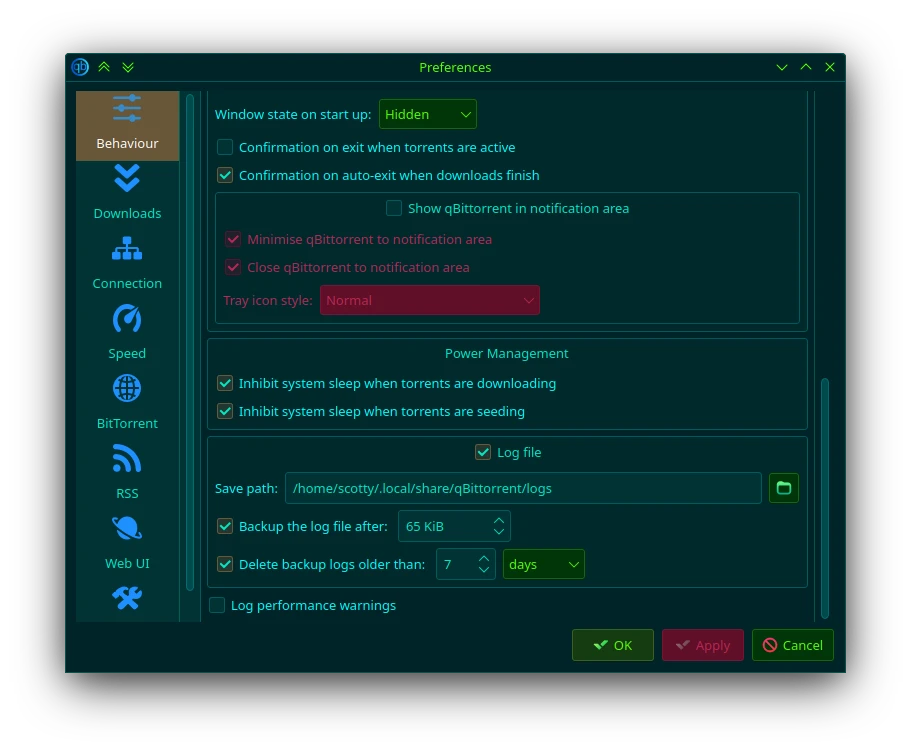
Edit: If logging isn’t available from the View menu, then you may need to open qBittorrent’s preferences window. You will find the option to switch on logging in the “Behaviour” section. You might also want to tick the “Log performance warnings” box:

Just looking at that screenshot too, I wonder if the Power Management choices might be affecting your system. If the “Inhibit system sleep” boxes are not ticked on your installation, could your system be trying to suspend/hibernate while torrents are running, and that be causing problems?

1 Like

I (and others) will recommend never to use ntfsfix on a Windows filesystem; not because it’s particularly harmful, but because it fails to run the full gamut of tests and repairs required to properly fix an NTFS filesystem – only chkdsk can do this reliably – use the right tool for the job.

I presume you also defragmented the filesystem after that, right? Just because you use NTFS in Linux doesn’t negate the need for that. This wasn’t mentioned previously, as it should have been part of your regular maintenance anyway.

I notice you haven’t relocated the destination target of qtbittorrent to a native Linux partition. You could try that (if only for the sake of testing) and move it back later. Actually, I’d suggest copying the directory (and adjusting your qbit configuration) instead, as it’s only a few GB’s.

If issues with RAM, or BIOS misconfiguration, I dare say, you would be experiencing many more issues across the board, so that seemed unlikely.

Are you aware that the default chkdsk scan/repair does not actually check for (or repair) bad sectors (no, ntfsfix does not, either)?

To enable that level of repair with chkdsk, a deeper scan must be used – there are specific parameters for this – See the link given earlier (that you seemingly haven’t bothered to look at yet) for a link to the respective M$ site for guidance.

:warning: Checking/repairing bad sectors with chkdsk can take an extremely long time to complete (possibly days); once started, the process should not be terminated, otherwise, the risk of further damage (data loss) is high.

How have you modified the respective qbittorrent settings if:

… Did you modify the configuration file directly?

Try this;
rename the qbit configuration directory, and try starting qbit again:

mv ~/.config/qBittorrent ~/.config/qBittorrent-old

I’d suggest changing the setting that starts downloading automatically.

1 Like

@van_rea What torrent are you downloading? And exactly where are you downloading it to?

I ask because I’ve seen a whole bunch of weird corner cases where there are some quirks in Linux’s NTFS support. In particular, creating or reading long paths, paths with special characters (esp. those which are normally valid in Linux filesystems but not Windows), and reading/writing certain NTFS objects found in a Windows User Profile can cause Linux to hard crash.

1 Like

I’m providing a little update since I’ve been quite busy these days and didn’t have time to test things out.

  1. I moved the config folder - mv ~/.config/qBittorrent ~/.config/qBittorrent-old and tried again, but unfortunately, it didn’t work.
  2. I tried running the torrent on an ext4 partition, and it froze again after it started downloading.
  3. I checked the settings and enabled “Log performance warnings,” while the options for “Inhibit system sleep” were already disabled.
  4. To colleague @dgdg - I download torrents from an NTFS disk, which I use, although I rarely use Windows, maybe once a month. I’ve never had a problem with this until now. The path has no specific name or symbols. I’ve always used torrents since I’ve been using a computer, and I’ve never had such an issue. That’s why I’m seeking help.
  5. After all these tests, I did the update from 29-07-2024 today and repeated the same steps with moving and settings, but again without success. There’s nothing useful or any form of error in the log file. When I start it through the console, nothing comes up there either. What I found out is that if it’s paused, it doesn’t break. So, the problem is in the downloading itself. I also want to note that NTFS and ext4 are on different physical drives, so logically, it wouldn’t make sense to suspect the drives anymore :slight_smile:

Well, this seems like it’s more complicated than first thought…

One thing that might be worth doing is trying to disable CPU#6; that’s the one that’s got some problems in the log you posted. Maybe it’s possible that the CPU is slightly dodgy somehow? Especially if lines mentioning CPU#6 appear in other logs.

In any case, maybe try running echo 0 > /sys/devices/system/cpu/cpu6/online to see if turning off CPU#6 makes a difference? Can’t say I think it’s too likely, but it’s worth a shot.

If the file was damaged due to a bad sector, just copying it to any other location won’t magically fix it, so yes, it still makes sense to check it.

I’ll make the assumption that you haven’t actually checked the NTFS filesytem for bad sectors; you haven’t responded at all to my previous comments on that topic.


I don’t suppose it has occurred to you to delete this file completely, and download it again. If there is an issue with the file itself, it matters not which filesystem it resides on.

Cheers.

1 Like