A question about Plymouth / KDE login splash screen has wonky artifacting / rendering on an external monitor

Just a general question on the updates to the plymouthd.conf file:

Why the change in the theme to a generic “spinner” from Manjaro? I rather liked the Manjaro look.

And what is:

‘# XkbExtraEscButton=0x1008ff2a # Power button (XKB_KEY_XF86PowerOff)’

These are additions, and commented out, so there’s no impact, but I’m just curious what they might be for.

So do I, so I deleted the pacnew.

1 Like

Just noticed this after connecting an external monitor to my laptop after running the update:

Desktop (KDE) returns to normal after log-in, but the log-in splash screen is all sorts of wonky. This didn’t happen prior to the update.

Log-in splash screen is normal if external display isn’t connected.

Edit: Additional info:

I’ve been using PLM since it was offered several testing updates ago. The screen glitch is present on both 7.0.13-1 kernel and 7.1.1-3 kernel (latest stable). The monitor setup is such that the external monitor is the “extended desktop” display and my laptop monitor is the main monitor.

External monitor is a 1440p display and integrated monitor is 1080p. Connected via HDMI.


Mod edit:- Screenshot of text removed. Please see the Moderator post (below) for information on how to provide system information.

Is this sddm or new Plasma Login Manager?

2 Likes

@Mydixadril

Your (and related) comments have been moved to a dedicated topic.


Quick tip: In Update Announcement threads if you feel the need to provide system information, then your issue may better be served in it’s own thread, instead.


Please also note that screenshots or photos of text are generally not welcome. Instead, one should ask the computer itself to provide system information, in the form of text, which can be easily selected, copied and pasted by others, as needed.

See below for more helpful instructions: :point_down:

Regards.


[Mini-HowTo] Present code or command output

Note: Grave accent (or, backtick) characters are used. :eyes:

For inline code or to show a single command:

  • please follow this simple example: code here.

For multi-line command output:

  • place text beween two rows of three (```) backtick characters to form a scrollable text box, or …
  • use the </> button in the Compose window to achieve the same result.

The empty row between these rows of backtick characters is where to paste any multi-line command output (such as inxi).

An example of a pre-formatted text enclosure:

What is a Quark?

A. In Physics, an elementary particle and fundamental constituent of matter. 
B. A character from the Star Trek: "Deep Space Nine" television series.
C. A soft, creamy, usually unsalted cheese traditional to central Europe.

[Mini-HowTo] Provide System Information

Basic details provided by *-fetch type apps might give enough information for someone wishing to buy a computer, however, for Support purposes it’s best to ask your system directly.

Output of the inxi command will generate more useful and detailed information for those who may wish to help:


Suggested inxi command (use either):

inxi -zv8 (short-form)
inxi --filter --verbosity=8 (long-form)

Command output should be presented as pre-formatted text in accordance with forum guidelines. :eyes:


Running inxi within a chroot environment

  • Add --color=0 to the long-form command, or…
  • Change the short-form command to inxi -zv8c0

Your privacy is respected
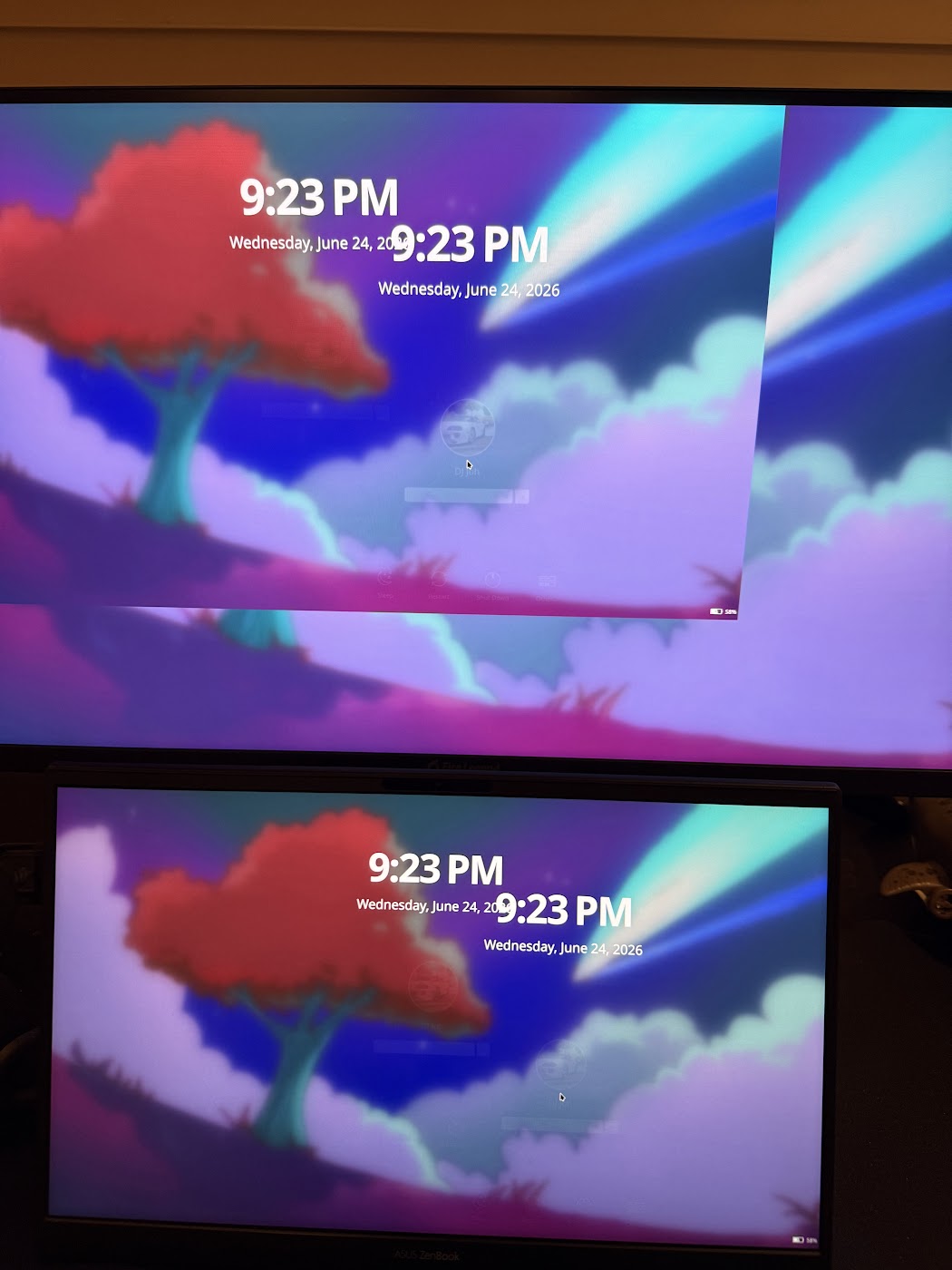

@soundofthunder Understood, and appreciate the creation of this new thread and letting me know about how to provide system information; what about the Plasma login splash screen issue, shouldn’t that go back to the original Testing thread, as that is an issue related directly to the update?

Not sure how that happened. I’ve made sure the default theme is set in the distribution defaults with plymouth 26.134.222-2 coming along shortly.

❯ cat /usr/share/plymouth/plymouthd.defaults
# Distribution defaults. Changes to this file will get overwritten during
# upgrades.
[Daemon]
Theme=manjaro
ShowDelay=0
DeviceTimeout=8
# XkbExtraEscButton=0x1008ff2a  # Power button (XKB_KEY_XF86PowerOff)
❯ cat /etc/plymouth/plymouthd.conf
# Administrator customizations go in this file
#[Daemon]
#Theme=manjaro

That’s to allow configuring an additional key for Escape.

Some devices (phones/tablets) don’t have keyboards, so this allows
specifying an additional key using a new config option
(XkbExtraEscButton) that works like Esc e.g. for hiding the splash.

2 Likes

This topic was automatically closed 3 days after the last reply. New replies are no longer allowed.