Due to being forced onto Wayland by KDE my automatic login stopped working, and my PC is stuck on 30fps and no option to select anything higher.
I’ve never had a properly working experience with Wayland trying it on and off over the last 10 years different hardware and OS’s, I wanted it to work but just doesn’t for me.
I’m on a 4k monitor over HDMI with a Nvidia 3060.
Any ideas?
Edit: Auto login was fixed by getting rid of sddm as instructed above
Edit2: for me, KDE issue was “fixed” by switching to xfce, quite happy with it so far.
I believe the 30fps issue can be fixed by switching to DisplayPort, but that’s just a theory I can’t test.
While we’re happy you found a resolution – XFCE is a fine DE – your post does not add much to the Testing Update Announcement thread, and has been moved to a Support category.
My opinion is that “4K”, "HDMI and “NVidia” together are the main contributors to your historical woes.
4K and HDMI – Where connectors are available on both the graphic card and the monitor, quality DisplayPort cables are certainly recommended – to confirm this in your own mind, the only test is to actually use one, whether borrowed or purchased.
NVidia – There are known reasons for opting for AMD graphics in preference to Nvidia; that they do not actively contribute to open-source, being one of them, which leaves little alternative but to reverse-engineer their driver software.
By contrast, AMD are fully supportive of open-source and most AMD reference drivers/modules are already available via the GNU/Linux kernel.
That said, one still needs to select a GPU wisely. I use an RX580 myself, on Plasma (Wayland); a combination I have used exclusively for some three years and has never let me down – although, I might have reservations about driving a 4K monitor (that’s where selecting a card wisely comes into play).
This is a workaround, rather than a solution to your stated issues, and as such this thread is now closed accordingly without a marked solution; especially, given that you have moved on to XFCE.
Remember to check the respective Announcement threads as per usual for news on breaking issues.
1 - Up to 4k 12-bit HDR at 240Hz with DP1.4a+DSC. Up to 8k 12-bit HDR at 60Hz with DP 1.4a+DSC or HDMI2.1+DSC. With dual DP1.4a+DSC, up to 8K HDR at 120Hz
2 - Supports 4K 120Hz HDR, 8K 60Hz HDR and Variable Refresh Rate as specified in HDMI 2.1
HDMI 2.1 on Linux is finally real. AMD’s FRL support lands in Linux 7.2, Intel has native HDMI 2.1 since Meteor Lake, and NVIDIA works through proprietary drivers. Here is the complete vendor-by-vendor guide to checking, enabling, and troubleshooting HDMI 2.1 on your Linux system in 2026.
NVIDIA HDMI 2.1 on Linux: The Proprietary vs Open-Source Split
NVIDIA’s HDMI 2.1 situation on Linux is split between two worlds, and I have dealt with both sides extensively. The proprietary NVIDIA driver has supported HDMI 2.1 for years. If you run nvidia-smi and see a recent driver version, your HDMI 2.1 output works. FRL, DSC, VRR (G-Sync Compatible), HDR10, all of it. No issues there.
The problem is the open-source nouveau driver. Nouveau has had limited HDMI 2.1 support for a long time. NVIDIA recently opened up GPU specifications, which should help nouveau developers implement better HDMI 2.1 support over time, but as of mid-2026, the nouveau driver still lacks full HDMI 2.1 feature parity with the proprietary driver.
For most NVIDIA Linux users, the practical answer is straightforward: use the proprietary driver. It works, it supports HDMI 2.1 fully, and it is what NVIDIA officially supports
Query supported modes with xrandr
xrandr | grep -A3 hdmi
The modes listed after your display resolution tell you everything. I look for 3840×2160 at 120Hz or higher as confirmation that HDMI 2.1 FRL is active. If 4K is stuck at 60Hz, you are likely running HDMI 2.0 speeds and need to troubleshoot your cable, monitor, or driver.
What refresh rate can I expect at 4K with HDMI 2.1 on Linux?
With FRL enabled, 4K 120Hz is achievable. With DSC, 4K 240Hz is theoretically possible on hardware that supports it.
I had various performance issues when the forced switch to Wayland occurred, I made a script with the help of Grok and it helped me fix all my issues (I had to also reconfigure KDE settings but that’s OK). Beware that this script will remove KDE related things from your home.
Always review the code before running it, maybe there is an oversight and it is not perfect.
I ran it from a TTY before login to the desktop.
#!/usr/bin/env bash
set -Eeuo pipefail
umask 077

# KDE Plasma 6 configuration reset with backup.
# Run as your normal user. Never use sudo.

[[ $EUID -ne 0 ]] || {
    echo "ERROR: Do not run as root or with sudo."
    exit 1
}

command -v tar >/dev/null || {
    echo "ERROR: tar is required."
    exit 1
}

HOME_DIR="$HOME"
TIMESTAMP="$(date +%Y%m%d-%H%M%S)"
BACKUP="$HOME_DIR/kde-plasma6-reset-backup-$TIMESTAMP"
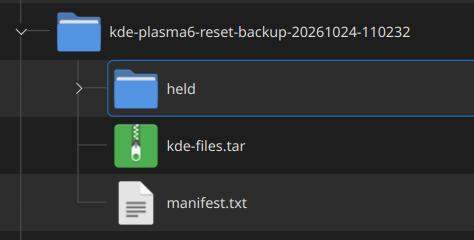
ARCHIVE="$BACKUP/kde-files.tar"
MANIFEST="$BACKUP/manifest.txt"

[[ -d "$HOME_DIR" ]] || {
    echo "ERROR: Home directory not found."
    exit 1
}

echo "=========================================="
echo " KDE Plasma 6 configuration reset"
echo "=========================================="
echo
echo "This script resets selected KDE settings,"
echo "application preferences, Plasma data and caches."
echo
echo "Your files, browser profiles, SSH files and"
echo "KDE Wallet are intentionally preserved."
echo
echo "Custom panels, widgets, shortcuts, themes,"
echo "and some application preferences may be lost."
echo "A backup will be created before changes."
echo

read -r -p 'Type RESET-KDE to continue: ' answer
[[ "$answer" == "RESET-KDE" ]] || {
    echo "Cancelled."
    exit 0
}

targets=()

add_target() {
    local path="$1"
    if [[ -e "$HOME_DIR/$path" || -L "$HOME_DIR/$path" ]]; then
        targets+=("$path")
    fi
}

# KDE configuration files
if [[ -d "$HOME_DIR/.config" ]]; then
    while IFS= read -r -d '' path; do
        targets+=("${path#"$HOME_DIR"/}")
    done < <(
        find "$HOME_DIR/.config" -maxdepth 1 -type f \
            \( \
                -name 'kde*' \
                -o -name 'plasma*' \
                -o -name 'kwin*' \
                -o -name 'kscreen*' \
                -o -name 'kcminputrc' \
                -o -name 'kglobalshortcutsrc' \
                -o -name 'khotkeysrc' \
                -o -name 'kactivitymanagerdrc' \
                -o -name 'dolphinrc' \
                -o -name 'konsole*' \
                -o -name 'krunnerrc' \
                -o -name 'kiorc' \
                -o -name 'kservicemenurc' \
                -o -name 'kaccessrc' \
                -o -name 'kded6rc' \
                -o -name 'ksmserverrc' \
                -o -name 'systemsettingsrc' \
                -o -name 'spectaclerc' \
                -o -name 'arkrc' \
                -o -name 'okularrc' \
                -o -name 'kate*' \
                -o -name 'kwriterc' \
                -o -name 'baloorc' \
                -o -name 'baloofilerc' \
                -o -name 'yakuakerc' \
            \) -print0 2>/dev/null
    )
fi

# Selected KDE application and Plasma data
for path in \
    .local/share/plasma \
    .local/share/plasmoids \
    .local/share/kxmlgui5 \
    .local/share/kxmlgui6 \
    .local/share/kactivitymanagerd \
    .local/share/kscreen \
    .local/share/konsole \
    .local/share/dolphin \
    .local/share/kate \
    .local/share/krunner \
    .local/share/knewstuff
do
    add_target "$path"
done

# Selected KDE caches
for path in \
    .cache/plasmashell \
    .cache/ksycoca6 \
    .cache/ksycoca6stamp \
    .cache/kwin \
    .cache/krunner \
    .cache/kioexec \
    .cache/konsole \
    .cache/dolphin
do
    add_target "$path"
done

if ((${#targets[@]})); then
    mapfile -t targets < <(
        printf '%s\n' "${targets[@]}" | LC_ALL=C sort -u
    )
else
    echo "No matching KDE settings found. Nothing to reset."
    exit 0
fi

echo
echo "Paths selected for reset: ${#targets[@]}"
printf '  %s\n' "${targets[@]}"
echo
echo "Backup destination: $BACKUP"
echo
echo "Close KDE applications and save your work first."
read -r -p 'Type BACKUP-AND-RESET to proceed: ' answer
[[ "$answer" == "BACKUP-AND-RESET" ]] || {
    echo "Cancelled."
    exit 0
}

mkdir -m 700 -- "$BACKUP"
printf '%s\n' "${targets[@]}" > "$MANIFEST"

# Create and verify a backup before modifying anything.
if ! tar -C "$HOME_DIR" -cpf "$ARCHIVE" -- "${targets[@]}"; then
    echo "ERROR: Backup failed. Reset aborted." >&2
    exit 1
fi

if ! tar -tf "$ARCHIVE" >/dev/null; then
    echo "ERROR: Backup verification failed. Reset aborted." >&2
    exit 1
fi

echo
echo "Backup verified: $ARCHIVE"

# Preserve the original files in the backup directory.
mkdir -m 700 -- "$BACKUP/held"

for rel in "${targets[@]}"; do
    source="$HOME_DIR/$rel"
    destination="$BACKUP/held/$rel"

    [[ -e "$source" || -L "$source" ]] || continue

    mkdir -p -- "$(dirname "$destination")"

    if ! mv -- "$source" "$destination"; then
        echo "ERROR: Could not move $rel" >&2
        echo "Backup and moved files remain at $BACKUP" >&2
        exit 1
    fi
done

echo
echo "KDE Plasma settings reset completed."
echo "Backup: $BACKUP"
echo
echo "NEXT STEPS:"
echo "1. Log out of KDE Plasma."
echo "2. Log back in to recreate default settings."
echo "3. Check your displays, panels and applications."
echo "4. Keep the backup until everything works."
echo
echo "A reboot is normally unnecessary."
echo "Do not delete the backup until you are satisfied."
After login to Desktop, find the backup folder in your home