I personally do not use timeshift – others can help with that.
However, I can clarify the use of manjaro-chroot;
Well, that wasn’t the way.
And neither was that;
however, manjaro-chrootdoes indeed work; although, I’d suggest first removing those USB drives you mentioned.
The myBook entries are USB-drives (for backups, media etc.) …
There is no need to switch to the Super User (su -) to use manjaro-chroot , because manjaro-chrootalready does this for you when you run it.
The general procedure when using manjaro-chroot:
Boot to the Manjaro live environment on the bootable DVD/ISO/USB, or via a Ventoy USB – Open the Terminal.
Run sudo manjaro-chroot -a – This automatically detects the installed system and mounts the root / file system (on /mnt) and mounts the $esp (on /mnt/boot/efi).
There is then nothing more to be done with manjaro-chroot – if you wish to mount additional volumes once inside a chroot environment, just use mount as you normally would. To exit the chroot environment enter exit.
Within a chroot environment neither sudo or su - are needed, as you are already the Super User.
If you want to do the whole procedure manually, don’t use manjaro-chroot at all – use chroot instead, according to the following references;
So the next command is : sudo timeshift --restore
and you will be presented a list of snapshots. You just have to choose one by its associated number (and cross finger while it runs )
For the record @soundofthunder we did try manjaro chroot auto - didn’t work because tried to mont something else too, and this failed.
For timeshift one does need chroot (you are replacing the whole os, you cannot be quasi logged in in what you want to overwrite).
The timeshift launcher asks for sudo if needed, at least when run from installed os, I don’t know if it asks at all when run from live iso.
And the picture tutorial looks good to me.
Yes, the assorted USB drives that the OP mentioned, which I initially thought might need to be disconnected first – @MaMicha said they already were – which means manjaro-chroot attempted to load them solely based on the /etc/fstab references.
Adding nofail to those entries would likely not have the desired effect, but, temporarily commenting the entries prior to booting and attempting to enter chroot, would prevent them becoming an issue while manjaro-chroot is searching for /.
Using Timeshift (GUI or TUI) from the live image never used to work. Even when trying to point the root in Settings.
The only way to restore from the Timeshift GUI before, was booting into a past snapshot. Though 3 years ago, that was wasn’t even possible until they fixed it.
It seems like they have made this possible now too.
But I am not sure if I trust this yet… I was able to make timeshift-gtk crash in my first use.
All I did was boot the live image, pointed to my root, then deleting multiple snapshots crashed it.
Nov 04 20:51:06 manjaro systemd[1]: run-timeshift-26162-backup.mount: Deactivated successfully.
Nov 04 20:51:06 manjaro kernel: BTRFS info (device nvme0n1p2): last unmount of filesystem f33ea810-355f-4662-b046-6d8f72bae82b
Nov 04 20:51:06 manjaro kernel: BTRFS: device fsid f33ea810-355f-4662-b046-6d8f72bae82b devid 1 transid 584558 /dev/nvme0n1p2 (259:7) scanned by mount (27645)
Nov 04 20:51:06 manjaro kernel: BTRFS info (device nvme0n1p2): first mount of filesystem f33ea810-355f-4662-b046-6d8f72bae82b
Nov 04 20:51:06 manjaro kernel: BTRFS info (device nvme0n1p2): using crc32c checksum algorithm
Nov 04 20:51:06 manjaro nfsrahead[27659]: skipping non-NFS device btrfs-13
Nov 04 20:51:06 manjaro kernel: BTRFS info (device nvme0n1p2): enabling ssd optimizations
Nov 04 20:51:06 manjaro kernel: BTRFS info (device nvme0n1p2): turning on async discard
Nov 04 20:51:06 manjaro kernel: BTRFS info (device nvme0n1p2): enabling free space tree
Nov 04 20:51:28 manjaro pkexec[27835]: pam_unix(polkit-1:session): session opened for user manjaro(uid=1000) by manjaro(uid=0)
Nov 04 20:51:28 manjaro audit[27835]: AUDIT1105 pid=27835 uid=0 auid=1000 ses=1 msg='op=PAM:session_open grantors=pam_systemd_home,pam_limits,pam_unix,pam_permit acct="manjaro" exe="/usr/bin/pkexec" hostname=? addr=? terminal=? res=success'
Nov 04 20:51:28 manjaro pkexec[27835]: root: Executing command [USER=manjaro] [TTY=unknown] [CWD=/tmp/timeshift-KNdKBVJM] [COMMAND=/usr/sbin/env DISPLAY=:0.0 XAUTHORITY=/home/manjaro/.Xauthority DBUS_SESSION_BUS_ADDRESS=unix:path=/run/user/1000/bus notify-send -t 10000 -u low -i gtk-dialog-info TimeShift Removed '2026-04-06_12-23-39' -h string:desktop-entry:timeshift-gtk]
Nov 04 20:51:28 manjaro kernel: audit: error in audit_log_subj_ctx
Nov 04 20:51:28 manjaro kernel: audit: type=1105 audit(1793825488.644:456): pid=27835 uid=0 auid=1000 ses=1 msg='op=PAM:session_open grantors=pam_systemd_home,pam_limits,pam_unix,pam_permit acct="manjaro" exe="/usr/bin/pkexec" hostname=? addr=? terminal=? res=success'
Nov 04 20:51:55 manjaro pkexec[27986]: pam_unix(polkit-1:session): session opened for user root(uid=0) by manjaro(uid=1000)
Nov 04 20:51:55 manjaro audit[27986]: AUDIT1105 pid=27986 uid=1000 auid=1000 ses=1 msg='op=PAM:session_open grantors=pam_systemd_home,pam_limits,pam_unix,pam_permit acct="root" exe="/usr/bin/pkexec" hostname=? addr=? terminal=? res=success'
Nov 04 20:51:55 manjaro pkexec[27986]: manjaro: Executing command [USER=root] [TTY=unknown] [CWD=/home/manjaro] [COMMAND=/usr/bin/timeshift-gtk]
Nov 04 20:51:55 manjaro kernel: audit: error in audit_log_subj_ctx
Nov 04 20:51:55 manjaro kernel: audit: type=1105 audit(1793825515.672:457): pid=27986 uid=1000 auid=1000 ses=1 msg='op=PAM:session_open grantors=pam_systemd_home,pam_limits,pam_unix,pam_permit acct="root" exe="/usr/bin/pkexec" hostname=? addr=? terminal=? res=success'
At that point the window vanished, and I could only get it back with a sudo kill.
This is my host system, so I am not about to try an unneeded restore at the moment.
But it sure looks like restoring from live image should be possible now!

 There is no need to switch to the Super User (

 – if you wish to mount additional volumes once inside a chroot environment, just use

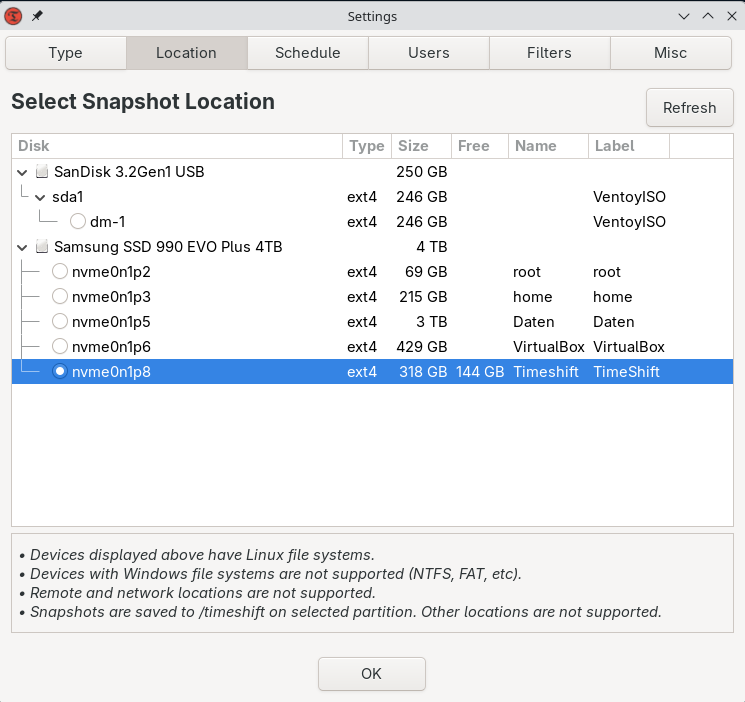

 )

