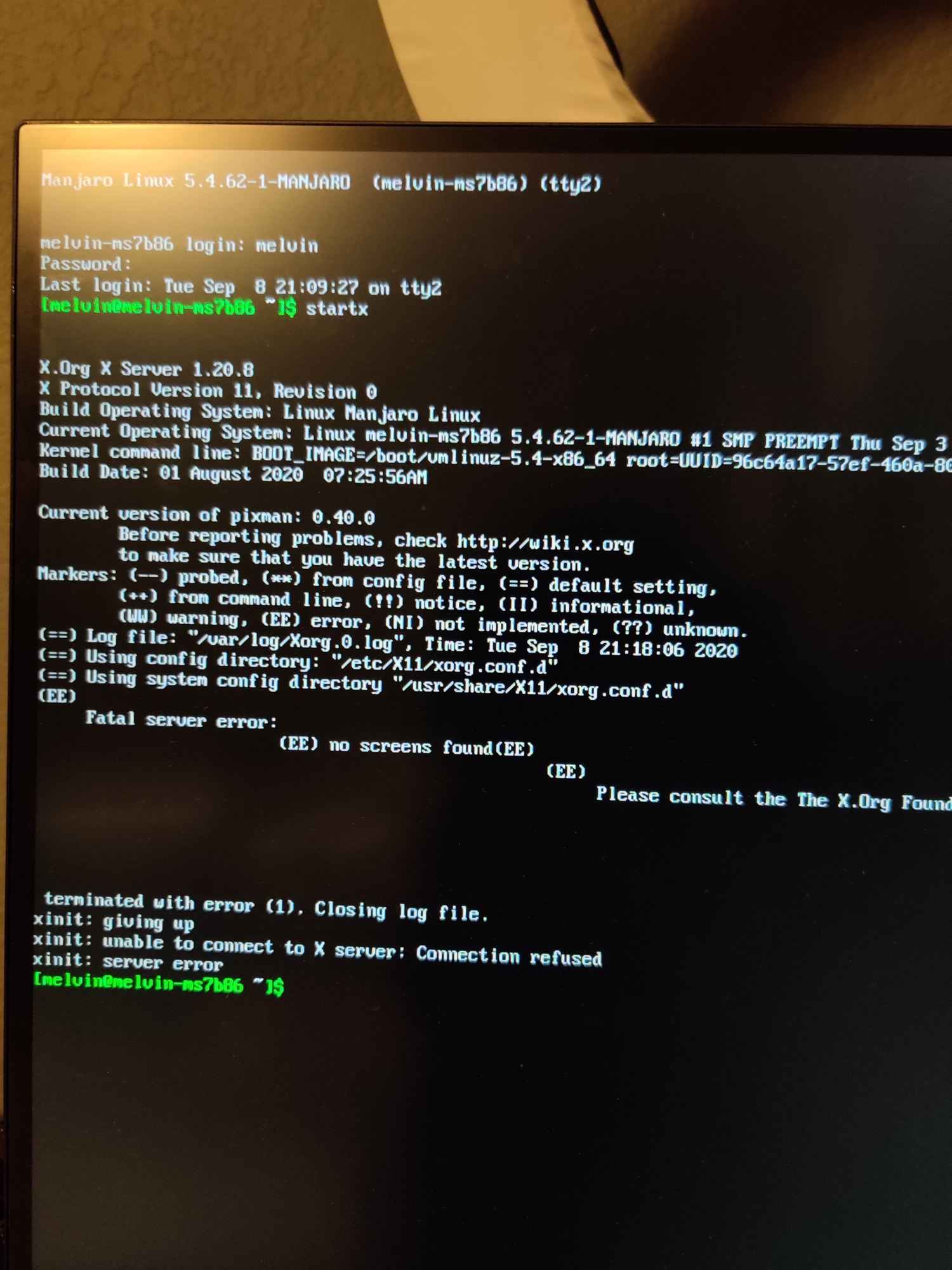
Yet another stable update that breaks my graphics. Couldn’t upgrade due to Nvidia so I read a few possible solutions on here and now I have this beautiful classic screen when I boot. IMG_20200908_212048|375x500
Now I have to spend extra time trying to fix this or reinstalling Manjaro on my work machine.
I couldn’t upgrade anything because I had 440 installed. I removed CUDA, removed 440 and installed 450 and it’s broken. I might stop updating this system if I fix it. Every Nvidia update breaks the system without fail. I hate it, this is a video production computer and I don’t have time to play around fixing stuff…
Edit: managed to fix it. #FYouNvidia
Edit 2: I went back to 440 but can’t install CUDA because the new version depends on 450 (which doesn’t work on my system). I need CUDA for Resolve so I’ll wait for an official fix.
Did this again: sudo pacman -S linux54-nvidia-450xx nvidia-450xx-utils opencl-nvidia-450xx lib32-nvidia-450xx-utils
Still getting the same error-message from nvidia-settings and blender can’t use the GPU (I tried to provide a screenshot, but apparently I’m not allowed to).
Is there anything else, I can/should try, before just downgrading to 440xx again and calling it a day?
UPDATE:
I just tried downgrading, but that failed, because cuda depends on nvidia-utils>=450.51.06: sudo pacman -S linux54-nvidia-440xx nvidia-440xx-utils opencl-nvidia-440xx lib32-nvidia-440xx-utils
But I want to keep cuda … so I don’t know, what to do next.
I honestly don’t know what’s broken, but after finally getting 450 to “work” everything was choppy, slow and Resolve wouldn’t open. I downgraded to 440 and all of the above was fixed, the only issue I have is the fact that I can’t install CUDA. I will not mess with it anymore, it works now, so whatever.
I don’t always update drivers, I only upgraded because I read here that a lot of Nvidia users were having issues upgrading and some fixed it by removing CUDA and installing the 450 driver. Bad luck I guess?
Every so often my system breaks after a stable update and I really don’t have time to fix it every few weeks. At this point I only run Manjaro on that computer for Davinci Resolve Studio and because it’s easy and safe to upgrade from version to version through the AUR, that’s why I think I won’t be updating the system frequently. I really only use that machine to do work. I don’t know if this is on the Manjaro team or Nvidia, but I have a gut feeling Manjaro isn’t the distro for production since the rolling release nature of it is guaranteed to break at some point or another.
Manjaro is indeed not a production server OS, but it can be a production Workstation OS as long as you as your own system’s SysAdmin are conservative is what I was trying to point out.
Crash-proof backups and Data backups do help with that:
I normally update my system backup after the install went fine, but as a SysBck takes a while, Data backups are performed every couple of days as I can afford to lose that much data, but you should make daily backups (or twice per day or hourly, depending on how much data you can afford to lose).
If you need a rock stable WS and don’t mind running older versions of Da Vinci Resolve Studio, you should look at Debian stable, but if you want the latest version of that, (or any other software) Manjaro is the best choice that I’ve tested so far.
I’m on 450 drivers since they cam out, but i always use my own nvidia.conf. The default configuration gave me random behavior: a boot was fine, another not ok and so on. Maybe you can do that too.
@Fabby
I had dependency issues too and when I forcefully resolved them that’s when I got issues. I ended up removing the nvidia driver and temporarily installing the open source one which got me back to the GUI then I used the kde gui tool to switch back to 440xx. See my post here…oh darn I don’t have high enough rank yet to put links in posts I’ll quote post it.
To anyone reading this, be very cautious! I was unable to start the X server after trying these commands, couldn’t do startx. Hopefully I managed to resolve this with uninstalling and reinstalling the nvidia driver and following the instructions " Troubleshooting: X-Server Failed to Start and Install" from Manjaro wiki page, I did that in safe mode because I couldn’t start the GUI at all. I am not saying it’s wrong, it may have worked for you, but in my case it messed up things.
Same issue, on my case the only way to get back to a working system was to enter tty and use:
sudo mhwd -i pci video-linux
Previously removing all nvidia video drivers. I tried different combinations and both 440xx and 450xx are failing for me (unable to start GUI). I have a single gtx 1080 card on a desktop build.
@Fabby a few days ago I had my system up to date and with 440 working, then tried to go with 450 and started having issues (kernel modules not loading, GUI not starting). I checked for updates with pacman -Syyu and there were new updates, installed those, reinstalled 450xx mhwd and now I have 450xx working : D
So, basically my steps ended up being:
Remove all 440xx and 450xx stuff with sudo mhwd -r
Thanks for the help @cefk. I was about to dropkick my machine. I just moved from a 5600xt to a 2070 super, and am unaccustomed to this kind of fuckery.
your solution patched me up.
 IMG_20200908_212048|375x500