As you’re on KDE like me, that’s exceedingly simple:
-
Execute:
sudo nano --backup /usr/local/bin/PulseRestart -
Copy-paste the following in there:
#!/bin/bash sleep 5 systemctl --user restart pulseaudio.serviceCtrl+X Enter (and if you do this twice because you made a mistake, you have to add Y to overwrite)
-
Make this text file an executable file:
sudo chmod a+x /usr/local/bin/PulseRestart -
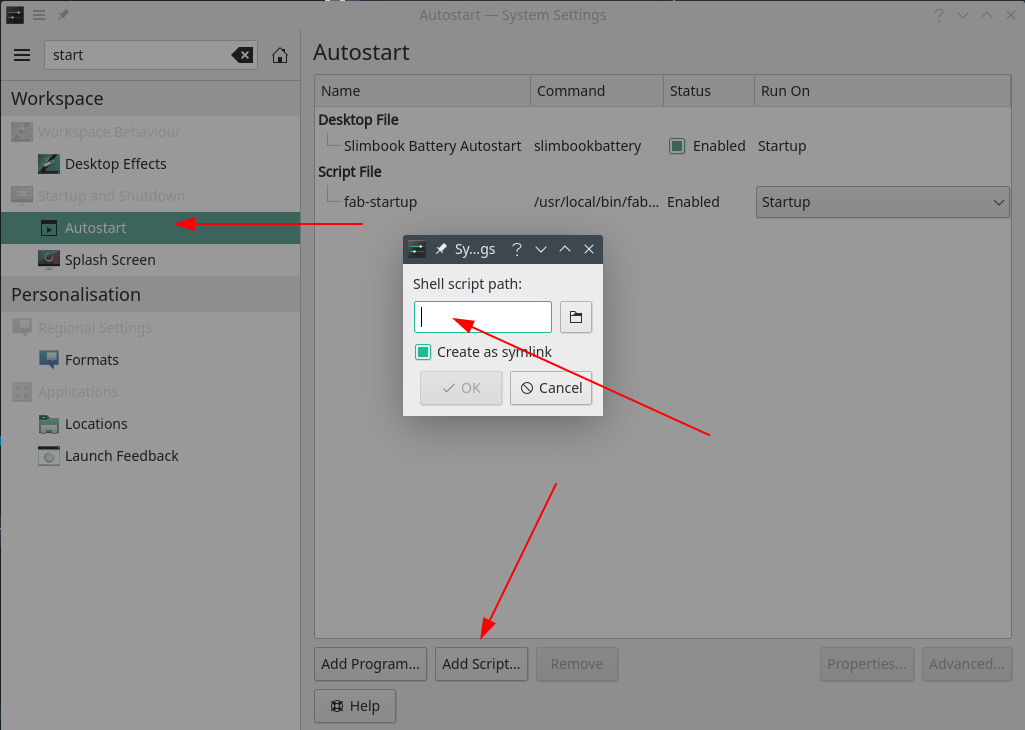
And now go to System Settings
-
Type
start -
Click on Autostart
-
Click on Add Script
-
Copy-paste
/usr/local/bin/PulseRestartin the Shell script path
-
Click on OK
-
Quit System Settings
-
Log off and back on and see if that worked.
If it doesn’t or only does work every now and then, increase the 5 in sleep 5 by 1 second and keep increasing until it does work (or if it’s too slow, decrease that number)
