Is there an alternative that looks exactly the same?
I’d check with a new user to see if it’s a user config issue.
I assume you have a dark theme set in 
System Settings → Colours & Themes → Colours
Yes, exactly. I set Breeze to dark.
Have you read this yet? There are a couple of things to check.
1 Like
Do you have kde-gtk-config installed?
At the top right of that page there is a button: Configure GNOME/GTK Application Style:

Click on that button and ensure that it is set to “Breeze”.
I have mine set to Breeze, and firefox (which is GTK application) follows my Plasma theme & colors.
2 Likes
Having just switched to Breeze Dark (and confirming the setting for GNOME/GTK is on Breeze — no Dark option here) Firefox etc. still follows my preferred dark theme. So, a local issue?
If you want firefox to follow Plasma’s color scheme, then on the about:addons page you need to have the theme set to System theme - auto:
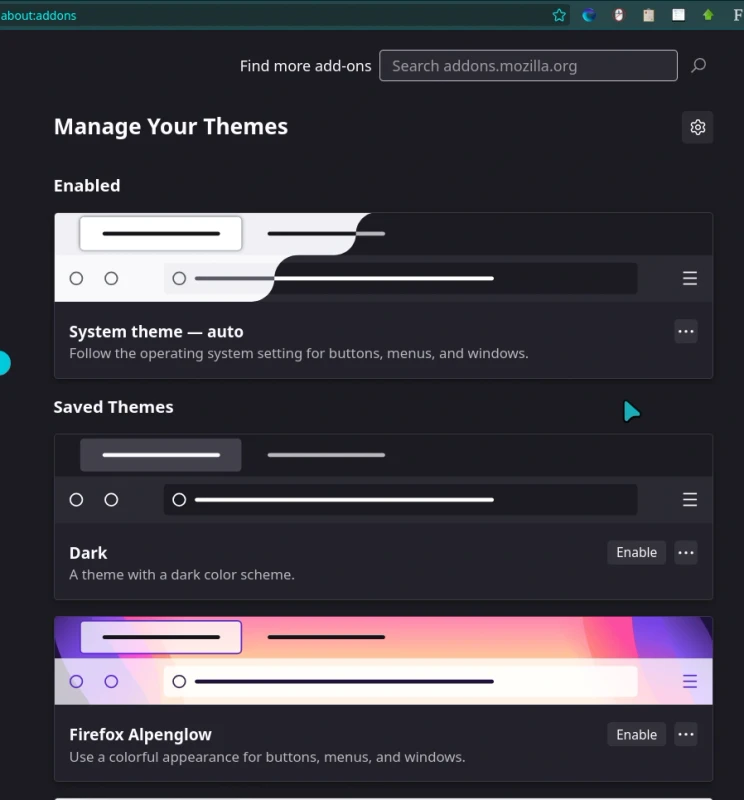
2 Likes
A blind stab in the dark (excuse the pun);
GTK-2 is apparently being “phased out”.
If there is any gtk-2.0 theming being used, perhaps that is longer applicable (read: no longer being used).
That said, I’m uncertain just how far this “phasing out” has progressed, at this time, or whether it only applies to Gnome.
@Yochanan could likely clarify.
GNOME itself is now fully gtk4.
gtk2is being phased out because it is no longer supported upstream, and Arch has begun removing it, as well as any packages depending on it — they will likely still be found in the AUR.
In Manjaro concretely, gtk2 has already been dropped from the repo for the Unstable branch. Testing and Stable are currently still carrying it.
1 Like
Quite a few custom themes requires the kvantum theming engine to be able to tweak the look and feel.
If you have the kvantum package installed it may cause unexpected and hard to explain issues.
The first comment in this thread by @dmt is the only correct answer to this request.
The Breeze theme provided by the breeze-gtk package applies properly.
Your issue is a local issue -so you will have to adapt your configuration.
Please bear in mind there is a huge difference between GTK3 and GTK4 - It is well known that GTK applications - especially GTK4 based applications is not responding well in the Plasma environment.
One of the best tests you can do is to open the Add/Remove Software application.
Ensure you have the breeze-gtk package synced and that you have chosen the breeze gtk theme using the
- System Settings
- Colors & Themes
- Application Style
- Configure GNOME/GTK Application Style.
- Application Style
- Colors & Themes
It is how it is - but sometimes it feels like Gnome is deliberately making it difficult to ensure a proper blend when an app is used in a non-gnome environment - something like never ending series named Toolkit Wars™
3 Likes
It’s unlikely to be gtk2 related, most things have moved to gtk3.
All the colour schemes seem to work for me, using PrusaSlicer, GIMP, Eye of Mate, Sublime and Firefox for testing. Some have their own settings (Sublime) so it’s only partially applied, but it works and @scotty65 has it working too.
As @linux-aarhus said it seems to be a local issue, perhaps a missing package or corrupt config. I did suggest trying with a new user, but 
It might help if we knew what software isn’t respecting the theme, then we could rule out software specific settings and old stuff that relies on gtk2.
@Nanachi What software are you testing this with? I have PrusaSlicer and it respects the theme.
1 Like
The Breeze theme provided by the breeze-gtk package applies properly.
Not really. There are sound effects in GTK-Applications where there should’nt be any.
GTK themes provides no sound - however system operations may trigger a sound…
And this is the key, isn’t it.
I recall that prusa-slicer-rel-bin (AUR) for example, lists prusa-slicer, prusa-slicer-bin, prusa-slicer-git, prusa-slicer-gtk2 as conflicting, which suggests there are/were versions with a gtk2 dependency. Or, perhaps they are using slic3r, which seems unmaintained since 2022; we just don’t know until the OP is forthcoming.
The OP doesn’t seem to be communicating well; I’d consider making that suggestion again. As we both know, this is an important troubleshooting step to help rule out the problem being a local issue.
Help us diagnose the problem
Please create a new User account (for testing purposes) – reboot, and login to that account, and verify whether or not you still experience the same issue in a fresh environment.
If the issue is no longer apparent, then this will indicate that the cause is limited to your main User account; this information is invaluable for those who might wish to help; giving some direction; a place to start.
Anecdotal:- I’m using Breeze Dark (default) with the Breeze GTK defalt theme, and prusa-slicer from the official Manjaro repositories displays as expected with a dark theme (gtk3).
Please confirm which “slicer” you are using.
3 Likes
Steps to set GTK to Follow KDE Theme.
System Settings → Colours & Themes → Global Theme → Breeze Dark
Click Apply
System Settings → Colours & Themes → Application Style → Configure GNOME/GTK Application Style → Select (from Drop Down) GTK Theme Breeze
Click Apply
Expected Behaviour: By and large GTK applications follow the KDE Theme. This can also be previewed in that page by clicking the Preview Button.
Actual behaviour: By and large GTK applications follow the KDE Theme.
Any deviation from the expected behaviour, after this, can be blamed on GNOME and GTK.
1 Like
As already mentioned, I cannot show you any pictures to illustrate the problem, and the rest is set up as follows.
@Nanachi In addition. flatpak applications are not likely to follow the selected Application style.
Yes?
prucer-slicer is also available as a flatpak, my guess @Nanachi has the flatpak installed.
My guess as to why. First it shows up in the list before the Repo version, and it has a pretty icon picture beside it, while the version in the repo is just a bland blue grey icon, and barely noticable.
1 Like
The problem occurs with Bambu Studio Flatpack version. When I install and start it via AppImage or AUR, the program starts in dark mode. However, when I start the Flatpack version, the window runs in light mode.


Is there a good reason you need (or prefer) the Flatpak version? 
2 Likes