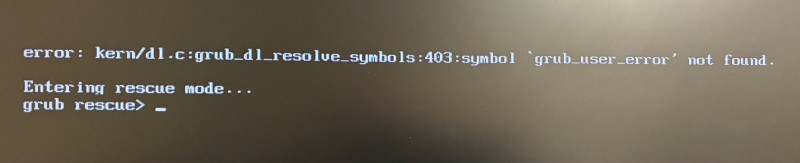
Iv’e got major problem! I updated the system and everything went smooth, and I even restarted the system and was fine. I shut the computer down and turned it back on. Now I’m stuck with a grub user error., and I can’t bypass that. What can I do?
See my reply above to another user with a similar issue:
EDIT: Also see:
EDIT 2: Another option is restoring a Timeshift backup. Then after updating, make sure to manage your pacnew files, then run sudo install-grub && sudo update-grub before rebooting since there was an update from GRUB 2.14 to 2.16.
Had the same error. I fixed it, using my Ventoy stick like that:
Stick in Ventoy USB, reset, choose Manjaro (or any Linux), choose Boot in normal mode, choose detect EFI bootloaders, choose (hd1,gpt1)/efi/Manjaro/grubx64.efi
System should boot, if not, try again with an entry below.
At the Command line:
It’s too late, I’m stuck at that screen as soon as I start the computer. I can’t even get to the Timeshift or anything. Should I create a new thread on this?
@volker62
Could you explain in more detail? I have Manjaro 26.1 minimal 618 on a USB. Can I use that to access the grub and update it?
If you like doing it like me, boot a live system, install Ventoy, and make an Ventoy Stick by following the instructions. I don´t know much about it, I did it and it works.
After you get the stick ready, follow my instructions I wrote before.
edit:
I had nearly the same fault approximately 2 years ago. It was a hard time for me to find the solution.
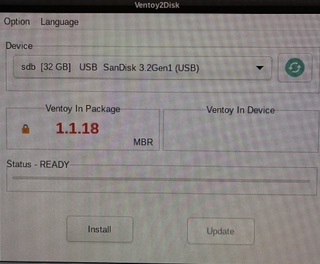
I have downloaded the Ventoy iso. I only see Ventoy Package 1.1.18 MBR. The next box next to it is Ventoy in Device (which is blank). I don’t see any of the options you’re mentioning! Do I have the right version?
I’m going to create a new thread. I didn’t expect this on a stable update!
I ran in to a catastrophic error message which I didn’t expect on a stable update! I rebooted my computer after an update and it rebooted fine, but I got this error message after a complete shut down.
I can’t access the timeshift to revert back, because it by passes the advanced options for Manjaro Settings all together. I’ve been using Manjaro for 6 years and never had any major issues like this! I’m not that technical savvy, but I’ve always been able to fix things as you expect on a rolling distribution with the help of the great Manjaro team. I really hope you can walk me through step by step to fix my computers. This happened on my work computer. I came home and updated one of my home computers and I performed the “sudo install grub && sudo update grub” before rebooting per Yochanan’s notes, and the grub broke, and getting the same error message. So now I have two computers to fix, and 4 more to go, but I will not update until I figure this out (hopefully). A side note. Doesn’t have to be “sudo install grub && sudo update-grub”? The dash was missing and I didn’t catch it until it was too late. Perhaps that’s why it didn’t update on my home computer and broke the grub.
This information also appears in yesterday’s Stable Update 2026-10-28 Announcement thread. It is recommended to always check Announcements prior to updating your system.
Is Manajro effectively 'dead'? - #5 by nikgnomic
The next stable branch update release will likely include updates relating to GRUB bootloader that may require manual intervention before rebooting
warning: /etc/default/grub installed as /etc/default/grub.pacnew
:: To use the new features provided in this GRUB update, it is recommended
   to install it to the MBR or UEFI. Due to potential configuration
   incompatibilities, it is advised to run both, installation and generation
   of configuration:
     # install-grub
     # update-grub
Probably. Then you at least has the encryption config right.
The other changes are cosmetic.
The hook changes are important, but they were introduced like an year ago.
Thanks - Just to be clear, I’m on stable and I was thinking these low level packages not to require manual intervention perhaps? Anyhow, the fact it’s running fine should be a good sign?
@Yochanan,
Is it safe to update the grub each time after a major update whether it needs it or not? I don’t think it’s going to hurt anything, but I just wanted to be sure.
Yes, just review the pacnew first if there is one. When grub is updated to a new version, just updating the package doesn’t actually update your related boot files–that’s what the install-grub script does.
Ran into this issue as well. I did not realise “detect EFI bootloaders” was an option in the live ISO boot at first. Following along after that got my system booting again. Thx! The community is why I stay on Manjaro.
That’s right, and on my mainboard it would be F8 (Asus).
However it’s no solution, it only works around the issue by using the native Boot Menu generated by most BIOS types – although it is a viable workaround, it does not actually solve the specified problem with GRUB2.