Perhaps I should have stated that more clearly. I am aware that pamac is not being abandoned by the developer. I am referring to those who seem to be saying “well pamac has faults, so we should always use parmac, and simply not use pamac”
Well, that is the opinion and advice of many seasoned members of the community, and they are entitled to their opinion. It is not the official stance of the Manjaro Team themselves.
2 Likes
OK. I guess basically I agree with them.
1 Like
pamac is the ideal candy - if the GUI can fix it’s inability to find cheese then I’ll trust it to find me all options for a given keyword…
So if you want Cheese installed, you can search for ‘chee’ instead (Official comes top, Flatpak second) but if you search Cheese it’s broken (so basically you’d be better off using your browser - the GUI fails miserably on this occasion and so I will never trust it to find software options until it gets fixed).
So there’s the question of fragmentation - we can use yay/paru to search also AUR and then we must use flatpak:
❯ flatpak install cheese
Looking for matches…
Remotes found with refs similar to ‘cheese’:

   1) ‘flathub’ (system)
   2) ‘flathub’ (user)

Which do you want to use (0 to abort)? [0-2]:
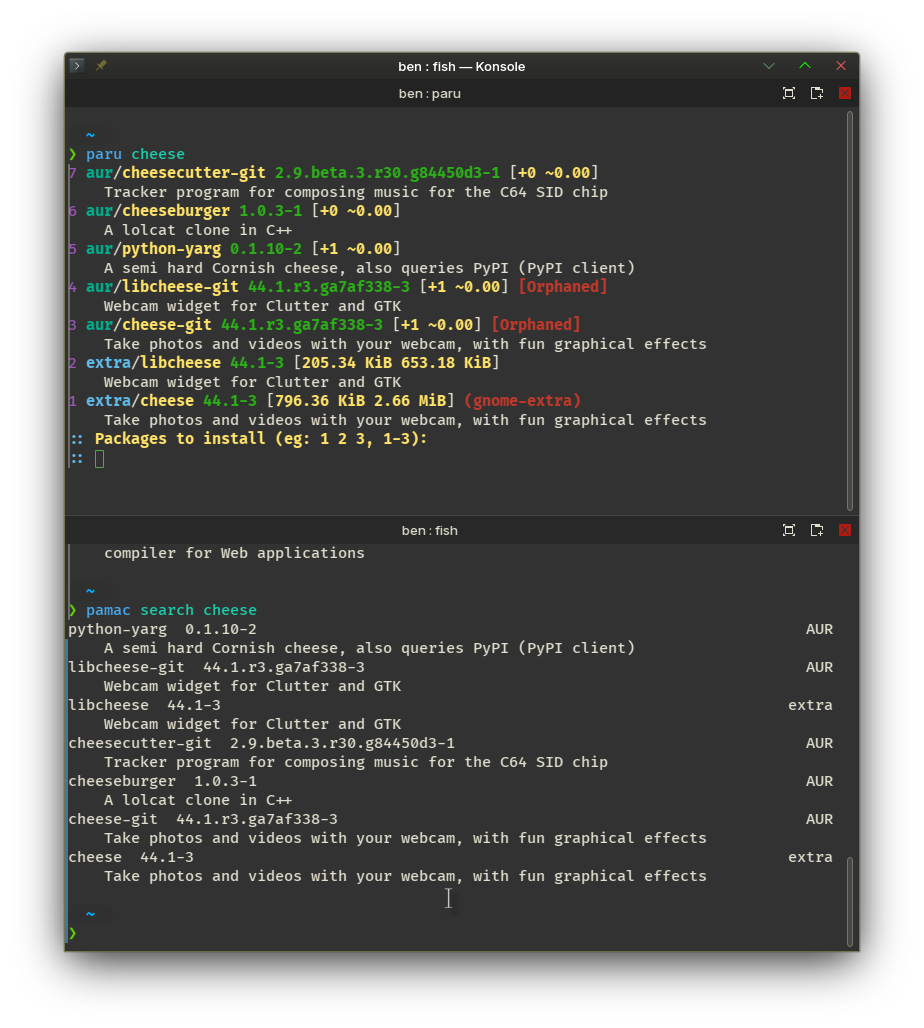
Finally the presentation with colour highlights (pamac cli excludes channels added to the GUI - so no flatpak or snap included there).
I’m very familiar with CLI (Debian and RHEL background) but new to Arch-based distro world and I find the pacnew , pacdiff and meld are intimidating.
I realize in the Arch world there is going to be more of a fine-tuning and DIY approach.
Always handy to have a backup in any case.
1 Like
Pacnew files a just updates to the config files, there’s nothing special about them. Pacdiff is just the app that lists any pacnew files. Meld is a graphical Diff application, that has been around for a long time on most distros.
In spite of @anon33601770 said about Mandrake Linux being just another fixed release. I remember that there were often updates to config files… they were not called pacnew files, but they existed, and one did have to diff them, to decide if they needed to be applied. Fortunately the Manadrake devs provided a nice GUI for that., a diff application that ran when ever one wanted to inspect the changes to the config files.
So When I came to Manjaro the pacnew structure was not new to me. What surprised me was that it required tools that most people coming to Manjaro will be unfamiliar with, and may never want to become familiar with. That seems to have changed.
2 Likes
.rpmnew and .rpmsave. 
1 Like
Name
dpkg - package manager for Debian
Synopsis
dpkg[options] actionOptions
--force-things,--no-force-things,--refuse-things
Force or refuse (no-force and refuse mean the same thing) to do some things. things is a comma separated list of things specified below.Warning: These options are mostly intended to be used by experts only. Using them without fully understanding their effects may break your whole system.
confmiss: Always install a missing conffile. This is dangerous, since it means not preserving a change (removing) made to the file.
confnew: If a conffile has been modified always install the new version without prompting, unless the--force-confdefis also specified, in which case the default action is preferred.
confold: If a conffile has been modified always keep the old version without prompting, unless the--force-confdefis also specified, in which case the default action is preferred.
confdef: If a conffile has been modified always choose the default action. If there is no default action it will stop to ask the user unless--force-confnewor--force-confoldis also been given, in which case it will use that to decide the final action.
Everything you need to know about conffiles: configuration files managed by dpkg
How dpkg manages configuration files
Most packages rely on dpkg to properly install configuration files. Dpkg keeps a checksum of the last installed version of configuration file. When it must install a new version, it calculates the checksum of the currently installed file and if it doesn’t match anymore, it knows that the user has edited the file. In that case, instead of overwriting the configuration file, it asks the user what to do. You probably already have seen those questions, they look like this:
Configuration file `/etc/bash.bashrc'
 ==> Modified (by you or by a script) since installation.
 ==> Package distributor has shipped an updated version.
   What would you like to do about it ?  Your options are:
    Y or I  : install the package maintainer's version
    N or O  : keep your currently-installed version
      D     : show the differences between the versions
      Z     : start a shell to examine the situation
 The default action is to keep your current version.
*** bash.bashrc (Y/I/N/O/D/Z) [default=N] ?
The OP abandoned this thread six months ago. Despite some interesting commentary from others in the meantime, the topic has nonetheless run it’s course.