I promised to check back in. Note: I don’t have much time to follow this further today. I was hoping to convert a friend to Linux, after him being annoyed with the forced microsoft account for Windows 11. My plan was to set up a dual boot and leave him to test both – now I need to get his Windows partition working before I leave.
Here’s what happened:
Reinstalled Manjaro, this time booted from MBR, not EFI. Installation wizard completed without errors. When i try to boot the computer, I get a black screen with the text “Operation system not found” - presumably from BIOS.
I selected “replace partition”. Notice MBR top right.

Then, after selecting the yellow manjaro partition, the visualization looked weird. Take 100 GB and turn it into 200 GB? That doesn’t seem right.
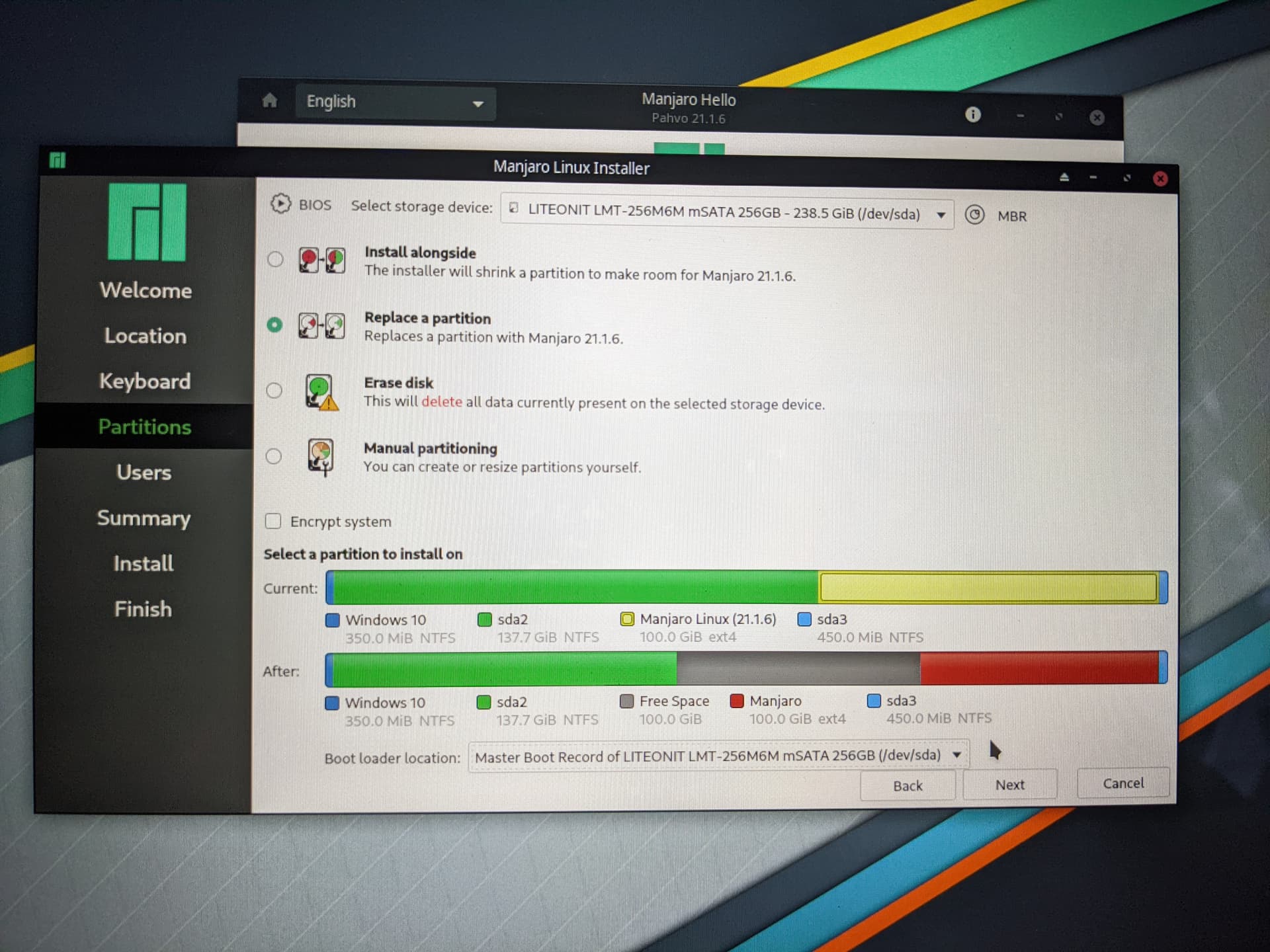
From fdisk, it looks like the two partitions are overlapping:
[manjaro@manjaro ~]$ sudo fdisk /dev/sda -l
Disk /dev/sda: 238.47 GiB, 256060514304 bytes, 500118192 sectors
Disk model: LITEONIT LMT-256
Units: sectors of 1 * 512 = 512 bytes
Sector size (logical/physical): 512 bytes / 512 bytes
I/O size (minimum/optimal): 512 bytes / 512 bytes
Disklabel type: dos
Disk identifier: 0x000ce6a5

Device     Boot     Start       End   Sectors   Size Id Type
/dev/sda1            2048    718847    716800   350M  7 HPFS/NTFS/exFAT
/dev/sda2          718848 289478655 288759808 137.7G  7 HPFS/NTFS/exFAT
/dev/sda3       499193856 500115455    921600   450M  7 HPFS/NTFS/exFAT
/dev/sda4       289480702 499193855 209713154   100G  5 Extended
/dev/sda5  *    289480704 499193855 209713152   100G 83 Linux

Partition table entries are not in disk order.