Wow, that is UI design from hell. I wasn’t aware of that.
EDIT: Actually a right click anywhere on an entry works. Still very hidden.
If somebody is interested in creating a mockup how this dialog should ideally look, that would be pretty helpful as I’m looking into a rewrite of the tool.
Just one advice, don’t make the same Pamac’s mistake for using that cursed LibAdwaita, because it’s nightmare for consistence and theming on non GNOME desktops. Either use Qt or pure GTK3/4 widgets.
Besides for NVIDIA proprietary drivers, for which it is very helpful for the non terminal people, I don’t think this GUI is useful at all now (especially if you’ll drop the Realtek driver, what other external drivers are managed here?). If you’re going to remake it, I would guess just focus on NVIDIA proprietary drivers management.
Have you been using the dialog in the past? What have you been using it for?
Yes. Installing the NVIDIA driver in a reliable way. (I was using the NVIDIA open beta driver from AUR for some reason, and encountered some issues, and after uninstalling that, I used this GUI to get “secure” driver verified by you guys easily)
I use Hardware Configuration & mhwd on my system for nVidia legacy drivers
and on my partner’s system for latest nVidia drivers and r8168 drivers
The GUI is not as confusing for users that need nVidia drivers. There is a button to Auto Install Proprietary Drivers and user can see from the checkboxes if a proprietary nVidia driver is installed
If the checkboxes ☑ could be replaced with a check mark ✓ ✓ users would be less likely to think it was an interactive item
Screenshot shows 2 open-source drivers installed for [UHD Graphics] device
If the GUI does not make sense for you, try checking installed drivers with:
mhwd --listinstalled
Intel GPUs do not have proprietary drivers, so Manager Manjaro Settings Manager does not show an option to install them
Most Realtek r8168 NICs work with the default r8169 driver and do not need r8168 driver
But some early generations of NICs do not work at all with r8169 driver, or the internet link keeps dropping out, and need the alternate driver
IMO Manjaro Team should consider redesigning all the tools in Manjaro Settings Manager to have a consistent UX and appearance. Optimal would be for GUI tools use the same theme and icons as all other packages
An improvement in the current tool for sure would be to stop using checkbox because as said, user expect to interact with checkbox, and right clicking a line is not obvious to make appear the hidden menu.
Removing the two columns for open-source/installed would be good. Clickable buttons at the end of the line would be less confusing (an Install or Remove button would be better in my opinion maybe with a visual graphic clue when it is installed).
A text popup could also appear when you click the Install or Remove button to clarify what is going to happen, for example information as simple as “You are about to install [OR] remove the Nvidia proprietary drivers. Are you sure to continue?” with an OK/Cancel button. The message popup could be even more informative, with more text for example “This will do this action and this action, to end up in this situation”, and/or hyperlink to some webpage, or whatever. In case your Install action would forcibly Remove something else, the text popup could also warn about it (if you were to install video-linux to replace video-nvidia for example or vice versa).
Maybe we don’t need to reinvent the wheel, but just improve what already exists and works, to simply make it better. This tool, as confusing as it could be for many, myself included the first time I tried to use it, has proven to be working good. It probably only need some better UI that’s all.
Just one suggestion: change the column headline from “Installed Drivers” to “Driver selection” as in the moment you change it, it’s no longer “installed”.
To additionally indicate the currently installed driver an appended “*” might be helpful.
The Buttons should indicate an action “OK” is somewhat ambiguous. Here I would prefer “Apply” or “Apply changes”.
Make a couple of mockups, number them 1,2,3,4,5 and post a new poll topic so that the forum users can vote. Maybe even announce it in the monthly announcement update topic so that even people logging in only for the announcements and not actively using the forum see it.
No I never use it since it is confusing. (examples are in this thread already)
Since al the functionality (and more) can be done from within a shell and searching for solutions/howto’s predominantly results in commands instead of clicks the value of this part of the settings window is low for me.
From experience it is always a bad idea to have decisions made because of a forum poll only few people will participate in. Or because a forum post is “liked” by a dozen of people.


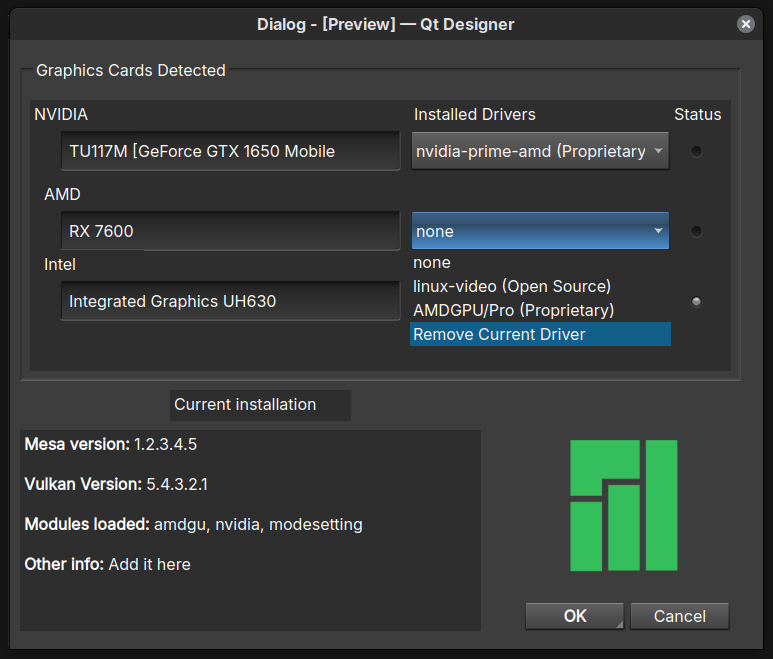


 when it is installed).